

-
Announcement
-

Simtropolis Returns! 05/26/2026
See here for details about our site recovery efforts.
-
Search the Community
Showing results for tags 'grass'.
Found 38 results
-
Version 1.1.0
258 Downloads
This set of files covers and replaces various Maxis grass and dirt textures found on all Maxis Lots. This distribution offers a conversion to the SuddenValley grass texture. It is an opportunity to offer a Fabrik that you will find on my Drive to adapt it to your grass texture, and/or for your own version/creation of sports fields. Textures : baseball field | soccer field | Golf course | Beach sand | Rural dirt tracks | Buildings plots for growth Lots and others .. | About twenty "multis" (grass only and grass+soil) | 4 gardens | grass and bushes and various planters -
Everyone, I downloaded something that changes the default green grass in SC4 to a golden Fall/yellow looking color. I have no way of knowing which items I need to remove in order to correct it. Does anyone have a suggestion on how to get it to default back to the original green grass color in SC4? Thanks in advance for any guidance.
-

Grass textures desaturated in game
TheMurderousCricket posted a topic in SC4 Modding - Open Discussion
For whatever reason, when I try to make some lots in LE that use grass textures 0x252b3000 and 0x25273000 (the latter being Maxis default for "open grass area") both of these textures turn out awfully desaturated in game and completely different from what they are supposed to be. They look good in LE but break down in the game. The left is how the default Maxis grass looks like. The right is exact same texture that I applied in LE for my own lot. What's the problem here? -
I recently installed NAM45 but now there is square of grass around my roundabouts, rather than pavement. Anyone know what's up with that? Was previously using NAM36.
-
Painting grasses and flowers en masse
TheMurderousCricket posted a topic in SC4 Modding - Open Discussion
I'm getting really tired of painting entire city tiles with mmps, all having tiny, tiny brushes. Is there any way to actually paint mmp grasses, shrubs etc. with some kind of a large brush? Or, for example, fill (populate) a designated area flood-style with an mmp? -

Are There Fillers Equivalent to Open Grass Area of Diagonals and Curves
Propfam posted a topic in SC4 - Custom Content
Hello, Are there fillers equivalent to Open Grass Area except they're for diagonals and curves? I sick viewing square parks on diagonals. -
Version 2.2.0
1,608 Downloads
New .. Submenus. Included Seasonal Version By Phil - philforhockey51 This little plugin of 66 Lots, proposes a field path lined with hedges (bushes, trees). To create bocages. The tracks are adapted to the tractors proposed by the VIP and Namspopof team. They can be found for example in Fantozzi’s farms (Colossus Farming). And won’t be too disturbing with SPAM. The set of Lots includes ortho, diag, and various junctions with streets. All Lots come with a generic grass Basetexture, which can be «canceled» to obtain transparent Lots. So, depending on your situation (DLL, OS, plugin) you will be able to use this plugin while keeping texture files or simply delete them. It’s not more complicated than that! If you have installed Transparent Texture (Water Bug) Fix DLL, do the part A installation. If you do not want or can not use this DLL, you can use the file proposed here in 2021 (from Cori’s patch), to fix the «water-bug» and thus do part A installation also. You prefer or can not fix the water-bug (really ?!) - FPH v. 1 - then I propose you the part B of installation. Installation Unzip into the Plugins\ directory. Load the Dependencies. .. In directory ..\plugins\scoty\ Choose between the EverGreen or Seasonal version of Lots by deleting one of this folder : scoty_fieldpaths_hedges_seasonal\ or scoty_fieldpaths_hedges\ .. In directory ..\plugins\scoty\scoty_textures\ scoty_FPH_Tex_strt_CHOOSE Choose the texture of your current streets and delete the others .. In directory ..\plugins\scoty\scoty_textures\scoty_FPH_grass_CHOOSE-ONE .. A ... You can delete all files, since you opt for Transparent Lots! .. B ... Choose the file to keep from the supported Terrains (V.1 of FPH .. see scoty_FPH_guide_2.pdf in ZIP). Dependencies » Nams props pack vol 2 » Nams props pack vol 1 » VIP orange AgriPack ... Only VIP_Or_AgriPack_Props.dat, if you don’t want the MMPs. » Vnaoned propspack 1 » Les Murets de l’Aubrac Orange TSC ... Only /props/Or_TSC_Les_MuretsAubrac_prop.dat .. But I recommend this complete plugin! » Plane Tree » bsc-vip-girafe-flora » Rock ‘n’ Stones » SPOT 2.2 .. » Submenus DLL 2.2 .. » Scoty Submenus & Icons Collection ... Fieldpath submenus are inserted into the sub-submenu: Filler\Rural-filler\ ------------ Many thanks to @philforhockey51 - aka BushMan - and his horticultural team, fresh out of the agronomy school of FPH (Fabulist Prankster Hedgehog), for his most luxurious and bushy Seasonal version! ----------- A special thanks for RIVIT. For its time, expertise and support in so many projects. Zip of information and Photoshop Curve file : convert_Terrain_inLot.zip -
Hello, I want to ask about philosophical SimCity 4 question. We all know that open grass area is an area with manicured grass that provides park effect and cap relief to residential area. The common use is in parks. However, its texture is so versatile that you can place them virtually anywhere and beautifies the landscape (of course not the level of carefully placed MMPs, although they can be used in the open grass area). What background my question is I have more than enough income. I mean, lots of income. I want to spend my money to improve my city. How should we use open grass area really? Should I replace unzoned area with open grass area? Thanks.
-
Hi!! I'm using: Also installed this MOD years ago: Now during confinement I have reinstalled the game with all the plugins and note that one of the NAM avenue curves does not have its sidewalk. I upload a photo: I remember that the last times I played SC4 it no longer worked and the only thing I can tell you is that I installed NAM 36 around that time. Do you know why this error could be caused? Thank you very much in advance!!
-
Hello, I recently downloaded MGB's Diagonal Filler Set and MGB's Terrain Grass NAM (TGN) for Gobias Sudden Valley as well as a lot of other mods. I attached a screenshot of the list of mods that I downloaded along with MGB's Diagonal Filler Set and MGB's Terrain Grass NAM (TGN) for Gobias Sudden Valley. I decided to remove MGB's Diagonal Filler Set and MGB's Terrain Grass NAM (TGN) for Gobias Sudden Valley mods because I did not like how the grass looked. I saw that some of my props were missing after I removed the MGB's Diagonal Filler Set and MGB's Terrain Grass NAM (TGN) for Gobias Sudden Valley mods. I reset the detail level to low and then back to high and my props were restored. However, I saw that some of my grass textures were missing, like in @kingofsimcity's Young Happy Park and BSC Myrtle Park. Prior to downloading the mods, KOSC's Young Happy Park and BSC Myrtle Park were displaying correctly. I suspected that either MGB's Diagonal Filler Set or MGB's Terrain Grass NAM (TGN) for Gobias Sudden Valley were causing the issue but after removing the mods, the textures are still missing. I downloaded all the dependencies for the KOSC mod but the issue persists. Any help would be greatly appreciated.
-

Dark blue grid on some industrial lots and roads replaced by grass / concrete
Ormus posted a topic in SC4 - Custom Content
First off thanks to Mattb325, Jasoncw and the NYBT crew for the great buildings/mods. It makes the SimCity 4 experience much more enjoyable! Everything was going great until dark blue grids started appearing in some industrial lots and roads became grass and concrete next to those buildings... I have DN, NYBT essentials, various buildings associated with NYBT , mipro, SimFox day n night , ... at first this would only happen with some lots (large modern hospital , century link tower etc.) so I either didn’t use them or hid the glitch with other buildings... but after I downloaded 31-33 madison , Barton Paul and e. 59th the glitch appeared ... i realized I may have been missing some of the manhattenville project packs so I downloaded all three (possibly duplicating one of them even though I chose to “replace the files).. in an attempt to fix it I deleted the recently downloaded files ... I believe I also had and industrial w2w but I. Can’t find which one it is so I must have deleted it.. Any help would be greatly appreciated. I began playing this summer after not having played the game since ‘05! If needed o can upload pics of my plugin in folder as well as several visuals of the graphic glitch.. in addition to the glitch appearing with industrial buildings it seems to also appear with 112 Mott st. -
Is there a terrain mod that matches the appearance of the "open grass area" maxis park? I just want that texture everywhere except on cliffs. I like using the open grass area next to roads to add sidewalks to them, but I have to play so much with MMPs to make everything blend then.
-

Entry 45 -- Introducing Thirlmere
The British Sausage posted a City Journal entry in My SC4 CJ Scrapbook
Replies: Simmer2: Thanks! Your work has helped bring some of that about! 89James89: The grey concrete words really emphasise the grid; thanks for your comment! hammysonata: Cheers! Takingyouthere: Thanks! It's why it takes so long for them to be completed! {---} Entry 45: Introducing Thirlmere So it's been a while since I posted an entry, almost two months ago! I came back to SC4 because I wanted to briefly experiment with the ARDEN tree controllers and terraforming. An idea soon came to mind where I would loosely recreate the area of Thirlmere in the Lake District, England. I will be coming back to Thirlmere in the coming weeks and months, but in the immediate future I will be posting the last of the entries from Pololomia, what remains to be shown of Madison Plains and of course updates from Cindersville (which is my current big project to complete). Anyway, enjoy some rural goodiness! {---} 1. We have Thirlmere Lake and to the bottom right a loose recreation of Helvellyn; England's third highest mountain! 2. The break in the mountains will be used as a mountain pass. 3. Creating gullies and ridges is kind of hard in SC4! 4. To create crag-like and mound-like mountains (which are often seen in the Lake District), I used the mesa tool after I dragged out hills and mountains. A bit of erosion and softening helped too... 5. Only the erosion tool can provide so many mini gullies. 6. I changed the tree controller to ARDEN Coast extended, the reason being was to increase the diversity of the trees and to enable the creation of meadows in mid-level areas. 7. The meadows above are the coolest feature of the ARDEN extended tree controllers: it saves so much MMP work and they appear in a very natural way. 8. I can't wait to drag some a road through to create a mountain pass! 9. An overview of most of the city tile. In the top left is the very large Helvellyn mountain. 10. There will be village next to Thirlmere Lake, this will be the largest settlement on the city tile; the rest will be smaller villages or hamlets. 11. The main part of Thirlmere is the lake itself. I plan to have several rivers/streams run into the lake. 12. I used the water terrain brush from the JENX Poseidon mod to plop water textures onto the flat ground. 13. To expand out the lake's shoreline, I used a mixture of gravel and stepping stone MMPs. 14. Yet another overview... 15. Trees encroach upon the bottom and top of this crag! {---} This Saturday I will be posting another entry. This one will be an update concerning Cindersville.- 4 Comments
-
- 17
-

-
Can anyone help? My grass has suddenly changed shade on all of my cities, out of nowhere.... No mods were done and it just started suddenly... As per images below, these textures used to match
-
Open Grass Area and Small Park Green are both 1x1 tiles that have the same Plop Cost and Monthly Cost. According to the SimCity 4 Encyclopedia - entries for Open Grass Area and Small Park Green - they have the same stats except for in three categories, in all of which Small Park Green outperforms Open Grass Area - Park Effect, Landmark Effect and Air Pollution reduction. (Note that I don't know how reliable these stats are in the links, since it says that Open Grass Area is 2x2 lot size). The only advantage I can think of that Open Grass Area has over Small Park Green is that one can plant trees on it. Is this correct? If so, is it a good balance? How many trees must one plant on an Open Grass area tile to make it as good or better than a Small Park Green tile?
-

From the album aciaKa's City
-

From the album aciaKa's City
-
- 1
-
-
- expressway
- highway
- (and 4 more)
-
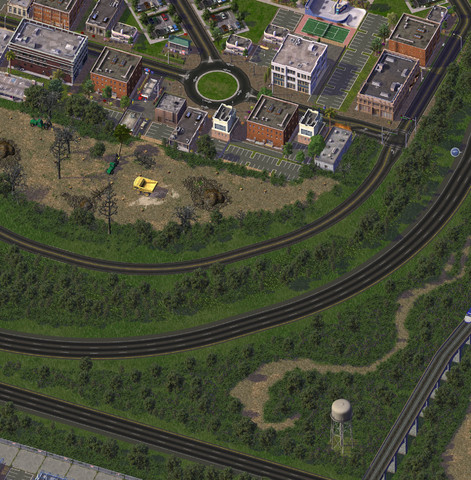
From the album aciaKa's City
Punggol Highway, still not good at planting trees and grass vegetation. -
ARE those wonderful vortextures working with SPAM, and if not, could they ?
-
(Mod note): Just in the process of setting everything up. It may take a while, for now I'm keeping this thread locked. Go-FSH Texture Automation This thread will serve as a home for discussion of Texture Automation for SC4. What is texture automation and why would I want to use such a thing? In the past, if you wanted to customise in-game textures, it meant a lot of arduous work, finding, extracting, converting, editing and then re-packaging textures. But recently GoFSH has been developed to automate many common tasks, which is good news not just for modders, but for regular folks too. It is now possible for creators to release customisable texture mods, users just need a copy of a working repository and GoFSH will do almost all of the work for you. How does this work in principle?, for example, say you'd like to see a custom sidewalks on those NAM textures which otherwise won't show them. That's exactly what my SWN mod was designed for, however rather than being limited to the handful of sidewalk variants I've released, you can use the same process to make a custom version. You simply download the SWN repository, install the GoFSH application (STEX Download here) and use them to create your desired sidewalk mod. Below are some basic tutorials to get you up and running. I hope to add a list of available repositories (with links). I'll also be adding some of the more complicated stuff in due course.
- 5 Replies
-
- 1
-
-
- gofsh
- automation
- (and 2 more)
-
To Come from pdelmo.
- 12 Replies
-
- 11
-
-
Version 1.2.0
1,958 Downloads
These textures are freely useable and distributable for any SC4 user created content, if they are used in lot-making it is better to refer to them as a dependency and link back to this file to keep file space on the STEX free of mulitiple repeated content. The texture data file is located in the FOLDER: Elements Textures DAT, 3 sample lots are in the FOLDER: Elements Sample Lots, and 1 7x8 test lot showing all 55 textures is now included in the FOLDER: Test Lot 7x8 Park. Also included are the 2 previews showing all the textures and this text in readme.txt and HTML. The texture '.dat' file size is 498K with 55 textures. This volume is called 'Elements', including diagonal, broken, patterned and squared stone, dirt, grass, metal, pavement, sand, water and wood. Also included are 3 sample lots found in the Parks Menu, each have been made functional for radical purposes of helping with start-up cash, reducing pollution and garbage, and recovery from nuclear meltdown. DAT FILE INCLUDED: FOLDER: Elements Textures DAT FILE: SC4_BaseTextures_Vol01_1_Elements.dat FOLDER: Test Lot 7x8 Park FILE: A0A_Base_Textures_Vol01_Elements_55_Test.SC4Lot This is one lot with all 55 textures in a 7x8 grid. This lot may be used to preview the textures in-game, then delete. FOLDER: Elements Sample Lots --------------------------------------------- 1.) Subfolder: Patterned Grass (Anti Pollution) Menu description: Base Textures Elements (Anti-Pollution) Vol. 1: Grass Texture. This lot is a sample which also provides some radical relief from pollution and garbage. _________________________________ 2.) Subfolder: Color Reg Mark (Radiation Reducer) Menu Description: Base Textures Reg. Colors (Anti-rad.) Vol. 1: Elements, Use this lot as a registration mark for color and contrast. In RGB, Red (255,0,0), Green (0, 255, 0), Blue (0, 0, 255), and Gray 50% (127, 127, 127). This lot will radically decrease radiation. Use this lot in the event of a nuclear power plant meltdown. When you plop this lot you will see the Maxis 'Sparkles of Purification'. _________________________________ 3.) Subfolder: SC4 Logo (50K Business Deal) Menu Description: Base Textures Elements (Bus. Deal) Vol. 1: Elements. 55 Textures: Stone, Dirt, Grass, Metal, Pavement, Sand, Water, Wood. Use Lot Editor to see all the textures. This lot will radically increase your income by 50,000 Simoleons a month, Use this lot to help get your city started, then bulldoze it. When you plop this lot it will appear as a 'Business Deal' in your budget panel. _________________________________ INSTALL the TEXTURES and SAMPLE LOTS To install the sample lots copy and paste the 'Elements Sample Lots' folder into your User\Documents\SimCity 4\Plugins folder. The sample lots are found in the Parks Menu. To install the textures copy and paste the 'Elements Textures DAT' folder into your User\Documents\SimCity 4\Plugins folder. _________________________________ ABOUT the TEXTURES, INFO FOR LOTTERS and GAMERS The texture images are derivatives of images from a variety of commonly, freely shared sources, hand re-worked for use with SC4. The design of the textures leans toward lower contrast, saturation and brightness as more usual in realism, and for dimmer screens. If using them for creating and distributing SC4 lots the '.FSH' file may be extracted and included as a '.DAT', but don't re-distribute changed associations between the image and the ID (instance) as that could impact another user of the file. No crediting is required, but no claim of original artwork should be made if redistributing them with SC4 lots. The Texture ID Range was assigned by the BSC Texture Index at SC4 Devotion. https://www.sc4devotion.com/forums/index.php?topic=2101.0 To redistribute variations of the textures or to make your own, request and use a unique personal Texture ID Range at SC4D. ---/--- -

From the album Modular Complexes (S3-15-C)
Before voting, we recommend you download and try out this item of content: [Download Here] Some FA2 based fillers for your anti-staircase needs. -

Tips on dealing with river banks/empty terrain?
sizarieldor posted a topic in SimCity 4 General Discussion
So, I developed the economy of my city, which means I could finally make it look pretty with the tons of spare cash on my hands. Then I realized that I don't know of a convenient way of turning the cartoonish, oval river banks into something presentable. I searched here and there, and I found some sea walls for download. I started plopping them, but it looked horrendous. So I was wondering, how do people deal with the extremely uncomfortable terrain of the regions? And if you have any tips for me. -







