

-
Announcement
-

Simtropolis Returns! 05/26/2026
See here for details about our site recovery efforts.
-
Search the Community
Showing results for tags 'bipin'.
Found 41 results
-
Hoping that this is an OK place to post this, it's a quickish question. Mods feel free to remove this to another thread if better suited. So I have never experienced this problem before, I wondered if this was a known issue with these mods in particular or if I have made some clear error (which is extremely likely to be the case). I have this roundabout filler in my city, which I am 99.99% sure was made by Bipin, but not sure exactly which download I got it from. I think I downloaded almost everything Bipin ever made, and I really love the roundabout. However, when I use the enquiry tool on it, it is described as 'WMP allotment K', one of the many allotment LOTs from (unsurprisingly) the WMP allotment pack. Now, I have downloaded a lot of SC4 content over the years, but I dont always use all of it. This is true of the WMP allotments, and of a lot of Bipin's content which, whilst beautiful, can seem quite contextual and not 100% straightforward to just plop down. I thought that was weird, and when I go to my Parks menu, I noticed some more weirdness. (usually I am scrolling past quickly for something I have a rough idea of where it is in my insanely long park menu, and I dont look at the menu icons until I have reached enough 'scrolls' down the menu to start looking for the lot I want, so I didnt notice this before) Anyway - the icons in the menu do go a bit (well, actually totally) invisible around the WMP allotment stuff like this: Or this: - Now not invisible icons, but manifestly a 'non icon', here 'WMP allotment G', but (although probably hard to see here), not a 'non-icon' depicting anything remotely allotmentish. In fact, when plopped, WMP allotment G looks like this; Very Bipin, from Bipin Industrial Essentials I am assuming. When enquiry tool is used on it it brings up lovely WMP description of WMP allotment G, so I think this industrial hulk basically acts in game as a place for city dwellers to have a plot to grow carrots, which is strange. Now, hunting down 'WMP allotment K' in the menu. It wasn't hard and the odds were in my favour. The menu shown below, all such lots are described as 'WMP allotment K' from the top one down to the bottom. (I assume the one at the bottom with the nicer Icon is actually WMP allotment K) It does include the lovely roundabout filler looking lot in this list, and also this huge thing, which is Definitely from Bipin, but from another totally different download, in this case some urban highway retaining wall lots that I downloaded years ago and swore I would use one day. It is definitely not 'WMP Allotment K' though. So the question part, which is indeed quick. Do I: 1) Delete all these things including the lovely roundabout filler 2) Remove the WMP allotment stuff, and the Bipin stuff (some of which has the WMP as a dependency, I am sure even without checking) from my plugins 3a) forget these things ever existed, and don't download them again 3b) re-download the relevant files and hope that this does not re-occur upon doing that 3c) Ask the lovely people at Simtropolis if any of them know about this specific conflict and whether there is a known solution. Already did that. So I think really if you could confirm 1) and 2), and then select an option between 3a) and 3b) and give any extra exposition you desire, or not. If anyone reposts this last picture to the 'can't find it, ask here' thread looking for the retaining walls which are excellent, I can tell you it's this; saves you the trouble! Thanks for reading.
-
Replies: SIMCITYPLIS: Thanks a lot for your comment! And, to answer your question, I use Simcoug's Diagonal Houses. kim026: That was just a small sample, I'm going to be applying that rock work to entire sides of mountains! _Michael: Cheers! reg: Thanks must go to the Sudden Valley terrain mod and the ARDEN tree controllers- they do most of the heavy-lifting! JulioC: It's one of those rare times where I'm happy with my rock MMP work. But what you see is just the beginning, it will be applied on a larger scale to the mountains of Cindersville. Anthrax92: Thanks a lot! dédale: Thank you! Simul8ter8: The first version of this CJ (sadly defunct due to computer problems and Imageshack issues three years ago) had loads of landscapes. I used to go really heavy on the MMPs, now I'm using the terrain and the ARDEN tree controller (at high altitudes) to create realistic-looking landscapes- thus cutting out on a lot of the MMPs. Layla Sims: Thanks! It took about an hour just finishing off that rocky area! {---} Entry 61 -- Travis City Due to the Covid-19 outbreak in the UK there's a lockdown in place and I'm working from home. This means more time and which means a return to SC4. I'm starting on Travis City which is a higher-elevation town in the USA which is surrounded by coniferous forest. I'm experimenting with housing density and squeezing out any last possible lot combination of C.P.'s Early 19th Century Houses and Victorian Houses. Later on in the week I'll be returning to Cindersville, but Travis City is me getting back into SC4 after six weeks of not touching the game- because I was busy story writing. {---} 1. It starts with a concrete road cutting through the coniferous forest... 2. I've always liked Bipin's industrial roads and now I'm using them on a vastly larger scale- sadly they can only be used on flat terrain. 3. The city so far, as of today I've doubled the size from what can be seen here. 4. I've found the 2x2 Victorian House from C.P. to be a great fit to both the concrete roads and the landscape. 5. For the houses I'm pretty using C.P.'s content. 6. One challenge of Bipin's industrial roads is getting the power poles (and their corresponding wires) to line up without overlapping. Further challenges include 1/2 of all road tiles (in a symmetrical fashion) not supporting 1x1 zone tiles. Thus I use 2x1 or larger to get around this problem. 7. Though the houses are all the same I bunch up the density to indicate proximity to focal points of Travis City- this city doesn't have a centre per say, instead there are several focal points where higher density radiates out and transitions to lower density. 8. The reason why Bipin's industrial roads are so brilliant is due to their sidewalk textures- they allow for the seamless connection of driveways which MASSIVELY increases realism. It's subtle but it's the only reason why these concrete roads look so good. 9. The city tile has hills to the south. 10. I plan on creating a few villages in the southern areas and a possible suburb (or two) of Travis City winding its way into the hills... 11. NO MMPs were used in these scenes! I achieved this by vastly increasing the terrain's elevation so that I can ensure the entire city tile will be covered with coniferous trees, thanks to the ARDEN tree controller. Given the high elevations then any slopes or hills will bring out the Sudden Valley's true range of terrain textures and bring out the very best from the ARDEN tree controller- as you can see here. 12. Which means I don't need to MMP the area- the ARDEN tree controller has done that work for me. 13. I've never seen these flora combinations before from the ARDEN tree controller! 14. Again- who needs MMP when the done is already done? 15. By spacing out the buildings I've deliberately left small city blocks empty of buildings (or green areas behind the buildings), thus creating pockets of woodland and more natural space. 16. The ARDEN tree controller working its magic. However, where the terrain is drier, say very yellow or even rocky grey or brown, then I deliberately demolish trees growing on those areas. Thus helps to create natural breaks in the forest. The rest of the forest breaks, which give way to grassland and shrubs, were all generated by the remarkable ARDEN tree controller. {---} This Friday- Brooklyn, New York! And an overview of my progress... FYI- the Brooklyn part (well approximation of Brooklyn) can be seen in the bottom half of the picture.
-

Entry 58 -- Madison Plains (South)
The British Sausage posted a City Journal entry in My SC4 CJ Scrapbook
Replies: Vigilante: Thanks for the comment. Unfortunately I was pushed for space and I needed as many fractionally angled buildings as possible to create that line leading up to Times Square. Scribosilyn: Recreating New York got me inspired, this included using seawalls and of course using the very best BATs, including Kellydale2003's creations. Ke|is: Thanks for the suggestion, it does look better that area! {---} Entry 58: Madison Plains (South) In this short entry I have more to show from Madison Plains, some of the areas are quite grungy and have given me ideas in the future- where all the roads use Bipin's grungy roads. {---} 1. 2. 3. 4. 5. 6. 7. 8. 9. 10. 11. 12. 13. 14. 15. 16. 17. 18.- 11 Comments
-
- 18
-

-
Entry 42 -- Industry in North Pololomia
The British Sausage posted a City Journal entry in My SC4 CJ Scrapbook
Replies: Tonraq: Cool- not sure where the similarities are though! 89James89: Thanks, it's what I speciallise in which is completing full city tiles. I never do any region work because it would take too long! Silur: Thanks for that Silur! Scribosilyn: Thanks a lot! I've still got more to show: a city built on hilly terrain and in a valley (Cindersville). I am even thinking about a Manhatten-styled project which I've called the "Big Mango". Altec: I always use three or four particular building themes and largely stick with them, as for the "blank" spaces, these are MMP fields. {---} Entry 42: Industry in North Pololomia This entry is full of heavy industry, garbage facilities and factories. Enjoy! {---} 1. 2. Jestarr's VW Automobile factory (https://www.sc4devotion.com/csxlex/lex_filedesc.php?lotGET=2578). 3. 4. 5. 6. 7. 8. 9. 10. 11. 12. 13. 14. 15. 16. 17. 18. 19. 20. 21. {---} This Tuesday we will be going to Madison Plains- a new city tile I've just finished. Until then, enjoy the rest of the weekend.- 4 Comments
-
- 12
-
-
Replies: raynev1: Thanks! The links are for people to replicate what's shown in these pictures and then make it their own. Prophet42: Thank you. It's a time-consuming process but a strangely hypnotic one... Takingyouthere: Cheers! MMPs are free from the restrains of square lots, thus they have that natural feel as you pointed out. Entry 33: Going FA in Madison Plains Recent FA buildings created by Mattb325, and rather quietly published on the BSC LEX I might add, have given me a whole range of ideas and of course new building methods for SC4. Madison Plains is a medium-sized city tile and another experimental city which I intend to complete as I'm trying various new things at the moment! This entry is a little glimpse in what could hopefully be the future for SC4 and quite possibly one last shot of life for the game this community loves. 1. Mattb325's FA-3 buildings are a real game changer and there's just enough to create a dedicated FA city block. 2. But it's not just FA buildings which I'm experimenting with. Another experiment is the grungy avenue. 3. With some diagonal fillers it's reasonably straightforward to integrate these FA-3 buildings. The FA-3 buildings are overhang lots which are 1x1- this gives a lot of freedom and flexibility. 4. The initial overview of Madison Gardens. I didn't want to go too crazy on the FA or diagonals, but I wanted them to cut up the grid. 5. I'm further refining my suburban creation techniques with even greater user of Bipin's grungy roads from his Industrial Essentials mod. 6. And of course Mattb325 continues to churn out new buildings year on year- he may be the reincarnation of the highly prolific Simgoober! 7. 8. Here I'm emulating some American architectural style- taller commerical/industrial buildings on the sides of the major road/avenue, suburbs and smaller suburbs fanning off the road. 9. The magic of Bipin's grungy roads is the seamless pavement textures- great for connecting up parking/road textures within various lots be that RCI or Civic. 10. Madison Plains is also considerably more American in feel as I've ditched a lot of the European buildings I often use to infill commercial and civic areas. 11. And in the top left is Mattb325's massive Ikea BAT. How massive you might ask? 18x18! 12. The most up-to-date overview of Madison Plains. 13. I push to the very limits the aesthetic functionality of Bipin's concrete roads- it's tricky because the power poles have to connect up for the best results. 14. The area in the middle was tricky to finish off, then I discovered that I could place down Bipin's grungy curved road pieces and slap in some diagonal industrial fillers to encroach on the curved road for it is a dead-end and thus a quiet road. Throw in some diagonal tree fillers (which don't overlap onto the road) from SFBT's diagonal fillers and the result is a reasonably seamless area. 15. And another look at those FA buildings. 16. To think that Mattb325 has only released 7 or 8 of his FA-3 buildings and fillers! There's another 25 more to come! 17. Now that there is the prospect of a good selection of FA buildings, FA grid-busting has now become possible on a large scale. Perhaps Mattb325's FA creations will inspire others to create further FA buildings, lots and fillers. / I would like to wrap up this entry with the following: with diagonal- and now FA- grid-busting, it's slowly becoming possible to create cities that can truly escape the limits of the SC4 grid. This is the future of SC4 and hopefully this will be a new direction for new modded content. This is going to radically change the game and open up entire new possibilities and opportunities. Thanks a lot to Mattb325 for going in this direction. For all those interested in his FA-3 creations, go to the BSC LEX and check out his latest work. I am eagerly awaiting the next instalment of FA goodies!
- 3 Comments
-
- 15
-
-

-
Version 1.0
1,972 Downloads
@Bipin requested I upload these concrete retaining walls as he no longer has access to the files. These walls are solely the creative output of Bipin and I take no credit whatsoever nor assume responsibility for them. Please bear in mind these walls were never released as a 'final version' and should be considered a test/draft version and treated as such by members. The walls contain a variety of retaining wall pieces as you can see from the images. I have only tested them with 10, 12 and 14 metre-high embankments and as you can see from the image the 'boutiques' entrance is best suited to use at 10m. Placing the corners can take a bit of trial and error so be patient, remember these are not a final release. Walls should appear in the Misc Transport menu Redistribution of these files is forbidden without the express permission of @Bipin Lot Files include; bipin_retainConcreteSD_1_1ee99f0a bipin_retainConcreteSD_1_sidewalk_1ee9f7d2 bipin_retainConcreteSD_2_9ee99fd4 bipin_retainConcreteSD_3_9ee99ff7 bipin_retainConcreteSD_bee98991 bipin_retainConcreteSD_corner_bee9a93d bipin_retainConcreteSD_corner_sidewalk_5ee9f84a bipin_retainConcreteSD_corner_sidewalk2_fee9f8f8 bipin_retainConcreteSD_UB_dee9e094 bipin_retainConcreteSD_UB_sidewalk_1ee9f76c bipinboutique_2_5eebe300 Dependencies required - PEG-MTP Texture Pack Volume 2 -
Version 1.0
726 Downloads
Thank you for looking at one of my low-income neighbourhood stores; something you could expect to see in the rougher ends of town. Featured here is Fabland; a take on the often-decrepit Fabricland that dots the strip malls of my home town. Aside from the anchor store, a couple of small, generic, convenience stores pay the rent for this little mall. It is a growable 5x4 CS$ lot. The building is Dark-Nite compatible. The dependencies are as follows: - Girafe's Car Pack vol 3.: https://www.sc4devotion.com/csxlex/lex_filedesc.php?lotGET=2860 - Girafe's Urban Pack: https://www.sc4devotion.com/csxlex/lex_filedesc.php?lotGET=3192 - Girafe's Berries: https://www.sc4devotion.com/csxlex/lex_filedesc.php?lotGET=2888 - Girafe's Feather Grass: https://www.sc4devotion.com/csxlex/lex_filedesc.php?lotGET=3001 - SHK Parking pack: https://community.simtropolis.com/files/file/27563-shk-parking-pack/ - Mushy's Trailers: https://community.simtropolis.com/files/file/30773-hd-north-american-53ft-semi-trailers-vol1/ Thanks for taking a look at my introductory strip mall - I hope you enjoy the download! Don't forget to check out my other downloads - everything from factories to family houses. See what's new by checking out my BAT thread: https://community.simtropolis.com/forums/topic/46654-bats-by-bipin/?do=getLastComment Enjoy!- 12 Reviews
-
- 25
-
-
-
Version 1.0
1,963 Downloads
Please follow this page for future updates! New files in this collection will be added to this page periodically. The American Roadsign collection - popular on the Steam Workshop - has now been added to Simtropolis! This collection includes gantry signs, barriers, delineators, and all sorts of other goodies. It's always expanding, so keep up to date by following this file or the Steam Workshop collection! Currently, the collection includes over twenty assets. Here's a taste of what you can expect: These gantry signs are great for any sort of avenue or highway. They're generic enough for most situations, and just the right size for most road types. While we've got plenty of aptly named BGS's - big green signs - there are also some smaller exit signs available for download! It doesn't stop there - delineators, barriers, and markers are essentials too! For this and more, make sure to hit the download button here or on the Steam Workshop! Don't forget to subscribe to this page either - that way you'll know exactly when new content has been uploaded! -
 Upon closing the game, everything was fine. Next time I reopened it, a few hours later, I was bombarded with the following message: Object reference not set to an instance of an object [System.NullReferenceException] Details: No details As soon as I pressed "play", the error would continuously come up, essentially making the game unplayable. I have no idea what is causing this issue; as far as I'm concerned, it never appeared before I saved the city. In any case, here are a couple of logs: output_log.txt from Cities Skylines itself Loading log from "Loading Screen Mod" Any help would be greatly appreciated. This is driving me crazy. I currently have the Save our Saves mod installed, but it didn't help. I also have Advanced Vehicle options and of course the Loading Screen mod. Nothing helped apart from giving me the above error logs.
 -

From the album Southside
Taking the path to the right, we loop around towards the end of the park. I even see some benches and tables - it's a decent place to relax, in spite of not so decent company - I'll take unruly residents over heat exhaustion any day.© Bipin
-

From the album Southside
Looking to the left again, we're blinded by the inescapable glory of a morning sunrise. I think it's best we keep the sun to our backs. Let's take a right.© Bipin
-

From the album Southside
The police station is a beacon to the weary cyclist - a bastion of relative safety.© Bipin
-
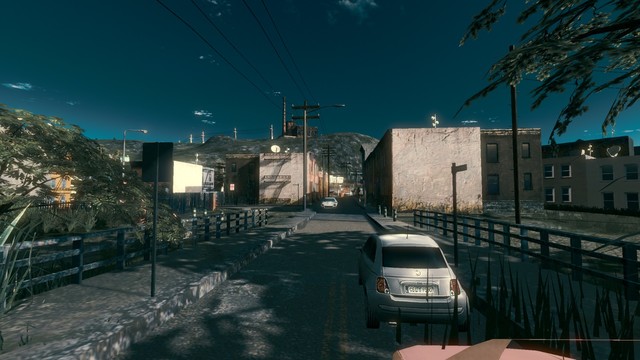
From the album Southside
There's a difference between more respectable and most respectable neighbourhood. All the more reason to hasten our way through traffic. Let's take a quick left up here...© Bipin
-
- 1
-
-
- city
- neighbourhood
- (and 5 more)
-

From the album Southside
I say marginally better because, in reality, it's hardly nicer than southside across this river. The only difference is that the folks over here have a real place to call home - a palace might be a stretch, but at least it's not an abandoned shop front or upturned cardboard box.© Bipin
-

From the album Southside
Cops or not, the lack of bike paths is a real killer - and I say that in a regrettably literal sense. At least things don't look too busy today...© Bipin
-

From the album Southside
Fortunately, the gravel path isn't too long. Besides, I suppose it isn't that bad so many of our tax dollars are spent on the cops - given the neighbourhood, I'd hate to be around if that wasn't the case.© Bipin
-

From the album Southside
We've made our way to the end of the paved street. I hate having to cycle on gravel, but that's all the city budget allows for.© Bipin
-

-

From the album Southside
Now admittedly, the neighborhood isn't so nice. I suppose there's some redeeming quality to this decrepit infrastructure; some character, if you could call it that. There seems to be a new pothole every day - pockmarking the pavement like an adolescent's pimpled face. In any case, it's ample reason to look twice before crossing the road. You never know what you'll come across over here.© Bipin
-

From the album Southside
Factory work is also exhausting. Even in spite of that, I'd still rather cycle home; I can't imagine a day where I'd feel so defeated - so exhausted - that I'd be complacent in taking the bus. That thing is a pathetic excuse for public transit. Being that it's not air-conditioned, it's stinky and most of all slow, it's a veritable death chamber on four wheels in this kind of weather! I might as well make the most of it - biking was definitely a good idea today.© Bipin
-

From the album Southside
Factory work is grueling work. Fortunately for us, the shift is over and the sun is out.© Bipin
-
Version 1.0
2,014 Downloads
Welcome to the first of several houses, modeled after those of contemporary, suburban America. Thank you for taking a look at the Hamilton! This house model has undergone significant changes over many months, initially as a completely different model, which ultimately turned into a separate dwelling all together. Keep an eye out for the next one - a nice complement to this house, whose stats can be found below: A couple points of interest: R$$ medium wealth, low density lots. 13 unique lots. Lots beginning with "bipinhouse3_" are growth stages 1,2. Lots beginning with "bipinhouse4_" are growth stage 3. Part of the Chicago and New York styles/tilesets. NOTE: It has come to my attention that some houses are causing CTDs, most notably those of the "bipinhouse4_" lot set. I am currently working on a solution. Be careful with these lots for the time being! Dependencies: Girafe's Maples V1 https://www.sc4devotion.com/csxlex/lex_filedesc.php?lotGET=2614 Girafe's Feather Grass https://www.sc4devotion.com/csxlex/lex_filedesc.php?lotGET=3001 Girafe's Chestnuts https://www.sc4devotion.com/csxlex/lex_filedesc.php?lotGET=3049 Girafe's Sparaxis https://www.sc4devotion.com/csxlex/lex_filedesc.php?lotGET=2980 Enjoy, and keep your eyes open for more complementary house lots! For more details, check out BAT thread! -
Version 1.0
1,607 Downloads
Believe it or not, I'm still alive and kicking! In the works for over a year, these FLUP models do just what the title says; they're cosmetic models that overlap the old, standard FLUP entrance and exit models. These new tunnel portals will have your Sims practically throwing money at you - they want to pay taxes, because these BAT's are just that good! These tunnel entrances are modeled loosely after those in Boston - part of the infamous Big Dig. However, they're generic enough that they may be used in any situation that calls for some some new infrastructure. They stand out as something fresh, but they're worn enough to appear well-used. Included in this download are three (3) cosmetic FLUP portals; an entrance portal, an exit portal, and a two-lane road portal. These can all be found in the Power Menu with a lot icon like the one below: Don't forget to download the following dependency: Enjoy your new FLUP tunnels portals. I know your Sims will!- 11 Reviews
-
- 18
-
-
8/1/2016 - I've uploaded several new barriers; orange, yellow, and white marker posts/delineators! Go check them out! Releases Work In Progress
- 86 Replies
-
- 11
-


