Nero55
-
Content Count
157 -
Joined
-
Last Visited
Everything posted by Nero55
-
Hello everyone. I have installed NAM41 and there is also a crosswalk mode mod. Now, only the zebra crossing of avenue cannot be displayed properly. why? why why? By the way, I have installed a complete NAM controller for right-handed driving. Please tell me how to solve this problem, thank you very much!
-
@rsc204 You always help me to solve lots of problem ,thank u! hopeful u will com back soon,can't wait!“Avenue Auto Turn Lanes”?What's that?i don't remember whether i use it. Is it somthing in NAM? or Mod? I tried to removed NAM all, and just keeped “CPM_ZebraCrossings_v2.dat”, but still have the same problem. And then i restored NAM41and “CPM_ZebraCrossings_v2.dat”,this is all results : 1. Avenue pass through avenue: 2.Road pass through avenue: 3.One way road pass through avenue: Interesting!The white zebra crossing can be display normally when Avenue pass through avenue half and diagonal crossing can be show on all!The One way road pass through avenue is absolutely no problem. I am lost.............there definitely has somthing wrong in it i can't figure out.
-
@youngwii Yes, i have changed the folder name in english, but still nothing happened. I don't understand , the point is the avenue white zebra crossing can be show on normally when i use NAM 39 . Any way , thank u!
-
@City_Slider San-ai Dream Center by @20huskies https://community.simtropolis.com/files/file/34270-san-ai-dream-center/
- 21,240 Replies
-
- 7
-

-

-
- simcity 4
- custom content
- (and 8 more)
-
@rsc204 God, u are here! You mean make the “CPM_ZebraCrossings_v2.dat”→“Z_CPM_ZebraCrossings_v2.dat”? Btw, thanks for your remind, I deleted “"SFBT Euro Road Textures Mod” and re-install NAM 41,selected Texture of EU_RightSide. And now, the white zebra crossing can be show on the Road、One Way road and SAM-1 crossroads,but the Avenue still can't. Fine, i give up...........
-
@Tarkus Truly thanks for your professional reply and also thank @CorinaMarie kindly help! I just only using “CPM_ZebraCrossings_v2.dat” , The path of my SC4 is:“Computer\game(E:)\Simcity4\SimCity 4 Studio Deluxe Edition\Plugins\交通\NAM41\ZZZ Crosswalks Pattern Mod ” Only a “CPM_ZebraCrossings_v2.dat”file in the "ZZZ Crosswalks Pattern Mod " folder. I don't know original author,but there is a synopsis about it down below i uploadedCPM_ZebraCrossings_ReadMe.html,i think i can't figure out it,pls correct me. Btw, i also using"SFBT Euro Road Textures Mod".
-
@CorinaMarie I mean i want white zebra crossing can be show on avenue crossroads, but it can't be , i don't know why...... maybe NAM41 don't support? Thank you!
-
@City_Slider Thanks for your reply, i just realized that I didn’t type in English before. could u tell me how to solve my problem for that?
-
Haha~~~
-
@off @sejr99999 Thank you indeed!
- 21,240 Replies
-
- 2
-
-
- simcity 4
- custom content
- (and 8 more)
-
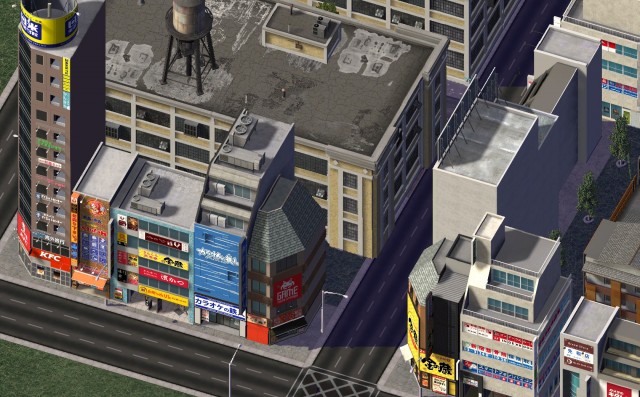
Who can tell me these Apartments or commercial bats? Thank you!
-
-
@Tyberius06 Unfortunately this person who send this commercial buildling image don't know where it from.
- 21,240 Replies
-
- 1
-
-
- simcity 4
- custom content
- (and 8 more)
-
@Yarahi I see! Thank you very much indeed!
- 21,240 Replies
-
- 1
-
-
- simcity 4
- custom content
- (and 8 more)
-
Hi, is there anyone know these two Japanese BATs?Look so gorgeous! The commercial building i have never seen it before,and the stadium from Japanese website :http://simcityedit.com/simedit/lev-bbs.cgi?bid=SC4=&style=0 But there isn't download link,i don't understand Japanese. If u know,pls tell me where can i get it,very appreciate!
- 21,240 Replies
-
- 2
-
-
- simcity 4
- custom content
- (and 8 more)
-
 So great! Looking forward to you sharing them!
 -
-
- 1 Comment
-
- 3
-
-
- electric car
- modern
- (and 8 more)
-
- 2 Comments
-
- 1
-
-
- amenities
- public toilet
- (and 4 more)
-
-
-
-
I'm so confused this magic problem for a long time, truly hope some kind master could help me!Thanks a lot. My Setup(SC4): Screen Resolution:1600x1200 Hardware Rendering 16-bit texture of material Win7 64system
-
Thanks for your kind reply again! That's absolutely a good idea!
-
Thank you so much! You mean “2 step” i need to do as below: 1.Lower the resolution and save the city 2.Improving the resolution to 1600x1200 after “1 step”? Or just lower the resolution to play SC4?