Jump to content

4 Screenshots

About This File

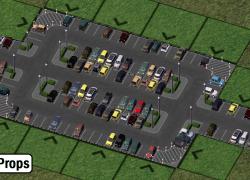
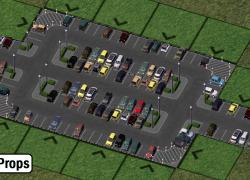
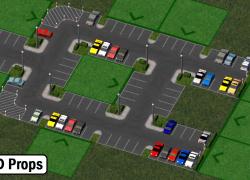
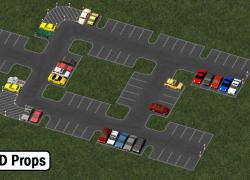
Here is the SAM1 override - a little mod that will reskin your SAM 1 textures and display new props for your greater pleasure! A small variation willl occur on some textures and props (as can be seen on screenshots), depending of zoning.

Not much else to say, but keep in mind that SAM 1, despite how it looks, does not have parking functionality: it's only purpose is eye-candy.


UPDATE 1.1

A fellow member brought to my attention a problem with the plugin - possibly due to the use of HD props and its incompatibility with software mode. For those who use software rendering and/or prefer to use SD props, a new iteration of the SAM 1 override has been created. The mod is now divided in 2 distinct folders: one for HD, one for SD. Please only use one at a time.


What's in the packs?

HD Props pack

SAM - 1 - Parking Lots Textures.dat: contains the new textures specific to the HD setup

SAM - 1 - Type21.dat: T21 files for HD car props

Bollard.dat*: small post model

Grfe_Cars_family_props.dat*: turns those bootiful car props into bootiful family timed props

Lot Textures.dat: lot textures for overriding SAM1 - style parkings

SD Props pack

SAM - 1 - Parking Lots Textures.dat: contains the new textures specific to the SD setup.

SAM - 1 - Type21.dat: T21 files for SD car props

Bollard.dat*: small post model

Lot Textures.dat: lot textures for overriding SAM1 - style parkings

* files already used in the overhanging parkings: if you have the overhanging parkings in your plugins, you can delete them.


Installation

Must load after the NAM. You can also replace the texture and T21 dats directly in the SAM folder if so you desire.


Dependencies (all optional beside the NAM - not having these will not trigger BB's)

NAM with the Street-Addon-Mod installed

BSC MEGA Props - SG Vol 01

BSC - VIP girafe carpack vol. 1 & 2 (HD version only)

Neko Prop Set vol 03 (only Neko_Fence_Black_2m.SC4Model and Neko_Fence_Black_2m.SC4Desc are needed)
(See here for the main page)


Strongly suggested for users of the SD version

The T21 file that generates props use Maxis family cars as default; it's very likely you'll want somethng better to replace them.

Choose one of the following replacement mods (they all supersede Maxis family cars), depending of your preferences:

1960s car replacement Mod

Japan car replacement Mod

European car replacement Mod

Jim's car prop pack 1.2


Credits

- Special thanks goes to Mr. Jim, the author of this excellent and highly recommended parking set. The textures used by the SAM1 override are based on his textures and inspired me to create this mod.  ありがとう JIM!

:party:

Suggestions or Problems with this mod: report here please


-Cori Edit:
Thanks to @Flann three of the dep linkys are now updated and a fix for a mismatched texture IID in the SD version is fixed.

-CB Edit:
The dep links to the hide-inoki site got borked again, so we've fixed them.
Thanks @hugues aroux for reporting!


What's New 1.1.2   View Changelog


Released

  • 1.01 Fix on cross texture
  • 1.02 Added high density textures
  • 1.1 Added new files using SD props
  • 1.1.1 Small correction on the curve texture
  • 1.1.2 Fixed texture IID in SD version
  • Like 7
  • Thanks 4


User Feedback


Recommended Comments

To the 37 1st downloaders: please re-download the mod as there's a small texture that has to be corrected on the cross piece. I also forgot to include textures for high density zones. Thank you!


@KonstantinII: if you need some help I'd be happy to provide assistance. Please create a new thread in the modding subforum and try to be as specific as possible. Thanks!

Share this comment


Link to comment
Share on other sites

Fantastic... awesomely fantastic. Definitely going to use this in some upcoming projects. :D

Share this comment


Link to comment
Share on other sites

MOAR PARKING!! You know I loves me some parking lots, and I'm digging this texture. Would have been nice to have it as an added SAM piece instead of an override, But I'm sure I can live with that. 

  • Like 1

Share this comment


Link to comment
Share on other sites

Would have been nice to have it as an added SAM piece instead of an override, But I'm sure I can live with that. 

This should have been the standard instead of what we ended up with. Also, one of Rivit's tar sealed sets should go in the SAM eventually. Maybe the NZ gravel as well.

  • Like 1

Share this comment


Link to comment
Share on other sites


Must load after the NAM. You can also replace the texture and T21 dats directly in the SAM folder if so you desire.

When you said that, what do you mean by that? I don't understand what you are saying. What's the file path it should go?

  • Yes 1

Share this comment


Link to comment
Share on other sites

DIS. IS. AWSUM. I guess it was only a matter of time to see a SAM modification with road props :D

Share this comment


Link to comment
Share on other sites

Love it!!  Perfect for creating beautiful custom car parks with ease!

Share this comment


Link to comment
Share on other sites

Thanks so much, I was looking for a way to get rid of all the streetlamps on the SAM1 set, since using them with Marteens LRM was so bright at night I stopped using SAM1 altogether.

Now I can use SAM1 again, and better still shiny new textures and props, this has got to be a must have download.

  • Like 1

Share this comment


Link to comment
Share on other sites

The BSC-Giraffe carpack is NOT an optional dependency for the HD version.

You will get a parking lot packed with brown box's if you do not have this installed. 

  • Like 1

Share this comment


Link to comment
Share on other sites

Great mod! However, this keeps happening and I have no idea what I'm doing wrong:

bf83a0b752.jpg

Share this comment


Link to comment
Share on other sites

Great mod! However, this keeps happening and I have no idea what I'm doing wrong:

Try downloading the mod again, one of two things are happening here:

1 - You simply don't have the straight texture for the parking installed (quite unlikely)

2 - Another texture is overriding it, i.e. there is another SAM1 mod somewhere in your plugins folder you need to find/remove. You could try making Magneto's mod load later also as a workaround.

Share this comment


Link to comment
Share on other sites

I understand that this mod must load after the NAM's. What about the dependencies, should they load after the NAM's also.  

Share this comment


Link to comment
Share on other sites

Sign In or register to comment...

To comment in reply, you must be a community member

Sign In  

Already have an account? Sign in here.

Sign In Now

Create an Account  

Sign up to join our friendly community. It's easy!  

Register a New Account

×

Thank You for the Continued Support!

Simtropolis depends on donations to fund site maintenance costs.
Without your support, we just would not be in our 24th year online!  You really help make this a great community. *:thumb:

But we still need your support to stay online. If you're able to, please consider a donation to help us stay up and running. This helps sustain a platform where we can share our community creations for years to come.

Make a Donation, Get a Gift!

Expand your city with the best from the Simtropolis Exchange.
Make a Donation and get one or all three discs today!

STEX Collections

By way of a "Thank You" gift, we'd like to send you our STEX Collector's DVD. It's some of the best buildings, lots, maps and mods collected for you over the years. Check out the STEX Collections for more info.

Each donation helps keep Simtropolis online, open and free!

Thank you for reading and enjoy the site!

More About STEX Collections