


Brooklyn81
-
Content Count
89 -
Joined
-
Last Visited
Everything posted by Brooklyn81
-

How to transfer plugins/regions to new computer.
Brooklyn81 posted a topic in SC4 Bugs & Technical Issues
Hi everybody! I am posting this because I was unable to find this covered in the forums after I did several searches. I'm sure that it is covered somewhere, but I didn't have any luck tracking down the answers. Anyway, I have received remarkable help previously when I had a technical-type issue, so I knew where to go for help this time, so I thank you in advance for any responses. Ok, here's the issue: my old computer recently bit the dust, so I had to re-install my Origin digital copy of SimCity 4 Deluxe Edition on my new computer. From my old I do have the buildings I downloaded from STEX (in a folder marked 'plugins') and a region I was working on (titled 'Scottsville') saved on a flash drive. Now I need to know how I go about getting my buildings and region into my game on my new computer. I am one step above 'Amish' in my skill level regarding computers, so please use as basic of terms/instructions as you can; I appreciate it. I assume I can accomplish this goal involving something along the lines of two options, which are: Option #1: Go to Windows (C:)--> Program Files (x86)--> Origin Games--> SimCity 4 Deluxe Edition, then either ADD my plugins/regions folder from my flash drive to the plugins/regions folder now visible here, OR delete the visible plugins/regions folders and REPLACE it with my plugins/regions folders from my flash drive. Option #2: Go to Documents--> SimCity 4, then either ADD my plugins/regions folder from my flash drive to the plugins/regions folders now visible at this point OR delete the visible plugins/regions folders and REPLACE it with my plugins/regions folders from my flash drive. I am leaning towards the fact the solution will be some variant of 'Option #1' but I've learned over my years not to make a move with computers unless I'm absolutely sure of what the correct move is, on accounta I think computers have put a lifelong curse on me, that I need to tread lightly in order for complete disaster to be averted when our paths must cross in something more complex than the basics (word processing, e-mail, internet (news, sports, porn)). Thanks for the help people. -
How to transfer plugins/regions to new computer.
Brooklyn81 replied to Brooklyn81's topic in SC4 Bugs & Technical Issues
Hey everybody! I just wanted to thank you all for offering your advice and help for me and this issue I came across with my computer and game. For some reason there were too many folders associated with SimCity 4 on my computer, and this caused conflicts and problems, so I knew I'd have to get rid of excess folders that were causing problems and didn't serve a function. I messed around with some file folders, followed my gut, and miraculously I now have all my downloaded buildings in my game and the NAM I downloaded is functioning in the game as well. I did mess up and for some reason saved one of my regions from my old computer on a flash drive, but accidentally saved it as a shortcut instead of a file folder, oh well. Anyway, thanks again for your help, I really appreciate it. I believe some of you who responded had actually responded to an issue I posted about in the past, so thanks for sticking with this fella that always has issues with computers/SC4, haha! -
How to transfer plugins/regions to new computer.
Brooklyn81 replied to Brooklyn81's topic in SC4 Bugs & Technical Issues
Oh crap, I went back on my flash drive and saw that I saved the 'Scottsville' region as a shortcut for whatever reason, so I can kiss that one goodbye, haha! I might just have to download NAM 34 over again and maybe it'll work. Computer stuff exhausts me, I'm going to take a break and eat some gummi bears for comfort then try to figure out stuff a little later on tonight. I'm not too upset by losing a region, as I only had two or three squares of the region built up, but that's a lot of hours flushed down the ol' ceramic bowl. As long as I can figure out how to get my buildings and the NAM in my game I will have a smile on my mug. ttyl, thanks again CorinaMarie. -
How to transfer plugins/regions to new computer.
Brooklyn81 replied to Brooklyn81's topic in SC4 Bugs & Technical Issues
When I double clicked the 'Scottsville' folder in my flash drive it opened up and had a bunch of files such as 'City-New City (2).sc4', 'City-New City (3).sc4', and so on, then the two files there that don't end in '.sc4' are titled 'config' and 'region'. I checked the plugins and all of those are all classified as 'File folders' which is probs a good thing and means that I have the actual files for those buildings. So I'm glad that even with my bad computer skills I did manage to save stuff correctly on my flash drive, haha! Thanks for bringing that stuff up so I could check and see if things are legit on that subject, I would've never known to check the 'shortcut' vs. 'file folder' stuff. Now it's just a matter of investigating and figuring out why my buildings and region aren't showing up in the game, and also why the NAM 34 didn't download like it did on my old computer and why there's no icons automatically put on my desktop like the last time. I might have to download Java or some schit, this computer's brand spanking new so I don't even know if I have that. -
How to transfer plugins/regions to new computer.
Brooklyn81 replied to Brooklyn81's topic in SC4 Bugs & Technical Issues
@CorinaMarie, you've already helped me tons, and I have a feeling there is some snafu or glitch that I somehow overlooked, or that my computer has a bunk folder or something that it shouldn't have or it's in the wrong place or something. I checked where I put my buildings, and I did put them in the correct spot, so I'm baffled about that. As far as my region ('Scottsville') missing from the game, I have a potential clue to why that may be. I went to the 'Regions' folder of SC4 in my documents folder and noticed that 'Scottsville' is there but where is lists the 'type' of the regions folders, all the regions 'type' is classified as 'File folder', but 'Scottsville' is classified as 'Shortcut', not 'File folder'. I think this has something to do with the region not appearing in my game. But considering I have computer skills one level above Amish, I wouldn't know how to jimmy with that stuff. We can wait until those gurus show up, or if I said anything in this current reply that sparks a thought with you, just let me know what it is, even if you're not 100% sure, I appreciate your help. -
How to transfer plugins/regions to new computer.
Brooklyn81 replied to Brooklyn81's topic in SC4 Bugs & Technical Issues
Ok, bad news everybody. I finally went on to play SC4 just now and none of my downloaded buildings that I took and maneuvered from my flash drive are in the game, and neither is my region. I don't know why this is. I followed what you said, I thought, to the t. But my region is missing ('Scottsville') and my buildings I had downloaded off of STEX which I had on my flash drive and thought I correctly moved them to the appropriate folders are not in the game. If anyone has any idea why this is, please let me know. Also tried downloading NAM 34 and it didn't show up like when I downloaded it on my old computer, don't know why. I am operating on Windows 10, so I don't know if some of the advice I received about the files/folders are only applicable to Windows 7 and the earlier version of Windows. I have a feeling this is going to suck. Any suggestions would be helpful. -
How to transfer plugins/regions to new computer.
Brooklyn81 replied to Brooklyn81's topic in SC4 Bugs & Technical Issues
Thank you everybody for your help, I think I may be able to play SC4 today with all my stuff on it, time permitting, as I have some lame adult tactics I gotta get done today. You guys/gals are a huge help, I wouldn't have been able to do this without yous, thanks again! -
Unable to change region name no matter what I do.
Brooklyn81 posted a topic in SC4 Bugs & Technical Issues
Hi everybody, So, my problem is that no matter what I do, I'm unable to change the name of my region. I went to the region folder I'm trying to rename (Fairview), right clicked and renamed it to what I want (Scottsville). That didn't work. So, I opened the region folder for Fairview and clicked on the region.ini entry, and proceeded to rename the region 'Scottsville' in that folder. No dice. For the life of me I cannot figure out why I'm unable to rename to my region. Back when I was using the disk version of the game on Windows 7 I never had an issue renaming regions. But since I got duped (like many others) into upgrading to Windows 10, I was no longer able to play SC4 using the game disks I've had since SC4 came out. I got the game off of Origin and it runs fine, I don't have any issues, however, this issue of being unable to rename my region seems to be unachievable. If anyone has any insights, or have successfully manuevered through whatever obstacle is holding me back, it would be much appreciated if you could help me out. DISCLAIMER: I am far from what you could call "computer saavy", so if what I need to do happens to be past the computer level of "Amish" I'd appreciate easy-to-follow, step-by-step directions. Thanks again. -
Unable to change region name no matter what I do.
Brooklyn81 replied to Brooklyn81's topic in SC4 Bugs & Technical Issues
@CorinaMarie, thanks for your input, I had tried that a few times but to no avail. Unfortunately for me, it was against my wishes to upgrade to Windows 10, it did it automatically so I thought I was stuck with it either way. Little did I know, that you could revert back to whatever version of Windows you had, but only within a 30 day time frame. Unfortunately it was already past that time frame when I realized how much Windows 10 sucked, so I am stuck with it for the long term. Your assessment of Windows 10 is definitely spot on, haha! Thanks again for your input. @RandyE, you're the man! I did exactly what you outlined in your comment and it worked! That crucial step with the file folder and such was the solution to my quite annoying issue. Thank you so much for your time, and explaining it in terms that a computer knowledge-deficient person can understand! Your help is much appreciated! -
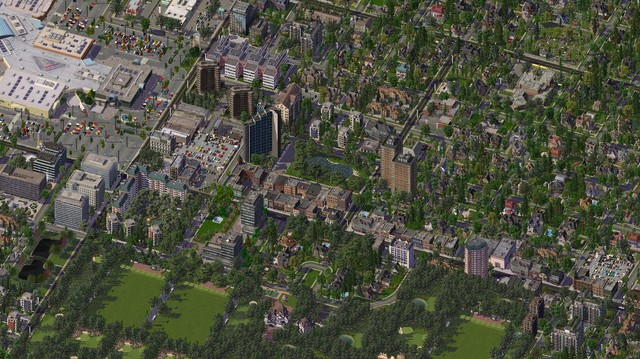 Although it's titled "Suburban Center" it incorporates not only a suburban feelings, but urban atmospheres are also present. These two blending aspects, combined with generous amounts of greenspace, make it a visual pleasure to viewers like myself. Great job. I'm stingy with 5 star ratings, but you're getting one from me.
 -
 Reminds me of the Bay Area/Silicon Valley in California. Definitely captured the feeling of a suburban office park with tech firms. Good job.
 -
 I would like to see a snapshot of the surrounding area around this naval station. I'm definitely intrigued. I like what I see so far.
 -
 Reminds me of Atlanta, Georgia in some ways. Nice blend of suburban features in an urban environment.
 -
Windows 10 Problem Reporting Thread
Brooklyn81 replied to rsc204's topic in SC4 Bugs & Technical Issues
Hey @rsc204, thanks a lot! I initially didn't put that space between the end of the existing text and what you told me to enter. I put in that space and it worked out. My game hasn't crashed then (although I save it all the time because I have an inherent fear/distrust of computers, haha!). I do still have the problem of not being able to rename my region. I don't know why it won't let me rename it, but I've renamed it in the regions folder by right clicking on the folder name and putting in the name I want. I even went into the regions.ini file and typed the name I want in the line I was told by you (or someone else, can't remember who was trying to help me). If you have any advice on that it'd be greatly appreciated, and thanks again for helping with the crashing issue! -
Windows 10 Problem Reporting Thread
Brooklyn81 replied to rsc204's topic in SC4 Bugs & Technical Issues
Hi rsc204, I downloaded the SC4 Patch successfully, thank you for that. Unfortunately, when I tried the 2nd part of your solution, I added the line you said -CPUCount:1 but after I clicked 'apply' at the bottom, it said that this is invalid, so I had to get rid of the part I added. -
Can someone help me out with a few questions?
Brooklyn81 posted a topic in SimCity 4 General Discussion
Hi everybody! I've played SimCity since it first came out long ago, then progressed through the different versions, bought SimCity 4 Deluxe Edition immediately when it came out back in '03. I've played the game for tons of hours, eventually learned about mods and downloading buildings, then eventually learned about NAM and finally, just recently, downloaded NAM 34. A week ago I caved and bought SimCity 4 Deluxe Edition from the Origin website, and I hadn't played the game for a month or two due to me switching over to Windows 10 (really wish I didn't). Ok, now that a little back story is over, I have some questions. DISCLAIMER: I'm pretty terrible with computers, so please excuse me not quite understanding responses if they get too in depth regarding the intricacies of files, programming, etc. I'm a decent learner, but when it gets into real computery stuff I need dumbed down directions to move forward. APOLOGY: I couldn't seem to find somewhere on the site with a forum called 'Help' where I could post this, but I'm sure there's a placd where my post would fit better, so I apologize, I couldn't find the right place. My questions don't quite fit in the 'Technical Help' thing I saw because it's not too much about hardware problems and such. First of all, I can't seem to rename my region. I never had a problem doing this before, but now that I have the digital version that I bought from Origin I cannot seem to rename my region. I started with how I used to do it, by simply right-clicking on the region I wanted to change while in the SC4 files. This didn't work. I saw on a post on this site somewhere about finding a file titled 'regions.ini' double clicking on it and change the title line to whatever name I want to change it to. I tried that. Didn't work. Not sure what I'm doing wrong. If anyone could help me with this I would really appreciate your input. Second thing is kind of general, related to NAM 34. Although I've played SC4 for many years, I'm new to this mod. I have looked on YouTube for videos showing me step by step instructions on how to use this mod, but there is a slim selection of videos and they are short and only cover one component of NAM 34 that I'm not really interested in. I am mostly interested in mass transit options, but you have to do things very specifically, and there really isn't too many directions I have been able to find. Does anyone know of a video that shows, in a very basic, dumbed-down way, how to build different things using NAM? Like I said, I'm not quite interested in the highway and roads aspects, mostly just mass transit (subway, high-speed rail, tram, elevated subway, etc.). Any help on that would be appreciated as well. The world of NAM 34 is confusing and uncharted territory for me. Sorry for writing a novel folks. Thank you all for reading and any help/suggestions you have. -
Can someone help me out with a few questions?
Brooklyn81 replied to Brooklyn81's topic in SimCity 4 General Discussion
Thanks @rsc204, I appreciate it. I will definitely check out your tutorials on YouTube. Also, about renaming my region; I will try what you suggested and see if there's any problems. Also, I'm not sure if this is affecting renaming my region but I still have the old 'Maxis' files on my computer from my disc version that I uninstalled when I changed over to the digital version. I am hesitant to erase the files within the 'Maxis' folder, particularly the 'regions' folder (obviously), so maybe that's the thing causing the issue, maybe I need to get rid of the 'Maxis' folder from my computer. Ok, I'm going to check on this stuff and get back to you. If you have an opinion on the 'Maxis' file folder (if I should delete it or whatever) I'd be happy to hear your input. -
-
As a Brooklynite, I am delighted to see Ebbets Field, and it was done great! I will definitely download this. I happen to live in Flatbush, Brooklyn, which is neighborhood where Ebbets Field used to be. The only things that remain of Ebbets Field is that apartment complexes that were built there after the stadium was gone, they named the development the Ebbets Field Apartments. On one on the buildings, there's a very small plaque on one of the buildings, not even displayed prominently, but it reads something like "This is where Ebbets Field used to stand, home of the Brooklyn Dodgers". Thanks for making this, you put a smile on a Brooklynite's face.
- 1 Comment
-
- 1
-

-
- brooklyn dodgers
- ebbets field
- (and 5 more)
-
Windows 10 Problem Reporting Thread
Brooklyn81 replied to rsc204's topic in SC4 Bugs & Technical Issues
Thank you rsc204, much appreciated, thanks for the response. -
Windows 10 Problem Reporting Thread
Brooklyn81 replied to rsc204's topic in SC4 Bugs & Technical Issues
Ignore my previous post, I figured out the problem. For some reason even though I uninstalled my disc version, there was still a folder left over titled 'Maxis' that had a plugins folder and all my stuff was in there. I found the new plugins folder (it was located in my origin games folder in the SC4 files) so I just transferred my stuff from the old to the new folder and it worked. However, my digital version of the game already crashed once after only playing it for 10 minutes and I didn't have anything saved, annoying. I guess I'll have to save every few minutes while I'm playing, unless someone knows the reason for the game crashing and what, if anything, can be done to prevent it. Let me know if anybody has insight with that issue. -
Windows 10 Problem Reporting Thread
Brooklyn81 replied to rsc204's topic in SC4 Bugs & Technical Issues
Dear @rsc204 and @A Nonny Moose , since you two seem very knowledgeable (I've read a lot of both of your comments) with both SimCity 4 and computers in general, I am asking you two, and anyone else who may be able to help me. Ok, I broke down and bought the digital version of SimCity 4 Deluxe Edition from the Origin website, I hate dealing with customer service stuff, and I'm lazy, so I forgoed trying to get a digital version for free using my disc version stuff. I uninstalled everything on my computer associated with my SC4 disc version (or at least I thought I did, I'm bad with computers). Before I did this, I copied all my stuff (buildings) from the 'plugins' folder to a flash drive. When I installed the digital version, I checked to see if my plugins were somehow kept and put in the 'plugins' folder of my new SC4, and sure enough, they were there. However, when I ran the game, none of my downloaded buildings appeared anywhere when I started a city. I just now quit SC4 and once again checked the 'plugins' folder and all my downloaded building files were there. What do I do? Is there something that happened to affect them when I uninstalled my original disc version? Or were they somehow affected by the new installation of the digital version I bought? I'm very confused. Should I put in my flash drive that I copied the 'plugins' folder to and move the folder to the spot where the current 'plugins' folder is under my files for my digital version? Any advice would be helpful. Thank you everybody. -
Windows 10 Problem Reporting Thread
Brooklyn81 replied to rsc204's topic in SC4 Bugs & Technical Issues
Ok, maybe it was mentioned somewhere in these 7 pages of comments, but my internet is slow and I don't feel like reading 7 pages of comments to see if my question was covered, and for that I apologize. Ok, if I uninstall then reinstall SC4 on my computer (trying to get around the Windows 10 horribleness cause it isn't working, some said this tactic worked for them, others said you're just plain screwed if you have the disc version of the game, whatevs, I'll try anything), will I lose all the different buildings from the exchange that I've downloaded? I heard that NAM and the Traffic Simulator doesn't get erased, but some people have had their 'plugins'/downloaded buildings get erased. If uninstalling/reinstalling will erase my stuff, what do I have to do? Keep in mind I'm horrible with computers, and by horrible I mean I'm a $%&^!in' retard with computers, so I'd need step by step instructions to help me save my buildings instead of them getting erased. If anyone is patient enough to deal with a computer dunce, lemme know. -
I've been playing Simcity 4 for a long time, but I've never got into it too much. So my question is, in your opinion, what's easier, creating a new region or downloading and installing a region? First of all, I don't even know if you can create a new region, haven't figured out the answer to that question yet. Secondly, I know you can download regions from the exchange but I'm not too computer savvy and I'm assuming you have to do some file/technical stuff on your computer to get it into the game, although I have managed to download buildings from the exchange and get them onto my game. That being said (you guys are probs like "damn, this guy is an idiot"), let me know your opinion and why, or if my topic is totally off base because there's no way to create a region of your own on the game. Thanks for your time and patience in dealing with someone who loves playing the game but is basically clueless on everything else about it. Maybe this thread is redundant but I did Google searching and searched the forums here but I could find a thread that addressed specifically what answers I'm looking for. If it is somewhere on this site, please let me know and share the link with me. Ok, thanks again people, take care.
-
Creating vs. Downloading a region
Brooklyn81 replied to Brooklyn81's topic in SimCity 4 General Discussion
Many thanks Bones1, A Nonny Moose, and last but not least, raynev1! Very much appreciated you guys, now I can enjoy the game even more.
