


Leaderboard


Popular Content
Showing most liked content since 08/31/2016 in all areas
-
25 pointsCori's Rock Shoppe by CorinaMarie@Simtropolis A picture catalogue of every known Rock Mod for SimCity 4 Note: I did not create any of these mods. This thread is simply to display each rock mod using the same city tile for easy comparison. If you find this useful feel free to use your browser's Save As function and do a Save Complete Web Page. This will give you an offline copy with all the pictures. My content is freely available for use by anyone. You can even make a duplicate thread on any other site if you like. Please, just be sure to give me credit for the original creation. For peeps with 16:9 (or other wide screen) monitors you could open this thread in two separate windows side by side. This would allow you to have independent scroll bars to compare specific mods. It would also work if you have dual monitors tho there may be some slight color difference between the two. Other Threads in Cori's Shoppe Series: Cori's Water Shoppe (Linkys to and Pictures of every Water Mod) Cori's Side Water Shoppe NEW! – March 2022 (Pictures and in topic Downloads of the Water's Edge for every Water Mod) Cori's Beach Shoppe (Linkys to and Pictures of every Beach Mod) Cori's Terrain Shoppe (Linkys to and Pictures of every Terrain Mod) Cori's Jolteon's Ferrians's Tree Shoppe (Linkys to and Pictures of almost every Tree Mod) And see: C.O.R.I.M.A.P.S. - A Tutorial for SimCity 4 (Quick alternative realistic map making method) Note: If you download a mod and have any difficulty with it and when all else fails, read the ReadMe instructions that comes with it. The rest of my game is vanilla atm so the only difference between the pics is which rocks are installed. First off, here's the vanilla Maxis texture: dogfight Rock Mods (v1.0) contains 3 Calm Limestone: Dark Igneous: Dark Limestone: ENN Rock Mod Set 1 SD contains 8 Brown Granite1: Dark Granite2: Dark Granite3: Dark Granite4: Granite9: Red Igneous: Sandstone1 Brown: Sandstone1 Gray: Tropical Mossy Rock Mod: Sandy Rock Mod: Mossy Rock Mod: Grassy Rock Mod: Jeronij Maxis Rock Mod: JRJ PEG Limestone Rock Mod: Mossy Rock Mod: Grassy Rock Mod: Granite Rock Mod: Sphinx Rock mod: PEG PPOND Rock Mod: PEG ROCK MOD II Weathered Granite: PEG ROCK MOD II Eroded Sandstone: PEG ROCK MOD II Golden Sandstone: PEG ROCK MOD II Dark Basalt: PEG ROCK MOD contains 6 Craggy Sandstone: Gray Granite: Gray Rock: Limestone: Red Craggy: Sandstone: The following are HD so you will need to have Hardware Rendering or you will get CTD. ENN Rock Mod Set 2 HD (v1.0) contains 3 Granite9: Sandstone1 Brown: Sandstone1 Grey: The following are HD so you will need to have Hardware Rendering or you will get CTD. ENN Rock Mod Set 3 HD (v1.0) contains 3 Dark Granite2: Dark Granite3: Dark Granite4: The following is HD so you will need to have Hardware Rendering or you will get CTD. LK_StarterSet (v1.0): The following is HD so you will need to have Hardware Rendering or you will get CTD. Sudden Valley Terrain Mod (v1.0) SV Rock.dat only: The following is HD so you will need to have Hardware Rendering or you will get CTD. Berner Oberland Terrain Mod (v1.0) BO Rock Mod.dat only: SMP Gray Marble Rock Mod: VIP Orange Snowy rock mod (v1.0): Les Roches de l'Aubrac v 1: CPT Painted Desert Terrain Mod1 (v1.0) / CPT Painted Desert Terrain Mod CPT_C_MoabCliff.dat only: CPT OlympicTerrain Mod1 (v1.0) / CPT Olympic Terrain Mod 1 CPT_C_OlympicCliff_Optional.dat only: Columbus Terrain Mod von Cycledogg CPT_C_ColumbusCliff_Optional.dat only: Meadowshire Terrain Mod (v1.0) CPT_C_MeadowshireCliff.dat only: The following are HD so you will need to have Hardware Rendering or you will get CTD. SHK HD Rock Mods contains 5. SHK_HDRockMod_01.dat: SHK_HDRockMod_02.dat: SHK_HDRockMod_03.dat: SHK_HDRockMod_04.dat: SHK_HDRockMod_05.dat: The following is HD so you will need to have Hardware Rendering or you will get CTD. Rock Mod contained in VIP Terrain Mod by Cédric. (Attached to this post on Devotion.) Note: In addition to the Rock Mod there are also Beach, Terrain, and Water mods. The following pic has all 4 installed: ^ Thanks to @Indiana Joe for mentioning this one. So, when peeps ask: Which rock mod should I get?, show them this thread so they can compare and decide. Attached is the medium size city tile I've used for these pics that way you can make your own with the exact same mountain. City - Rock Mods.sc4 Return to SimCity 4 Ultimate Guide: https://community.simtropolis.com/forums/topic/762954-SimCity-4-ultimate-guide/
-
22 pointsHi guys a little update... @wasmic I haven't forgotten about your concerns from a few posts back...It is a valid concern. I have been out of my mind the last few days and have not been as chatty as...I should? Anyway, I have been feverishly working on a backward compatibility algorithm for existing stations. the goal, for now, is to allow the users to choose a depth (preferably -12m) and length (144m) of existing stations in the game. The premise is that if the station works now, it should work with my mod. The way it will work (tentatively) is that all ped paths leading into the station will stay the same but the stations tracks as well as the pedestrian paths that lead to them will be lowered. A 'spiral staircase' of ped paths will be dynamically laid to fill in the gap and prevent any 'slope too steep' errors. So far, we can support stations with: Ped entrances at ground level and down to -4m below ground Stations with multiple entrances Stations with multiple tracks (almost always...see below for exceptions) Stations with diagonal tracks Still working on: Stations with curved tracks Done (90 degree only) Finding stations that do not require these modifications May/Will not work on (exceptions): Modifying length of station tracks that are connected to other station tracks (they can still be lowered) Modifying unique buildings (at least for first release) Stations that ordinarily don't work (If it didn't work without this mod, it won't work with it) Other considerations...Don't know much about UI but I would like to allow users to modify the length of tracks and depth that they are drawn (as mentioned above). I would imagine that: Right now: Depth and lengths are hardcoded. Not too hard: Add dropdowns in mod options. Harder: Add UI box with dropdowns for length and depth whenever stations are clicked. Hardest/Not sure it's even a thing: dropdown for length and pageup/pagedn for depth. Also, officially, I am sorry for not having this thing released last week as I kinda promised. With all the wonderful feedback from the alpha, I realized how much more there was to do (secretly saying this is everyone else's fault but mine ). But please, remain patient and continue with the feedback so we can ensure this is done properly(ish) the first time. More when I get home from work...
-
20 pointsHello guys, I stopped playing on Olsènes, the city crashing all the time, which is a nightmare. I still plan to post some unfinished stuffs in a near future though. So, I worked on a new city when I had the time during the holidays: Alijstar. The city is inspired by Bruges, Amsterdam and Berlin with my little personal touch. So yeah, water will be everywhere. Here are the first pictures: 18. ALIJSTAR - INTRODUCTION 1. You already know that one 2. The 'Liberty Square'. More details next time! 3. The city is known for its churches... 4. The most impressive one: the Cathedral 5. And one small mosaic for the end That's enough for the moment, I hope you enjoyed it! More pictures soon - REPLIES - @_Michael Thanks for the kind words @philforhockey51 Thank you too. I really enjoyed building that small park @Ln X Thank you too!
-
19 points
Version 1.0
6,016 Downloads
KOSC presents: Maxis Mansion Overhaul Introduction Ah, Maxis mansions. In the early days, it was one of the first signs of a flourishing city. If you had a few of these large plots sprout up in your neighborhoods it often meant that your city was growing well! However, the fact remains that throughout the years, improvement with custom content and detail in general have left the original Maxis lots in the dust. One of the biggest problems with the vanilla lots is they often contained vast amounts of well...nothing! There's some occasional shrubbery and a pool here and there, but for the most part, the lots are grossly under-detailed. Furthermore, the tendency for these larger lots to sprout up in the midst of your nice R$$ neighborhoods meant that your detail level takes a pretty significant hit! Pretty odd considering the richest of Sims could easily take advantage of the vast property spaces that they have. Taking inspiration @T Wrecks' fantastic Industrial Revolution Mod and more recently @Manuel-ito's Maxis Renewal, I present to you Maxis Mansion Overhaul: A full set of override lots that replaces all default Maxis mansion lots. This is also including some of their larger medium-density counterparts. Package Overview This set contains a grand total of 60 lots. These are all broken down according to the categories that Maxis determined: 18 "A Class", 18 "B Class", 18 "C Class", 3 "D Class" and 3 "E Class" mansions. These re-lots fundamentally change the original mansions in the following ways. better realism and detail: gated homes, larger driveways, and much more flora (fully seasonal). all lawns are not made equal: You may find patches of wildflowers, dirt, or even poorly watered grass in these lots. No one has time to maintain perfect grass in those corners! better slope support: many of the original lots had that ugly full lot foundation at certain slopes. These are more friendly overall but some discretion is still required as the tennis courts are model-based. the rich get richer: the largest lots boast private tennis courts (all kinds of angles), massive driveways, huge pools and gardens. asymmetric lot design: not every yard has to come in a square. Some lots are enclosed with angled hedges and have open space for a better blend between the lot and the wild. all kinds of pavement: gone are the days of every lot having bright and pearly tiling. Now you can have everything from dark brick to different colored stones. There are a few things to keep in mind when using this set. Read the following section carefully. There are two different packages included with this lot, the OVERRIDE version and the STANDALONE version. The standalone is for those who prefer to not disrupt lots in their developed cities. This is also suitable for people that use Maxis blockers and only want to see the mansions (and nothing else). The override set is recommended if you don't care about bulldozing acres of existing Maxis mansions or if you're starting a fresh region or city. If you're using other mods like CAM or Maxis blockers that modify the original mansion exemplars as well, make sure to load this override set last. Alternatively, you can look tweak those files with Reader. Make sure to find exemplars starting with instance ID: 30000710 and ending at 300008f1. Simply deleting those will remove any potential block on these lots. For those of you that downloaded my Maxis Mansion Facelift lot for the Facelift challenge, that lot is now obsolete. General Stats All lots boast the same dimensions, growth stage, and road orientation as their original counterparts. Install Instructions Drop the files in your My Documents/SimCity 4/Plugins folder. Dependencies Due to the larger amount of content here, the dependency list is a little heavier than usual. However, most of them should be pretty commonplace if you've downloaded any of my lots beforehand. Textures SuperSHK MEGA Parking Textures BSC Textures Vol 1 BSC Textures Vol 2 BSC Textures Vol 3 BSC Texture Pack Cycledogg V01 Props SHK Parking Pack AnyOne for Tennis LBT MEGA Prop Pack Vol. 1 BSC MEGA Props SG Vol. 1 BSC MEGA Props CP Vol. 1 BSC MEGA Props CP Vol. 2 Huge thanks to @rsc204 for coming up with these amazing model-based tennis courts! Enjoy! CB Edit: Fixed dependency links. Thanks again to @Garlicked for reporting! -
19 pointsOky, now its time for the show and tell of all 36 pieces and their respective icons. They are easy to follow and distinctive enough to stand out in the menus. Actual props. Water footing. Icon Legend Simmer2
-
19 pointsAt 42 of 60 now. Have another sampler! An example neighborhood:
-
18 pointsHello! Thanks for everbody the support, oppinions, suggestions, criticism @metasmurf, @matias93, @Dreadnought: Thanks for the advice about the Container ports, I made a few changes on them. Special thanks for @Simmer2, @rsc204, @kingofsimcity, @Girafe and @FrankU for their work. Finally I could upload the Heretic SeaPort Project into the STEX (and the LEX aswell). You can download it from here Heretic SeaPort Project Enjoy and have fun!
-
18 pointsWe know they are not a problem, because so much scrutiny was poured over PEGs files after the whole prop pox business. The BDK (Beach Development Kit) is the only currently known pack that remains not updated that has been linked to this problem. Out of the entire pack, the issue has been isolated to no more than 5 props. Since BDK stuff doesn't really appear in the CDK lots, I can't imagine how you could have any problems with it. Anyone for Tennis? As you may have seen, @kingofsimcity has been adding tennis courts (amongst other things), onto the Maxis R$$$ Mansions. Well to keep things short, we talked a bit, I ran with the idea and currently there are about 35 HD-Rendered Tennis props ready for release. I've some ideas for other tennis lots using this new set of props too, this is just a WIP teaser .
-
18 pointsHere are those pictures I promised (for like 5 hours ago but still). We are seeing light at the end of the tunnel (you like what I did eh? EH?)
-
18 pointsHello to all, It was long time ago since the last time that I've played Simcity 4... This week I was able to play SC4 again and I've started to make a small village located in the bay of Saitama... I must say that I have a new PC and finally I will be able to make some High quality videos and I`m thinking to update my MD with some pictures from this village and with some videos too... I hope you like it and see you soon. #Jonathan
-
17 pointsDisturbing the grid and making some overcomplicated crossings Sadly, as my game has been very unstable recently, this is taking too much time: I'm having a CTD or hanging each half hour, on average...
-
17 pointsComing soon to a STEX near you! Doing the finishing touches on my submission for the Facelift Challenge. As per what was allowed, this one stretches the rules to some extent, as Willmott Widget Assembly was originally a Stage 3 I-M Outbuilding, so I made a new exemplar for a Stage 3 I-M Anchor. The lot size (6x5) is one of (the largest) WWA's default sizes. Fun fact with that, it's one of the largest growables in the game. I also tried something that I know CP did with some of his individual props a long time ago (shadows): I added in correctly-sized boxes to my scenes when BATting the props to represent the buildings. This way the fences, cars, and trucks all have cast shadows on them. Looks pretty neat I think! Only have two dependencies so far too: JES Props Vol 1 and the prop files from LRM (don't have to install the overrides if you don't want, I just used the tall light towers from the prop set). And yes, those are all custom trucks that say Willmott Widget Assembly on them.
-
17 pointsEveryone for tennis! Coming sometime in the near future... You can also get a preview of all 60 in my lot thread, with rear angle shots as well!
-
16 pointsCori's Water Shoppe by CorinaMarie@Simtropolis A picture catalogue of every known Water Mod for SimCity 4 Note: I did not create any of these mods. This thread is simply to display each water mod using the same city tile for easy comparison. If you find this useful feel free to use your browser's Save As function and do a Save Complete Web Page. This will give you an offline copy with all the pictures. My content is freely available for use by anyone. You can even make a duplicate thread on any other site if you like. Please, just be sure to give me credit for the original creation. For peeps with 16:9 (or other wide screen) monitors you could open this thread in two separate windows side by side. This would allow you to have independent scroll bars to compare specific mods. It would also work if you have dual monitors tho there may be some slight color difference between the two. Other Threads in Cori's Shoppe Series: Cori's Side Water Shoppe NEW! – March 2022 (Pictures and in topic Downloads of the Water's Edge for every Water Mod) Cori's Rock Shoppe (Linkys to and Pictures of every Rock Mod) Cori's Beach Shoppe (Linkys to and Pictures of every Beach Mod) Cori's Terrain Shoppe (Linkys to and Pictures of every Terrain Mod) Cori's Jolteon's Ferrians's Tree Shoppe (Linkys to and Pictures of almost every Tree Mod) And see: C.O.R.I.M.A.P.S. - A Tutorial for SimCity 4 (Quick alternative realistic map making method) New Information Many of the water mods have Maxis nuclear blue sides. I've now written a tutorial showing how to fix those. See here: ---------- Note: If you download a mod and have any difficulty with it and when all else fails, read the ReadMe instructions that comes with it. I do have Ennedi's HD Sandstone1 Brown Rock Mod installed, but otherwise my game is vanilla. Let's start with the default Maxis blue water: And here I'm showing the underwater view. I hope I've designed this so all aspects of the water mods will show their various colors based on elevations. Water Mods by dogfight contains 3 Cold Blue: Marshy: Muddy Lake: Joergs Water Mod 2 contains 10 Black Sea: Bloody Nile: Caribbean Dream: Emerald Isles: Icy Arctic: Mediterranean: Muddy River: Northern Pacific: Rivers of Lava: Yellow Puke: Mas71 Water MODs (v1.0) contains 5 Waters_100: Waters_200: Waters_300: Waters_400: Waters_500: PEG WATER MOD Brigantine: SHK Brigantine 2.0 contains 8 BluGrn: ClrBlue: DkBlue: Emerald: LtBlue: Orig: Silt: Teal: PEG WATER MOD Clipper: PEG WATER MOD Windjammer: PEG WATER MOD Hawaiian Holiday: PEG WATER MOD Crystal Lagoon: SMP Teal Water Mod: SMP Paradise Blue Water Mod: Runamuck's HD Water MOD v1: ELSHA WATERMOD: ^ This one looks vastly different depending on zoom. Realistic Water v1 by Joerg and Teirusu: Drunken Water Mods, The Blues and Greys. In HD! contains 6 Blue1: Blue2: Blue5: Grey: Grey1: Grey3: Ocean River MOD final 1.1 contains 6 with 4 variations each This one goes beyond the typical single .dat file. Be sure to check out the Readme.html file in the download. For the following pics I did install the TerrainProperties.dat and the WaterSurface_256.dat. There are also 4 other files for blending. I skipped those in favor of brevity. DeepSea_5F5F00: DeepSea_669966: DeepSea_669999: ShallowWater_5F5F00: ShallowWater_669966: ShallowWater_669999: Gobias HD Water Pack 1 (v1.0) contains 3 All 3 of the Gobias Water Mod Packs have two variations tweaked for use with either Lowkee or Gobias Terrain Mods. There's also a Berner Oberland Shore Patch for two different altitudes. Check out the Readme files in the download. For the following pics I used the GB version. GB Bodensee: GB Seto Inland Sea: GB Staten Island: Gobias HD Water Pack 2 (v1.0) contains 3 (see comments under pack 1 above) GB Cape Cod Bay: GB Caribbean: GB Mississippi River: Gobias HD Water Pack 3 (v1.0) contains 3 (see comments under pack 1 above) GB Chicago River: GB Inside Passage: GB Loch Lomond: LK_StarterSet (v1.0) Coastal Modd Ok, so this one contains: 10 Offshore Textures 14 Inshore Textures 9 Foreshore Textures 6 Beaches Be sure to check out the Readme file included in the download. Since this could yield a zillion combinations I simply picked the Offshore and Inshore .dats which have corresponding color names to illustrate here. DkBlue: DkCyan: Emerald: Green: Ice: Overcast: Steel: Tropic: Turbid: Ultramarine: Sudden Valley Terrain Mod (v1.0) SV Water.dat only: Berner Oberland Terrain Mod (v1.0) BO Water and Shore Mod.dat only: Tobermory Style Water VERII: Edmonton Water Texture VERII: Sharp Teal Water Texture: Tobermory Style Water VERI: Minnetonka Style Water: Pennsylvania Style Water: BBlue Water Texture: Tropical Style Water Modd: PEG Stream Kit Water: Oppie Canal Water: Green Water: Auckland Water Texture: Purple Water Texture: Bright Blue Water v2: Japan Water Pack contains 5 blendedjapan: japan01: japan02: japan03: japan04: Barbados Water Pack contains 8 barbados01: barbados02: barbados03: barbados04: barbados05: barbadosblend2: barbadosblend: barbadosblendblur: Water Pack 2 contains 13 Baltimore: Blood: Chesapeake: Fiery-Darker: Fiery-Lighter: Flamesrock: Medium Blue: Metallic Grey: Navy Blue: Tropical: Venice: Wintry: Yellow: Edmonton Style Water: Port Huron Style Water: Muddy Grey Water: Dark Green Water: Bright Blue Water: San Fransisco Style Water: Rocky Bottom Water Texture: Timotheus4 Water Pack contains 12 algae: ^ Same as: Algae Water drkmud: ^ Same as: Dark Mud Water embrx02: ^ Same as: Emerald Brownish Try Two emerald brownish: ^ Same as: Emerald Brownish Try One Fadedblue: ^ Same as: Faded Blue Water hotpink: ^ Same as: Hot Pink Water muddy: ^ Same as: Muddy Water natu-rals: ^ Same as: Natural Water reddx01: ^ Same as: Reddish Water richblu02: ^ Same as: Rich Blue Water ukwx01: ^ Same as: UK Water X01 ukwx02: ^ Same as: UK Water X02 The following is HD so you will need to have Hardware Rendering or you will get CTD. Water Mod contained in VIP Terrain Mod by Cédric. (Attached to this post on Devotion.) Note: In addition to the Water Mod there are also Beach, Rock, and Terrain mods. The following pic has all 4 installed: ^ Thanks to @Indiana Joe for mentioning this one. So, when peeps ask: Which water mod should I get?, show them this thread so they can compare and decide. P.S. If I've missed any water mods, feel free to post a linky to their download and I'll get them screenshotted and edit them into this post. I plan to make similar threads for Beach, Terrain, and Tree mods. You can already get your rocks off here. (I might take a bit of a break tho. This is a tedious and boring task I've set for myself.) I hope everyone makes good use of my reference threads. Attached is the medium size city tile I've used for these pics that way you can make your own with the exact same location. City - Water Mods.sc4 Return to SimCity 4 Ultimate Guide: https://community.simtropolis.com/forums/topic/762954-SimCity-4-ultimate-guide/
-
16 pointsIntroduction With the much appreciated help of @boformer I managed to make the beginnings of a mod that aims to add more customization to the existing Train Tracks network. I'm currently testing to see what others experience when using this mod. Anyone who has me as a friend on Steam can subscribe to the Beta. I update daily as I keep encountering small issues. With your help I can speed up the process and get the mod ready for release sooner. For your information: I don't know how to code, all current lines of code are taken for the Bus Stop Replacer mod (by @boformer) Aim The aim for this mod is to give players full control over the visuals of their rail network. I plan to do this by adding as much variety as possible. I'm thinking of all standard catenaries of most major countries. Along the way I can also make (generic) requests. On top of that I want to give you the ability to submit your own models, which I can then add to the mod. Unfortunately, you cannot do this yourself as you can for Network Skins, as I try to keep this mod simple. However, this might change in the future as Network Skins is still undergoing development. How it works The mod will include several 'Styles' you can choose from in the Mod Options. Changes are applied when loading a save from the Main Menu only (again: keeping it simple). The mod will then replace all vanilla props with custom props. This includes vanilla Station Tracks, but also all tracks from Extra Station Tracks and One-Way Tracks. Until Network Skins is updated, you cannot change props per segment. All changes are visual and will therefor not break your game. When anything goes wrong or when unsubscribing, the game will simply load the vanilla props. While it's in Alpha, I still advise to avoid testing on your favorite city, but that goes for every mod you try out. Roadmap All will be optional Add more variety to the props (example) Add random track-side junk (e.g. rails & sleepers) Add random track-side props (e.g. powerboxes) Add signals at intersections Add End-of-the-line prop (example) Add custom Buffers (per style) Add custom wires (per style) Current Issues (September 15th) When switching styles, props disappear when loading new save from main menu (prop = null) (Thank you @boformer) Changes are not applied to all neworks (inconsistent) (Fixed myself) Props big in file size (1,8mb) even when all source files together are 500kb Sometimes props have a +2m offset to the left or right at intersections (Magically disappeared) Props have an offset of 2,4m (might be from the asset editor) (Thank you @boformer and @Ronyx69) Help me please! Like I said: I'm not familiar with coding in C#, so every bit of help is much appreciated. I'm doing all I can to teach myself, but I've been unable to find CS related tutorials. At the moment I have Notepad++ and Microsoft Visual Studio. If you know any good sites or documentation, please let me know. If you can help me with testing, or know how to fix an issue, please leave a reply. I check the forums hourly. Thank you all! Screenshots
-
16 pointsOur trip to Africa starts off in Lagos, Africa's largest city. Getting anywhere around town seems to be an impossible task with the never ending flow of traffic. Street vendors and hawkers are on every street corner, and the massive crowds of people everywhere adds to the congestion. In order to go anywhere, using the bright yellow danfos (buses) are almost a necessity - they're virtually everywhere in the city. But just when we thought the traffic was bad enough around our hotel - one of the local markets spills out onto the streets. This in turn forces one of the main roads to shut down and everything comes to a complete standstill for a couple of days. We're limited to touring the city by foot at this point, but at least we get to check out many of the beautiful goods that the local markets have to offer. After our stay in Lagos, we start traveling East - right into the heart of Congo. All the roads from this point forward are dirt covered - which potentially makes rainy season a real headache. Fortunately for us, we don't run into any problems for the time being. Along our way, we get to meet numerous tribes, observing their rituals and getting a chance to see how the locals live. The mud and thatched roof huts they call home have been a mainstay for thousands of years - and we can see why, noting their sturdiness and ease of build. Our next stop in our African journey is northern Tanzania where we take our Jeep through Serengeti National Park. The views from the ground are amazing, almost immediately spotting large herds of elephants, giraffes, and zebras. However, to get an even better view, we decide to board a hot air balloon instead. It's wildebeest migration season, and we get an excellent birds-eye view from our balloon - also finally spotting a couple of lions on the prowl as well. Once we get back on the ground, we finally start to make our way out of the park - but not before stopping a few times to let a herd of Giraffes make their way across the road. We board our plane and arrive next in Madagascar, being sure to see it's famous Avenue of the Baobabs. Not only are they perhaps the world's fattest tree, but they also can live for 2,000 years or more - they're truly marvelous as they tower high above us. However, just as we make our way out of the area, we're met with an unexpected surprise. We thought we left the traffic back in Lagos - but evidently we were quite wrong, getting stuck in a cattle traffic jam on numerous occasions. Once we make it back to the mainland, we travel a couple hundred miles West and make our way across the Zimbabwean border. After getting lost more than a couple times and finally getting some much needed help from the locals, we're able to locate Great Zimbabwe, nestled in the middle of the Zimbabwean foothills. Once the capital of the Kingdom of Zimbabwe, all that's left is a collection of ruins scattered around central and western Africa. Despite their current state, you can still get a sense of the power and greatness that these walls once held. Our final destination is perhaps Africa's most famous - Victoria Falls. One of the Seven Natural Wonders of the World, these awe-inspiring falls truly live up to the title. Once we get there, we're sure to try out a little whitewater river rafting - it's the middle of the high season and the river is in full force. However, there's still something that's a little more dangerous that we have to try out. Our tour guide takes us back up to the top of the falls, and we board a small boat to Livingstone Island near the middle of the Zambezi River. We slowly move our way across the lip of the falls, careful not to take one wrong step on any slippery rocks along our way. Finally, we reach our destination - the infamous Devil's pool. We take the plunge, and the only thing protecting us from a 300+ foot drop is a small submerged rock barrier on the edge. We take a deep breath, carefully leaning over the edge to catch the view of a lifetime. Don't forget to comment, like, and follow True Earth if you haven't already! Thanks -korver
-
16 pointsKoch C is still not there, terrible busy month. I did release one building a few days ago though: Besides that, I stumbled on this poor thing (a watertower): It used to look much better: So I started some renovation Its about 56 meters tall Its actually pretty lowres, at least in terms of texturesize, as its done on a 512² texture, but its fine I guess, only really noticeable when you zoom in. I can´t wait to make the LOD.... not
-
16 pointsStarting to get the hang of this river making stuff *Finished results here*
-
16 pointsAlso those tracks look good using GCVos's Railway Trench
-
16 pointsStarted working again on some stuff today such as the HD rendering for more of these things;
-
16 pointsThe city of Monroe is taking shape. Everything is very sparse right now, because whatever fool founded this town decided it should be on a hill right next to a swampish estuary or whtever. City planning becomes so much trickier when half the land is dramatic rocks and half the land is mud.
-
16 pointsThx Not much new here, I updated an very old building of mine (not actually updated the workshopfile so far because I´m not entirely happy with the brightness, might brightten it up a pinch) Old sreenshot for comparison. I replaced these ugly black areas on 2nd and 4th floor with windows. Im pretty sure they used to be windows and got replaced by that black stuff for unknown reason. Also have some boobs I mean books, BOOKS! Oh and I slightly tweaked my pavement and roadtexture replacements, I think it it ready to be released. Im not really firm with how terrain themes work, I suppose I need to upload a theme for each biome right? So 5 in total?
-
15 pointsWORK IN PROGRESS -- THE JADE BIGHT -- WILHELMSHAVEN: (Click to make bigger.) Just a couple of quick shots -- This is Lighthouse Point, just off the entrance to the ship canal. The idea here was to put a lighthouse out on a mostly deserted area off the edge of the industrial park. The emphasis was on the "nature MMP" aspect. I'm finishing up a few fine points on the naval base and will show those in a day or two.
-
15 pointsI think I'm going too far away ^^
-
15 pointsWorking on an entry for the Realistic Recreation Challenge... It's a scene from the island of Hawai'i in the state of Hawaii. I'll have to Photoshop it to show it better, but it's a large hill that has some moderately lush plant life that has survived the many eruptions of Mauna Loa. Other things I'll need to Photoshop in include the small highway and some tourist-related stuff. There are also some old roads that will be in the shot that are partially covered in the cooled lava. Overall it's a very strange and interesting landscape.
-
14 pointsSpent the last couple of days finding, organizing and then reordering(in-game) all my mmp files something I've been meaning to do for months. Now I'm now ready to work on my first water mmp scene in about 3 years. So far so good, but still much work left to do;
-
14 pointsThe Weeping Silver Birch is such a nice looking tree. I had this on my radar for a while now. It's great for decor and suburban neighborhoods. This might be the last large tree for a while as I want to focus on smaller shrubs and roof landscaping plants.....and train stuff. Steam Link http://steamcommunity.com/sharedfiles/filedetails/?id=765126845
-
14 pointsWORK IN PROGRESS -- THE JADE BIGHT -- WILHELMSHAVEN: (Click to make bigger.) I've been trying -- FOREVER -- to find a way to work this lot into the game. This is part of "Nob's" 1905 series of warship dock lots. I decided to make it a "museum ship", like many other historic warships that have been preserved world wide. Just north of the naval base is the "Old Fitting Out Dock" where over the course of many years a dizzying variety of experimental pre-dreadnought battleships were readied for sea after launching. The facility became obsolete when newer classes of warships simply became too large and complicated for the old methods. The Navy turned it over the the local authorities along with an old relic reputed to be Admiral Tirpitz' last sea command -- to be used as a memorial museum. They did a wonderful job remodeling the entire area and incorporating it into a new amusement and marina complex. Note the restaurants, coffee shops, park paths, and carousel. Also of special interest, is a refurbished sailing frigate -- the last remaining warship from the days of the old wooden Prussian Navy. I luuuuuuv the warship model !!! It's a crying shame someone with "Nob's" skills couldn't make a few World War I bats.
-
14 pointsNew possibilities..... 1 2 3
-
14 pointsHere are detail shots from Central Bennox.It is based off some parts of NYC where i live visit me our imgur! http://libertyblack.imgur.com/all/ 2Like this
-
14 pointsJust a small area I'm quite pleased with.
-
14 pointsHere's a two from my latest city:
-
13 pointsBig decals! reflective puddles, skid marks, stains, cracks... You'll be able to get these and more later today! If you are quick and enough and suggest me your big decal idea, I might make it today! They support: diffuse, specular, smooth alpha, normal bump UPDATE: Riverside drain decal And more screens:
-
13 pointsHere is an overview of Wolfskreut. I entered this in the Overview challenge.
-
13 points
From the album Realistic Recreation (S3-08-M)
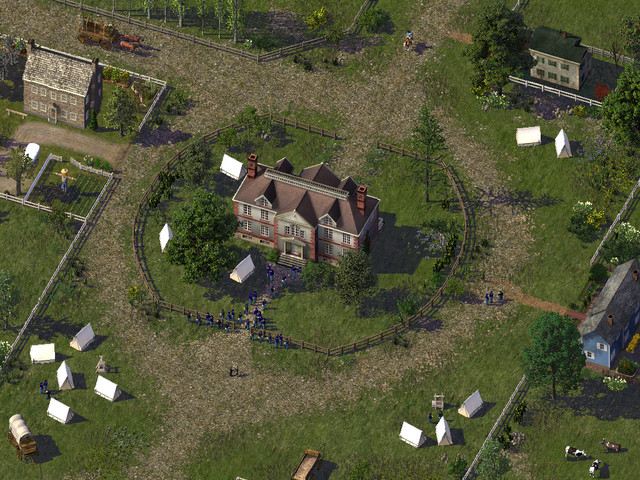
The Appomattox Court House was the location where General Lee signed the surrender of his Army of Northern Virginia during the American Civil War. I created this image ages ago for a CJ entry and I thought it would be a perfect fit for this competition (hopefully it can still be entered). I was inspired by this photograph while making this recreation, which was taken around the time of the surrender. Here are a couple other photos to give you an idea of what the real place looks like today: Photo 1 Photo 2 When I entered this through the submission page it deleted all my info, so hopefully it works the second time around. Thanks -
13 points@Ceafus 88 - Thanks for the nice comment! I'm hoping to release more of my mostly-finished work soon. --- Coming soon to a STEX near you! Doing the finishing touches on my submission for the Facelift Challenge. As per what was allowed, this one stretches the rules to some extent, as Willmott Widget Assembly was originally a Stage 3 I-M Outbuilding, so I made a new exemplar for a Stage 3 I-M Anchor. The lot size (6x5) is one of (the largest) WWA's default sizes. Fun fact with that, it's one of the largest growables in the game. I also tried something that I know CP did with some of his individual props a long time ago (shadows): I added in correctly-sized boxes to my scenes when BATting the props to represent the buildings. This way the fences, cars, and trucks all have cast shadows on them. Looks pretty neat I think! Only have two dependencies so far too: JES Props Vol 1 and the prop files from LRM (don't have to install the overrides if you don't want, I just used the tall light towers from the prop set). And yes, those are all custom trucks that say Willmott Widget Assembly on them.
-
13 pointsFinally working on pushing some of the models sitting on my HDD to the point of release. I started with the school buses, which are now on the STEX.
-
13 pointsHere's the last one of this set: 22 battery street: http://steamcommunity.com/sharedfiles/filedetails/?id=758274191 https://sketchfab.com/models/fa09548c50e943e5a7a002b8a07ef838 I purely made this to get some more filler for the 3x4 plot (no more 50 Candler buildings).
-
13 pointsDowntown by night.
-
13 points@airman15: Glad you like 'em! I'll definitely keep an eye out for slopes with some of the bigger lots. From what I can see stat-wise so far, none of the lots should have that nasty full-sized foundation. @rsc204, @nos.17, @Xander Dax, @Manuel-ito, @metarvo: Thanks a lot guys! I've made some considerable progress lotting-wise; been cranking out at least a couple a day (the small 2x2-2x3 ones usually take ~10 minutes). I've also gone ahead and broke down the different groups of R$$$ for easier tracking. For a quick reference, Maxis has 3 different low-density based categories of mansions and 2 different medium-density ones. First of the bunch is the 16x20 mansion category. These are the smallest footprint-wise in Maxis' mansion hierarchy. A couple of these I feel are still a bit "meh" but smaller lots do leave a little less room for imagination. I've also made some significant tweaks to the first 4x6 that I submitted for the lotting challenge, including swapping out the Maxis court (no shadows, and that pink was an eyesore!) and tossing in a pool and some more foliage. Yeah, I kind of regret making such an early challenge submission now... Next are the 20x20s, the "medium" sized mansions. One annoyance of working with this set was one of the Euro tileset mansions (the modern looking one on the 2x2 lot). For whatever reason, this model is placed backwards which makes it look a little awkward. Thankfully it's only a 1/16 chance here. I think the 4x6 on this one is my personal favorite of the bunch: just chock full of detail and I really like the grand entrance. Bonus grey and green tennis court! 24x14 is another set of medium sized mansions. Probably the easiest group to work with because most of the footprints are reasonable. The 3x3 is a little questionable at the moment but everything else seems OK so far. Totally went all out on symmetry for a couple of these as well. The two bigger sized ones - both of em feature FA-angled courts. The one on the left in particular has a dramatic sweeping diagonal driveway entrance. I've made considerable tweaks to the color palette of the tennis court textures. In addition to some suggestions provided by @rsc204, I spent some time a few days ago perusing Google maps and sampling some colors from courts found in affluent areas. Thus you might've noticed some subtle changes to the green and tan/red ones and a more dramatic change to the blue ones. Another huge shoutout to @rsc204 for the tennis net models! I think placing those on the lot in was definitely one of the most satisfying moments of this project. Here we have Maxis' medium density palazzos. Truth be told, some of these aren't much larger than the low density mansions... especially one of the "larger" ones which is essentially a recolored 16x20 Chi tileset mansion. Also why is that giant one a part of the same building family? It's way wider and shallower for some reason and make lotting around this family a nightmare. On the positive side, there's only 3 variants I need to really consider. Like with the standard mansions, I've also taken the liberty and created some brand new footprints and lots for the palazzos. In particular, I found the NY tileset version gave off a Spanish-revival/Mediterranean vibe so I gave it the American southwest treatment, with palm trees, cacti and a sandy base texture. For certain models I may try doing a specialization in the future. One last rear shot. Until next time!
-
12 points
Version 1.0.1
1,320 Downloads
In the largely low density population centers of the United States, how does one get their children to school if they can't drive them? Schools are often too far (or the cities are too unsafe) for the children to walk there, and public transit is hard to come by. The answer? The yellow limousine. Whoops, I meant the school bus. How do you know that you're on a school bus? You might see dirty windows that are impossibly difficult to slide open, and the floor might be strewn with lost homework. Used gum will likely cover the bottom of every seat. You might feel very hot during the summertime because there's no air conditioning... or if there is, the unit will leak on people who sit under it. You may also notice that every other vehicle on the road is passing you, including city buses and garbage trucks... but you'll only notice this if you can keep your thoughts straight while your brain is rattled by every bump in the road. Yes, school buses really are the dream. They're something you dread getting on in the morning, but once you're on you wish that the bus will never stop... because once it does, you know you're at school. --- OK, all comedy aside, this a simple prop pack that includes 20 HD models. It has 5 different bus designs rendered in 90 degree (ortho), 45 degree (diagonal), and both 22.5 degree (FA2) angles. Four of the buses are built off of a Navistar International truck chassis and the other one is a Ford E-Series bus with a handicap door. These are not automata. I do not know how to make automata, and these models have far, far too many tris to be directly converted into automata. In other words, please don't ask me if these are automata and please don't ask me to make them into automata. Thanks. I have already tested the models and did not encounter any problems, but if you find a bug or issue, please post it here or on my BAT thread. --- Please be advised: currently these props may not appear 100% right next to other car props made by other users. People who have made cars for SC4 over the years have adopted wildly different scales. Since my end-goal is to redefine the world of vehicle props for the game, I decided to use a near-realistic scale for my cars and trucks (probably somewhere between 100-110% scale). Because of this, they will appear small next to the shk cars and very small next to the VIP cars. The same problem plagues truck props made by different creators (or sometimes even the same creators... some people aren't consistent with their own scale!). They will look about right next to the Jim car props, but that set is rather limited (no angles). Eventually I'll release other sets of cars, trucks, and buses (and textures) so eventually there will be a unified scale that can be enjoyed using my props. -
12 points

From the album Realistic Recreation (S3-08-M)
Please view it in full resolution to see all the fine detail before you cast your vote! Realistic recreation of Pisa's Piazza dei Miracoli (Square of Miracles) - home of the world famous Leaning Tower of Pisa. Additional notes: Every last building and object was carefully analyzed to find the most suitable SC4 replacement. All of the textures were carefully created from scratch to match those of the actual plaza itself. -
12 points

From the album Realistic Recreation (S3-08-M)
40.000m2 (430.000ft2) square meters of urban space in the heart of european city? Yes! Welcome to Poland, welcome to Cracow! This realistic recreation is inspired by the biggest medieval market square in Europe. More about Main Square: https://en.wikipedia.org/wiki/Main_Square,_Kraków Before you'll vote I recomend to take a look on this picture for small comparison. How many landmarks are you able to recognize? -
12 pointsTalk about a complete one-eighty. When last we left Pretoria, I showed you the massive industrial monolith known as the Apotex Refinery. This time however we'll be looking exclusively at a natural landscape - the Rosco Valley. It's been a very long time since I made an entry where the main focus was nature. The last time mmp work was one of the main feature(s) of an update was back in The Ring of Steel(entry 21) and the last time it was the exclusive feature was for Gravenhurst Mosaics(entry 12). That was also the last time I made a large scale water mmp scene. Needless to say it's been far too long. Truth be told, I've been avoiding creating (mmp)river scenes. You may or may not have noticed, but there's been a distinct lack of them in my journal so far, aside from waterfront scenes with in-game water. For one I've always been more focused on creating urban, transportation and industrial scenes. But the other reason is that I simply didn't have the confidence to realistically pull off such scenes. The last time I created an mmp river was around 3 to 4 years ago and it looked a little something like this; I was actually kind of proud of myself for being able to create that scene, especially since I hadn't been on any of the SC4 sites for a while at the time. It was the most elaborate mmp scene I had created to that date. Heck I didn't even know the meaning of 'mmp' then. When I finally got around to being more active on this site and started my own CJ towards the end of 2014 I took a long look at what others had created and needless to say I was blown away. It was then I decided to simply stick to what I was good at. But like any true SC4 enthusiast one can't help but try out new things. I surprised myself a lot with what I've been able to create. Dresden(rebuilding it) was a revelation for me both with how much better I had gotten at city building and with the community response. I can't beleive I actually thought I couldn't improve my city building(urban areas) when I first started the CJ To be fair it had been a decade since I started playing the game by that point. I now believe the exact opposite, there is no such thing as reaching a 'peak' and there is always room for improvement no matter how good someone is. Following Dresden my focus was two-fold, I would further refine my specializations(transportation, industry) and I was going to tackle the things that I was avoiding both in-game i.e. river scenes, the airport(eventually) and 'out'-game i.e. plugin management, lot editing, realistic photoshoping. Whelps, I finally came around to creating that river scene and today I'll show you the results. To note there has been no photoshopping of any the images. That's not to say that there's anything wrong with photoshopping, in fact my second to last entry featured nothing but photoshopped images. Through the use of image editing, players can create incredibly realistic scenes indeed almost photo realistic and those who can do it well should certainly be commended for their accomplishments and abilities. But at the same time while the end result looks fantastic I can't help but feel like the creator is no longer playing SC4 but rather some other game entirely. This is not meant to be a criticism of those who photoshop but simply describes a feeling I sometimes get when looking at them. Anyhow for my first mmp river scene I wanted to show exactly what can be done using only what is available to everyone in the game itself. Also I've decided to take things one step further yet. In the process of trying to make the best scene possible I experimented with different terrain/rock mods. But what I ended up noticing most was that there was barely any difference at all. Once the 'mmp saturation' reaches a certain point, it practically doesn't matter what terrain mod(urban scenes are another matter) or rock mod you use. So I decided to go 'vanilla maxis' with this one, that is no terrain mods of any kind. Anyhow I think that's enough with the suspense and explanations, on with the show we go. The Rosco Valley is located in Providence National Park, near the geographical center of the mid sized city of Baycole. At the base of this valley is Scribosilyn river which you guess it, is named after a certain member of this site who's recent entries on creating river scenes motivated me to create my own river scenes and serves as a great resource and for those looking to make their own hand crafted rivers. Plus it's just a kick-ass name Here the Scribosilyn river emerges from the thick brush of Providence NP (i.e the edge of the map ) Mcbride trail is a nature trail that runs along the northern/eastern bank of the river in this area. The river bank quickly becomes more rocky as it enters into Rosco Valley. 5. 6. 7. 8. Here the Mcbride trail crosses over to the south bank of the Scribosilyn river over a small pedestrian suspension bridge. The bridge is a popular recreational spot for locals. Just east of the bridge is a series of rapids as the river slowly drops in elevation. A couple different angles for your viewing pleasure 13. 14. 15. The terrain is much steeper on the north side and large boulders occasion fall down towards the river which is why the trail continues on the south side. 17. 18. Next we move into a relatively calm area of the river. 20. 21. 22. 23. The river then starts to drop some more in elevation leading to another series of rapids. Large rocks have fallen into the river careening off this steep cliffs which rises over 650ft/200m above the valley floor. This is probably my favorite area of the river. 26. 27. 28. Mcbride trail more or less ends at Miller St. which leads to the residential areas of Baycole. 30. 31. This part of the river is a popular spot for fishing. Just don't fall into the river because just beyond this spot is Aizen fall's. The height of falls is 155ft/47m, nothing too spectacular but more than enough to be fatal to anyone unfortunate enough to go over the edge. A short stub trail leads to a lookout over-looking the falls and the area below. 35. Edit* Bonus terraformation pic added From here the river continues until it reaches Cisco Bay, that part of the city and plenty of other landscape scenes will be shown in the next entry. As always comments or suggestions are always appreciated, thanks for stopping by.
-
12 points
Version 2.0.0
3,633 Downloads
Time to give our SC4 coastlines some love! This MMP pack comprises of 17 different sea and coastline items. From fish to vegetation to rocks, etc. They will literally paint your terrain. For individual plops please click once. They will also complement my previous MMP release, SM2 Breakwater Concrete Blocks. Included are a couple of pics for reference. No dependencies. Enjoy! Simmer2 -
12 pointsLantern Bluffs has expanded pretty far along the highway and grown to a population of 162, 037. In case you're wondering why it's all so green all of a sudden, there was a lot of rain over the past month.
-
12 points

From the album Facelift (S3-10-C)
Before voting, we recommend you download and try out this item of content: [Download Here] A bigger and better version of the largest (ft2-wise) CS$$$ building in the game. Utilizes CP's seasonal trees, custom textures, and was designed to be easily compatible and expandable with KOSC's modular parking sets. With Lotplop, it can be found under CS$$$_60x62_1ChiFashionCentre_ (it is the last CS$$$ family fyi) -
12 pointsMy first flowering tree! Blooming Jacaranda. Now we can add more color to our foliage and decorative areas. I plan to update this with a decal of fallen petals soon. Steam Link http://steamcommunity.com/sharedfiles/filedetails/?id=759858371 I also made my first LUT in case you wonder about some of my brighter screenshots. I use it along with Ultimate Eyecandy by our friend @Judazz to add fog and Daylight Classic mods. Steam Link http://steamcommunity.com/sharedfiles/filedetails/?id=759857629
-
12 pointsHello , " ça fais longtemps " ^^ Some details on industrial zone in port ( work in progress )
-
12 pointsSlowly but surely... I think I'll take a break from the roads and continue the pillars. Progress - 6cell over-canal stack - 2lane on 2lane highway:





-
Home
-
Activity
-
Forums
-
ST Exchange
-
City Journals
-
Gallery
-
Omnibus
- Clubs
-
Restoration
-
SimTopical
- STEX Collections

Thank You for the Continued Support!
Simtropolis depends on donations to fund site maintenance costs.
Without your support, we just would not be in our 24th year online! You really help make this a great community. 
But we still need your support to stay online. If you're able to, please consider a donation to help us stay up and running. This helps sustain a platform where we can share our community creations for years to come.
Expand your city with the best from the Simtropolis Exchange.
Make a Donation and get one or all three discs today!

By way of a "Thank You" gift, we'd like to send you our STEX Collector's DVD. It's some of the best buildings, lots, maps and mods collected for you over the years. Check out the STEX Collections for more info.
Each donation helps keep Simtropolis online, open and free!
Thank you for reading and enjoy the site!