


Jump to content

Updated Asphalt Highway Textures  1.0

   (32 Reviews)

4 Screenshots

About This File

This package contains a variety of updates for Throvin’s Asphalt Highway Texture mod which helps to make it more compatible with the NAM and other downloads lurking in your plugins folder.

Since the mod’s release, various new pieces for the Maxis Highway (MHW) network have been added by the NAM team and do not contain an asphalt texture. They will remain concrete-based while the rest of the highway is asphalt-based.

An alternative is to use Mandelsoft’s Highway Restyling (HRS) mod, but some still like the grey look of Thorvin’s textures on our highway network.


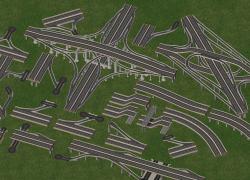
The screenshots displayed show compatibility with various components

-Screenshot 1: Pieces fully compatible and textured for the NAM

-Screenshot 2: Textured base Maxis highway network pieces

-Screenshot 3: Pieces fully compatible and but not properly textured for the NAM


Dependencies:

This mod has only one dependency file, and that is the Asphalt Highway Texture by Thorvin


Credits:

-Euro Highway Texture replacements by Thorvin

-Highway Signs remover by Mandelsoft

-On-Slope connection texture by OnlyPlace4

-Diagonal ramp pieces by Warrior

-Updated Asphalt Highway Textures by Samerton

-Packaging and documentation by Haljackey


If you have any questions regarding the mod, post below for support.


Enjoy!

-Haljackey

  • Like 2


User Feedback

Recommended Comments

Really nice work, although I have to admit the only reason I've never used the old Asphalt retexture mod is because the interchanges in pic three still have patches of the old concrete which really sticks out like a sore thumb in my cities. Would love to see an updated version of this mod that takes care of that problem.

Share this comment


Link to comment
Share on other sites
[quote name='drneske' timestamp='1343216124']
Really nice work, although I have to admit the only reason I've never used the old Asphalt retexture mod is because the interchanges in pic three still have patches of the old concrete which really sticks out like a sore thumb in my cities. Would love to see an updated version of this mod that takes care of that problem.
[/quote]

same here...
but ignoring this it's an outstanding piece of work

Share this comment


Link to comment
Share on other sites
[quote name='drneske' timestamp='1343216124']
Really nice work, although I have to admit the only reason I've never used the old Asphalt retexture mod is because the interchanges in pic three still have patches of the old concrete which really sticks out like a sore thumb in my cities. Would love to see an updated version of this mod that takes care of that problem.
[/quote]

This update patches nearly all of the NAM interchange pieces. Think of the ones that aren't fully textured as your city slacking off on repaving jobs :P

[quote name='ronaldo128344' timestamp='1343230839']
what kind of highways are those in pic 2 and 3
[/quote]

Those are the NAM interchange pieces for the Maxis Highway. Do you have the NAM installed? If you do they're found in various ramp menus. Press TAB until you find them.
  • Like 1

Share this comment


Link to comment
Share on other sites
I never got the original mod to work. The asphalt only shows up on on-ramps.

Will this mod fix that?

Share this comment


Link to comment
Share on other sites
[quote name='Joe_Quimby' timestamp='1343235900']
I never got the original mod to work. The asphalt only shows up on on-ramps.

Will this mod fix that?
[/quote]

It should. If not let me know and I'll see what the issue may be.

Share this comment


Link to comment
Share on other sites
[quote name='Haljackey' timestamp='1343238950']
Joe_Quimby, on , said:

I never got the original mod to work. The asphalt only shows up on on-ramps.

Will this mod fix that?

It should. If not let me know and I'll see what the issue may be.
[/quote]

Me too. I hope this fixes it.

Share this comment


Link to comment
Share on other sites
Good Job! just tried it out works fine for me, wish someone can remake those interchanges in pic 3. i could use those in a few of my cities.

Share this comment


Link to comment
Share on other sites
Its the same problem for me, it doesnt replace the ctexture of anyone of the intercahnges, and the NAM addons interchanges, the just stay like in pic 3

Share this comment


Link to comment
Share on other sites
Two possible solutions:
-If you have the Highway Restyling mod or another highway texture mod, remove them.
-Add a "z" to the front of the files in this package so they load after everything else. That will help override any possible conflicts.

Hope these suggestions help!

Share this comment


Link to comment
Share on other sites
[quote name='Haljackey' timestamp='1343797367']
Two possible solutions:
-If you have the Highway Restyling mod or another highway texture mod, remove them.
-Add a "z" to the front of the files in this package so they load after everything else. That will help override any possible conflicts.

Hope these suggestions help!
[/quote]
well the highways also doesnt change but im gonna see if this changes anything

Share this comment


Link to comment
Share on other sites
Great mod. I think it makes my highways look more realistic in a way, despite some areas not being textured, but I think it's okay.

Share this comment


Link to comment
Share on other sites

Those are the NAM interchange pieces for the Maxis Highway. Do you have the NAM installed? If you do they're found in various ramp menus. Press TAB until you find them.

Haljackey or someone, please help me for one question. I see on the screenshots of this mod some yummy ramps and smooth curves for Maxis highways - I wanna them both! :) I have already installed NAM 31.1, but there are no ramps and no curves... Only have two ramps (cloverleaf and one T-interchange - they are maxis original if I'm not mistaken) and "custom interchanges" menu, but it's empty!  And smooth curves... I found curves for anythig - for roads, rails, RHWs, avenus, monorail.. But no curves for maxis highways. Nowhere.

What am I doing wrong?

Share this comment


Link to comment
Share on other sites

issue has been resolved - NAM 31.2 re-enable custom interchanges and curves for MHW... I already afraid the future NAM 31.3 :)

Share this comment


Link to comment
Share on other sites

Sign In or register to comment...

To comment in reply, you must be a community member

Sign In  

Already have an account? Sign in here.

Sign In Now

Create an Account  

Sign up to join our friendly community. It's easy!  

Register a New Account

×

Thank You for the Continued Support!

Simtropolis depends on donations to fund site maintenance costs.
Without your support, we just would not be in our 24th year online!  You really help make this a great community. *:thumb:

But we still need your support to stay online. If you're able to, please consider a donation to help us stay up and running. This helps sustain a platform where we can share our community creations for years to come.

Make a Donation, Get a Gift!

Expand your city with the best from the Simtropolis Exchange.
Make a Donation and get one or all three discs today!

STEX Collections

By way of a "Thank You" gift, we'd like to send you our STEX Collector's DVD. It's some of the best buildings, lots, maps and mods collected for you over the years. Check out the STEX Collections for more info.

Each donation helps keep Simtropolis online, open and free!

Thank you for reading and enjoy the site!

More About STEX Collections


