Supported

About This File

A SimForum BAT Team (SFBT) production.
Platform-BAT created by Kenworth (SFBT).
Bus stop shelter and sign created by Khiyana (SFBT).
Adaption and NAM-consistent Modding by Chrisim (SFBT).
There are not many new publication by the SimForum BAT Team. Thanks to the team for long-term support and especially to Andreas for his good observations, suggestions and testing.
Happy to publish for Christmas 2025:
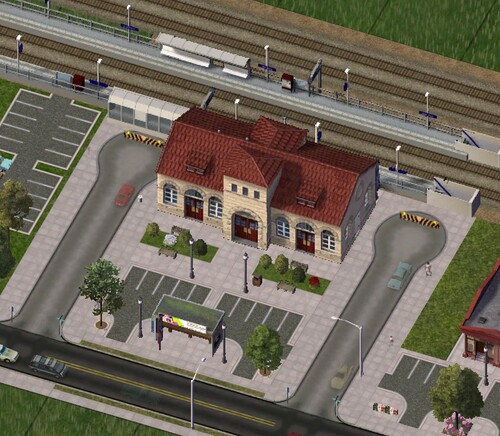
SFBT Rail Station Emeryville: Maxis passenger station with SFBT platforms and bus stop
Maxis delivered the normal passenger rail station for SimCity 4 without platforms. This has the great advantage that it can be used very flexibly. It works on orthogonal and diagonal tracks, and also on hilly terrain.
In the real world, all rail stations have some kind of platform. Since my first day of playing SimCity 4, I wanted platforms for the Maxis station building with the distinctive red roof. A few years ago, Kenworth had created several German-style platforms for the SFBT Commuter Stations. Why can't we combine these platforms with the Maxis station? We can, but it wasn't trivial.
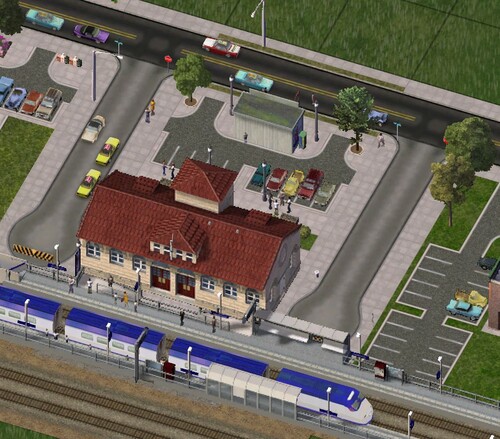
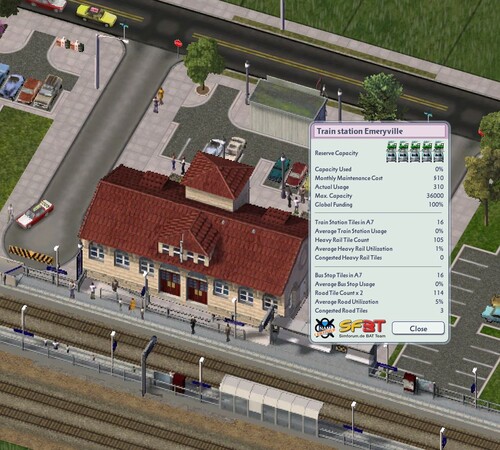
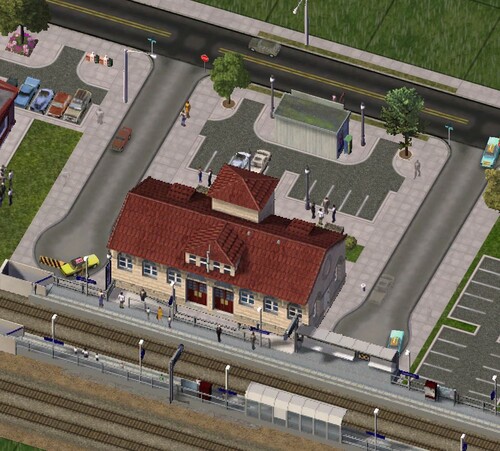
Here is the SFBT rail station Emeryville with the Maxis station building, two platforms from Kenworth (SFBT, slightly modified) and the SFBT bus stop from Khiyana. Maxis was headquartered in Emeryville, California, a city on the east coast of the San Francisco Bay between Oakland and Berkeley.
The actual Lot was extended to 2x4 tiles to make room for a double track with platforms. The latter are implemented as overhanging props, so that the platforms are 7 tiles long. One overhanging tile in one direction, four in the other. This asymmetry is necessary so that the staircase from the door of the Maxis station building to the platform is visually correct.
Lot Details and Information
This Emeryville station is an additional rail station and does not replace the original Maxis passenger station in the game.
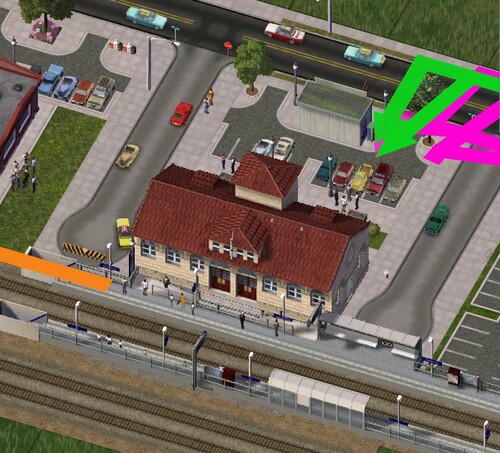
The overhanging platforms require an orthogonally straight track of the railway, at least 1 space to the left and four spaces to the right.
Plopping the station on hilly or mountainous terrain is not recommended, as it is likely to cause unsightly display errors along the platforms.
When the original Maxis station is plopped on one side of a rail line, Sims need an additional external transition to cross it. However, for the Emeryville station, there is an underpass included under the railway line. Sims (also bus and car traffic) can reach the station from both sides of the railway line.
The tile marked in the fourth picture (with the community garden and the red exclamation mark) is partially overhung by an platform shelter. If a lot grows or is plopped on this tile, unsightly interference can occur. It is recommended not to build on this tile.
Since the overhanging platforms are implemented as props, there is no risk of Immortal Lot Syndrome, which can occur with overhanging buildings. The platform props were originally built by Kenworth for the SFBT Commuter Stations. They were modified by Chrisim in such a way that they overhang the actual lot with the Maxis station building. The prop families of the bus stop shelter and sign are from the SFBT Bus Stop created by Khiyana.
Installation
Extract all files (excluding this readme file and the images) to "\My Documents\SimCity 4\Plugins\SFBT".
The optional file "Optional RealRailway StraightTexture LotSupport.dat" is usually not required. If you still see grey (Maxis) track textures in the area of the station when using a current NAM with brown RRW track textures, this file would be needed and should then be copied to the subfolder "SFBT Rail Station Emeryville".
The file SFBT_Bushaltestellen_Props.dat from Khiyana's SFBT Bus Stop is included, because it is presently not available as download.
To ensure the proper functionality, make sure the files mentioned above are installed in the plugins folder. In addition, you need the following files:
This station is suitable for all SimCity 4 cities, whether developed with the original railroad (grey textures) or the Real RailWay (RRW with brown textures) from the current Network Addon Mod (NAM), see the remark above in section "Installation". A current NAM is useful for a complete display in the user interface window, but not absolutely necessary.
- now in German - nun auf Deutsch -
SFBT Bahnhof Emeryville: Maxis Passagier-Bahnhof mit SFBT Bahnsteigen und Bushaltestelle
Anders als den großen Bahnhof lieferte Maxis den normalen Passagierbahnhof für SimCity 4 ohne Bahnsteige aus. Dies hat den großen Vorteil, dass er sehr flexibel einsetzbar ist. Er funktioniert problemlos an orthogonalen und diagonalen Strecken, und auch auf hügeligem Gelände.
Aber eigentlich haben alle Bahnhöfe Bahnsteige. Seit meinem ersten Tag mit SimCity 4 wollte ich Bahnsteige für das Maxis Bahnhofsgebäude mit dem markanten roten Dach. Vor einigen Jahren hatte Kenworth für die SFBT S-Bahnhöfe mehrere Bahnsteige im deutschen Stil erschaffen. Warum kann man nicht diese Bahnsteige mit dem Maxis - Bahnhof kombinieren? Man kann, allerdings war es nicht trivial.
Hier nun der SFBT Bahnhof Emeryville mit dem Maxis- Bahnhofsgebäude, zwei Bahnsteigen von Kenworth (SFBT, leicht modifiziert) und der SFBT Bushaltestelle von Khiyana. Maxis hatte das Hauptquartier in Emeryville (Kalifornien), einer Stadt an der Ostküste der Bucht von San Francisco zwischen Oakland und Berkeley.
Das eigentliche Lot wurde auf 2x4 Felder erweitert, um Platz für ein Doppelgleis mit beidseitigen Bahnsteigen zu geben. Letztere sind als überhängende Props implementiert, so dass die Bahnsteige sieben Felder lang sind. Ein überhängendes Feld in eine Richtung, vier in die andere. Diese Asymmetrie ist notwendig, damit der Aufgang von der Tür des Maxis-Bahnhofsgebäude zum Bahnsteig visuell passend ist.
Lot-Details und Informationen
Der originale Maxis Passagierbahnhof wird nicht durch diesen Bahnhof ersetzt. Der SFBT Bahnhof Emeryville ist ein zusätzlicher Bahnhof im Spiel.
Die überhängenden Bahnsteige erfordern eine orthogonal gerade Streckenführung der Eisenbahn, mindestens 1 Feld nach links und vier Felder nach rechts.
Das Setzen des Bahnhofs auf hügeligem oder bergigem Gelände wird nicht empfohlen, da es wahrscheinlich zu unschönen Darstellungsfehlern entlang der Bahnsteige kommen wird.
Den originalen Maxis-Bahnhof setzt man auf eine Seite einer Bahnlinie. Damit Sims von der anderen Seite der Bahnlinie den Bahnhof erreichen können, bedarf es dort eines zusätzlichen, externen Übergangs. Bei diesem SFBT Bahnhof Emeryville dagegen gibt es eine Unterführung unter der Bahnstrecke hindurch. Sims (und auch Bus- und Autoverkehr) erreichen den Bahnhof von beiden Seiten der Bahnstrecke.
Das im vierten Bild mit dem Gemeindegarten und dem roten Ausrufezeichen markierte Feld wird partiell von dem Bahnsteigunterstand überhangen. Falls auf diesem Feld ein Lot wächst oder gesetzt wird, kann es zu unschöner Interferenz kommen. Es ist empfohlen, dieses Feld einfach freizulassen.
Da die überhängenden Bahnsteige als Props implementiert sind, gibt es kein Risiko für das Immortal Lot Syndrom, dass bei überhängendem Buildings auftreten kann. Die Bahnsteig-Props waren ursprünglich von Kenworth für die SFBT S-Bahnhöfe erstellt wurden. Sie wurden von Chrisim so verändert, dass sie passend überhängen vom eigentlichen Lot mit dem Maxis Bahnhofsgebäude. Die Prop-Familien der Bushaltestelle und des Haltstellenschilds auf dem Vorplatz stammen aus den SFBT Bushaltestellen von Khiyana.
Installation
Zur Installation muss der Ornder "SFBT Rail Station Emeryville" vollständig in den Plugin\SFBT-Ordner von SimCity 4 kopiert werden, also nach "...\Dokumente\SimCity 4\Plugins\SFBT".
Die optionale Datei "Optional RealRailway StraightTexture LotSupport.dat" wird normalerweise nicht benötigt. Falls bei Verwendung eines aktuellen NAM mit braunen RRW-Gleistexturen trotzdem graue (Maxis-) Gleistexturen im Spiel im Bereich des Bahnhofs angezeigt werden sollten, würde diese Datei benötigt und sollte dann in den Unterordner "SFBT Rail Station Emeryville" kopiert werden.
Die Datei SFBT_Bushaltestellen_Props.dat aus Khiyana's SFBT Bushaltestellen ist enthalten, denn sie sind derzeit nicht als Download erhältlich.
Damit dieser Lot korrekt funktioniert, müssen die weiter oben aufgeführten Dateien im Plugin-Ordner vorhanden sein. Weiterhin werden folgende Dateien benötigt:
Dieser Bahnhof eignet sich für alle SimCity 4 Städte, ob entwickelt mit der originalen Eisenbahn (graue Texturen) oder dem Real RailWay (RRW mit braunen Texturen) aus dem aktuellen Network Addon Mod (NAM) (siehe auch der Hinweis in der vorherigen Sektion "Installation"). Ein aktueller NAM ist sinnvoll für eine vollständige Anzeige des User Interface Fenster, aber nicht zwingend notwendig
Ein Dankeschön an das SFBT für die langjährige Unterstützung und speziell an Andreas für gute Beobachtungen, Vorschläge und sein sorgfältiges Testen.
What's New 1.0.0 View Changelog
Released
File restored 6/27/2026
-
 9
9
-
 3
3