

Jump to content

MGB - Sidewalk NAM (SWN) for Paeng's Sandstone Pavements  v1.46

   (10 Reviews)

rsc204

IMPORTANT NOTICE:

Existing users of previous SWN versions, should completely remove any existing SWN files BEFORE installing new updates.

To do this, find the P – SWN folder (by default inside Plugins\z____MGB Mods) and delete it.

Message added by rsc204

6 Screenshots

About This File

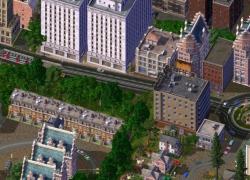
This Mod contains a complete sidewalk override for the NAM, to ensure your transport networks blend in better with Custom Sidewalks.

Paeng's Sandstone Pavements (PSS) Version.

Installation

This mod is packaged as a Windows .exe installer. For those that would prefer not/are unable to use an Installer, the NSIS installer files can be opened with 7zip or a similar application. If you wish to do this, you will have to manually setup the folder/file structure with the correct individual files within the archive.

Please refer to the installed documentation for further details, note these files are installed here:

My Documents\SimCity 4\LEX_Downloads\MGB Mods

This is to avoid cluttering up your Plugins folders with non-SC4 files.

De-Coupling Rail Crossing Textures

When installing SWN, you can de-select the Rail Crossing Textures. This option exists, so users with other mods for those features, will not have issues when installing SWN, even if SWN loads after them.

  • The Rail Crossing Textures should be de-selected if you are using the RRW Reskin mod.

Note: No SWN support is included for such optional custom textures, you need to get SWN compatible versions from elsewhere, or those networks will remain as their defaults. This feature simply allows you to prevent SWN from conflicting with such customisations.

Dependencies / Compatibility

There are no dependencies for this mod. The base mod is suitable for use with the vanilla game, but I highly recommend using it with the latest version of the Network Addon Mod. Of course, it goes without saying, it would also look weird if you were not using the supported Sidewalk mod.

Highly Recommended:

This mod is designed for either the US or EU Cosmetic ReTexture mod in the NAM. Both RHD and LHD textures are supported. Additionally you can select from three rail types, Maxis, PEG 205 or RRW (Real Railway).

SWN was designed from the ground up to be used with either my TGN or NGN mods. It also contains support for Rivit's Urban TSR mod.

Help make this mod better

Found a missing or unsupported texture? Having problems or got comments? Then why not visit my thread at either SC4D (MGB's Mods and other stuff) or Simtropolis (MGB's Lot and Mod Shack)?

I would like to say a big thank you to the following people

  • Rivit, for the huge support and tools that made this mod possible in the first place.
  • A big thank you to David G. Varona for making the Alpha textures for the Turbo Roundabouts and GLR, plus for showing me how to use photo-editing tools. Without your help, I would never have started down this road.

What's New v1.46   View Changelog


Released

NAM 46 updates including:

  • RHW FLEX DRI/SPUI
  • RHW QuickChange and Elevated FTLs
  • Yellow SHK Texture Option
  • New option for Network style under Elevated Roads/Rail
  • Like 7
  • Yes 1
  • Thanks 2


User Feedback

Recommended Comments

Thank you very much! I can finally get rid of the last concrete sidewalk textures!

Share this comment


Link to comment
Share on other sites

Hey, I got little problem. I installed it but it overrode Riiga's TuLEP by putting in standard Euro TuLEP. Is there any way to fix it?

Share this comment


Link to comment
Share on other sites

@ WolfGuy100 - There are many different TULEP options within the NAM installer, these are just for the standard Euro versions so it's not an error per-se. I will probably include the Dexter UK versions at some point in a future update but outside of that I have no plans to do this for other sets at this time.

  • Like 1

Share this comment


Link to comment
Share on other sites

Hi

What have used to make the GLR track sandstone as well? I hate the white concrete when everything else in my city is sandstone. Just did a search, is it the light asphalt mod? This is a needed addition to the sandstone mix as well. Good work.. 

Share this comment


Link to comment
Share on other sites

@rsc204 alright, just take your time, looking forward to it. Hopefully to see you make it for Riiga's TuLEP option.

Share this comment


Link to comment
Share on other sites

What have used to make the GLR track sandstone as well? I hate the white concrete when everything else in my city is sandstone. Just did a search, is it the light asphalt mod? This is a needed addition to the sandstone mix as well. Good work.. 

Yup, this is the Super Light Asphalt mod by Magneto, I just grabbed the GLR files from that and ditched the rest, takes a bit of playing with to get it right.

Otherwise look at my Tutorial, here on SimPeg - there are two other GLR mods, one as part of the Japanese NAM Facelift Mod which is SMP Sandstone that fits quite well. The other by AtmoGuy uses Paeng's Sandstone, but keeps the white concrete in the centre. I switched to the Super Light Asphalt one because it covers pretty much every piece including stations and diagonals so it's vastly more uniform than other mods I've tried. The Asphalt stands out, but not anything like as bad as the white textures.

I plan to get to the Tram Stuff next, but I can only work so long at a time with images so it may be a while before any release.
New Version Released 19/08/14, GLR textures are now fully supported.

Share this comment


Link to comment
Share on other sites

Hi, 

Where can i find a tutorial which tell me how to set the load priority. 

Shortly: "make sure that the Sandstone Euro NAM loads after the Japanese Facelift Mod." How does it work?

Share this comment


Link to comment
Share on other sites

The load order is done in alphabetical order, but I don't have a link to hand and it gets slightly more complex than it's worth going into here. The easiest solution would be to have three folders in the root of your plugins folder like so:

  "z___NAM"                                (No rename/change required)

  "z____Nam FaceLift"                 (4 Underscores)

  "z_____Sandstone Euro Nam"  (5 Underscores)

The underscore works counter-intuitively, but if you rename the Nam Face-lift Mod and the folder for my mod in this way, the loading order will be as shown above, although Windows will show them the other way round.

Share this comment


Link to comment
Share on other sites

Hi, this is a great looking mod, but I'm having trouble getting it to work.  I reinstalled the NAM to use the Euro road textures, but I also selected some other options, and I wonder if any of those conflict.  Perhaps you can share your NAM custom installation configuration for us novices.  I grabbed the needed file from the super light asphalt file and stuck it in the z_____Sandstone Euro Nam folder.  My other folders are named exactly as above.  I am using Paeng's pedmall parks mod, which also uses the Japanese FaceLift Mod, and I wonder if that's the culprit.  Any ideas?  Do you know of any other mods that conflict with this one?

Share this comment


Link to comment
Share on other sites

Sorry for the delay in responding, I have been on holiday in September and just got home, but have a load of real-life stuff to deal with right now. This is a bit too complex to write out an answer here, therefore I would ask if you continue to have problems to post on my Lot and Mod Shack page (link in download description). You will probably have a load order issue if it's not working since compatibility issues shouldn't arsie if everything loads correctly (see my previous comment here for instuctions) - I'll try to include a listing of the NAM install that would be most preferable to use with this mod at some point, but it should be pretty obvious and of course many people don't use everything so I've tried to keep the mod as modular as possible to avoid a larger install than necessary.

Share this comment


Link to comment
Share on other sites

Looking forward to when you get them last pesky parts done. I have been keeping my eye on your SCD thread :3.

Share this comment


Link to comment
Share on other sites
On ‎14‎/‎06‎/‎2016 at 9:59 PM, Talla 2XLC said:

Could you maybe make a Patch for the American Style Textures?

Already taken care of. The new version of this mod, which will be called SWN (SideWalk NAM), will fully support US textures. In fact it will support more than one sidewalk option too. Right now there is still a bit of work to be done, but for the most part the textures are finished. If you'd like a preview version, chuck me a PM and I'll happily pass one along.

  • Like 2

Share this comment


Link to comment
Share on other sites

FAR isn't covered directly, no. If you are using the draggable FAR (roads only currently) from the NAM, you don't need any mod to show your sidewalks on them. If you aren't familiar, I've a YouTube tutorial that shows you how to use them.

For the legacy puzzle pieces, which also includes OWR and Ave in addition to WRCs, you should install the Japanese NAM Facelift Mod:

Since this mod works with all sidewalks, I have no plans to replicate it's functionality.

Share this comment


Link to comment
Share on other sites

I've been holding my breath since you first announced the SWN. I even switched from the SLA to the PSS just to try this pre-release. I'm very much impressed and grateful for this and all your exceptional works!

Share this comment


Link to comment
Share on other sites

Can I leave the files of the Super Light Asphalt Mod or do I have to just leave the "TIR-s3d fix.dat" to work properly?

Share this comment


Link to comment
Share on other sites
On 18/02/2018 at 7:41 AM, Wiotbilu said:

Can I leave the files of the Super Light Asphalt Mod or do I have to just leave the "TIR-s3d fix.dat" to work properly?

In short you only need that one file, in fact installing any other files from that package would just cause problems.

However, I'd recommend you download instead the Preview Edition of SWN, which is linked here, that no longer requires this dependency and is ultimately a more complete mod.

Share this comment


Link to comment
Share on other sites
On 28/03/2020 at 8:59 AM, owenensims said:

It doesn't work! I don't know where or what I did wrong. Help?

Sorry I've only just seen your comment. Whilst I try to answer all questions, this isn't really the right place for support, a link is in the download description to my support thread where I would be happy to assist with any problems.

Share this comment


Link to comment
Share on other sites

Sign In or register to comment...

To comment in reply, you must be a community member

Sign In  

Already have an account? Sign in here.

Sign In Now

Create an Account  

Sign up to join our friendly community. It's easy!  

Register a New Account

×

Thank You for the Continued Support!

Simtropolis depends on donations to fund site maintenance costs.
Without your support, we just would not be in our 24th year online!  You really help make this a great community. *:thumb:

But we still need your support to stay online. If you're able to, please consider a donation to help us stay up and running. This helps sustain a platform where we can share our community creations for years to come.

Make a Donation, Get a Gift!

Expand your city with the best from the Simtropolis Exchange.
Make a Donation and get one or all three discs today!

STEX Collections

By way of a "Thank You" gift, we'd like to send you our STEX Collector's DVD. It's some of the best buildings, lots, maps and mods collected for you over the years. Check out the STEX Collections for more info.

Each donation helps keep Simtropolis online, open and free!

Thank you for reading and enjoy the site!

More About STEX Collections



