


Leaderboard



Popular Content
Showing most liked content on 04/19/2013 in all areas
-
11 pointsUpdate, again ? Well actually some of you might already know this one, for some reasons I forgot to upload it here... But I have a mosaic to go with the other 20 pictures ! So here is a second update for Beacon Hill. After the Canadian MMPs, back with some growing action ! I'm working on the next entry which is almost ready, so stay tuned ! All I can tell you is that I just discovered a new amazing prop pack ! And again, thanks a lot for the comments ! 1 2 3 4 5 6 7 8 9 10 11 12 13 14 15 16 17 18 19 20 21
-
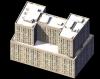
7 pointsHi all. Thanks for the BoA, but I've a problem with it, I can't open the building and his backup I hope it's only an memory problem... I present you an other project, this small tower: Do you known this building ?
-
6 pointsNAM 31.1 is a full package, which improves upon the initial "open beta" that was NAM 31. It fixes about 100 issues that had been reported since the NAM 31 release in March 2013, improving overall stability and performance. Crash-to-desktop (CTD) on save and related performance issues from NAM 31 are largely solved: A number of users, particularly those with newer Intel Core Sandy Bridge and Ivy Bridge CPUs (e.g. i7, etc.) had experienced issues with the game crashing to desktop (CTDing) when trying to save, with NAM 31 in their plugins. This was tied to the much larger NAM Controller build that was contained in NAM 31, which also caused the game to use considerably more memory. The increase in size was largely due an attempt to "ultra-stabilize" some NAM override networks, including some RealHighway widths/heights and the Street Addon Mod variants (SAM ultra-stability had been in place in NAM 30). The code on these override networks has been whittled down for this release, eliminating stability for situations that users were much less likely to build. In order to address a wide variety of scenarios, the NAM Team is now providing two different controller packages--the smaller "standard" (or "s-series") package, and the larger "extreme" (or "e-series"). The difference between the s-series and e-series is that the s-series disables SAM ultra-stability, and the higher elevated RealHighway networks (Level 3/22.5m and Level 4/30m). The s-series is installed by default. Users who desire the larger e-series controller can select the option from the installer, using the Custom Installation option. It is recommended that if you are using the e-series controller on one of the crash-prone processors, such as a Sandy Bridge Core i7, and especially if you have a large plugins folder (at least 3GB), that you should patch your SimCity 4.exe file to be Large Address Aware. A suitable Large Access Aware patch can be found here. You should have more than 4GB of RAM if using Large Access Aware modde. Road Turning Lanes: As with NAM 31, the Road Turning Lanes are no longer automatically generated when a Road x Road intersection is built. The auto-build functionality was causing considerable complications with the functionality of the Network Widening Mod and new Draggable Fractional Angle Roads, and as the NWM and Draggable FAR have a greater impact on game functionality (adding capacity and new build angles, as opposed to mere eyecandy), the Road Turning Lanes Plugin has been redesigned to function in an "optional" manner, which doesn't interfere with other features and allows the user more freedom in turn lane placement, without resorting to Turn Lane Extension Pieces (TuLEPs). To add turn lanes to a Road x Road intersection, simply click the intersection with the Rail tool. As with all previous releases, the Road Turning Lanes only apply to Road x Road intersections. If you desire turning lanes on Road x Avenue intersections, you will need to use Turn Lane Extension Pieces (TuLEPs). New Street network functionality: Some new draggable wide-radius curves, and intersections along wide-radius curves, are now possible with the Street network. Credit for this new feature goes to Swordmaster from the NAM Team. Transit stations: After the first release of transit stations in NAM 31, a number of bug reports were received about these stations. As a result, all of the stations included with the NAM have gone through extensive retesting, and have been modified when necessary. Many of the modifications fix major bugs, while some of them simply improve the performance of the station. For PC users, any stations plopped in your cities from NAM 31 will automatically be upgraded when you install NAM 31.1.For Mac users, the replacement set of basic Maxis stations had to be modified, along with the Modern El Train Station by Brenda Xne. These fixes were necessary due to a bug in the Mac version of SC4. If you're a Mac user and you plopped any of these stations from the NAM using version 31, you will have to bulldoze them and replop them once you have installed NAM 31.1.NAM 31.1 also includes a number of new stations, which have gone through the same extensive testing as the stations listed above. Most of the new stations are optional, meaning that they are not automatically installed with the Complete Standard Installation; instead, you must select the Custom Installation and select these new stations on the Components page. RealHighway Filler Pieces: The RHW Fillers have been, at long last, restored and expanded for NAM 31.1. They were previously in such a broken state, that they had been disabled for NAM 31. Mac users: The separate NAM for Mac OS package has been discontinued as of NAM 31. It is recommended that you access a Windows machine or Windows installation (or use WINE), run the installer, and transfer the two installation directories (Plugins\Network Addon Mod and Plugins\z___NAM) to your Mac system. Alternatively, use Keka (http://www.kekaosx.com) to open the executable like a .zip file. If you are planning on using cosmetic additions, like the Euro Textures or the Maxis Highway Override (AKA "Project Symphony"), they are contained in the "$[65]" folder, which you should rename to "z____NAM" upon extraction. Please also note that the NAM--and most other Plugins--have compatibility issues with OS 10.7 (Lion) and later, due to the removal of Rosetta and the requirement to use the Aspyr Universal Binary patch to play SimCity 4 Deluxe in those OSes, which make the game prone to crashing. Installing over previous versions: NAM 31.1 may be installed directly over top of any previous NAM releases. It is a full release, not a patch or a hotfix. All future updates are planned to be in full package form, and there are no plans to issue patches or hotfixes in the future. Please also note that the NAM Team only provides technical support for the most recent version, which, as of this document, is NAM 31.1. We cannot assist users of the original NAM 31 release, or NAM 30 (or earlier). Special Thanks: The NAM Team would like to thank the following members of the community, who have tested the penultimate build of the NAM 31.1 controller and given their feedback on its stability, and/or assisted with other controller-related tests after the NAM 31 release, in an effort to nail down the game stability issues: A Nonny Moose, dyoungyn, Joe 90, mgarcia, mneonnew, shanghai kid, spot, and txrailcat74. Also, special thanks are in order to Haljackey and the Dirktator, for their efforts on getting this file onto the STEX. The file is also mirrored at SimCity 4 Devotion's LEX and ModDB.
-
5 pointsReplies: dubaidude303: Thanks! ggamgus: Thanks, I'm glad to know people enjoy the written details! City Builder 9111: Thanks! I love Lot Editor Forthwall: Thanks! k50: Thanks! That means a lot for me, especially coming for you. Schulmanator: Thanks, glad you enjoyed it. 111222333444: Lol thanks. We will probably be coming back to Smith City later on to show more of the city. kamran azam: I had to modify it to make it the way it was. ImanRafidin: Thanks! jack3oh3: I know right. city89: No. Guys, I understand I may have mods that you may want. But does that mean you need to be rude and only make a comment to ask for the link to them? The vibe I get from those asking for links is: "I only came here because I use your pictures as a Content Catalog.". If you can't enjoy my updates for the content, don't expect me to give you a link. Back to the update, Welcome to Anthony! Anthony is located on the coast of Cartier. Cartier was added as a Shayden state in 1887 as the 30th State. Anthony has a total population of around 900,000 people, which makes it the 16th largest city in the nation. (Updated 4/20/13, was previously 170,000) It continues to grow to this day. This fine city even has its own fine baseball team. The Anthony Armory has made it to 3 Shayden Series in the past 20 years, and won one of them in 2005. Anthony was close to the gold and silver mines during the Cartier Gold Rush, causing much of the wealth from Gold-Mining to be used to build up this city. Climate Change on Adonia has been a major scare in Shayden, especially in Cartier. The entire nation is working on cutting pollution to reach its Federal Mandate. This is the slum of the city. While poverty is lowering in the city, it is still an issue that needs to be confronted. Thanks for reading! Sorry for the short update, but I am dealing with real life stress and stuff I wish would just go away. Oh well, see you guys later.
-
4 pointsForgot to show this one: Enjoy!
-
3 pointsScrew the game, SimCity has become a cynically brilliant advertising platform So the good news is that Cheetah Speed has returned to SimCity, and some new content in the form of the “Attractions Set” has been released. Who doesn't love new buildings to add into their cities? So this is something that's free right? Or will we have to pay? Son of a $%&^!. So there's no way to buy the content, and it certainly isn't free. It's just a way to get people who like SimCity to buy toothpaste. This isn't a cosmetic addition to the game, as these additions - and I think a giant ball of twine is seriously an awesome addition - will give you an advantage during play. “The Attractions Set adds happiness to low wealth Sims,” the official post stated. “They will also bring in all three wealth classes of tourists into your city.” This is why I have such a deep loathing for EA at the moment. It's not that you get neat stuff for buying a certain brand of toothpaste, it's that the game seems designed around these sponsorship deals and monetization strategies. It doesn't feel like EA and Maxis sat down and tried to create the very best version of SimCity possible, it feels like they designed the game that would be the easiest to control, monetize, and sell to advertisers. Source: http://penny-arcade.com/report/article/simcity-as-advertising-platform-how-ea-rewards-you-for-buying-real-world-pr
-
3 pointsGuess what guys NYBT 201 E. 19 Street is on the STEX!!!!! NYBT 201 E. 19 Street, by Aaron Graham Credits Aaron Graham- Building Creator/ Modder Darknon35- Growth Tester Vlasky- Growth Tester Noahclem- Shop Logo Suzaku- Shop Namer Jack_wilds- Shop Namer Aaron Graham- Shop Namer Here’s the 201 E. 19 Street, located in Gramercy neighborhood in Manhattan. These apartments are Wall to Wall (W2W) buildings. This 16 story brick apartment building set is a New York City style. The architecture style for this building is a modernism style completed in 1960, by architect Feldman, H.I. There are four bats/ Building models, each one have a different brick color. Each model has four lot types R$$, R$$$, CS$$, and CS$$. 201 E. 19 Street should be a comfy place for your Sim to live in. Enjoy the upload!! Here's the link to the architect's floor plan of 201 E. 19 Street. http://nyre.cul.columbia.edu/projects/view/16467 Please Download Maxis Nite or Dark nite, if you download both please install the nite verion you use for your cities at night. If you install both and using the default path settings that's appled in the installer the installed model file will replace the model file that's in the plugins folder. Dependencies SimFox Day n Nite Modd (For Dark Nite Version only) BSC - VIP Girafe Maples V2 MAC Users: File Juicer should enable you to use this installer package. (For Mac Users only) If anything is wrong with the links in this description or problems with the files please go to my to the last page and post your problem, or you can PM (Private Message) Me.
-
2 pointsApril 20th, 2002 As construction for homes and businesses continue, Civic services are also in demand. No formal vocational school has been founded in Rumination yet, so police, firefighting, and medical personnel are either certified in Japan or Russia, or are veterans. This is an example of the growth of civics in Rumination. Hospital-01 is the first major medical center in Rumination. Doctors here have an expansive database of medical knowledge from Japanese and Russian literature. As well as having a trauma center, Hospital-01 has a Psychology department that is heavily funded, as all settlers are required to see a Psychiatrist to log the information required by the study. Among these personnel is a young doctor who is excited to start her career in a new land... Dr. Kallista Prokofiev, a recent graduate of Moscow State University, moved to Rumination to start a Psychology practice. Her office is one of many in Hospital-01. Her quick graduation to doctor is partially based upon her family having high power in her hometown of Samara. Rumination has a hilly landscape that can be difficult to build upon, however, it's soil composition is perfect for building. People are now allowed to bring their old vehicles to Rumination. This decision is not permanent, as there are plans to make Rumination the first territory to use hybrid transportation only. Things are going very well for the citizens of Rumination. Soon, though, this prosperity will be tested...
-
2 pointsWay to go, Boston PD. Maybe now justice will be served.
-
2 points
-
2 pointsPics or it didn't happen.
-
2 pointsOf course I know it! It's that sexy little BAT from I-don't-care-where that will be heading straight for my plugins folder, that's what it is. I don't need to know more. Seriously, the roof and the wall textures are STEXy as heck, and it looks to me like the top of the triangular base will get a gardening treatment, eh? I also like the size of the building, it either makes for a good downtown filler or for a central element in the CBD of a smaller city.
-
2 points
-
2 points
-
2 points
-
2 points
-
2 pointsOh, and although this is slightly off topic, I must confess that I'd prefer a more down-to-earth, less alarming thread title based on the immediate facts and not on speculation and fears. You see, people will read the title and may react like "OMG; a virus on the STEX, are we all in danger?" - when all that happened is that you had a wrong browser setting and nobody (including you) has ever been in any danger. This may cause unnecessary confusion, rumours and uncertainty. IMO it's better to stick to the actual, immediate problem that you know for sure - in this case e.g.: "My new computer blocks downloads from the STEX" or something like that. This would have described your problem perfectly, and without any potential for uncertainty. If you wonder if there might be a virus involved, you can of course still ask in your post, but for a thread title I'd always prefer a problem description over wild speculations that may make other users feel insecure. Even for explicit virus warnings from some antivirus software, I'd advise to write something like "My [sOFTWARE] gives a virus warning on file XYZ - what's up?" (which is what actually happens and what you can say for sure) instead of "File XYZ is infected!!11!" (which you don't know for sure). Please don't take this as a reprimand or warning of any kind, everything is fine. It's just a suggestion.
-
2 points
-
2 pointsheres my new region im working on. A total of 6 cities right now. So far it has all the transportation simcity 4 has to offer. Monorail running thru the left side,north, and part of the east side of the region.Along with a tree branch shape subway system. Elevated rail takes care of the south half of the city all the way down to the harbor. Passenger train provided in all the cities build so far. Highways circle the downtown and will cover the region to the other sim states. My planned downtown is to the north where the river is ending. 5 of the cities consist of low wealth, the city to the south more mid wealth. City to the left, is a beach city all high wealth favored. West and north of downtown will have mostly mid and high wealth citizens. Let me know if you wanna see a close up of anything
-
2 pointsGap town region i stopped working on it, a downtown close up is in the cbd thread in the same forum
-
2 pointsJust working on this for fun, in and out: I could use some help with procedural shingles.
-
2 pointsThis is a medieval-styled city I'm working on, inspired by Vannes in Brittany.
-
2 pointsMy new distraction I'm already done with this one. There's a few points that I haven't fixed but I want to move onto bigger and better things. If there's anything really that detracts from the quality of this render please let me know, though. Check out these sexy capitals though mmm... sexy capital.
-
2 pointsDuke, I really love that photo. And Bipin those are some pretty great shots too! These are some photo's I've taken. Some recent, some not. They're just some of my personal ones I like the most.
-
1 pointHello, builders and planners of mighty cities! After watching a few videos about the latest Simcity I wanted to play a game where I could build and manage cities, but for some reasons (one being that I'm on a tight budget this month and that 60 euros was too much for me) I wasn't too hot for the latest Simcity (though it did seem like a nice game in its own right), so I decided to go for Simcity 4 as I was told it's an amazing game. This is my first time playing a Simcity game, as I was never a Sims and/or Simcity person, so I learn as I play (though I did check a short and simple tutorial). As I was playing the in-game tutorials, I thought that it might get a bit repetitive so I decided to break the pace by making videos out of this. Tho you'll only want to check those if you are quite bored I reckon, as watching someone build cities may not be the most exiting thing on earth Just remember I'm a total newbie, so if one of you veterans has some suggestions (or complaints!) let me know in the comments! I'll also be checking this thread though. Have a good day! edit: I realised I shoud write this after Bdub post, but please be aware that there may be some swearing in those vids, I dont remember saying anything huge though, so it should mostly be cute and harmless as far as swearing goes.
-
1 point
-
1 pointhttp://youtu.be/m-afsrgaBYs
-
1 point7/10 Haven't been really into the new CN shows- I mostly watch the older stuff on it's sister channel Boomerang.
-
1 point
-
1 point
-
1 pointIt's a mixture of old and new.
-
1 pointNice city.
-
1 pointWhat a charming town. Your unparalleled mastery is on display again as it is every time. Top marks!
-
1 pointI do spot roundabout signs on the roundabout itself. May that be in conflict with your other T21? For the rest, I look at the files and at first glance it looks clean.
-
1 pointHi, B-more4. Five weeks... and five different number ones. Hi, Cobhris96. Good stuff last time. Hi, galacticwarrior. In for a second week - good work. Hi, 89James89. On the rise this week. __________________________________________________________________________________________________________________ Ben's Top Ten The title of the new number one is too long for BTT, so I had to truncate it. Congratulations to "Now who here likes a good story about a bridge?". Board_Marshal has another CJ that is a new entry - Oreo Hills. Also new this week: hyrule, kabom invasion. Until next time, happy CJing! You can follow Ben's Top ten on Twitter @benstopten
-
1 point
-
1 pointYup. Happens to me most games. Extremely annoying. I've had several games "crash" back to the main menu over the last few days and lost hours of progress.
-
1 pointThanks :P And amazing use of those civic lots, they aren't used much but they look great here :D
-
1 pointIs something changed in the maxis interchanges since NAM31? Samerton's MHW Total retexture mod (l) was fully compatible with 31 but now all textures are reverting to US I
-
1 pointInteresting images and data shots. I like the view of the street cars, as well as the closeup of the tracks. Is the grid on in some of the shots? Is there a way to turn that off prior to taking screenshots as it would improve the images.
-
1 pointExactly the same problem. I've uninstalled SimCity now, had enough of it.
-
1 pointSqueaked that report in just in the nick of time . . . I was about to pass off s180/e180 for packaging. Edit: Fixed. Appears it was another victim of some kind of strange reversion. Thanks again, Wiimeiser! Second Edit: The controller has now been sent off for packaging into the installer. -Tarkus
-
1 pointWhat do a Diverging Diamond... ...and a Pinavia have in common? They are all made in the brand new Cities in Motion 2 of course!
-
1 pointedward, I am not going to repeat myself, but please be patient and wait for a BATer to post their progress and please don't bump threads anymore. Be patient
-
1 pointReplies: Forthwall: Thank you. Schulmanator: Thanks! ggamgus: Lol, thanks. I really appreiciate it. sucram17: Thanks! Fox: Lol yeah, I doubt I'll be making many more CitiesXL updates though. Megan Fox: Danke. Ace❤: Thanks! Rex12345: Thanks, I really appreciate it. C: IL.: Thanks, I'm really glad you enjoyed it! RepublicMaster: Thanks bro! InvaderNat: I don't usually play it either, I just decided to put it to use after sitting on the shelf for a year. SimCity 2013 < Cities XL < SimCity 4 KonstantinII: Reading is a nice ability to bear, don't you think? jack3oh3: Indeed there are, but no one is interested in those. Jamonbread: Thanks! I'm glad there is a community of Cities XL modders. This update wouldn't be successful without them (I found a majority of my mods at XLNations). titanicbuff: Yeah, that is one of the problems I have with Cities XL. As you zoom out more, the cars turn into black boxes, making them harder/impossible to see under the shadow of skyscrapers. I'm back with SimCity 4 for this update, but first I want to address the Trixies: I would like to thank everyone who nominated me for 3 Trixies and helped me win CaptCity's Tough Guy Award (I don't mind the typo by the way). I am honored and plan on updating more seeing I was even a thought during the nomination period and I don't update often. I don't think I deserve the Trixie, but I won't complain. Instead I am going to update more, and go deeper into Shayden culture. Today we are going to visit a humble rural community in Monsaintallen named Triton! Triton is a rural community located in Mid-Shayden (Full State Map here). Triton has the basics of any city, a police and fire station, schools, a hosipital, residents, and jobs. Though we have way more trees than a typical city. The Gas Station on the left provides us with our fuel needs for only §1.19 ($1.50) per gallon. If you are ever hungry or need to stay a night in a hotel, I suggest you go to the place on the right (I suggust you try the breaded chicken and homefries)! I definitely wouldn't mind living here... Feeling bored? Why not play a game of baseball! It is fun and good for you! Hurt yourself while playing Baseball? No problem, just come to the hospital! Your health insurance/state (about 4/5 of all Shayden states participate in the national universal healthcare program) will cover it! Finally we end with this picture, a view of one of the neighborhoods. By the way, that house that looks abadoned really isn't. The shadows of the trees make it look that way. Thanks for viewing! Next update I plan on going into more detail about Shayden currency the Sent! See you then!
-
1 pointYou guys drive some hard arguments. Sadly, this is all I have to offer: Religion is dead. That is all. Thank you to everyone for allowing me to deposit my two cents.
-
1 point
-
1 point
-
1 pointTutorial: How to B.A.T. a sign? I've been asked frequently to make sings for some people. Since I don't have the time to make all those signs, maybe this tutorial will help some people. Requirements You require the following programs for this tutorial: gMax with the B.A.T. installed the SC4 Plug-in Manager (comes with the B.A.T.) SC4 Lot Editor MS Paint, Inkscape, Photoshop or any other image editing program Preperations Before starting to make your own signs, I suggest you should look for Real Life pictures of real signs on the Internet to make sure that everything looks realistic. Even if you do make completely Self-designed sign, it's always good to look how it's done in Real Life, and maybe find some inspiration. It's also good to know how wide the roads are (this is required for making portal sign models. One tile is 16m by 16m. A street is only 8m wide, the roads and avenues are 12m wide. Highways have their specific widths: Also keep in mind that the elevated versions of all these networks are 15m high. Step 1: Basic B.A.T.ing First thing's first, you'll need to learn how the tools from gMax work. Some basic of the tools have straigt-forward functions (Select, move, rotate, scale), and some other are more difficult to understand. Experimenting with those tools can give you knowledge of their functions. But for now, we are going to use the basic tools. My first tip is to use only basic geometry. You can make stunning signs while you only use boxes and cyllinders, like this example: Now let's make our own sign. Signs can be defined in three categories: Roadside signs: these signs are placed next to the road. Arm sings: these signs are partially overhanging the road. Portal signs: these signs are fully overhanging the road. In this example I make a simple portal sign for the RHW-4. Notice that I only used boxes Of course, this is a simple model, but if you are more experienced, you can put more detail in your model. O.K., what did I do here? Let's begin with how I made the boxes at the bottom. Go to the 'Create' tab at the side toolbar Select 'Box' Go to the 'Keyboard Entry' dropdown list that has just appeared on the side toolbar Type in the following values x: 0,0 y: 0,0 z: 0,0 Length: 1,0 Width: 1,0 Heigth: 0,5 Click on the 'Create' button A box is created Go to the 'Edit' menu Click on 'Clone' Click on O.K. in the Clone message window The box is cloned on the exact same position Right-click on the 'Move' tool at the main toolbar A type-in transform display appears. I use this often to move, rotate and scale objects precisely Type in the relative position of x: -14,0 The cloned box moves 14 meters Now for the side supports: Follow the excact same steps as stated in the previous box creation, except the values typed in the 'Keyboard Entry' list: x: 0,0 y: 0,0 z: 0,0 Length: 0,5 Width: 0,5 Heigth: 7,0 ... the overhead support: Go to the 'Create' tab at the side toolbar Select 'Box' Go to the 'Keyboard Entry' dropdown list that has just appeared on the side toolbar Type in the following values x: -7,0 y: 0,0 z: 6,7 Length: 0,5 Width: 14,0 Heigth: 0,3 Click on the 'Create' button A box is created. Do nothing else. ... the sign itself Go to the 'Create' tab at the side toolbar Select 'Box' Go to the 'Keyboard Entry' dropdown list that has just appeared on the side toolbar Type in the following values x: -8,0 y: 0,35 z: 6,0 Length: 0,1 Width: 7,0 Heigth: 3,0 Click on the 'Create' button A box is created. Do nothing else. ... and the sign supports that connect the sign to the portal support structure Go to the 'Create' tab at the side toolbar Select 'Box' Go to the 'Keyboard Entry' dropdown list that has just appeared on the side toolbar Type in the following values: x: -5,0 y: 0,3 z: 6,0 Length: 0,1 Width: 0,1 Heigth: 3,0 Click on the 'Create' button A box is created Clone the box Move it with x:-1,0. Repeat the last two steps until the next box is placed beside the sign. Delete that last box. NOTE: this is just an example. You don't have to type the excact same numbers as given in this tutorial. Be creative and try something out. Experimenting is one way to learn how the program works, and a good one for me. Now the basic model is complete, but it still looks funky. It's time to apply some materials: Go to the 'Material Editor'. You can find the button on the main toolbar Click on 'New' Select 'Standard' and click on 'O.K.' You've just created a standard material You can edit the colors if you want to by double clicking on them Click on the button beside the diffuse color Select bitmap Go to gMax/gamepacks/BAT/Textures. Here you'll find the textures that come with the BAT. You may search on the Internet to search for more textures Select a material (I used 'MaxisRoofPipes.jpg') Apply the material on the boxes. You can just drag and drop them onto the boxes, or you can select the boxes and then hit 'Apply' on the Material Editor window If you want to let the material show on the editing viewports (and not just only when you render your object), click on the white and blue checked box on the Material Editor window If you want more materials, repeat the previous steps After applying materials, my model now looks like this: Note that the sign still doesn't have a material. That's the following step: Go to the 'Material Editor' again. Click on 'New' Select 'Multi-Material' and click on 'O.K.' You've just created a multi-material. Multi materials can have more than one material. Edit the first material for the rest of the sign (the back, the sides). You can edit the material by double clicking on it. Edit the second material for the actual sign. Here's where you need a image editing program, to make your sign. It's good to keep a scale (like 1 meter = 100 pixels). You may find useful images on the Internet, or you can start making your own. Apply the material on the sign Select the sign if you haven't selected it yet Go to the 'Modify' tab on the side toolbar Select 'Material from the 'Modifier List'. Set 'Material ID' to 1 Select 'Mesh Select' from the 'Modifier List'. Select the front polygon of the sign Select 'Material' from the 'Modifier List'. Set 'Material ID' to 2 Your 'Modify' should look like this: And there you have the final result: Did I told you to save your scene often? If not, I suggest you to do it now. After that we are making this model B.A.T.-ready: Go to the 'Utility' tab at the side toolbar Select 'B.A.T' Go to the 'Parameters' dropdown list that has just appeared on the side toolbar Click on 'Re-Fit LOD's'. The LOD's tell the B.A.T. what to render and what not. It also makes a simplyfied model for the game to optimize processing times Your model shoud look like this: Double-click on 'All' to hide the LOD's Go to the 'Preview' dropdown list. You might be curious how the model will look in the game Click on 'Day' to see the preview of your model during daytime: Now you are ready to render your model. Go to the 'Export' dropdown list and hit 'Export'. The render will take a while, since it renders your model from all views and all five zoom levels. After the rendering has finished, exit gMax. Now we are going to make it functional in the game: Open the SC4 Plug-in Manager Find your model Drag it to 'Props', like this: Set 'Is Ground Model' in the 'Common' tab to 'True' Set 'AppearanceZoomFlag' in the 'Advanced' tab to 'Zoom 1,2,3,4,5' Set 'Previewable' in the 'Advanced' tab to 'True' Set 'Query as Main Building' in the 'Advanced' tab to 'True' Hit O.K. Your model can now be used in the game Close the SC4 Plug-in Manager Open the SC4 LOT Editor Select a LOT, like the Open Grass field Lot. Go to the props tab. Click on 'Add Prop' Select your model Place it on the Lot in the right direction (you can rotate your model with 'PageUp' and 'PageDown') Your LOT may look like this: Save your LOT and exit the LOT Editor Open SimCity 4, and play a City If you used the Open Grass Field LOT, go to the parks menu Presto! There's your sign, right in the parks menu. Have fun! You can repeat this method over and over again to create a vast range of signs. That's it for today! In a following tutorial I'll teach you more advanced techniques. Have fun making signs, and keep experimenting! Best, Maarten
-
1 point




















-
Home
-
Activity
-
Forums
-
ST Exchange
-
City Journals
-
Gallery
-
Omnibus
- Clubs
-
Restoration
-
SimTopical
- STEX Collections

Thank You for the Continued Support!
Simtropolis depends on donations to fund site maintenance costs.
Without your support, we just would not be in our 24th year online! You really help make this a great community. 
But we still need your support to stay online. If you're able to, please consider a donation to help us stay up and running. This helps sustain a platform where we can share our community creations for years to come.
Expand your city with the best from the Simtropolis Exchange.
Make a Donation and get one or all three discs today!

By way of a "Thank You" gift, we'd like to send you our STEX Collector's DVD. It's some of the best buildings, lots, maps and mods collected for you over the years. Check out the STEX Collections for more info.
Each donation helps keep Simtropolis online, open and free!
Thank you for reading and enjoy the site!