

 Supported
About This File

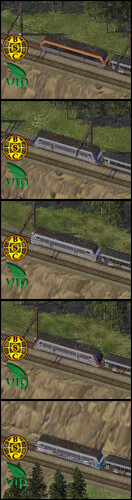
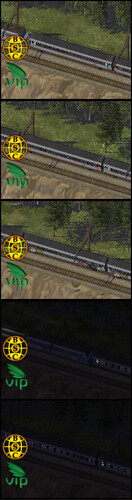
This is a set of HD automatas for the passenger train.
It includes:
- 5 passenger train engines, 1 replacement of the regular passenger engine (BB26000 orange) and 4 additional skins (BB 26000 en voyage, BB26000 grandest, BB26000 carmillon, BB26000 grey).
- 3 passenger wagons, replacement and additional skins (1st class, 2nd class and 2nd class tagged)
All the engines and wagons are available as props only in Darknite version.
Special thanks to Anachron for the 3d models of the engine BB26000, VIP and BSC members.
Thanks to Tibi for maintaining these files over the years.
MOD Details and information
Automata replacement and additional skins for passenger train engine and wagons.
The skins appear randomly for the automatas.
Nightlights are included.
Automata can be driven in free mod in automata panel.
These engines and wagons are available in Lot Editor props section under the name:
- Grfe_BB26000_...
- Grfe_Corail_...
The LE props of this pack have been datpacked into two files: Grfe_Props_Pack_LE_Train BB26000.dat and Grfe_Props_Pack_LE_Train Corail.dat.
Please use the provided Cleanitol_BSC-VIP Girafe Train Corail HD+BB26000.txt to remove the single sc4model+sc4desc file combos by one of the 3rd party cleanitol tools:
Nos.17 SC4 Cleanitol (new tool)
BSC Cleanitol (old tool)
Note: The automata models are high poly which could affect negatively the performance of your game.
Installation
Installation: copy/extract the BSC parent folder into your plugins. If you extracted the ~Documents folder into your plugins, too, it's highly recommended to keep it, but move it out of the Plugins folder.
Un-Installing: To un-install the files, simply bulldoze every lot from this download in your cities and delete the files from the plugins folder afterwards.
Dependencies
What's New 1.0.0 View Changelog
Released
04.06.2026
The restored pack after the site crash.
-------------------------------------------------------------------
-
 10
10
-
 4
4


