
Jump to content
Ulisse Wolf

This mod has been deprecated by the community because Submenus DLL allows better management of in-game mods

It is recommended to install Submenus DLL instead of DAMN

https://community.simtropolis.com/files/file/36142-submenus-dll/


Message added by Ulisse Wolf

11 Screenshots

About This File

Hello!

I want to introduce my first creation for the fans of SimCity 4.


DAMN Manager

DAMN Manager is an alternative to the commonly used (I hope *;) ) program SSPTool and DAMN Plugin by Stefan Wertich.

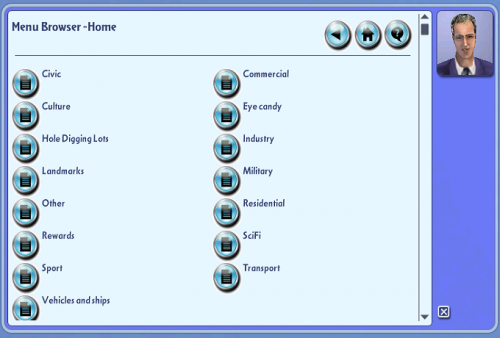
It is a tool for creating files for Dealey's "Daeleys Advanced Menu Navigator" plugin aka DAMN.


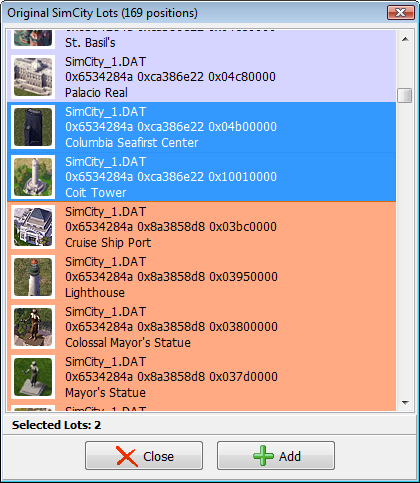
The program to use is very similar to its original, has some new features: adding the original lots of SimCity, menu items can be created automatically using custom templates and a few minor additions.

I have written this program because i had have some problems with the original SSPTool.

To not bore you any longer, I invite you to download the program, all (or almost all) the information can be found in the help files included with the program.

Any comments are welcome, especially those critical.


If you have any problems with specific plugins, give me it's name and a link where to download the plugin.

The program includes the language files in English and Polish (polski).

ps. Please forgive me if the English contains errors. If (dare I say when) some will see (help file or user interface), please let me know.

pss. Manager has been tested on Windows XP, VISTA (64bit), 7 (64bit) and 8 (64bit - clean install).


What's New 1.3.1   View Changelog


Released

  • 1.3.1:
  • fixed: CTD when plopping items
  • Like 10
  • Confused 1
  • Thanks 3


User Feedback


Recommended Comments

This device takes patience which some here seem to have none do they bad mouth what they cannot comprehend there is extensive help files in SSPTOOL and Damn manager... look.
If your SC4 has "APPS" in path remove it try moving SC4 out of Origin file and add to Maxis all 1.5 gigs Rush hour is required (I think I remember).. Read the red colored Paragraph In Damn manager. This program will not list every little thing you question or fix every bug you have..So read the read me> This Prog is mostly; to make menus for LOTS away from the over-crowded Landmarks, parks and other menus so if you do not go for mods and adding tons of details, theme packs,and like stuff available here do NOT bother it is not for you however when you have 200 lot files or a gig or so of add-ons etc. then it is for you

When you get it running (requires help some time) It is more than worth the time took me four days to find last little opps my bad.

There is only one guy doing this thing stop biting his head off chill and do some homework..it is a custom program not some corporate BS off the shelf.

See other web sites for help but NOT EA certainly, SC4 devotion comes to mind SimPeg another.

Did I mention this thing is free and it works on win7 64bit 32bit win8, xp, and MAC good luck have fun and thanks be to Yild forthis thing is great gift

10 stars but they stop at five lol
  • Like 1

Share this comment


Link to comment
Share on other sites

Been trying to get the Damn working for about two weeks now, Damn works fine until you get in the game then it's a total piece of useless dribble. The you try to get help and there's nothing available for help! The tutorial is fine if you have XP. It's useless for Win 7! In fact don't bother using it!
 
I give it at best a 2. Only because the program itself works just not in SC4 Deluxe!!!!


Hi I have Win 7 tutorial does NOT change originally there were(are three parts to this Damn manager SSPTool and SSPTool Damn plugin all were needed before this update to the Manager. Might want to ask programmer if this is still the case. These files can be found.

The program is not for the faint of heart. There is huge read-me included in D Manager. Some folks have a shortcut path problem i.e. menu appears but wont work.. Read Red Paragraph in D Manger if there is an "APPS" in your path this will not function try start menu\Maxis will work .

I ended up moving entire 1.5 Gigabytes from Program files(x86)\Origin left all Origin behind and copy/paste/moved it to Program Files(x86\Maxis\SC4 this IS a 32 bit game so it appears in 32 bit part of menu. Also Not all types of items will work in DM mostly for building lots. Try other sites for more help. SIMPEG for one Devotion another.

It is Very Well Worth the effort to get this up and running especially if you find your "Menus" ridiculously over-full-cramped and just plain old hard to find.

Yild if you see this do folks still need the Original Damn Manager already installed or does the update include those files for folks new o the Manager.

There is help sure it can be hard to find but useless dribble certainly not..

5 out of 5 stars once running...took me four days
  • Like 1

Share this comment


Link to comment
Share on other sites

Hi All,

DM runs OK on my WIN7 box. 5 out of 5. Love the tool


To add to Daddiogrif's post : one cool enhancement that would allow DAMN Manager to run more smoothly under Win7 and Win8 even if you are not admin of your own PC (as all of you do i guess ...) would be to allow DamnManager to read 2 paths from registry or from a parameter file : 


1 )  a customized path to ...my documents\symcity\plugin    (so we can launch DM in Admin mode and target the plugin folder of another user Document folder.

2)  a customized path to   ...\Program Files   so we do not need to copy the whole Maxis folder from "ProgramFiles (x86)" to "Program Files"


that would add a lot of flexibility to DAMNManager.


thank you for the useful tool

  • Like 1

Share this comment


Link to comment
Share on other sites

Installed the latest 1.1.1 edition


I had a serious problem with this program, at first.  When I tried to initialize the program it would not function.  DAMMANAGER.EXE was appearing in the task manager as a zombie process and nothing more.  So, I figured I would shut down all other applications that i was running to see if that made a difference.  After numerous attempts I narrowed down the culprit. MEDIAMONKEY.exe.  Mediamonkey is a music playing program that is freeware, and rather good.  Anyways, whenever the mediamonkey program was running the DAM would not launch, but would launch when the mediamonkey was closed.  Tested 5 times all positive.


So make sure you close all nonessential programs when using the DAM if you get a zombie process.


Thanks to the idea man and the creators

  • Like 1

Share this comment


Link to comment
Share on other sites

Nice idea, but unfortunately it doesn't seem to work for about 1 in 5 lots. After scanning my plugins folder numerous times many lots simply don't show up, the same ones every time. I've tried restarting the programme and changing the lots file location in the plugins menu several times but to no avail.


Is there a fix for this? 2/5 for the effort at the moment but it's not useful to me if i can't put all my lots in the menus with it.

Share this comment


Link to comment
Share on other sites

Amazing, this program saves a lot of scrolling and weeding through Mayoral Menus!!! Thank you.

  • Like 1

Share this comment


Link to comment
Share on other sites

I love your tool for organisation issue´s and it is a great invention for the sc4 gameplay

BUT

I have a little annoying problem.(and I wonder nobody mentioned it on these pages, or I just overread it)


Well, when I open the manager as usuall, I can switch through different sub menues like butter. while I´m in a menu and build one of them lots - the "Damn Manager Menu" turns from black typo to a grey color and I cant choose another one for eg a different tree or whatever.

So it deactivates itself.

I always have to press "Open Damn Menu" in the news ticker to be able to choose/build another one, which results in a lot of scrolling.


I can't imagine there is no solution for this .


anyway, much obliged

Share this comment


Link to comment
Share on other sites

I have downloaded and used the DAMN Manager and, so far, it has been good to me.  I have a huge plugins folder so this tool is essential for me.  I have one question to ask. 


I have been using the SC4 DAT Packer to compress files and I still have some files to go.  If I compress the files of a BAT or lot which has already been entered into the DAMN Manager, do I have to delete the original entry and reenter the BAT or lot after the files have been compressed?  I have been playing it safe by doing so and I know it creates extra work.

Share this comment


Link to comment
Share on other sites

When going on News menu and clicking "Open DAMN Menu", the DAMN doesn't appear, there is only a white window. I read the "help" document on DAMN Manager, I found the requested thing in the FAQ, but I don't understand anything in this :  check the properties of the shortcut to Simcity, in the "Start-in" property path cannot have "/Apps" string, remove this part from the path.
 
If somebody can help me, this will be great, I need DAMN menus, because scrolling down all Maxis menus is very long.
PLEEEAAASEEE ! Answer as quickest as you can !!! :read:


PS : I know this question have been asked many times by other people, but it's always the same answer :  ...check the properties of the shortcut to Simcity, in the "Start-in" property path cannot have "/Apps" string, remove this part from the path....

Share this comment


Link to comment
Share on other sites

Great!!! and a side use is as simple trad matrix for all stuff.. 5\5


while using this tool remember to set icons as hidden on menu or it's pointless.


P.s.... a little archeo post answer but.... even removing "apps" from property it doesn't work... so simplier change your shortcut to just open the SC4 folder and run the exe.... slower than a normal shortcut, but faster than open every folder

Share this comment


Link to comment
Share on other sites

Game keeps crashing when plopping ANY hidden Lots, dont know why that is.... Too bad, that mod looked promising. Thx for making it anyway :)

Share this comment


Link to comment
Share on other sites

Hello! Thank you for the program, indeed, as great as SSPTool was it used to have many issues to process bigger folders or datpacked.

Still, I am having a strange issue that I am not sure why. I am unable to hide any lots. I get them to work on the menu structure but they remain on their original place (I double checked many times and it is not working, I even tried hiding a Maxis building to be 100% sure and no change). I used to have a prior DAMN installation but after having some issues I ereased all traces of it (from both plugins folders).

Any help would be appreciated, I am currently swimming in so many park parts. X_x

P.D.: May Datpacking have anything to do with this?

Share this comment


Link to comment
Share on other sites

When going on News menu and clicking "Open DAMN Menu", the DAMN doesn't appear, there is only a white window. I read the "help" document on DAMN Manager, I found the requested thing in the FAQ, but I don't understand anything in this :  check the properties of the shortcut to Simcity, in the "Start-in" property path cannot have "/Apps" string, remove this part from the path.
 
If somebody can help me, this will be great, I need DAMN menus, because scrolling down all Maxis menus is very long.
PLEEEAAASEEE ! Answer as quickest as you can !!! :read:


PS : I know this question have been asked many times by other people, but it's always the same answer :  ...check the properties of the shortcut to Simcity, in the "Start-in" property path cannot have "/Apps" string, remove this part from the path....


Hey

 try going to: C/programs/Maxis/ ...look for SimCity 4.exe (in apps) and remove (cut then Paste) into C/Program/Maxis as seperate entity in Main file list as APPS but outside. It will reappear in file outside APPS folder and still work (DAMN cannot see inside APPS folder) this fixes LOTS of issues. You may need to redo path inside DAMN  program click on arrow follow path to SIMCITY$EXE you just moved and clicl OK restart windows.  not been a while. This also works for Origin DL Games too

Play off line or online. Goodluck

I am in middle of reinstalling win 7 again and have SC4 on flash drive but I use Vitim.us launcher and DAMN works like charm but interesting to get all files in RIGHT places but worth the effort.

  • Like 2

Share this comment


Link to comment
Share on other sites

Hello! Thank you for the program, indeed, as great as SSPTool was it used to have many issues to process bigger folders or datpacked.

Still, I am having a strange issue that I am not sure why. I am unable to hide any lots. I get them to work on the menu structure but they remain on their original place (I double checked many times and it is not working, I even tried hiding a Maxis building to be 100% sure and no change). I used to have a prior DAMN installation but after having some issues I ereased all traces of it (from both plugins folders).

Any help would be appreciated, I am currently swimming in so many park parts. X_x

P.D.: May Datpacking have anything to do with this?


I believe Datapacking is considered illegal (as in it wont work) for using DAMN and a lot of MODS in general check out Sim PEG 4 website or SC4 devotion

Share this comment


Link to comment
Share on other sites

Game keeps crashing when plopping ANY hidden Lots, dont know why that is.... Too bad, that mod looked promising. Thx for making it anyway :)

Exactly the same happens to me. Got the DAMN working with all the menus hidden and showing where they should be.

Tried plopping Lot from Maxis menu and everything is fine. Tried plopping from Damn menu and CTD.

Sandboxed to check for conflicts, using just a handful of tried and trusted content, same result.


Anyone's got an idea what could be the problem?

Share this comment


Link to comment
Share on other sites


Game keeps crashing when plopping ANY hidden Lots, dont know why that is.... Too bad, that mod looked promising. Thx for making it anyway :)

Exactly the same happens to me. Got the DAMN working with all the menus hidden and showing where they should be.

Tried plopping Lot from Maxis menu and everything is fine. Tried plopping from Damn menu and CTD.

Sandboxed to check for conflicts, using just a handful of tried and trusted content, same result.


Anyone's got an idea what could be the problem?


Same issue here.

Share this comment


Link to comment
Share on other sites


Game keeps crashing when plopping ANY hidden Lots, dont know why that is.... Too bad, that mod looked promising. Thx for making it anyway :)

Exactly the same happens to me. Got the DAMN working with all the menus hidden and showing where they should be.

Tried plopping Lot from Maxis menu and everything is fine. Tried plopping from Damn menu and CTD.

Sandboxed to check for conflicts, using just a handful of tried and trusted content, same result.


Anyone's got an idea what could be the problem?


Same issue here.


I almost got the same problem.  searched for 2 weeks no solutions found , altought mine works but some plops makes the game crash like mtp mountain trail for an example.

Share this comment


Link to comment
Share on other sites


Game keeps crashing when plopping ANY hidden Lots, dont know why that is.... Too bad, that mod looked promising. Thx for making it anyway :)

Exactly the same happens to me. Got the DAMN working with all the menus hidden and showing where they should be.

Tried plopping Lot from Maxis menu and everything is fine. Tried plopping from Damn menu and CTD.

Sandboxed to check for conflicts, using just a handful of tried and trusted content, same result.


Anyone's got an idea what could be the problem?


Same issue here.


I almost got the same problem.  searched for 2 weeks no solutions found , altought mine works but some plops makes the game crash like mtp mountain trail for an example.


I'm having the same issue - crash whenever attempting to plop a majority of my plugins.

Share this comment


Link to comment
Share on other sites

After hours of reinstalling all of my content so that is was better organized and easily accessible in DAMN, I can see my content in DAMN, I can navigate through the menu, but I cannot seem to grab anything to plop. I click all the buttons and get nada

Share this comment


Link to comment
Share on other sites

uploaded new version that fix CTD problems, removed previous version

Share this comment


Link to comment
Share on other sites

help ! damn manager show " unknown format of the preview image (not PNG nor JPEG)"
I use win7x64 sp1

Capture.JPG

Share this comment


Link to comment
Share on other sites

Sign In or register to comment...

To comment in reply, you must be a community member

Sign In  

Already have an account? Sign in here.

Sign In Now

Create an Account  

Sign up to join our friendly community. It's easy!  

Register a New Account

×

Thank You for the Continued Support!

Simtropolis depends on donations to fund site maintenance costs.
Without your support, we just would not be in our 24th year online!  You really help make this a great community. *:thumb:

But we still need your support to stay online. If you're able to, please consider a donation to help us stay up and running. This helps sustain a platform where we can share our community creations for years to come.

Make a Donation, Get a Gift!

Expand your city with the best from the Simtropolis Exchange.
Make a Donation and get one or all three discs today!

STEX Collections

By way of a "Thank You" gift, we'd like to send you our STEX Collector's DVD. It's some of the best buildings, lots, maps and mods collected for you over the years. Check out the STEX Collections for more info.

Each donation helps keep Simtropolis online, open and free!

Thank you for reading and enjoy the site!

More About STEX Collections