


Leaderboard


Popular Content
Showing most liked content on 12/08/2018 in all areas
-
6 points
-
5 pointsIntroducing a SC4 mod: MySimtropolis @Cyclone Boom and I have decoded the file structure of the MySims.dat file such that we can now create it from scratch with a hex editor. This is used to add additional MySims to the selection window. We have now released the mod which features members of Simtropolis as selectable MySims. (This is an opt-in only creation.) Note: Any member who has an established, non-changing avatar on ST can still post here to request inclusion in our mod. Here's a pic of those who initially agreed (via PM) to be immortalized in the game: ^ Image created by @Cyclone Boom The initial MySims are coded in the game so new, additional ones are available on page two and after. Until a full second page fills up, clicking the number 2 on the selection window scootches the Sims to the left with the newest ones showing on the lower right. Here's how those look so far: Update: After we discovered a way to prevent the 21 default MySims being listed, it now looks like this with the optional "Rulez" installed: In addition to the name, the only two variables which can be set are gender and zodiac sign as follows: Gender: 0x00 = Female 0x01 = Male Zodiac sign: 0x00 = Capricorn 0x01 = Aquarius 0x02 = Pisces 0x03 = Aries 0x04 = Taurus 0x05 = Gemini 0x06 = Cancer 0x07 = Leo 0x08 = Virgo 0x09 = Libra 0x0A = Scorpio 0x0B = Sagittarius Should you agree to be included we will create the 36x41 pixel game image from your avatar. (Or you can supply one for us in 24 bit BMP format which we might tweak for positioning and size to fit within the circle.) To become a MySim, please submit the following: Name (As it'll be in the game. Screen name from ST or a derivative like I do.) Gender (Male/Female) Zodiac Sign (See list above.) Disclaimer: Due to the nature of the file structure you cannot be removed after opting in. Here's hoping you'll agree to be added as a Simtropolis MySim. Sign up in a post below. As a bonus, everyone who does will receive a special badge on their profile. Like so: Just a note to clarify for everyone... In reply to everyone who opts-in, prior to release we'll post images of the MySim Selection Panel and also your Sim moved into a home. These preview pics posted are simply to show what each of you look like in the game using vanilla Maxis residentials. The main idea being to ensure you're happy with the avatar as shown, since some require very slight cropping, stretching, or editing to ensure they're displayed properly in view. Once we release the mod on the STEX, you're welcome to place yourselves in whatever architectural style you prefer, wherever you'd like. This could be in a posh suburban estate, a skyscraper tower, somewhere in the middle of nowhere, on an idyllic remote island, or even on another planet! The choice is completely yours and we'd love to see your own MySimtropolis pics. In fact, coinciding with the unveiling of the mod (which won't be too long away), the plan is we'll open a dedicated " Show Us Your MySimtropolis Sims " topic focussed around sharing scenes. Even if you've never or don't usually play with the MySim Mode, this aims to give the community a way to see one other in SC4. With a bit of imagination, perhaps it could even inspire storylines and a few City Journal type posts, or even actual running CJs following the life of your Sim. We think there's plenty of potential. Additional info in spoiler box: Just published (20 January, 2019): MySims.dat - The Techy, Hexy Details ^ This guide is only for those who might want to add MySims for their own personal use in the game.
-
5 pointsRelieving traffic congestion a bit
-
5 points
-
4 points
Version 2.0
3,187 Downloads
This NHP DMScopio - University Campus Pack vol. 1 was made by DMScopio and originally was uploaded onto his web site (davidluart.com), which is no longer existing and this upload hasn't been available according to my best knowladge since then. I made this readme to collect all the dependencies into one place for easier access with updated links. Please note with the permission of the Simtropolis Staff Members (Cyclone Boom and CorinaMarie), this file has been uploaded on behalf of DMScopio. It was not available anymore due to the unfortunate demise of his web site. All the works contained within this download (lots, descriptors and models) were created by DMScopio. Installation: Unzip the whole bundle, or COPY the "NHP" folder from the *.zip into your plugin folder. You don't need to keep the "Documents" folder. To uninstall, bulldoze any instance of this lot in your city, then remove the file(s) from your Plugins. LIST OF ITEMS: * 5x4 Anderson Building * 5x6 F. Sullivant Building Dependencies: BSC Textures Vol 01 Special thanks to @Odainsaker and @praiodan, who sent these files over to me. Have fun and enjoy! - Tyberius06 -
4 pointsWell, it certainly has been awhile. I got myself a new house and a new job, and I've been slowly building up content. In no particular order, here's a part of what I've been working on. All of it will eventually be released in some form or another. As always, I love to hear your comments!
-
4 points
-
3 pointsSpent the last couple of weeks or so working on a rail depot for my region... Performs service and repair of commuter and high speed rail trains throughout my region... employs around 3k sims... a lot of time was spent on relotting, a lot of detail is missing at that view. Night view..... Some workers preparing to replace an overhead cable As you can see with the slight region view at the size of the depot on the left, i've gave myself an absolute misson with this region Full region view.. the plan, is for it to be the one big City Massive work in progress... From start to finish, from mods to relots, region building, city construction to learning.... It's taken me a few months off a year to get to this point...
-
3 pointsOk. Discounting the recent growth spurt it looks to me like once all the nice amenities were in place (police, fire, health, elementary+high school ... et al) the low wealth homes were being replaced with higher wealth and causing an imbalance. Would you mind to try the same thing again, but adding these two mods to your plugins? Less Abandonment No Kickout Lower Wealth
-
3 pointsWe are planning to release it when it and the documentation are ready. Not a moment sooner.
-
3 pointsSounds good to me. For many peeps it'll be their own they want to use, so you are certainly allowed to be a part of this.
-
3 points
Version 1.0
622 Downloads
Kirkland's, Inc. is a United States retail chain that sells home decor, furniture, textiles, accessories and gifts. It operates 434 stores in 37 states as well as an e-commerce website. It is based in Brentwood, TN. High wealth stage 2 lot that will also hopefully be a part of a future high wealth plaza. Thanks to @RRetail for the lotting! Dependencies BSC MEGA Props SG Vol 1 RR Prop Pack 4 SM2 Mega Prop Pack Vol1 SHK Parking Pack SuperSHK MEGA Parking Textures 1.0.1 SuperSHK + FA3 Parking Textures BSC - VIP Girafe Trees/Shrubs Feather Grass Hedges Linden Trees Maple Trees -
3 points
Version 1.0.2
601 Downloads
TL-HaS Sapporo Train Station 5x5 Another station, that one with a Ragu Taro bat from the Japanese website Hide & Seek. Nothing fancy, just a quiet smalltown station. You’ll need stuff from the original here. And check the website while you’re at it… I upped the capacity to 10 000. The rest of the properties are those of the original. Many thanks to my technical gurus, Rsc204, Kosc and Dreadnought. And especially Rivit, who lighted my SC4world and is always generously ready to help. And the guys and gals on the forums (Twalsh, Tyberius06, Matias93, Fantozzi, Catty-cb, Corinamarie…). We need help when we begin peeking under the hood of SC4. That the community is always there for us noobies is very comforting. _______________ Dependencies : BSC MegaProps JBSimio vol.03 BSC_MegaProps_JES_Vol01 BSC MEGAProps Misc. Vol.02 BSC MEGAProps MJB Vol.02 BSC MEGAProps SG Vol.01 https://www.sc4devotion.com/csxlex/lex_filedesc.php?lotGET=746 from the original, you need : HaS_SapporoStation-0x5ad0e817_0xb36989a4_0x30000.SC4Model HaS_SapporoStation-0x6534284a-0xce589200-0x52abbd2f.SC4Desc Also : HaS_dependencies.dat (you’ll find the zip at the same place as the original) JENXPARIS_Prop_Bridge_Light_Cones_R1.dat (in JENXPARIS_Prop_Pack_vol.02) LBT TexturePack vol02 NDEX Texture Pack Volume 1 Nos.17 essentials (SHK_indiv_orth.dat) Paeng_Resource_Parks 205 PEG Texture Pack vol.01 (PEG BA_Base-Textures_vol-1.dat) PorkieProps Vol.01 SHK Parking Pack 1.2 Tariel-Rivit’s Essentials (must load after the NAM) Tamorr_Family_Props_V210.dat wmp_power_props01.dat, in WMP Power Lots. ___________________ General warnings : (1) This is for SC4 Rush Hour. (2) I play with NAM36, RRW-EU selection (it shouldn’t interfere here, but you never know !) (3) I also play with Twrecks Maxis HD Tree Replacement (if you don’t use it, your trees might look a bit different ; perhaps you should use it…) (4) I play Nights. Depending on your using or not a Light Replacement Mod, the lighting will be slightly different, but There Will Be Light. If you dont want it, you can either tweak my lights in the Lot Editor or take them out of my Essentials folder dep. (5) I like trees. I usually make intensive use of trees. Especially Girafe tree collection on the LEX ; so here’s the link, once for all ; just follow it into the woods, when indicated. ***Girafe trees always necessary for Twrecks Maxis Trees HD replacement ***: Ashes - Beeches - Canary date Palms - Cypresses - Lindens - Rowans - VIP orange fagus Seasonal Flora (links in the readme) -
3 points@Bombardiere Thanks so much for the comments, it is very helpful for me to know how successful each aspect of this work is. Regarding roof textures and tiling, I agree completely with the sentiment that more grime is better, and tiling is bad. I've made an update already to try to address this in the newer brick warehouse. In general most of my textures end up with specular maps applied in Gmax. I've takens some screens of the roof materials' specular level map and settings... sometimes I use a lighter specular color but this texture was already rather bright... I would be happy to know if there are better ways to do this in Gmax. Likewise, here is the brick material, with salt texture specular map. Along with a squished preview. And the roof material. Turning Diffuse Color down to 60 from 100 results in more of the Diffuse color swatch coming through over the bitmap - this is more often near 80 but needed to darken the render quite a bit: And its specular level map - size is increased by 100% by setting Tiling to 0.5. This picture of salt has been working very well to generally grime up a lot of different textures: So there's still a bit of tiling, not as much as before but I'll look at ways to use multiple maps. I'd also love to find a setting that creates a gradient on the texture in Gmax, to simulate shadows/darker areas near the bottom of the building. Placing low intensity omni lights above and to the side of the building might be one option. And finally, I guess I could look into bump mapping, fake bump mapping or just adding new meshes to break up those perfect vertical shadows on the pilasters - perhaps a cornice at the 2nd floor is in order.
-
3 points
-
3 points
-
3 points
Version 1.0
538 Downloads
ParkerStores are a network of independently-owned operations that sell hoses, fittings, adapters and related products in the hydraulic, pneumatic and other fluid, gas and material handing markets. The ParkerStore brand is a subsidiary of the Parker Hannifin corporation and there are 3500 service points around the world. This one is a fictional franchise called "Hoff Cunningham Group." Stage 2 C$$ lot that can fit in your Industrial and Commercial areas. Lot done by myself. Dependencies: BSC MEGA Props SG Vol 1 nos17 essentials SHK Parking Pack SuperSHK MEGA Parking Textures 1.0.1 SuperSHK + FA3 Parking Textures BSC - VIP Girafe Trees/Shrubs Beech Trees Birch Trees Feather Grass Hedges Linden Trees Maple Trees Poplar Trees Rowan Trees -
3 pointsThat's the water cube from the 2008 Beijing Olympics Searched around but couldn't find a link I tried asking here EDIT: FOUND IT! Thanks!!!!!!!! @Tyberius06 ----- New Industrial Area + widened overpass
-
3 pointsAdding some bridges in a new small tile
-
2 pointsBeen really busy in RL but still managed to do a bit of work on the front side. Still lots of work to do. Simmer2
-
2 pointsWith the help of the community ( @Odainsaker, @nycsc4, @Belfastsocrates, @praiodan and @gwada971 - thanks everyone) I've got now +4 "lost" DMScopio's contents and they have been uploaded to the STEX with readme's, images and proper folder structure. In all cases the uploads contains the original files. For myself now the University Campus Pack is available: @gwada971 and @kschmidt: Boleyn Ground and New Anfield v3 Bonus - Anfield ("original"???) Thanks everyone the help! - Tyberius
-
2 points
Version 1.0
2,038 Downloads
This NHP DMScopio - New Anfield (L.F.C.) Stadium v3 was made by DMScopio and originally was uploaded onto his web site (davidluart.com), which is no longer existing and this upload hasn't been available according to my best knowladge since then. I made this readme to collect all the dependencies into one place for easier access with updated links. Please note with the permission of the Simtropolis Staff Member (Cyclone Boom and CorinaMarie), this file has been uploaded on behalf of DMScopio. It was not available anymore due to the unfortunate demise of his web site. All the works contained within this download (lots, descriptors and models) were created by DMScopio. Installation: Unzip the whole bundle, or COPY the "NHP" folder from the *.zip into your plugin folder. You don't need to keep the "Documents" folder. To uninstall, bulldoze any instance of this lot in your city, then remove the file(s) from your Plugins. LIST OF ITEMS: * 13x11 New Anfield Stadium Dependencies: BSC MEGA Props Misc Vol02 BSC Textures Vol 01 BSC Textures Vol 02 Special thanks to @nycsc4 and @Odainsaker, who sent these files over to me and to @gwada971 who put this lost item into my view in the Can't find... thread. Have fun and enjoy! - Tyberius06 -
2 points
Version 1.0
1,642 Downloads
This NHP DMScopio - Boleyn Ground aka the Upton Park was made by DMScopio and originally was uploaded onto his web site (davidluart.com), which is no longer existing and this upload hasn't been available according to my best knowladge since then. I made this readme to collect all the dependencies into one place for easier access with updated links. Please note with the permission of the Simtropolis Staff Member (Cyclone Boom and CorinaMarie), this file has been uploaded on behalf of DMScopio. It was not available anymore due to the unfortunate demise of his web site. All the works contained within this download (lots, descriptors and models) were created by DMScopio. Installation: Unzip the whole bundle, or COPY the "NHP" folder from the *.zip into your plugin folder. You don't need to keep the "Documents" folder. To uninstall, bulldoze any instance of this lot in your city, then remove the file(s) from your Plugins. LIST OF ITEMS: * 10x10 Boleyn Ground aka the Upton Park Stadium Dependencies: BSC Textures Vol 02 (NOTE: a re-LOTted version of this stadium (with the building model and desc file) can be found as a forum attachment on the following address, also bear in mind that it's a bit different from the original version, and you will need additional dependencies - BSC Textures vol. 3 and some other texture dependencies which I was not able to find. Since this is an independent reLOT, I will not upload it, but you can download it from this link: http://www.simland.eu/forum/grand-sud/utopia-feu-artifice-nouvel-375-t9955-4695.html#p594730) Special thanks to @Belfastsocrates, who sent these files over to me and @gwada971 who put this lost item into my view in the Can't find... thread. Have fun and enjoy! - Tyberius06 -
2 pointsWe're getting there. Some of the textures need reworked and there is still some empty spaces to fill.
-
2 pointsThanks so much. I caught on to that as well! It seemed that even with 5-6000 R-$ and R-$$ demand, around half of new R zones would grow R-$$$ with only 2000 or less demand. I researched this issue and found people would take hacky approaches like restricting water/civics to certain areas to keep them low-income. Not only does that seem unfun and counter to the way the Maxis intended you to play, but it also seemed it would be difficult if not impossible for those low-income areas to grow in density. But then you give water/civics to grow densitiy, and rich sims take over.. I think those mods will help a lot. I will start a new city and report back
-
2 pointsThanks for adding me... when can I expect the mod to be released? I'm already eager to play with myself... lol
-
2 pointsI'm still under a month old and have only contributed a hello forum-wise... but I would like to be immortalized... Meph Male (shame you can't have fallen angel as a sex) Gemini
-
2 pointsWow, that looks splendid! While you are using a lot of custom content, it still looks like good old SimCity - I like it. I like it a lot. If you're up to a challenge, you could try and see if you get those rail lines alongside the harbour and the avenue completely grade separated, but that's pretty advanced stuff. That city sure developed impressively. I just checked the initial picture again, and there has sure been a lot of change. The city now fills the tile and looks pretty complete. It's also fun to discern the BATs you used from this far away... a bit like spotting the faces of people you like in a crowd photograph. "Oh, there's Roy Thomson Hall by 6459978... and my, isn't that Simmer2's torus-shaped water tower there? Don't I know that retail store over there, too?" I always like that. Thank you for showing the progress of that city! I hope it won't be the last picture you post here on Simtropolis.
-
2 pointsWelcome aboard!
-
2 pointsHehehe - I'll volunteer.... my avatar hasn't changed in a while and don't plan on changing it. Robert Male Gemini
-
2 points
-
2 points
-
2 points
Version 1.0
436 Downloads
TL-Barbyw-JENX Passenger Rail Station 4x6 Here’s a slightly bigger station but still with that small town, Old World charm… The original is here. It was made by Barbyw with a model from Xannepan/JENX. You can find Barbyw’s content here. And JENX (Xannepan), while you’re at it ! The capacity is 62 000 and the other properties are also those of the original. Many thanks to my technical gurus, Rsc204, Kosc and Dreadnought. And especially Rivit, who lighted my SC4world and is always generously ready to help. And the guys and gals on the forums (Twalsh, Tyberius06, Matias93, Fantozzi, Catty-cb, Corinamarie…). We need help when we begin peeking under the hood of SC4. That the community is always there for us noobies is very comforting. _______________ Dependencies : BSC_BATProps_JENX_Vol02 BSC_MEGAProps_CP vol01 BSC_MegaProps_JES_Vol01 BSC_MEGAProps_MBEAR_Vol01 BSC MEGAProps SG Vol.01BSC MEGAProps swi21 Vol.01 BSC_Textures_Vol01 JENXPARIS_Prop_Bridge_Light_Cones_R1.dat (in JENXPARIS_Prop_Pack_vol.02) LBT Mega Texture Pack vol.02 NDEX Texture Pack Volume 1 Network Addon Mod 34 or up (for the RRW extures) Orange MegaProp V.01.1 PEG CC Car Clusters MOD PorkieProps Vol.01 RDQ HD Props Pack Maxis Nite, only for Trees 1-3-6-7-9-14-17 SCModel & SC4desc. (I know, I went a bit overboard, there, but those tree props are so fine, and so rarely used, I thought I would highlight them. **Also, if you already have RDQ HD Props Dark Nite version, I think it’s OK : for trees, it shouldn’t make any difference.) SFBT_Essentials_December_2015 SHK Parking Pack 1.2 Tariel-Rivit’s Essentials v3 (must load after the NAM) Tamorr_Family_Props_V210.dat wmp_power_props01.dat, in WMP Power Lots. General warnings : (1) This is for SC4 Rush Hour. (2) I play with NAM36, RRW-EU selection ; generally, from NAM 34 up, my lots should be OK for you. (3) I also play with Twrecks Maxis HD Tree Replacement (if you don’t use it, your trees might look a bit different ; perhaps you should use it…***) (4) I play Nights. Depending on your using or not a Light Replacement Mod, the lighting will be slightly different, but There Will Be Light. If you dont want it, you can either tweak my lights in the Lot Editor or take them out of my Essentials folder dep. (5) I like trees. I usually make intensive use of trees. Especially Girafe tree collection on the LEX ; so here’s the link, once for all ; just follow it into the woods, when indicated. ***Girafe trees always Necessary for Twrecks Maxis Trees HD replacement ***: Ashes - Beeches - Canary date Palms - Cypresses - Lindens - Rowans - VIP orange fagus Seasonal Flora (links in readme). -
2 pointsGranville Place in Downtown Vancouver, at Christmas time. Thanks!
-
2 points
-
2 points
-
1 point
-
1 pointI was asked about slope mods by Dreadnought today. Halfway through replying to a PM, I realised this would be better posted here for all to see. If anyone can think of something I've missed, I'd be happy to consider it's inclusion at some point. For now though, this will just cover some of the basics. What is a Slope Mod? A slope mod just adjusts the allowable slopes, at an individual network level. What does that mean?... Without any additional mods, if you have a big hill and draw a network, the game has a default setting for the maximum slope of each network. Maxis deliberately made this pretty unrestrictive, for ease of play. If you want to create more realistic looking cities, especially with hilly terrain, you will probably want to install a mod that adjusts the default slopes, making them more restrictive. This will help to avoid the bumpy uneven roads, that are very common when playing without such a mod. Each network in the game has it's own settings, that dictate how steep the slopes can be when dragging that network. These networks are: Street Road OWR (One Way Road) Avenue Maxis Highway Rail Elevated Rail Monorail Dirt Road (RealHighway [RHW]). It should be noted that override networks do not have separate settings. So for example, if you are using the Network Widening Mod (NWM) or Street Addon Mod (SAM), which are overrides of the Road and Street networks respectively, they will use the same settings as the base network. Dirt Road is so called, because it was an additional unused network left in the game's code. Whilst it has been repurposed by the NAM team to be used for the RHW mod, technically it's the Dirt Road network. From here on in, I will refer to dirt road as RHW, for the sake of clarity. A Slope Mod sounds just up my street... Hopefully if you've made it here, you'll be thinking right now about installing a slope mod. As always with mods for SC4, there are far too many options out there to go into every one in excruciating detail. They all do pretty much the same thing, but there are two important factors you should consider when selecting one. What networks does the mod support/change. How restrictive is the slope. For example, you may decide you only want to have restricted slopes for some of the supported networks. So if a mod bundles everything together in one DAT, unless you know how to remove those you do not want, (really not very hard, even though it does require the Reader), you should be mindful of this. A very restrictive slope mod will totally transform how you build and terraform in game. Whereas a very unrestrictive mod, could end up looking like the vanilla experience. If you are new to slope mods, then it's probably best to try a few out and get a feel for how they affect things. Especially before you start using one in a cherished region. For example, a really restrictive slope can mean a 15m height difference, would take something in the region of a whole large tile for the slope. Obviously that's an extreme example, most of them are much more balanced for general play. For the purposes of this tutorial, I'm going to show the three mods I'm using: BRF's Tunnel and Slope Mod RHW Slope Mod BTM Slope Mod And here is a comparison shot, to give you an example of how these changes affect your slopes. Each of the networks in this picture are transitioning from a 15m high hill. Even with the slope mod by BRF, the street network takes only three tiles or 48m to descend by 15m. For math aficionados, that's a slope of around 1:3. This is pretty steep, but probably not completely unrealistic in some places. The road takes 4 tiles or 60m by comparison, which is 1:4. As you can see, I've cunningly laid these out from bottom to top, in the order of the slopes gradients. From steepest, to the shallowest slope. If you are still wondering why you need a slope mod, this picture should hopefully show you how much nicer your slopes can be. Note: I've used Rail stubs to indicate the first three tiles that are at ground level for each network. I've also used PedMalls to help see the slopes better. As you can see, rail has the most restrictive slope of all, so much so, even with my fairly reasonable grades, it doesn't fit in the screenshot. Using your slope mods more flexibly Whilst you could have multiple slope mods for a number of different situations, that's quite a complex setup and requires you to close SC4 and move files about. Let's say I want a road to have a slope similar to that of the El-Rail network shown above. Rather than switch to a slope mod permanently with those settings, there is an easier way. Just use the El-Rail tool to draw the slope first, delete it and drag the road down your nice new slope. Using the above picture as reference, you can do this for any network which appears lower down the screenshot, than the slope you require. To put that another way, if you made a slope using the Avenue tool, but then wanted to use it for the Rail network, this would not work. Since the rail network is more restrictive. Using this setup though, you can have quite a bit of flexibility for a number of networks. Note how the Rail networks, including Monorail and Elevated Rail, have the most restrictive slopes of all. That makes a lot of sense when you think about it, since in real life, the gradients they are able to support are much less than cars and other traffic are able to deal with. Some final hints and tips SimCity 4 can be unforgiving at times, it's all too easy when making other changes, for your hard work creating slopes to become unravelled. Just as I have shown above, using PedMalls next to the slope, will lock-in the slope, making it impossible for development and other networks to alter them further. Of course, if you wanted a junction halfway down the slope, that now be impossible too. Here's where some planning really comes in handy. Using the four steps shown on the right, you can easily form intersections as part of your slopes. Drag the initial slope, here I am using the El-Rail tool for the slope. I have placed pedmalls and used a rail stub to completely flatten the tile where the junction will be. Now you can continue to drag your slope, in this case in two directions, from the stub. I've placed the pedmalls here before I built the road. As you can see, the slopes are working very well. Lastly, I've dragged the street tool, anything with a less restrictive slope would do, parallel to the new road. This makes the surrounding tiles match the slope used for the road. This is useful if you want to zone next to the road, or sometimes for blending into the terrain better. Note: I have not dragged next to the road junction, a gap of one tile must be left here. Because I've used pedmall to lock-in the slope, there would be no danger of messing up our hard work. But if the pedmalls were not present, dragging either of the parallel streets closer to each other, might mean you'd have to start over. Another useful thing to know, when zoning next to slopes, the game can actually alter the slope of the transit network. Either when zoning or when buildings develop. Often this is quite undesirable, but there is a way to avoid it. By holding the CTRL key when zoning, the game knows not to change the slopes in either scenario. It does require some thinking about how you zone each area, but is a very handy way to stop the game messing up all our hard work, to keep slopes looking good. If you make a partial slope, you can then level off areas using "stubs" as required. Stubs are made by clicking only once with the network tools, such as the Street, Road or Rail, in each tile. As opposed to connecting or drawing them in a line. I prefer to use rail stubs myself, because they do not feature auto-connect. This can catch you out on occasion, causing problems, especially when using the RHW or Streets tool. Leave these stubs in place whilst you are building your slopes, to incorporate many different things, that might otherwise look undesirable on uneven terrain. This can be especially useful for incorporating WRC's, TE connections and many other possibilities into your slopes.
-
1 pointNext one is bigger, and alas, woe with me, the building itself is not lit at night. Ill Tonkso, how could you ? (Who's ever heard of a European train station that doesn't work into the night ? I know, la Gare de Lyon closes at midnight but still, it's open and brightly lit until then !) I suppose there is no way to repair that now. Sigh. But I decided I would upload it nevertheless. Put too much work into it !
-
1 point@jacko2110 @Tyberius06 I've never seen an overhanging 0x258d1000 either, so I have made one, here it is for anyone to do what they like with. CT14 Overhanging Prop from Maxis Texture 0x258d1000.dat
-
1 pointStill churning out 19th Century Small Shops variations Setbacks Setbacks have been set to 2 tiles for all 7 lots. Lots I've added one that has 4m 'side alleys' between the buildings and I quite like the effect. I will add a couple more of those. Base textures match JBSimio now: Maxis $$ Gravel, 0x258c2000. All lots have SCILT support to extend sidewalk appearance (get your SCILT set up now if you haven't, it supports all the different sidewalk mods!) Props I've decided not to finish the board fences before this project - SM2 Old Pressure Treated Fence is doing the job splendidly. All the props are HD from Historic Harbor and SM2 with a few Maxis weedy clumps. BAT variety The set is almost where I want it - need more "Medium" models in particular. Several BATs have already been fixed (textures, positioning, etc) based on tests runs. There are 37 unique BATs in the set right now. It will not be more than 50, for the sake of my sanity. Most of the remaining renders will be awningless and lack exterior staircases, for variety.
-
1 pointJust bear in mind that every lot must have a building upon it. But how that really works is simply that this item upon the lot links to the Buildings Exemplar. So when you select a Building in PIM-X, what you are seeing is the Buildings Exemplar or properties of the Building upon the lot. In your screenshot, you can see a property Resource Key Type # (where # is usually 0 or 1). This is simply a string of three 8 digit IDs, or the TGI of the model to display where this building appears on the lot itself. However, whilst every lot must have a Building upon it, because otherwise there would be no actual properties for the lot. That Buildings Exemplar does not itself need to link to an actual model. Those you see without one are either because PIM-X did not load the model or because an invisible model was used in the lot's creation. That last option is fairly common, but functionally it works fine, instead of using one model as a building, it's invisible (to keep the properties we need), but Props are used instead for the visual items on the lot. I know it's a little complex, but getting your head around the correlation between a Lot, Buildings Exemplar and linked models is vital to really understanding this sort of modding. So if there is something here I've not explained well enough, please do ask for clarification. Filling degree is basically the amount of a model that encompasses the "Bounding Box", i.e. the rectangle around the model. SC4 models are generally larger than the actual part we see, because the LOD needs to cover every extremity of a model to work. A LOD is basically the 3D model (in SC4 terms), the object you see is simply the textures mapped to that LOD. It's much simpler to make this is a simple rectangle, than craft every edge to the actual edges of the model. Put simply, the LOD tells the game how big an item is, but if the building doesn't completely fill the LOD, that will end in incorrect values. If we judge the model takes up 90% of the LOD, i.e. a filling degree of .9, using such figures gives us a more accurate figure to calculate both the number of jobs and growth stage to use. So as per my last post, you can see the correct values for # Jobs and Growth Stage were pretty far off those for CAM. Certainly this is the correct workflow, just bear in mind different creators work in different ways. So whilst here the Building is most likely in the SC4desc file and the Lot in the SC4lot file, that won't always be the case. You don't need to worry about this too much with PIM-X, provided you save each page where you modify something, it will update those changes to the right file. Just note that you could have all files in one .DAT file, or for Plop lots, the Buildings Exemplar is usually embedded into the SC4Lot file. So this is pretty much what I mentioned at the beginning of the post. The actual file with the properties for the Building, the Buildings Exemplar is a separate file, but via the RTK value it links to a model elsewhere, in this case inside the games files. Of course that doesn't have to be the case, the model could come from any file, or even be invisible. The important thing to know is that a Buildings Exemplar is NOT the model, it just links to one. Similarly a model is not a Buildings Exemplar. An SC4Model is just a model, we can make it a Building, a Prop, a Flora item, lots of things. To do this we make an Exemplar of the appropriate type, which links to that model. This way, with only one model, we can re-purpose it many times over for different uses. For example, we could make 5 Buildings Exemplars, all with different properties, but would only ever need one model. At this point, I'll come back to those invisible models and how to work with them. From a PIM-X perspective, you won't see the LOD/Bounding Box, nor a model within it, so how then would you calculate the filling degree? It gets worse, because there is no model, likely the Occupant Size will not be accurate either, complicating matters. So in your screenshot, the Occupant Size is set to 41m x 38m x 57m, that's the size of the LOD/Bounding Box. This value is part of the process of creating a model, so should be automatically populated. When you apply the filling degree, of say .9 or 90%, PIM-X takes the bounding box size, reduces it by 10% and can work out the other stuff for you. But for an invisible model, the Occupant Size is going to be either really small, or set at a default that's very wrong. You need to ideally look at the lot and make some estimates of how big the actual parts where people might work would total in size. Then you can adjust that later with the filling degree until you feel the figures are right. Comparing such lots with similar sized-ones, will help you to see if your values are going to be similar or not. This method is unlikely to be 100% perfect, but you should be able to find a nice balance with a little trial and error. So I'll use the Building Named "IRM_I-M_Open Metal Building" as an example for this. The default occupant size is listed as 2.00000000,1.00000000,2.00000000 or 2m x 1m x 2m. If I right click on the Building, then select "Open all Lots using this Building/Family", it will open all the Lots using this buildings exemplar. In this case, that covers 4 actual lots, because many lots can re-use the same Buildings Exemplar. If we open all four lots, you can see how the actual Open Metal Shed is the key building on this lot, so we should set our values based on this common item: It's not just Buildings that have an Occupant Size, all Props do too. See on the right above all those yellow rectangles?, those come from the Occupant Size used in a Prop Exemplar. Which is just a set of Properties that relate to a Prop, which links to a model. A word of caution, because again a creator can alter these values, so you can't assume they are correct. There are good reasons for this, but here we can see the Bounding Box of the shed is pretty accurate, so we can get the Occupant Size of the shed from the Prop: In PIM-X's Lot Editor, under Lot, here we can view the Props upon the lot. Take a note of the name of the Prop in question, then in PIM-X's main interface, we can find this Prop's Properties (Prop Exemplar): That gives us an Occupant Size of 32m x 8.7m x 16m. Not also how as a Prop, we now see the Bounding Box, so we can decide on a good filling degree, probably .95 or .9 I'd say, but I always adjust this a little until the # jobs seems right. This takes a bit of time to get a feel for, but if you are going to be altering a lot of these, that hopefully will become more obvious. So now you return to the Building itself, where you can input these values. VERY IMPORTANT: before you save the Building, ensure you put the original Occupant Size back. We are ONLY using it to temporarily calculate the correct values, keeping the altered Occupant Size can lead to a number of annoying problems. It's not a terrible idea to open a spreadsheet, take a lot of all the changes you will need, then use that as a reference. But at the very least, keep a backup of the original unmodified files, in case you need to refer back to the original values or make a mistake. Also, pay no heed to the File Names shown in these images, I've DATPacked both the IRM mod and all my Dependency files. I don't have access to my usual files, so I couldn't switch to unpacked ones for taking pictures. But note for this to work, PIM-X would need to load the relevant dependency containing the Prop, in this case one of the JES files, I couldn't tell you which right at this moment. Just holler if you get stuck or need anything explained further .
-
1 pointI also redid Target. Much much more satisfied with how this turned out.
-
1 pointI fixed the wavy foundation bug, I think. It seems to be due to an off-center render. The problem also affects some of the new smaller BATs I'm showing here, but at least I know where to start fixing it. Wild West Commercial Pack Another thing I've wanted to do forever. These have 3.5m stories. I may do some utterly squalid shacks around 2.5m or 3m. Here are a few of them - they'll be in prop families for 8m and 16m widths. The corner BAT will be modded for corner lots. The buildings all have 2m setbacks with 2m awnings. I'm happy with how this looks next to the game sidewalks. And here is the fixed 1x2 Commercial with JBSimio and Cycledogg houses...along with the 1x2 Industrial and Wild West of course. The industrial has boxes on the floor and a revised roof texture, along with a crane at the cargo doors. Another view showing three different variations on the industrial. The plan is to render 4m, 8m, 16m sections of fencing/side lot to put into the Wild West and 19th Century Commercial 8m BAT prop families and give the lots some room to breathe. Another lot can have one 8m bat in center and 4m fence surround...a whole 16m lot with just fence and outbuildings...etc. Looks like most of the Wild West night lights need a double check.
-
1 pointReplies @rsc204, @RRetail: Thanks for the comments! @Terring: That's a pretty neat idea! IIRC, Maxis has different timed basketball players animations for day and nighttime, and the tennis ones run on a different timeframe as well. Wouldn't be too difficult to mod the net into a timed prop I suppose. @T Wrecks: Yep, faded and rundown courts are definitely coming as well! @VALASatoshi: I think the time I spent ogling your high school re-lot was what really jumpstarted this project to be honest! Hopefully I'll be bringing these bad boys out soon! @JimC: In the Overhaul mod downloads tab, there should be two available options, override and standalone. Override replaces the original lots and might cause conflicts with other mods that change the same stuff, and like you mentioned, can be configured based on load order. In this case, putting my mod further down alphabetically should override the seasonal mansions in PaulSawyer's, though I personally haven't tested it myself. If you want to be completely safe of conflicts, use the standalone version. These are individual lots with new IDs and will coexist with any of your existing ones. The extension set is completely standalone and you shouldn't have to worry about any incompatibility there too. Updates Just a quick little plug for a Peterbilt dealership that I did for @pclark06! I have a couple more CS$$ lots for it on the way as well.
-
1 pointHi it's Marrast M-TEL lot:
-
1 point
-
1 point
-
1 point
-
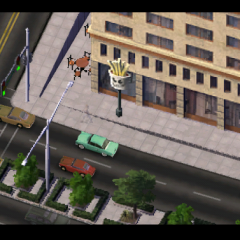
1 pointHey, all my big cities are gone with a fried hard drive..but have a look at my latest creation that I sat over this evening, will ya? Port Margery, population just shy of 27.000. Quaint, poor, no fancy colleges or drama schools...but a rusty old harbor and a run down mainstreet to boot. The city has seen significant decay over the last decades and consolidated the worker quarters of yore. Archers Peak thrones above the city, some hillside roads ever encroaching its slopes. (only NAM, i gotta do a WHOLE lot of downlading...).












-
Home
-
Activity
-
Forums
-
ST Exchange
-
City Journals
-
Gallery
-
Omnibus
- Clubs
-
Restoration
-
SimTopical
- STEX Collections

Thank You for the Continued Support!
Simtropolis depends on donations to fund site maintenance costs.
Without your support, we just would not be in our 24th year online! You really help make this a great community. 
But we still need your support to stay online. If you're able to, please consider a donation to help us stay up and running. This helps sustain a platform where we can share our community creations for years to come.
Expand your city with the best from the Simtropolis Exchange.
Make a Donation and get one or all three discs today!

By way of a "Thank You" gift, we'd like to send you our STEX Collector's DVD. It's some of the best buildings, lots, maps and mods collected for you over the years. Check out the STEX Collections for more info.
Each donation helps keep Simtropolis online, open and free!
Thank you for reading and enjoy the site!