


Jump to content

Diagonal Bridge Enabler (Removes Water)  1.0

   (65 Reviews)

2 Screenshots

About This File

PLEASE NOTE: This mod includes files that will remove game water and flattens roads. They are intended for temporary use. Please read the Readme documentation for more details, and refrain from asking "where's my water?" or "why are my roads flat?" or other such questions.

Version 1 (Cross-Platform)

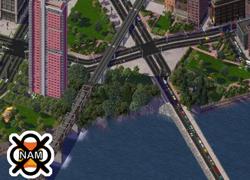
The NAM Diagonal Bridge Enabler is a mod intended for advanced users, containing a special "temporary" file, modifying the game's transit network slope and terrain parameters to allow for the construction of otherwise impossible diagonal bridges, coupled with starter pieces enabling several different styles of diagonal bridges.

The Diagonal Bridge Enabler contains just two file: the main file DiagonalBridgeEnabler.dat, and DiagonalBridgeEnabler_Locale_english.dat (which contains description strings for pieces and menu icons). There are temporary files designed only to be used when you wish to construct diagonal bridges--it is recommended you take the entire ~Diagonal Bridge Enabler (Temporary Files) folder and drop it into your Plugins, and remove the folder when you are finished constructing your diagonal bridges. The file does the following:


Upon opening your city tile with the ~Diagonal Bridge Enabler folder installed, you will notice all game water has been drained from the map, and your terrain will have dramatically shifted color (with default Maxis terrain, it will appear that your city is now in a desert). If you attempt to drag the Road, One-Way Road, Rail or RealHighway networks, you will notice that they stay on a level plane and can be dragged across the chasms where the waterways once were in your city. You can use this to create diagonal, curving and even neighbor connecting bridges with these networks with Maxis' default pylons (see here for more information). Removing the temporary files when you are done will restore the terrain, refill your bodies of water, and return network slopes to their regular setting (either the defaults or whatever slope mod you may have installed).

However, these default pylon bridges may leave something to be desired from a visual, aesthetic standpoint. Thus, the DBE also enables a set of options, designed to emulate the look and feel of traditional SC4 water bridges, including draggable bridges for Road, One-Way Road, Rail, Avenue and Maxis Highway networks, and a series of modular truss bridge puzzle pieces.

It is strongly recommended that you read the Readme Documentation in order to understand how to use this plugin.

DEPENDENCIES

NAM Version 30 with Essentials r132 (or later)
RealHighway Version 5.0 (or later)--required to use Avenue and Maxis Highway Bridges (as the techniques used here do not work natively with dual-tile networks)


As this plugin involves the use of temporary files to be added and removed from the Plugins folder, the DBE is a manual-install plugin, with no installer included. The same file works for both Windows and MacOS systems (as well as Linux).

For Windows users, the Diagonal Bridge Enabler DLL Toggler by Blue Lightning is also recommended, as it will make the DBE vastly easier to use.

  • Lowers the sea level to 0, effectively draining any in-game bodies of water in an opened city.
  • Forces the Road, One-Way Road, Rail and RealHighway networks to be completely level, allowing them to be dragged across the drained bodies of water.
  • Enables buttons in the Roads and Rails menus containing draggable Diagonal Bridge starter pieces and Waterbridge Viaduct puzzle pieces.
  • Adds pylon exemplars to the Rail and RealHighway networks.
  • Like 8
  • Thanks 2


User Feedback


Recommended Comments

This is EPIC! The Diagonal Bridge was the only thing that was missing from this game and you guys have brought it in. 5/5 Bravo. :thumb:
  • Like 6

Share this comment


Link to comment
Share on other sites
for the first time ever in my personal gaming history i am feeling faint :blush:
this is probably the most epic sc4 moment ever
  • Like 7

Share this comment


Link to comment
Share on other sites
[font=sans-serif][size=2][b] [/b][url="http://en.wikipedia.org/wiki/Lemniscate"]∞[/url]/5 This has to be one of the most revolutionary additions to the game, certainly changing it forever.[/size][/font]
  • Like 6

Share this comment


Link to comment
Share on other sites
As soon as the ambulance came, took me to the hospital, and they re-started my heart, I gave it a 5/5! This is the epitome of awesomeness.
  • Like 9

Share this comment


Link to comment
Share on other sites
EPIC , even after all these years , SC4 keeps getting better and better , because of you guys![img]https://www.simtropolis.com/forum/public/style_emoticons/default/39.gif[/img][img]https://www.simtropolis.com/forum/public/style_emoticons/default/39.gif[/img]
  • Like 6

Share this comment


Link to comment
Share on other sites
This is the best thing since sliced bread. No, wait, its BETTER than sliced bread! The NAM team is awesome.
  • Like 4

Share this comment


Link to comment
Share on other sites
WHOA!!! Does this allow bridges to be drawn next to each other? Didn't expect it to come so fast! [img]https://www.simtropolis.com/forum/public/style_emoticons/default/29.gif[/img]
  • Like 1

Share this comment


Link to comment
Share on other sites
My God..Ladies and Gentlemen.Today is a special day in SimCity history... Something we thought was never possible... has become... a reality... Props go to everyone on the NAM team and happy building everyone! 5/5 stars. Liked, Linked and downloaded.
  • Like 2

Share this comment


Link to comment
Share on other sites
hehe I tested it myself just hours after it was released on SC4D :D I have it in the "Show us your bridges" thread.

Kody, I had that same problem initially too. Where did you put the "~Diagonal Bridge Enabler (Temporary Files" folder? I had to place it directly in my plugins folder with no subdirectories.

Share this comment


Link to comment
Share on other sites
I have it in the same place. I will try and play around with putting it in different places and see what happens. Glad to know I am not aloe in not getting it to work the first time!

Share this comment


Link to comment
Share on other sites
im an advanced user but im also lazy so im not gonna download this, im sure its a 5, but im also too lazy to rate ;D :P
  • Like 3

Share this comment


Link to comment
Share on other sites
This. is. Perfect. There is not a single thing I can fathom to criticise this absolute work of art. A thousand thanks for the file that will craft a new city.
  • Like 1

Share this comment


Link to comment
Share on other sites
I was finally able to get a spot to build one, and now it won't let me connect the bridge to any of my other networks due to "unsuitable area to build network" errors. This mod is more frustrating than anything else.

Share this comment


Link to comment
Share on other sites

Sign In or register to comment...

To comment in reply, you must be a community member

Sign In  

Already have an account? Sign in here.

Sign In Now

Create an Account  

Sign up to join our friendly community. It's easy!  

Register a New Account

×

Thank You for the Continued Support!

Simtropolis depends on donations to fund site maintenance costs.
Without your support, we just would not be in our 24th year online!  You really help make this a great community. *:thumb:

But we still need your support to stay online. If you're able to, please consider a donation to help us stay up and running. This helps sustain a platform where we can share our community creations for years to come.

Make a Donation, Get a Gift!

Expand your city with the best from the Simtropolis Exchange.
Make a Donation and get one or all three discs today!

STEX Collections

By way of a "Thank You" gift, we'd like to send you our STEX Collector's DVD. It's some of the best buildings, lots, maps and mods collected for you over the years. Check out the STEX Collections for more info.

Each donation helps keep Simtropolis online, open and free!

Thank you for reading and enjoy the site!

More About STEX Collections


