

 Supported

About This File
Introduction --
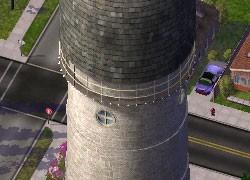
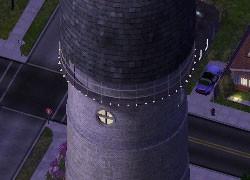
The Ypsilanti Water Tower was designed by William R. Coats and stands 147 ft (45 m) above Ypsilanti, Michigan. Erected in 1890, the water tower was, until 1956, the main source of water for the city. In 1974, the structure was declared an American Water Landmark, and two years later was completely restored. Even in its old age, the water tower is still fully functional.
This is a faithful re-creation of the actual building (reference), the only exception being the lots, since the actual structure stands on an irregular piece of land.
(Psst... keep an eye on the tower during the holiday season in-game!)
For SimCity 4, the building has been adapted in two versions to give you the widest possible choice, depending on your individual taste. It is up to you whether you wish to use just one or both lots. There are no conflicts or other limitations that would prevent you from doing so.
In total, the following versions are available:
+ Landmark
+ Water Utility
Note: The landmark lot will appear in your landmarks menu, while the water utility lot will appear in your water utilities menu.
At a Glance --
Both lots are 2x2, here are some other details:
| Version | Mo. Cost | Plop Cost | Misc. Info |
| Landmark | §100 | §1,500 | LM Effect 10,5 |
| Water Utility | §350 | §1,500 | 20,000 cu m/Month |
Complete details can be found in the readme.
Dependencies --
Props: Seasonal roof prop, included in the .dat file.
Textures: None!
Installation --
First of all, it is recommended that you unzip the entire contents of this ZIP into some archive folder where you keep all building versions, readme, and screenshots, and maybe even back it up onto a CD or an external HD together with your other SC4 stuff. This way, if you need to clean your HD and reinstall your OS, you can simply copy the stuff from your backup archive into your plugins folder instead of having to download all plugins anew.
That said, in order to use this building in the game, I suggest you first go to your plugins folder and make a sub-folder for this download.
Then, simply copy the .dat file (which contains the building model and the seasonal prop) plus the lot file(s) of whichever version(s) you would like to use into the newly created sub-folder.
Of course, you can also choose the opposite approach, i.e. unzip everything into your plugins folder and simply delete or move out all versions you don't want to use.
Remember that the screenshots and this readme are not needed by the game, but it is a good idea to store them somewhere.
To uninstall a version you don't like, fir
-
 2
2



Recommended Comments
Sign In or register to comment...
To comment in reply, you must be a community member
Sign In
Already have an account? Sign in here.
Sign In NowCreate an Account
Sign up to join our friendly community. It's easy!
Register a New Account