

 Supported



About This File
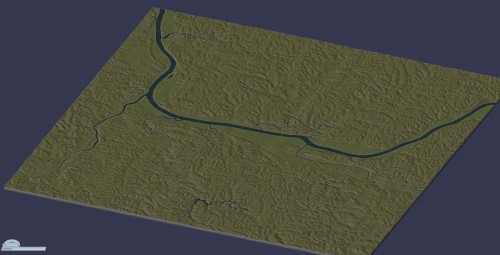
This Huntington 9x9 large tile region is to scale at 1359 km² and has been rotated for ease of building in the main areas.
Two versions are available to download:
The SC4M file requires SC4 Mapper to set up.
The png/config file for if you have a Mac or have preference for the ingame region import function. This version of the region requires downloading High Elevation Import Mods w Erosion Control Parameters and using "Mallow's Original 2500m.dat" file. Installation instructions are listed below.
Note: The png/config will render somewhat different than the SC4M version. The first region screen preview shown here is the sc4m version with the Appalachian Terrain Mod, and the last preview is the png/config version with no mods.
Region Installation Instructions for the png config version
1. Navigate to your SimCity "Regions" folder on your computer.
2. Create a new folder for the region in this folder and move the grayscale map png file and config file
from this download into the folder.
IMPORTANT: Follow the next few instructions so your region doesn't render underwater
3. Download High Elevation Import Mods w Erosion Control Parameters:
https://community.simtropolis.com/files/file/16790-high-elevation-import-mods-w-erosion-control-parameters/
4. Take only "Mallow's Original 2500m.dat" from the download and place it in your "Plugins" folders.
5. If you have any terrain mods such as the Columbus Terrain Mod, Middle European Climate Mod,
or Appalachian Terrain Mod, etc. or related files you will probably have to temporarily remove them from the
"Plugins" folder for the region to install correctly.
6. Launch SimCity 4 and load the new region folder you made. The region is flat but the tile layout is visible.
7. Hold the Ctrl+Shift+Alt+R buttons together which will display a file navigator in the upper left.
8. Navigate to the png file and select it. The game will show a screen as if it's loading a city tile.
9. Be patient and wait for the game to render the entire new region one tile at a time.
Don not interrupt or switch away from this until it is completed and the game returns to region view.
10. Your region is done and ready to play!
11. After exiting the game, remember to remove "Mallow's Original 2500m.dat"
and replace any Terrain mods in your "Plugins" you may have temporarily removed.
A requested region for Reddit user riley_remover.
What's New 1.0.0 View Changelog
Released
I updated the png/config heightmap file and included instructions so it will actually work.
-
 4
4






Recommended Comments
Sign In or register to comment...
To comment in reply, you must be a community member
Sign In
Already have an account? Sign in here.
Sign In NowCreate an Account
Sign up to join our friendly community. It's easy!
Register a New Account