

 Supported

About This File

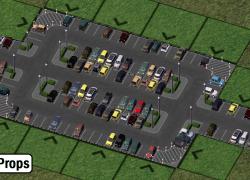
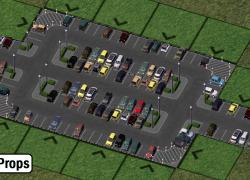
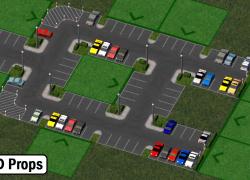
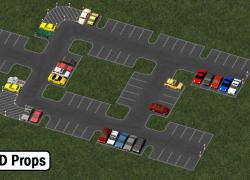
Here is the SAM1 override - a little mod that will reskin your SAM 1 textures and display new props for your greater pleasure! A small variation willl occur on some textures and props (as can be seen on screenshots), depending of zoning.
Not much else to say, but keep in mind that SAM 1, despite how it looks, does not have parking functionality: it's only purpose is eye-candy.
UPDATE 1.1
A fellow member brought to my attention a problem with the plugin - possibly due to the use of HD props and its incompatibility with software mode. For those who use software rendering and/or prefer to use SD props, a new iteration of the SAM 1 override has been created. The mod is now divided in 2 distinct folders: one for HD, one for SD. Please only use one at a time.
What's in the packs?
HD Props pack
SAM - 1 - Parking Lots Textures.dat: contains the new textures specific to the HD setup
SAM - 1 - Type21.dat: T21 files for HD car props
Bollard.dat*: small post model
Grfe_Cars_family_props.dat*: turns those bootiful car props into bootiful family timed props
Lot Textures.dat: lot textures for overriding SAM1 - style parkings
SD Props pack
SAM - 1 - Parking Lots Textures.dat: contains the new textures specific to the SD setup.
SAM - 1 - Type21.dat: T21 files for SD car props
Bollard.dat*: small post model
Lot Textures.dat: lot textures for overriding SAM1 - style parkings
* files already used in the overhanging parkings: if you have the overhanging parkings in your plugins, you can delete them.
Installation
Must load after the NAM. You can also replace the texture and T21 dats directly in the SAM folder if so you desire.
Dependencies (all optional beside the NAM - not having these will not trigger BB's)
NAM with the Street-Addon-Mod installed
BSC - VIP girafe carpack vol. 1 & 2 (HD version only)
Neko Prop Set vol 03 (only Neko_Fence_Black_2m.SC4Model and Neko_Fence_Black_2m.SC4Desc are needed)
(See here for the main page)
Strongly suggested for users of the SD version
The T21 file that generates props use Maxis family cars as default; it's very likely you'll want somethng better to replace them.
Choose one of the following replacement mods (they all supersede Maxis family cars), depending of your preferences:
Credits
- Special thanks goes to Mr. Jim, the author of this excellent and highly recommended parking set. The textures used by the SAM1 override are based on his textures and inspired me to create this mod. ありがとう JIM!

Suggestions or Problems with this mod: report here please
-Cori Edit:
Thanks to @Flann three of the dep linkys are now updated and a fix for a mismatched texture IID in the SD version is fixed.
-CB Edit:
The dep links to the hide-inoki site got borked again, so we've fixed them.
Thanks @hugues aroux for reporting!
What's New 1.1.2 View Changelog
Released
- 1.01 Fix on cross texture
- 1.02 Added high density textures
- 1.1 Added new files using SD props
- 1.1.1 Small correction on the curve texture
- 1.1.2 Fixed texture IID in SD version
-
 7
7
-
 4
4





Recommended Comments
Sign In or register to comment...
To comment in reply, you must be a community member
Sign In
Already have an account? Sign in here.
Sign In NowCreate an Account
Sign up to join our friendly community. It's easy!
Register a New Account