
Jump to content

Erosion Control Mod Set  2

   (8 Reviews)

2 Screenshots

About This File

Update version 2.0

Retuned quarter Erosion set

Fixed NE500m.dat

Fixed QE250.dat


All mods are standarised and identical to MallowTheClouds mod as far as the topographic scaling is concerned. They can be used with any texture set that does not alter this scale.


Issues

Bad news : The Erosion and Equalize tool in god mod won't work anymore


Installation and Usage

1) Locate this in your storage folder for use

2)When you want to render install add one of the plugins with the elevation


3)described to your plugins folder.

4)The cohice of the erosion control is up to you. NE denotes no errosion and QE


5)quarter erosion rate and 2E double the erosion rate.

6)Render your map.

7)Quit sc4 and remove the plugin

8)you can then reuse the erode tools if you so wish


Final Credits

Mallow the cloud and Wouanagnine for their prior plugins


Copyright

you can use this anyway you want and thedistribute anyway you wish however i do ask


for notification prior to distribution and credit if you chose to distrubute at


other websites

  • Like 2


User Feedback

Recommended Comments

Yes it prevents erosion and you can control it or amplify it and it includes Mallows original mods

Share this comment


Link to comment
Share on other sites
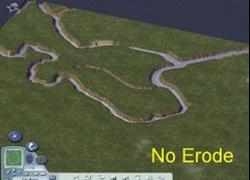
Excellent mod moganite, the picture is self explanatory !

Share this comment


Link to comment
Share on other sites
A few things NE = no Erode QE = quarter erode 2E double erode uses the same height scale as mallows mods and is compatabile with those to use copy to plugins folder render map, no other height mods installed or you wil get issues. Erode brush is modified also to restore remove mod from plugins folder If there is anything else you will have to pm me

Share this comment


Link to comment
Share on other sites
ERRORATA Updated file plugin QE200.dat was renameed QE250.dat Some plugins did not function properly this has been fixed

Share this comment


Link to comment
Share on other sites
That would be the XX500m.dat file NE or QE or 2E. 500 m refers to the elevation above the water as does mallows mods. Its internal scale factor is only .04 m per grey off the default.

Share this comment


Link to comment
Share on other sites
For each map they have a height factor for the plugin used. In this case the name of the plugin gives the height factor in the name NE500.dat gives the description No Erosion 500m relief above water level. These all match the nubers used by MallowTheCloud for the vertical scale. If a file has a 1000m m plugin and you want to use the no erosion version look for the file NE1000.dat

Share this comment


Link to comment
Share on other sites
Of course you can also use the SCTF or SC4Mapper for importing terrains as it also uses the same numbers developed by mallow for the import factor. hope this helped awnser your question.

Share this comment


Link to comment
Share on other sites

Sign In or register to comment...

To comment in reply, you must be a community member

Sign In  

Already have an account? Sign in here.

Sign In Now

Create an Account  

Sign up to join our friendly community. It's easy!  

Register a New Account

×

Thank You for the Continued Support!

Simtropolis depends on donations to fund site maintenance costs.
Without your support, we just would not be in our 24th year online!  You really help make this a great community. *:thumb:

But we still need your support to stay online. If you're able to, please consider a donation to help us stay up and running. This helps sustain a platform where we can share our community creations for years to come.

Make a Donation, Get a Gift!

Expand your city with the best from the Simtropolis Exchange.
Make a Donation and get one or all three discs today!

STEX Collections

By way of a "Thank You" gift, we'd like to send you our STEX Collector's DVD. It's some of the best buildings, lots, maps and mods collected for you over the years. Check out the STEX Collections for more info.

Each donation helps keep Simtropolis online, open and free!

Thank you for reading and enjoy the site!

More About STEX Collections
