

Jump to content

11 Screenshots

About This File

SENT - Swiss & European Network Textures

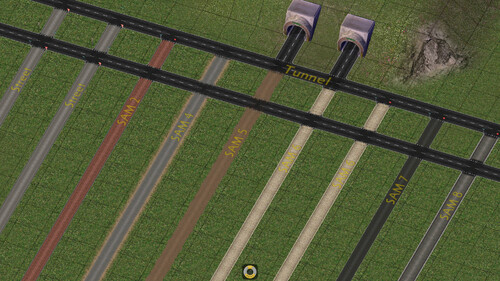
This mod aims to convert the textures of the base game's road networks and those of the NAM into new, more detailed ones with an aesthetic closer to what is done in Europe and Switzerland.

To do this, the textures were created with 4 variants :
    •     RHD/White - Driving on the right with white pedestrian crossing
    •     LHD/White - Driving on the left with white pedestrian crossing
    •     RHD/Yellow - Driving on the right with yellow pedestrian crossing
    •     LHD/Yellow - Driving on the left with yellow pedestrian crossing

SENT currently covers 3 different networks :
    •     One-way road, 1-lane / OWR1 (NAM)
    •     One-way road, 2-lane / OWR2 (Maxis)
    •     Road / RD2 (Maxis)

The textures were designed with a European feel, but also for audiences beyond the Old Continent. For example, the LHD/Yellow variation is more suited to Hong Kong, while LHD/White might be suitable for Great Britain as well as some Asian countries. While RHD/Yellow and RHD/White are more suited to Switzerland and Europe, respectively.

Please be sure to read the entire "Read me" file that is distributed in the SENT mod installer. This will enable you to install the mod correctly.


Compatibility

SENT is in principle compatible with all versions of the SimCity 4 game (Vanilla, Rush Hour and Deluxe) as well as all media (CD or digital).


Dependencies

Obligatory
    •     STEX     -     NAM Team                               -     Network Addon Mod (NAM)

Obligatory - T21
    •     STEX     -     Barroco Hispano                      -     AGC - Automobile DLC
    •     STEX     -     Barroco Hispano                      -     AGC - Casual Sims DLC
    •     STEX     -     Barroco Hispano                      -     AGC - Environment DLC
    •     STEX     -     Barroco Hispano                      -     AGC - Industry, Energy & Telecom DLC
    •     STEX     -     Barroco Hispano                      -     AGC - Streets DLC
    •     TSC       -     Citymax                                      -     Prop pack panneaux routiers
    •     SC4E     -     Girafe                                         -     BSC VIP Girafe Flora Pack Version 4
    •     STEX     -     Girafe                                          -     BSC-VIP Girafe Urbanpack vol01
    •     STEX     -     VIP Team                                   -     BSC-VIP Girafe Carpack vol03 v2
    •     STEX     -     VIP Team                                   -     VIP Girafe-Vnaoned CarPack Vol01-Vol02 v2

Optional - Compatibility with third-party replacement texture mods
    •     STEX     -     SAM 2    -     rivit                       -     SAM2 Override - Grey HerringboneBrick
    •     STEX     -     SAM 4    -     rivit                       -     SAM4 Override - NZ Gravel
    •     STEX     -     SAM 5    -     rivit                       -     SAM5 Override - Rural Tarseal
    •     STEX     -     SAM 6    -     hugues aroux     -     WestWindStreets SAM 6 - Detroit
    •     STEX     -     SAM 6    -     rsc204                 -     MGB - SAM6 Darkened Mod
    •     STEX     -     SAM 7    -     rsc204                 -     Cataylst's SAM7 Bikepaths Mod
    •     STEX     -     SAM 8    -     hugues aroux     -     WestWindStreets SAM 8 - Firenze
    •     STEX     -     Street      -     hugues aroux     -     WestWind Streets
    •     STEX     -     Street      -     rivit                       -     Urban Tarsealed Street Modd
    •     STEX     -     Tunnel     -     rivit                       -     Tunnel Modd


Installation

Installation
To avoid compatibility problems as much as possible, the first thing to do is delete the SENT mod from your plugins folder if you have an older version. Be sure to keep your dependencies up to date.
SENT installation requires Java Runtime Environment (JRE). This is included in the SENT installer download for Windows 64-bit (OpenJDK21U-jre_x64_windows_hotspot_21.0.7_6).
If you're not using 64-bit Windows and need Java, the open-source Adoptium edition is recommended at https://adoptium.net/temurin/releases/, although the JRE and JDK can also be obtained in proprietary/commercial (but free) form from Oracle at https://www.java.com/fr/. The Java Development Kit, or JDK, also works, but it contains additional files that you don't need unless you're a Java developer.

Loading order
For the SENT to work properly, the mod must be read after the obligatory and optional dependencies, if any.

The reason for this is that when SimCity 4 launches, it loads all the files in your « Plugins » folder and reads them in alphabetical order. However, if you have two different textures in your files using the same identifier (instance), it will load the last one to be read. Therefore, if you want the SENT to replace your game's textures, it must be read after the dependencies listed above.
If necessary, to ensure that the SENT is read last, you can change the mod's folder name, as in this example: « z_SENT », or add more « z » characters.

Note that some textures may not update in your city; in this case, simply return to the same network as the one you built and click on them. If you no longer wish to use SENT, then simply delete the SENT folder.


Note

Visit the SENT - Support & Development page for more information about the mod, to follow the latest news, ask questions, or for any other requests.


What's New 2.1   View Changelog


Released

Add :
• Bridge RD2-GLR TiR - Pont Notre-Dame
• Two new variants in addition to the existing ones : parking bay without markings, and parking without a bay
• One new variant road markings for bus & metro stations in addition to existing ones: Taiwan
• Four level crossing textures for RD2 and OWR2
Modification :
• One installer per SENT variant type (RHD, White / RHD, Yellow / LHD, White / LHD, Yellow), for more simplicity when installing the mod

  • Like 25
  • Thanks 2


User Feedback

Recommended Comments

Thanks for this mod! I love the textures and parking additions to OWR1.

Besides, I detected some kind of conflict with Simfox QuiTao Building as show in the picture.

It seems some Road FLUPs FSH are ovewriting FSH from SimFox building. Not sure but maybe repeated TGI?Simfox_conflict2.jpg.530750cf5b70b12225e1ea44b3174284.jpg

  • Like 1
  • Thanks 1

Share this comment


Link to comment
Share on other sites

Thank you @kergelen for pointing out this error. I simply forgot to change the Group for bridges and FLUPs. I've corrected the problem, and I've contacted Cori so that she can publish the new corrected version (I can't do it myself, because of the STEX limit in relation to the volume of data).

  • Like 2
  • Yes 1

Share this comment


Link to comment
Share on other sites
1 hour ago, Aka said:

I've contacted Cori so that she can publish the new corrected version (I can't do it myself, because of the STEX limit in relation to the volume of data).

v1.1 now uploaded.

(It's a Cloudflare limit so the only way even I can upload a file this size is when CB temporarily disables that service.)

  • Like 2
  • Thanks 1

Share this comment


Link to comment
Share on other sites

Hi there, do you mind me asking, is the 1x1 roundabout in the bottom left of this picture a part of the mod? if not were did it come from? I've been looking everywhere! Many thanks.

68a26089935bf_z_STEX9.jpg.8548649f12611f9322b24cf36acf3826

Share this comment


Link to comment
Share on other sites

Hello, the roundabout you are looking for is part of the NAM. Download the latest version of the NAM to access this option.

The configuration is a little unusual: to create a four-way roundabout with RD-2 (Road Maxis), you must first build a conventional intersection with RD-2. Then, using the “railway” network, simply build over the intersection and this will automatically create a four-way roundabout for RD-2.

Roundabout1x1.jpg.2c34cbaf838c33230e49448b1214f88e.jpg

  • Like 1

Share this comment


Link to comment
Share on other sites

I just got version 2.1 and it has kept the same bug from v2.0. I'm using RHD-Yellow and the Firenze crossing look like this:

Firenze.png.c74bda032d82617882cd55f4f30e88c9.png

Oddly enough, RHD-White has the correct street texture but the wrong road median (bright yellow). I forgot to take a picture, but I think you get the idea.

The same deal happens with one-way streets. They actually look really nice in RHD-White, but in yellow…

69236dd6a8dc3_Firenze2.png.a80e6072888ca9caa13388fad294be81.png

I thought maybe something was loading out of order, but it doesn't make sense that RHD-White works better, so I'd appreciate any help (I can also copy this comment in the development thread, if you'd prefer). Thanks!

Share this comment


Link to comment
Share on other sites

Hi @Girafarig,

After a few tests, I think you must have done something wrong.

Here are some images with the RHD White and Yellow version, everything works as expected:

Spoiler

692374a400acb_SENT1.jpg.26a97481ca177146cae23d1fda4cdeb9.jpg692374a6b90e0_SENT2.jpg.97fdc364f195a30ed8f73a529baf7d6e.jpg692374aa521cd_SENT3.jpg.32fc9aa98d1e9daa140717653c24f9f5.jpg

Have you correctly installed the option to get SENT with the SAM 8 - Firenze mod? Make sure that SENT is read last in your plugins folder (this doesn't seem to be your problem, but you never know). SENT must overwrite all third-party mods listed in the mod's dependencies, and therefore must be read after them.

Spoiler

692374abc954d_SENT4.jpg.4cc5f12648be57355b7c653438a3c722.jpg692374ac67e24_SENT5.jpg.5f6b8d5985c28aca83c1d033aea000f3.jpg

I hope this helps. Let me know if you still encounter any problems.

Best regards

Aka

Share this comment


Link to comment
Share on other sites
10 minutes ago, Aka said:

Have you correctly installed the option to get SENT with the SAM 8 - Firenze mod? Make sure that SENT is read last in your plugins folder (this doesn't seem to be your problem, but you never know). SENT must overwrite all third-party mods listed in the mod's dependencies, and therefore must be read after them.

I have tried adding "zzz_" to the relevant SENT folders (which sometimes, but not always does the trick —macos is a bit weird in that regard) and it doesn't work.

What does do the trick is adding "zzz_" to the "Sent 3 - Texture Replacement" file. Considering the files are otherwise exactly in the order and names the installer added them in, maybe you'd like to consider some renaming for the benefit of, at the very least, macos users, to make sure things load correctly within the SENT folder.

Anyway, now it looks right! Thanks for your help and for the absolutely insane amount of work and craft that has gone into SENT.

Share this comment


Link to comment
Share on other sites
7 minutes ago, Girafarig said:

What does do the trick is adding "zzz_" to the "Sent 3 - Texture Replacement" file. Considering the files are otherwise exactly in the order and names the installer added them in, maybe you'd like to consider some renaming for the benefit of, at the very least, macos users, to make sure things load correctly within the SENT folder.

I don't know anything about how MacOS works, and I'm not sure I understand what you mean about reading files for this OS. Can you take screenshots of the file paths for SENT?

Aka

Share this comment


Link to comment
Share on other sites
18 minutes ago, Aka said:

I don't know anything about how MacOS works, and I'm not sure I understand what you mean about reading files for this OS. Can you take screenshots of the file paths for SENT?

Aka

Here's my current SENT folder:

69237f3b550ae_Screenshot2025-11-23at18_39_43.png.b791f62ea73e55259b4df93a380b590e.png

Note I added "zzzz_" after the first SENT folder (which is where I keep it alongside its dependencies) and the actual SENT folder, a.k.a the one that the installer puts in there (it should be "SENT – Yellow" or something). That didn't do the trick.

Then, within the SENT folder inside the SENT folder (?), all the files are installed just like the installer puts them. SENT 1, SENT 2, etc. I had to manually add "zzz_" to the Firenze mod file in particular to make it work. I'll check my other cities next with other textures, because I think the same issue replicates in them. I think the important thing is that SENT 1 loads first.

"SENT 1" should load before everything else, but I have heard that macos loads any numbered files in weird ways. I don't exactly know how or why, but it does, and a cursory search on the internet suggest using "1.0" and so forth. It also loads lowercase files before uppercase ones in all cases, I think. All this to say that I'm not exactly sure what's the issue with loading order in macos, but I do know that it's different because I've had some issues with other mods.


  Edited by Girafarig  
  • Thanks 1

Share this comment


Link to comment
Share on other sites

MacOS uses a completely different system for file and folder ordering. Using underscores or other characters will lead to undesirable effects.

Ultimately you are better off using a simpler system without characters, to get a consistent load order.

Have one Z folder ONLY, zLast or something. Inside that, use numbers or letters to force order of mods to load. For example 1Mod1, 2Mod2 etc or AMod1, BMod2. Anything else and you may have a hard time working out the true order things are loading in. 

  • Like 2

Share this comment


Link to comment
Share on other sites

Hi! I'm just trying this mod for the first time and the textures are beautiful! I'm having a problem though where the textures only appear next to zones they won't appear next to plopped lots like landmarks ect, is this right? Many thanks!
 

New City-Aug. 15, 301764185459.png

  • Thanks 1

Share this comment


Link to comment
Share on other sites

Hello @SneakyDeaky,, thank you for your compliment! In principle, there are no known issues with SENT and the template bug you mention.

Try this:

1 - Rename your plugins folder to something else, such as “Original Plugins” (under C:\Users\Documents\SimCity 4\Plugins").
2 - Create a new folder with the correct name, “Plugins.”
3 - Inside, place only the NAM mod and the SENT mod, which must be read after the NAM mod.
4 - Try the game. If everything works, it means that you have a mod that interferes with the SENT mod in your Original Plugins folder. This mod is certainly read after the SENT mod and, by definition, overwrites the SENT textures for networks without zones/monuments.
5 - But if, despite this little test, the problem persists, repeat the test, but this time, do a new installation of NAM and SENT.

Aka

  • Thanks 1

Share this comment


Link to comment
Share on other sites
2 hours ago, Aka said:

Hello @SneakyDeaky,, thank you for your compliment! In principle, there are no known issues with SENT and the template bug you mention.

Try this:

1 - Rename your plugins folder to something else, such as “Original Plugins” (under C:\Users\Documents\SimCity 4\Plugins").
2 - Create a new folder with the correct name, “Plugins.”
3 - Inside, place only the NAM mod and the SENT mod, which must be read after the NAM mod.
4 - Try the game. If everything works, it means that you have a mod that interferes with the SENT mod in your Original Plugins folder. This mod is certainly read after the SENT mod and, by definition, overwrites the SENT textures for networks without zones/monuments.
5 - But if, despite this little test, the problem persists, repeat the test, but this time, do a new installation of NAM and SENT.

Aka

Hi! Many thanks for your response. So I did as you said over the past couple hours (large plugin folder) and I have narrowed it down to @rsc204's No Grass Mod (NGN)
MGB - No Grass NAM (NGN) - Graphical Mods - Simtropolis

Which makes sense now as it affects the grass around plopped lots. 

I assume it's not compatible or I have installed NGN or SENT or both incorrectly?
Many thanks!

Share this comment


Link to comment
Share on other sites
16 hours ago, SneakyDeaky said:

I assume it's not compatible or I have installed NGN or SENT or both incorrectly?

It is compatible, but only for networks that are not supported by SENT. I had exactly the same conversation recently. Please see here for more information. I think it will be very helpful to you:

https://community.simtropolis.com/forums/topic/763491-sent-support-development/?page=2&tab=comments#comment-1809871

  • Like 1

Share this comment


Link to comment
Share on other sites

Ah! Ok. thank you for the link. All makes sense now. Still determined to use SENT it has my favourite road textures so far, beautifully done!

  • Thanks 1

Share this comment


Link to comment
Share on other sites

You need to understand that removing the grass doesn't mean literally a mod that does exactly that. NGN (like TGN or any other texture mod), all replace the same textures with variants that alter how they appear. So no SENT is not cross compatible with any of my mods where they are replacements for the same networks. NGN and TGN versions of SENT are not possible without extensive modifications at this point.

However, you can keep NGN, TGN, SWN or my SAM mods, for those networks you are not using SENT for. I would recommend loading SENT after MGB mods, which will prioritise those you've installed for SENT (so they appear).

  • Yes 1
  • Thanks 1

Share this comment


Link to comment
Share on other sites
On 11/28/2025 at 2:21 PM, rsc204 said:

You need to understand that removing the grass doesn't mean literally a mod that does exactly that. NGN (like TGN or any other texture mod), all replace the same textures with variants that alter how they appear. So no SENT is not cross compatible with any of my mods where they are replacements for the same networks. NGN and TGN versions of SENT are not possible without extensive modifications at this point.

However, you can keep NGN, TGN, SWN or my SAM mods, for those networks you are not using SENT for. I would recommend loading SENT after MGB mods, which will prioritise those you've installed for SENT (so they appear).

Ah thank you for the information. I didn't appreciate the No Grass Mod is a replacement rather than a "suppression" of the grass.

Just out of interest, do you know why the game decides on the grass texture when we plop a building? So it decides on a texture based on the wealth type when a lot grows but when plopped it picks grass? It would be great to suppress that behavior somehow without having to make a full set of replacements.    

Many thanks!

Share this comment


Link to comment
Share on other sites

Can’t be easily changed, although I think there was an experimental DLL aimed at this side of things.

Bottom line that’s how the game was coded to work. There are eight wealthing textures and the one that appears is based on the zones touching the network. Maxis added grass to the Low Wealth textures, so those areas are what shows grass. Med/High wealth do not.

Now whilst you might suppress the grass with a DLL mod for results like NGN, you’d still need replacement textures to get different grass like TGN to work.

Oddly sidewalks are different, those can be changed at will and be applied as a layer to the network texture. Essentially any part of the texture that is transparent gets filled in by whatever sidewalk is in use.

  • Like 2
  • Thanks 1

Share this comment


Link to comment
Share on other sites
On 12/4/2025 at 8:15 AM, rsc204 said:

Can’t be easily changed, although I think there was an experimental DLL aimed at this side of things.

Bottom line that’s how the game was coded to work. There are eight wealthing textures and the one that appears is based on the zones touching the network. Maxis added grass to the Low Wealth textures, so those areas are what shows grass. Med/High wealth do not.

Now whilst you might suppress the grass with a DLL mod for results like NGN, you’d still need replacement textures to get different grass like TGN to work.

Oddly sidewalks are different, those can be changed at will and be applied as a layer to the network texture. Essentially any part of the texture that is transparent gets filled in by whatever sidewalk is in use.

Many thanks for all the information. I wish I wasn't so much of a Luddite lol. 

Share this comment


Link to comment
Share on other sites

Sign In or register to comment...

To comment in reply, you must be a community member

Sign In  

Already have an account? Sign in here.

Sign In Now

Create an Account  

Sign up to join our friendly community. It's easy!  

Register a New Account

×

Thank You for the Continued Support!

Simtropolis depends on donations to fund site maintenance costs.
Without your support, we just would not be in our 24th year online!  You really help make this a great community. *:thumb:

But we still need your support to stay online. If you're able to, please consider a donation to help us stay up and running. This helps sustain a platform where we can share our community creations for years to come.

Make a Donation, Get a Gift!

Expand your city with the best from the Simtropolis Exchange.
Make a Donation and get one or all three discs today!

STEX Collections

By way of a "Thank You" gift, we'd like to send you our STEX Collector's DVD. It's some of the best buildings, lots, maps and mods collected for you over the years. Check out the STEX Collections for more info.

Each donation helps keep Simtropolis online, open and free!

Thank you for reading and enjoy the site!

More About STEX Collections


