Jump to content

4 Screenshots

About This File

UPDATE: I have lost motivation in developing this tool, so I plan on handing this responsibility to someone else or making it open source. If you are interested, send me a PM.


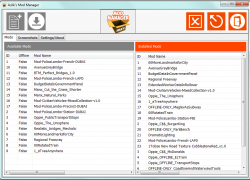
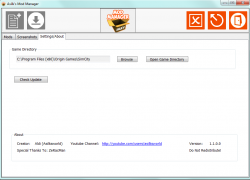
Welcome to my Mod Manager. This tool allows you to easily add and remove mods without the hassle of dragging and dropping many files. The functionality of this tool is fairly limited as of right now, as I am pretty new at programming (I am in high school), but  over time, more and more features will be added.


New Version ( 1.1,0) Released!


What's New in 1.1:

- HUGE Graphical Rework

- Ability to Re size Window
- Added Screenshot Viewer
- Bug Fixes


Update 1.0.8 Includes:

- Ability to Add multiple mods to available mod list (Finally!)

- Ability to drag multiple mods the available mod list

- ID numbers will now scale properly when a mod is removed from the list


For those updating from 1.0.0,

TAKE THESE STEPS:

 
1. Delete all mods currently installed
2. Delete SimcityModManager Folder in Documents Folder
3. Launch Application
4. Re install All Mods


Planned:

.rar support

Mod Downloader

Compatibility Checker

Icons and Pictures (Done)

More Friendly UI (Done)


Here are videos showcasing it:

(1.1.0)

http://youtu.be/ZRluydv8CNs

(1.0.5 Outdated)

http://youtu.be/NpsRtTkPkXs


(1.0.0 Outdated)

http://youtu.be/qY-LLG7ebCU


Subscribe to my Youtube channel! I make SimCity Let's Plays and Mod Reviews!

https://www.youtube.com/user/AsilksWorld


Have Comments or Suggestions?

Post them in the thread here:

https://community.simtropolis.com/topic/62781-asilks-mod-manager-suggestions-and-feedback/


What's New 1.1   View Changelog


Released

  • HUGE Graphical Rework
  • Ability to Re size Window
  • Added Screenshot Viewer
  • Bug Fixes


User Feedback


Recommended Comments

It still doesn't work for me. Everytime I download it, it is only 64kb and an error pops up saying that it can not open file. It's probably something on my end, but I just wanted to check if anyone else has ran into this issue.

Thanks

I also have downloaded this and it will not open, just says error. I have dont have any of the previous versions tho!

Share this comment


Link to comment
Share on other sites


It still doesn't work for me. Everytime I download it, it is only 64kb and an error pops up saying that it can not open file. It's probably something on my end, but I just wanted to check if anyone else has ran into this issue.

Thanks

I also have downloaded this and it will not open, just says error. I have dont have any of the previous versions tho!


A screenshot would be much appreciated!

Share this comment


Link to comment
Share on other sites

too bad to hear u lost interrest , its a great tool..


i just wanna ask if u can make it so that u can choose where to copy the mods instead of the documents folder


i would really like to have the whole package in 1 folder

Share this comment


Link to comment
Share on other sites

my norton anti virus came up with a major warning regarding this download , avoid avoid avoid

Share this comment


Link to comment
Share on other sites

my norton anti virus came up with a major warning regarding this download , avoid avoid avoid

First of all, a file like this would have been taken down near-immediately, it would not be up for this long. Second off, read this:


Can anyone run this? Windows keeps "protecting me" from it, and when I told it to run anyway Norton told me it quarantined the "SONAR.heuristic" virus.

To be honest I've been using Mac for the past 7 years (I'm borrowing my son's new laptop while he is at school) so I'm not sure what to make of this.


Category: Resolved Security Risks
Date & Time,Risk,Activity,Status,Recommended Action,Path - Filename
5/20/2014 9:00:58 AM,High,asilk'smodmanager.exe (SONAR.Heuristic.120) detected by SONAR,Quarantined,Resolved - No Action Required,c:\program files (x86)\asilk'smodmanager.exe

Update: I discovered that I could tell Norton to restore this app from quarantine and ignore it from now on. I hope I don't have a virus.  :)


I assure you it does not have a virus. Happy modding  :)

So this actually is not an a virus.

Share this comment


Link to comment
Share on other sites

Like TheKrush said, make it opensource so every can help a bit on things they think would be create to add or need improvements.

Share this comment


Link to comment
Share on other sites

    I am having the same problem! I have this mod manager set in the same folder that the 'SimCity.exe' is in, but when I right-click on it and 'open as administrator', nothing whatsoever happens! I cannot give a screenshot of nothing happening.

    I think maybe it's not working because EA Play changed the folder destination? I have all my games installed on my external hard drive at 'I:\Program Files (x86)\Electronic Arts\SimCity\SimCity'. If this mod manager is set to open from a specific folder like it did the old way at something like 'I:\Program Files (x86)\Origin Games\SimCity', then that would be why it isn't working anymore. If not, I can't think of any other reason why it's not functional. When I right-click on it to go to 'Properties' and 'Run the Compatibility Troubleshooter', it simply reads:

                                               "An error occurred while loading the troubleshooter.

                                                     An error has occurred. The Troubleshooting wizard can't continue.

                                                     View error Details:

                                                     Package ID: PCWDiagnostic

                                                     Path: Unknown

                                                     Error Code: 0x80070057

                                                     Source: Command Line

                                                     User: My PC Name/ My PC Name

                                                     Context: Restricted"

    To top it all off I can't just go back to using Origin. EA keeps finding new ways to make me very angry. The launcher barely functions. They really should not have forced players to ditch Origin until it was fully functional. Now no one can use Origin at all. When Origin loads, a pop-up opens telling the users to install the EA Play app! 🤬

    If anyone had this problem; but has gotten Asik's Mod Manager to work, please post why, and help all of us out! 🤕

Share this comment


Link to comment
Share on other sites

Sign In or register to comment...

To comment in reply, you must be a community member

Sign In  

Already have an account? Sign in here.

Sign In Now

Create an Account  

Sign up to join our friendly community. It's easy!  

Register a New Account

×

Thank You for the Continued Support!

Simtropolis depends on donations to fund site maintenance costs.
Without your support, we just would not be in our 24th year online!  You really help make this a great community. *:thumb:

But we still need your support to stay online. If you're able to, please consider a donation to help us stay up and running. This helps sustain a platform where we can share our community creations for years to come.

Make a Donation, Get a Gift!

Expand your city with the best from the Simtropolis Exchange.
Make a Donation and get one or all three discs today!

STEX Collections

By way of a "Thank You" gift, we'd like to send you our STEX Collector's DVD. It's some of the best buildings, lots, maps and mods collected for you over the years. Check out the STEX Collections for more info.

Each donation helps keep Simtropolis online, open and free!

Thank you for reading and enjoy the site!

More About STEX Collections