


BaskB
-
Content Count
54 -
Joined
-
Last Visited



-
Sub Buildings Enabler: The better "Larger Footprints"
BaskB replied to boformer's topic in Cities: Skylines Modding - Open Discussion
Humm got pinged this on Reddit and Steam, looks like am going to have to dust off blender and get back into things..... -
csl patch Cities: Skylines "After Dark" Expansion Discussion
BaskB replied to Mr_Maison's topic in Cities: Skylines General Discussion
Airports! Nuff said, here's my £'s -
Broken Mods Inbound (Patch Release today)
BaskB posted a topic in Cities: Skylines Modding - Open Discussion
Patch is coming so Modders be prepped for broken Mods. Players - DONT open savegames your keen on until Mods you have are confirmed fixed (if required) -
Wells by the Sea - #4 - The 2023 Water Incident & the Industrial Boom.
BaskB replied to BaskB's topic in Cities: Skylines City Journals
#4 - The 2023 Water Incident & Boom times and the Industrial Boom. Welcome back to Wells by the Sea. So as we saw, Wells By The Sea was having somewhat of a great boom in growth and the citizens loved the ground Mayor Bask walked upon. However that was all to change in the Year 2023. A planning application made by Bristom International was put in for a local incinerator onsite, now while not an issue in itself, the planning office of Wells By the Sea failed to notice one key issue.... The Incinerator was being placed next to the Fire Departments water tower... Before Mayor Bask had even become aware the issue this happened.... 22k Sick, 6k Evacuated and 700 dead..... Not Mayor Basks finest moment.... None the less the source of the illness was eventually found and dealt with and the people began to come back in. The Trees planted in the International Freight area had now begun to mature and the forestry industry began to thrive in the town. As a result, Commercial Business expanded and soon filled the remaining land at the side of the Town centre causeway. At this point job vacanies were numerous and it was opted to build larger High Density housing in the Dulcote Heights area of Town to try and fill these roles. Sadly the traffic situation here is much worse than what was designed for and as such a compulsory purchase order was made for the field next to causeway and all houses are in process of being knocked down (which is why you see the lone one in the field). A new Interchange/Spur is to be built in this area once the planners can work out a design. Moving on we see here Dulcote Junction which is the primary point for Commercial services to receive freight into the town. This has a direct link with the International Freight area via its own station there and also the new Wells Port which we will see later. Dulcote Junction is also the key station for the railway network with the incoming fast link from the airport, direct link to Upper Wells Centre and now also the Port. It also is the changeover point for the Dulcote loop that plans to service the whole of Dulcote Heights once this expands further Over the bridges above, we arrive in Upper Wells Centre, the "NEW" commercial hub for the town, the area is relatively new but with good commuting links already in place, Mayor Bask holds high hopes for the area. Meanwhile in the South, A new spur was built from the M1 heading Eastwards, with such an extravagent interchange the local citizens initially wondered if Mayor Bask was just spending money for the sake of it.... But all was soon to be revealed.... The pressure at the International Freight Terminal was starting to show and as a result it was felt the town would benefit by providing a new port and Industrial area to supply the commercial needs of the now fledging town. Land demand round here is high and the Industrial Boom has hit Wells By the Sea at full speed. Current overview:- Just some bonus piccies:- The Morning commute at Dulcote Junction is insane... Beginning the Dual lining of the railway back to Upper Wells Centre, the new dock area has been a massive success so far -
Increasing size limit in asset editor?
BaskB replied to foxnine's topic in Cities: Skylines Modding - Open Discussion
Highly interested in the 32x16 plots. Would certainly aid me with my modular distribution centres and airports thats a fact -
Wells by the Sea - #4 - The 2023 Water Incident & the Industrial Boom.
BaskB replied to BaskB's topic in Cities: Skylines City Journals
Progress shot -
Wells by the Sea - #4 - The 2023 Water Incident & the Industrial Boom.
BaskB replied to BaskB's topic in Cities: Skylines City Journals
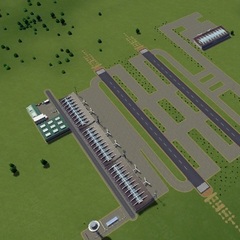
#3 - Bristom Expansion and continued growth Welcome back to Wells by the Sea. So since we last reported in as you can see from the helicopter shot above, Bristom International far exceeded what was initially planned for the airport and due to its excellent links to the M1 into the capital, Freight traffic went through the roof. So much so that the airport approached Mayor Bask about expansion plans including a 4th Runway. These plans were quickly passed and the airport expanded with the additional Cargo Centre area, the gap has been purposely left presently as it's believed DHL/TNT are in talks to fill this area between Runway 3 & 4. You'll also note from the screenshots that the Wellsway was dug up and a new dedicated Terminal road was built from the M1 to feed passengers directly into Terminal 1 and the future planned Terminal 2 (currently with the Architects in design stage). The Railway freight centre was moved to the other side of the M1 at massive cost to the Town, but a small forested area will be planted here to start off a new industrial enterprise. You'll also note above the M2 spur was built purposely to feed the cargo centre so freight traffic would arrive quickly, as old airport road was deemed no longer suitable. If you follow the M2 along to the Fourways interchange where it meets the M1 and extends beyond, currently a small offspur has been built for the now expanding down, but this section of motorway is still much under construction. If you refer back to the overview from #2 you'll note that the junction into Wells Town near the cargo centre has had major improvement works carried out. The bridges heading off the the left below will be to the new planned CBD area once this is approved. And as a result of increased load, the railways also received an upgrade (got to love sunken railways):- New international freight terminal tranfer facility and future forestry area..... Screen 7 attached shows the original village and how much it has grown since And last up for now the current overview:- Taking a break from Asset making over the weekend so will hopefully have a much larger update by next week -
LOD texture works on the asset editor, but not in game.
BaskB replied to LucasK336's topic in Cities: Skylines Modding - Open Discussion
What exactly does it mean to use only area inside 0-1??? I'm reading this in multiple posts but I don't understand what it means. I UV mapped my LOD model but have the same issue as in the OP. EDIT: I think I understand now after some reading. The original tile space of the UV map and not from within any areas that are "tiles" of the original coordinates (0-1)? Ok see attached. I use Blender so am unsure what it is like in other "modelling" programs. But if you see the + shaped cursor on the Texture below, this represents my 0,0 mark on the texture when I export it. Thus as C:S only uses textures in the 0,1 area it will only display textures on my model that are TOP RIGHT of that cursor, anything below will be ignored and "random" textures get applied to model/lod. To resolve I need to move my cursor back to the very bottom left of my texture map by using the cursor location on the right of the screen and setting as 0 X, 0 Y, this happens in blender often by accident (the cursor move) as it operates on a left click of the mouse when I need to use right click readjust my polys on the map. Of course may not be relevant here but is what I've established so far (I'm also new to the whole modelling so please any pro's forgive any terminology I've got wrong) -
What Causes a Broken LOD?
BaskB replied to Mr_Maison's topic in Cities: Skylines Modding - Open Discussion
Glad to see you saw about the lod_a & lod_s needed for lods to work ingame (wierd that they work in asset editor without them but meh). As for the textures on the engine that could be down to the 0,1 quadrant thing, as it draws textures from other sources sometimes if it's not perfect. Which modelling software you using? (I'm a blender user) Other check would be the "broken" color variation ingame, does switching all 4 varients to white resolve the issue? Probably neither of these but just throwing some ideas your way -
Wells by the Sea - #4 - The 2023 Water Incident & the Industrial Boom.
BaskB replied to BaskB's topic in Cities: Skylines City Journals
Will post somemore this weekend, but due to massive demand for its cargo offerings, Bristom International got an upgrade. Passenger numbers have also been large enough that Terminal 2 is currently in the planning stages with the Architects. -
Airport Assets & Scenic Builds
BaskB replied to BaskB's topic in Cities: Skylines Modding - Open Discussion
DHL pack released today (actually overnight but had to hide it due to a prop dissapearing issue). This one has a further reduced LOD model for both buildings that brings them both under the "advised" 200 limit. Applied the LOD update to the KLM pack to reduce the load on people. Thanks Now I've worked out how to do it all properly I'll likely go a similar route with most of my modular stuff as a) it causes less clutter in the workshop, b) Avoids the masses of subscribing needed to do it (and future unsubbing if required) and all essentially for a 5-10 minutes etc if my time (which is negated by the savings in the longer term anyway) -
Modders - Paradox (TotalyMoo) wants your questions/input asap
BaskB replied to BaskB's topic in Cities: Skylines Modding - Open Discussion
If anyones about he's after this pretty urgently -
https://www.reddit.com/r/CitiesSkylinesModding/comments/3axen0/need_your_questions/ Possible Modding panel discussion to be held but he wants some input.
-
Airport Assets & Scenic Builds
BaskB replied to BaskB's topic in Cities: Skylines Modding - Open Discussion
FedEx Pack - updated LOD's Large KLM Hanger - NO plane - Reduced LOD texture Large Bus Station - Reduced LOD texture. Going to release another Modular pack tonight (TNT or DHL am yet to make my mind up) and then am going to sort through my older assets and clean up Tri's/Lods on them all aswell as some of the textures (My Airport light has 1024x1024 also so I really need to stop being lazy with my textures for lods) ***Airport Light updated, was too ashamed to leave it a 1024x1024 for any longer Now is a nice 64x64 *** -
http://steamcommunity.com/sharedfiles/filedetails/?id=453956891&searchtext=Mesh+Info As daft as it sounds subscribe the above MOD. Go into your save, hit Ctrl + M List by Triangles - Remove excessive assets from your subscription (anything over 5000 is generally excessive unless a one off building, source http://www.skylineswiki.com/Asset_Editor). Vehicles work differently so less is better, remember you could have hundreds of these spawned at anytime all of which increase load time/lag. Then list by LOD triangles - Remove bloaty assets, Anything above 200 is regarded as CO as excessive, but ALOT of us asset makers (including myself) are slowly trying to bring our lod counts down now it's realised what impact it has ongame loadtime etc. Textures for LOD should also never be above 128x128 - again something us asset makers are working and I'd encourage you to advise any you see that are massively excessive via the workshop

