


Leaderboard



Popular Content
Showing most liked content on 01/11/2026 in Files
-
4 points
Version 0.9.7
259 Downloads
1. Introduction This resource is a small but hopefully useful project which attempts to recreate ordinances from SimCity 3000 for use in SimCity 4. SimCity 3000 had a very elaborate system of ordinances, complete with exhaustive descriptions, which provided mayors with an important and powerful city management tool. Half of these ordinances did not make it into SimCity 4 however. Thanks to the ".dll era", it is now possible to recreate these old ordinances and this is what this package is all about. As Penultimo from the Tropico series would say "I've got something for you to sign, and no - it's not my raise again!". Unleash the red tape! This pack contains a recreation of Health, Education and Aura and Public Safety ordinances from SimCity 3000. It also contains three “proof of concept” extras, created for test purposes. 2. Installation instructions Please read this section carefully to make sure the new ordinances work for you. Dependencies: Custom Ordinance Exemplar Host DLL (by @Null 45 - whom I'd like to thank for making mods like this possible) Instructions: 1. Download the package 2. Extract contents of the .zip file into "Documents\SimCity 4\Plugins\140-ordinances" 3. Launch the game 4. Open the "City ordinances" budget item to use new options (search the bottom of the ordinance list) 3. Uninstall Before uninstalling, it is strongly recommended that you uncheck all custom ordinances in the cities in which you enabled them and resave the cities first. To uninstall, simply remove the files from your "Documents\SimCity 4\Plugins\140-ordinances". 4. Installing new versions It is strongly recommended that you uncheck old versions of these ordinances in the cities in which you enabled them, resave the cities and delete old ordinance files, however... New ordinance versions will always have new IIDs which means that you can install them right away, without causing a conflict with the previous version of this pack. This enables you to employ the following workflow then: 1. Visit your cities, at your own pace and leisure 2. Uncheck old ordinance versions as you go, until all of them are eventually revoked 3. Delete the previous version of these files All while being able to use updated files along the way. Important! Some ordinances will become available only after certain conditions are met. Consult the readme section for further information on them. -
4 points
Version 0.9.6
238 Downloads
1. Introduction This resource is a small but hopefully useful project which attempts to recreate ordinances from SimCity 3000 for use in SimCity 4. SimCity 3000 had a very elaborate system of ordinances, complete with exhaustive descriptions, which provided mayors with an important and powerful city management tool. Half of these ordinances did not make it into SimCity 4 however. Thanks to the ".dll era", it is now possible to recreate these old ordinances and this is what this package is all about. As Penultimo from the Tropico series would say "I've got something for you to sign, and no - it's not my raise again!". Unleash the red tape! This pack contains a recreation of Transportation ordinances from SimCity 3000. 2. Installation instructions Please read this section carefully to make sure the new ordinances work for you. Dependencies: Custom Ordinance Exemplar Host DLL (by @Null 45 - whom I'd like to thank for making mods like this possible) Instructions: 1. Download the package 2. Extract contents of the .zip file into "Documents\SimCity 4\Plugins\140-ordinances" 3. Launch the game 4. Open the "City ordinances" budget item to use new options (search the bottom of the ordinance list) 3. Uninstall Before uninstalling, it is strongly recommended that you uncheck all custom ordinances in the cities in which you enabled them and resave the cities first. To uninstall, simply remove the files from your "Documents\SimCity 4\Plugins\140-ordinances". Important! Some ordinances will become available only after certain conditions are met. Consult the readme section for further information on them. -
2 points
Version 1.0
2,604 Downloads
IKEA Superstore, by Mattb325. --------------------------------------- IKEA is a world wide homewares brand that specialises in cheap, cheerful and functional design. Apparently, we are all pronouncing it wrong....instead of saying it as "eye-kee-ah", it should be "ee-kay-uh". Who knew? This is based on a real building in Sydney's suburbs. The building is accurate, but the car-park/lot is slightly reduced in size by about 2 tiles to avoid running into the maximum number of items that can be placed in a file. Despite this, it is still a very hefty lot of 18x18. It takes up a lot of real estate, but it provides a lot of jobs (1,472 across all wealth levels) and a lot of city wide benefits. Therefore, it is offered as a reward. Had I made it a simple ploppable with jobs it would actually have negative effects on regional demand for commercial services/commercial offices; whereas the civic jobs provide employment while keeping your CS/CO demand completely in tact. Like 95% of my rewards, this is offered without needing to meet pre-existing conditions and does not over-write any Maxis reward. Because everyone, even a SIM, loves spending a full day getting lost at IKEA, it also provides other city and regional benefits by driving up R$$ and R$$$ demand meaning that you'll enjoy more city growth by placing this reward. --------------------------------------- STATS: Lot Size: 18x18 Plop Cost: §0 Bulldoze Cost: §3,720 Monthly Cost: §0 Wealth: High Demand Created: Jobs§ 502; Jobs§§ 770; Jobs§§§ 200 Demand Satisfied: R§§ 600,000; R§§§ 39,000. Park Effect: N/A Landmark Effect 60 over 24 Mayor Rating Effect 30 over 60 tiles Pollution at Centre: 19 (air) /25 (water) /189 (garbage) Pollution Radius: 3/4/0 Power Consumed: 340 Mwh Water Consumed: 430 Gallons Occupant Groups: Reward; Tourist --------------------------------------- NOTE ABOUT DARK NITE vs MAXIS NITE: Select the appropriate download. This is the MAXIS NITE Version, the darknite version preceeds this file. Files suffixed with 'DN' is for those users with a night-time darkening mod installed. The file suffixed with 'MN' is for users who do not have any such mods installed. If you are unsure whether you have a night-darkening mod installed, then choose the Maxis night version. If you use the dark nite version, you will need a dark nite mod. (http://community.simtropolis.com/files/file/23089-simfox-day-and-nite-modd/) --------------------------------------- DEPENDENCIES: To ensure proper functionality, make sure the following files are in your plugins: *BSC MEGA Props - CP Vol02: (https://www.sc4devotion.com/csxlex/lex_filedesc.php?lotGET=2790) *SG MEGA Props Vol01 (https://www.sc4devotion.com/csxlex/lex_filedesc.php?lotGET=746) *SuperSHK Parking Textures Vol01: (https://community.simtropolis.com/files/file/30934-supershk-parking-textures-vol-1/) --------------------------------------- To install, simply unzip these files into your plugins folder. -
1 point
Version 1.1
43,756 Downloads
INDUSTRIAL REVOLUTION MOD (IRM) Base Pack - Maxis Lots 1 - INTRODUCTION/OVERVIEW What is this mod? The Industrial Revolution Mod (IRM in short) is designed to make playing with industrial lots much more enjoyable. It addresses some of the most annoying shortcomings of Maxis' industrial lots: The lots themselves look boring and repetitive The resulting industrial areas look cluttered and unrealistic Everything mixes wildly - modern and old, high-tech and heavy industry There is no real control - a dirty industry lot might grow right in the middle of a high-tech area and cause the high-tech facilities to dilapidate with its pollution If at least one of these points has always bothered you, then this mod might be something for you. What does this mod offer me? Imagine building a city where... ...industrial areas actually look interesting and vivid ...you can zone for areas filled with old brick factories and smokestacks - or clean, modern facilities ...industry is no longer a necessary evil, but becomes an integral part of your city and adds to its flair Does this sound like a deal? If so, then read on! And make sure you READ THOROUGHLY, because this mod is not recommended for beginners. It is important that you know what you do. There is more in the works, and this is not a mod where you can click "install" and "continue" a few times, and you're set. You should be clear about the way plugins work, and you should feel comfortable with manual file handling. You should know your way around your plugins folder and be able to find things you are looking for. How does the mod work? How does it achieve the changes mentioned above? APPEARANCE The altered appearance of all in-game industry is achieved by a simple remake of all roughly 250 Maxis lots, which have been completely overhauled and spiced up with custom textures, props, and lighting. These new lots will override their Maxis counterparts and make your industrial zones much more interesting to look at! GAMEPLAY Better control and a clear separation between "dirty" and "clean" industry becomes possible through a new zoning logic. Originally, medium-density industrial zones were intended for smaller industrial buildings, whereas high-density zones used to be reserved for bigger facilities. The downside to this was that all types of industry could grow wildly mixed. As a consequence, industrial areas often looked cluttered, and it was nearly impossible to keep "dirty" and "clean" industries from interfering with each other. With this mod in place, the cheaper medium-density zones will be used for I-D (Dirty Industry), which will help you when starting a city. Finally, you will be able to grow large facilities and employ many Sims in your starter towns with low education level without having to fork out precious funds for those expensive dense industrial zones. In contrast, I-HT (High-Tech Industry) will only be able to grow on dense industrial zones. This is in line with the way the game progresses: The better your Sims are educated, the further your city has progressed. Later in game, when your Sims are smart enough to work in I-HT jobs, you will probably have made enough money to afford the more expensive dense industrial zones. And isn't it only logical that laying out plots of land for those picky, demanding high-tech facilities will cost you more than reserving some land for a primitive old factory that will pollute its surroundings anyway? Now what about the third category, I-M (Manufacturing Industry)? There is no free zone type left, so it was not possible to assign I-M to its own zone. This is not really problematic, though, because Manufacturing Industry has a big advantage: On the one hand, it is robust and forgiving enough to grow next to Dirty Industry without dilapidating or getting abandoned. On the other hand, I-M buildings themselves do not pollute their surroundings too heavily, allowing High-Tech Industry to grow right next door without serious problems. So in short, I-M mixes well with both other types of industry. This is why it is distributed over the different zones according to its looks: Old-fashioned I-M brick factories will be restricted to medium density, where they will mix well with any I-D buildings. Modern-looking I-M facilities will be restricted to high density and will integrate seamlessly into any high-tech area. Generic, nondescript structures will be able to grow on zones of both densities. 2 - THE TECH STUFF What does the download contain? This package contains a set of 250 lots and one invisible dummy building that I used for some lots where I split building families. (If the last part of the foregoing sentence doesn't make sense to you, don't worry: simply keep that dummy model file, and everything will be fine.) Can I simply add this mod to a pre-existing city/region? Yes and no. It is possible with some drawbacks, but it is not recommended. The reason for this is that I changed lot sizes.When you add this mod "on the fly" (i.e., when you already have industrial areas), the lots will suddenly extend over adjacent tiles (transport networks, empty terrain, other lots), and the industrial area will look all chaotic and garbled. You will have to bulldoze it and rebuild it anyway. After bulldozing, some tiles will refuse to disappear. You can simply zone over these tiles and de-zone again, this will make them disappear. If you do add this mod and intend to continue playing with your existing industrial areas, I strongly recommend backing up your region before. How to install this mod? Simply unzip the IRM folder and copy it into your plugins folder (or into a sub-folder of your plugins folder). I recommend keeping the folder structure inside the IRM folder. What if I want to de-install this mod? It's pretty much the same as with any other download: Delete all lots pertaining to this mod (in this case, all industrial lots that are based on Maxis buildings!) Save all the cities and exit the game when you're done bulldozing Remove the IRM folder from your plugins Hint: Just to be sure, I recommend moving the IRM folder somewhere else and doing some checks before you delete it permanently. This way, if it turns out you forgot to bulldoze something, you can add it back in temporarily until you're done. Is this mod compatible with the Industrial Jobs Quadrupler by Toroca? Absolutely. I would even recommend using the quadrupler because I enlarged most of the lots to make them look more realistic. Hence, industry will consume a bit more space than it used to. Considering that Maxis gave industrial facilities few jobs to begin with, the Industry Quadrupler is a good compensation. It will allow you to sustain your population without covering endless areas in industry, even with the larger lots. Is this mod compatible with the Colossus Addon Mod (CAM)? No. The CAM contains copies of all Maxis lots that have been assigned to different stages and given a different IID. That's why the IRM lots cannot override the CAM lots. 3 - DEPENDENCIES ...don't we all love them? Of course, it would have been impossible to re-design all these lots so radically without custom props and textures - loads of them, in fact. I still tried to keep dependencies at a reasonable level and use packages that are rather commonplace for any custom content user, especially for players with an interest in industry. Remember that the following dependencies were used for 250 lots (and will stay the same for upcoming stuff!). I have seen single lots with more dependencies, just saying... PROPS BSC Mega Props Jestarr Vol.01 - an old classic; most of you will have this one. BSC Mega Props Jestarr Vol.02 - industrial fans will probably have this. BSC Mega Props Jestarr Vol.03 - industrial fans will probably have this. BSC Mega Props Jestarr Vol.05 - industrial fans will probably have this. BSC Mega Props Jestarr Vol.08 - industrial fans will probably have this. BSC Mega Props SimGoober Vol.01 - the #1 most downloaded prop pack! BSC Mega Props Gascooker Vol.01 - yet another old classic. BSC Mega Props DAE Vol.01 - yet another old classic. BSC Mega Props CP Vol.01 - Cycledogg's first pack, also a classic. TEXTURES BSC Mega Textures Vol.01 - the most widely spread texture pack of them all. BSC Mega Textures Vol.02 - not too exotic, eh? BSC Mega Textures Vol.03 - another rather common one. Rail Yard and Spur Textures Mega-Pak 1 Version 1.02 - ncd's superb textures - especially the rail nuts among you will have this. OPTIONAL I added lamps with custom light cones that will improve the lighting of the lots at night. The lots will look perfectly ok without these light cones, but if you want them, you will have to download this pack: PEG MTP Super Pack 4 - FINAL WORDS I've been working on this mod and off with long breaks, motivation was a serious issue. Making a lot is nice. Making two lots is okay. Making 250 lots is a serious pain in lower body regions; it's not even funny. In total, it took me nearly two years to piece all this together, test it, write the documentation, make screenshots, and all that. For the most part, it was by far more boring and painful grunt work than a pleasant creative task. So much time has passed that by now I'm already dissatisfied with several of the lots. It's about time I released this so I have it off my plate. I'm exhausted, fed up with it, glad it's done with. I hope you guys will like it although it's far from perfect. At least I hope it will be an improvement over the Maxis lots. I have some more nearly finished stuff in store that will be released soon, most notably two IRM addon packs with another ~80 lots in total, plus some filler sets further down the road. These should enable you to take even more control over your industrial areas and make halfways realistic-looking facilities. So make sure you watch the STEX! The next logical step would be to re-lot some popular industrial BATs for seamless integration into this mod, but we'll see how that goes. I would like to thank all the fine people who made the tools, the props, and the textures that I used, as well as the entire SC4 crowd for keeping this game alive, and for having me around. Should you want to share and/or modify this, be my guest - just try not to be a jerk and give credit where credit is due. In case of doubt, just drop me a line via PM here on Simtropolis. Finally, for those annoying people who keep saying things like "Duh, the Lot Editor simply won't cut it these days, you need to make your own BAT" in STEX comments, I have a little dedication, too. T Wrecks, December 2, 2012 -
1 point
Version 2.0.0
573 Downloads
DESCRIPTION This file contains four sets of freight automata, of types commonly seen in use across the UK rail network. The four features are Coal Hoppers (with empty and full variants), Cargowaggons, Box Wagons (with empty and full variants), and 102t tanker wagons. Each type also has a caboose variant with a warning light for night-time running. There are 10 variations of wagon per type, the exception being the cargowaggons, which have 12 variations. All automata have HD textures. Each wagon type will ADD automata, no REPlacements. The cabooses are REPlacements for the Maxis caboose. INSTALLATION Install into the 'Plugins' folder as usual. I would recommend making a folder just for these freight automata, to help keep things organised for future packs. If a freight type has an 'Empty' or 'Full' version, you can use either DAT separately, or use both for more variation. Use only one caboose file at a time. These wagons are also compatible with vanilla Maxis freight wagons. However, If you wish to hide the vanilla Maxis freight wagons, move the included blocker file into the same folder as well. COMPATIBILITY Each set can be used on it's own, for a more consistent rake of wagons, or mixed together in any combination for mixed freight consists. IIDs start at 0xF94C1000 and will also be compatible with vanilla maxis freight wagons, and other freight wagon mods not using the same IIDs. OTHER More trains and progress pics can be found in my workshop: -
1 point
Version 1.0.0
169 Downloads
This download contains a revised version of my 2009 BAT of the same name, which was one of my first SimCity 4 building models then. Although my SFBT teammate voltaic did his best to get the most out of it, there were still a number of shortcomings that could only be eliminated by a fundamental overhaul. In general, when attempting to represent reality in a model, its impression in the game is more important than fidelity to the original and details. Sticking to realism in terms of dimensions and proportions, as well as excessive detail, often lead to visually unsatisfactory results. Accordingly, I have now attempted to achieve a more complex and pleasing result using the simplest means possible. The new models—a row house based on the 2009 model, two additional variants, and a corner house—are characterized by a more richly structured façade and more harmonious proportions (balconies, roof). I have omitted the original side wing in the backyard in order to allow the buildings to be constructed on 1x1 lots. Dependencies: SFBT Essentials, BSC Common Dependencies Pack, BSC BAT Props BLS Floral Vol01, Nams Props Pack Vol 2, JENX-Porkie Expanded Porkie Props Please see the enclosed ReadMe file for further details! -
1 point
Version 1.0.0
470 Downloads
Al-Shati Elementary Schools B and C (for boys and girls respectively, as far as I know) are typical United Nations-built school buildings from al-Shati (Beach) Refugee Camp, Gaza City. This is a simplified model of both of them as they appeared prior to 2023. Murals on the walls are primarily taken from UNRWA's mural project. I've barely touched BAT4Max over the past couple of months and am not sure when I'll get back to it so I'm just uploading this by itself "as is". Additional civic buildings may or may not follow. Stats from PIM-X. Size: 6x4 tiles Capacity: 4200 students Demand created: 110 R§, 73 R§§ DarkNite only, sorry -
1 point
Version 1.0
1,009 Downloads
SELAMAT HARI KEMERDEKAAN, INDONESIA! Java, lying between Sumatra and Bali, is a volcano-dotted island that’s at the geographic and economic center of Indonesia, and home to more than half its people. Java’s largest city is modern, sprawling Jakarta, the nation’s capital. It’s home to the expansive National Museum, an old town (Kota Tua) with Dutch colonial buildings, as well as upscale hotels and shopping malls. Bali is an Indonesian island known for its forested volcanic mountains, iconic rice paddies, beaches and coral reefs. The island is home to religious sites such as cliffside Uluwatu Temple. To the south, the beachside city of Kuta has lively bars, while Seminyak, Sanur and Nusa Dua are popular resort towns. The island is also known for its yoga and meditation retreats. IMPORTANT NOTE (i suppose): The map is turned sideways (west = north) due to the map being too long to fit the original direciton while also keeping the original size. I will probaly get around to making a halfsize, true orientation map if requestred SC4MAPPER required to render file into game ENJOY! and happy independence day! -
1 point
Version 1.0.0
204 Downloads
This Jersey island 5x3 large tile region is to scale at 252 km². Two versions are available to download: The SC4M file requires SC4 Mapper to set up. The png/config file for if you have a Mac or have preference for the ingame region import function. This version of the region requires downloading High Elevation Import Mods w Erosion Control Parameters and using "Mallow's Original 2500m.dat" file. Installation instructions are listed below. Note: The png/config will render somewhat different than the SC4M version. The first region screen preview shown here is the sc4m version with the Appalachian Terrain Mod, and the last preview is the png/config version with no mods. Region Installation Instructions for the png config version 1. Navigate to your SimCity "Regions" folder on your computer. 2. Create a new folder for the region in this folder and move the grayscale map png file and config file from this download into the folder. IMPORTANT: Follow the next few instructions so your region doesn't render underwater 3. Download High Elevation Import Mods w Erosion Control Parameters: https://community.simtropolis.com/files/file/16790-high-elevation-import-mods-w-erosion-control-parameters/ 4. Take only "Mallow's Original 2500m.dat" from the download and place it in your "Plugins" folders. 5. If you have any terrain mods such as the Columbus Terrain Mod, Middle European Climate Mod, or Appalachian Terrain Mod, etc. or related files you will probably have to temporarily remove them from the "Plugins" folder for the region to install correctly. 6. Launch SimCity 4 and load the new region folder you made. The region is flat but the tile layout is visible. 7. Hold the Ctrl+Shift+Alt+R buttons together which will display a file navigator in the upper left. 8. Navigate to the png file and select it. The game will show a screen as if it's loading a city tile. 9. Be patient and wait for the game to render the entire new region one tile at a time. Don not interrupt or switch away from this until it is completed and the game returns to region view. 10. Your region is done and ready to play! 11. After exiting the game, remember to remove "Mallow's Original 2500m.dat" and replace any Terrain mods in your "Plugins" you may have temporarily removed. A requested region for Reddit user lukomorya Have fun mayors! Click here for a spreadsheet of all my SimCity 4 regions! -
1 point
-
1 point
Version 1
325 Downloads
Disclaimer: This file has been uploaded on behalf of Sarsey because their original upload somehow got lost. Sarsey uploaded this file to Dropbox instead of the STEX but the file disappeared from there. Please see this thread for additional info: https://community.simtropolis.com/forums/topic/71483-tram-in-road-alternative-textures-for-NAM-euro/ Description: This plugin will alter both the Tram-in-Street and Tram-in-Road textures. As for the Tram-in-Road, the white pavement part will be replaced by the same cobblestone texture used by the SAM 8 Cobblestone Street, and as for the Tram-in-Street, the cobblestone texture will be replaced by the default Maxis street. Furthermore, this plugin also contains two extra textures for the Lot Editor. This will affect some lots, such as the SFBT Tram-in-Road stop and Tram-in-Street stop to make the textures match. Dependencies: Network Addon Mod: https://community.simtropolis.com/files/file/26793-network-addon-mod-NAM-cross-platform/ How to use: This plugin contains three files, please use those that you need and remove the others. TiRalternative.dat: will alter the textures of the Tram-in-Road. zzzz_StreetGLRalternative: will alter the textures of the Tram-in-Street. SFBT_TramRoadStreet_Stop.dat: contains the additional LE textures. Will only affect lots, no networks. How to install: To install, just copy/move the files you want to use into your Plugins folder. To uninstall, just remove them. The textures will immediately adapt. Important compatibility note: This plugin contains textures with the same TGI as some content of the Network Addon Mod (NAM). Thus, it overrides NAM content and must load after it or else it won't work. -
1 point
Version 1.0.0
1,074 Downloads
Do you remember a little, "niche" game that went by the name "Stunt Island"? I do! Back in the 90s "Stunt Island" was a favorite hangout for stunt pilots, directors, film-editors and all the other adrenaline junkies from all over. This region is a rendition of the original, titular island and the game of my childhood! The original game has been designed by Adrian Stephens and Ronald J. Fortier and published by "Walt Disney Computer Software". (Mickey Mouse, please don't sue my pants off...) Here's the link to the original game on GOG: https://www.gog.com/game/stunt_island ____________________________________________________ YOUR ATTENTION PLEASE! SC4 retains the original Mapper coloring of the terrain. You will have to open and save each region tile to have them rendered correctly. Please keep that in mind before you hit the "Report problem" button. K? If you don't like the region composition, feel free to open the "SC4 Mapper 2013" and segregate and rearrange tiles. (Mount Chilliad mystery = confirmed). ____________________________________________________ AUTHOR'S NOTES: There are a few things that should be mentioned, so here goes... 1. If you would like to follow the "real-life" urban layout of the original Stunt Island, here is a resource to help you out: https://fabiensanglard.net/stunt_island/ (scroll down, about 3/4 way down for the map) 2. The mountain, canyon and overall island contours are 99% accurate. The elevations and slopes are not. There is a very simple reason for that. "Stunt Island" is an early 90's game, so the in-game topographic features have been rather bizarre compared to today's standards. Therefore, mountain ranges have been redone from scratch. Otherwise, they'd just look uninteresting and goofy in SC4. A 3700m high pentahedron with a perfectly smooth 66 degree slope? Good luck with that... 3. The island is completely BARREN. No vegetation at all. First of all, from what I see, most of the people prefer to plant the vegetation on their own. I do. It is quite possible you would not like my forest design and would wipe it out altogether. I believe that imposing certain compositional solutions onto others is, generally, mutually disappointing. What is more, I may be using trees that you do not have or lack dependencies for. If you are familiar with the "Tower of Babel" story, you probably know how much it hurts. -
1 point
Version 1.0.0
897 Downloads
I thought about a winter holidays gift for this great community and here it is for you the TRAM of Milan, the historic "Carrello 1500", known by the citizens of Milan as "Il ventotto", presented in its restored original double color livery yellow-Milan / white-cream. I made a re-skin of the most suitable tram model that I could find and that is a content of the SFBT's tram museum, a SimForum BAT Team production, created by Andreas, ArkenbergeJoe, GoaSkin, Mathe Man, Swamper77 and vester_DK, and that you can find here: https://community.simtropolis.com/files/file/14533-sfbt-tram-museum/ https://www.sc4devotion.com/forums/index.php?topic=13468.0 http://www.simcityplaza.de http://www.simforum.de ------------------------------------------------------------------------------------------------------------------------ This Upload comes with two files: - One is a TRAM for both GLR and ElRail networks (even if "Il Ventotto" fits better ground-based networks). - the other file is to use with the SFBT's Tram Museum, in substitution of the original Tram. INSTALLATION instructions: - If you wish to have "Il Ventotto" running around in your GLR networks, please download the file named "TRAM ATM Milano-Carrello 1501-Il Ventotto (GLR Replace).dat" and put it into your plugins folder. This first plugin can not be used with other files that change the in-game original El Rail Train. by the other hand - if you wish to have "Il Ventotto" spawned by the SFBT's Tram Museum, please download the file named "TRAM ATM Milano-Carrello 1501-Il Ventotto (X SFBT StraBaMuseum).dat" and substitute the original SFBT's file named "SFBT_StraBaMuseum_UI_Automata.dat" eventually present in your plugins folder. This second plugin can be used with the in-game original El Rail Train or with other files that change the in-game original El Rail Train. ------------------------------------------------------------------------------------------------------------------------- You can find more informations about "Il Ventotto" here: https://en.wikipedia.org/wiki/ATM_Class_1500 https://www.atm.it/it/IlGruppo/LaStoria/Pagine/ChiEravamo.aspx https://it.wikipedia.org/wiki/ATM_(Milano) https://en.wikipedia.org/wiki/Azienda_Trasporti_Milanesi ------------------------------------------------------------------------------------------------------------------------- Muttley -
1 point
Version 1.0
1,119 Downloads
Special request of @AsimPika3172 This map is at a scale of 1:10, and was pretty hard to make It is also very big in area, 25 x 25 large cities, 100 x 100 kilometers Borneo, a giant, rugged island in Southeast Asia’s Malay Archipelago, is shared by the Malaysian states of Sabah and Sarawak, Indonesian Kalimantan and the tiny nation of Brunei. It’s known for its beaches and ancient, biodiverse rainforest, home to wildlife including orangutans and clouded leopards. In Sabah is 4,095m-tall Mount Kinabalu, the island’s highest peak, and, offshore, the famed dive site Sipadan Island. -
1 point
Version 1.0
2,030 Downloads
The Berlin Palace (German: Berliner Schloss or Stadtschloss) is a building in the centre of Berlin, located on the Museum Island at Schlossplatz, opposite the Lustgarten park. It was a royal and imperial palace and served as the winter residence of the Electors of Brandenburg, the Kings of Prussia and the German Emperors. The palace was heavily damaged by Allied bombing in World War II. Although it could have been repaired, the palace was demolished in 1950 by the German Democratic Republic authorities, despite criticism. The palace is currently being rebuilt, with completion expected in 2018. The reconstructed palace will be the seat of the Humboldt Forum, a museum for world culture which is a successor museum of the Ancient Prussian Art Chamber, which was also located in the Berlin Palace. The Humboldt Forum has been described as the German equivalent of the British Museum. Menu position: Landmarks Lot size: 8 x 13 Plop cost: 70,000 Bulldoze cost: 3,000 Monthly cost: 1,000 Dependences: None -
1 point
Version 1.0
5,988 Downloads
Midtown theater is theater in New York City. It is built in Art Deco style, common for that period of time. It had ups and downs in its history, but luckily still stands on Broadway between west 99th and west 100th street. It is also known as Metro Theater. - Modding and Lot done by anotn - This upload contains two growable versions: one with HVAC and one without HVAC on the roof - Both lots are 1x2 tiles and provide 36 CS$$ jobs - Dependency for DarkNite version is SimFox Day and Nite Modd Visit Vlasky's Hell's Kitchen for news and support -
1 point
Version 1.1
16,530 Downloads
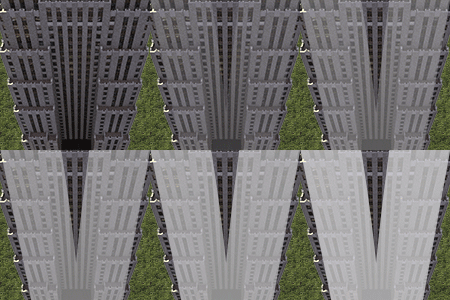
This is a Dutch themed prop pack. About 100 props, including colour variations and diagonals. You can give your lots or modds a Dutch theme with these. Various stuff like trash cans, paid-parking machines, glass recycle containers and phone booths. I guess the pictures speak for themselves. I intended them to be used in shopping centres, parks, plaza's, parkings, highways, roads, street-modds, busstops, bicycle-paths, rest-area's or residential-lots. Maybe you will even find a different use for them. All models are made by me, and all are in HD. Only a couple of decals are from the internet. Dependencies: None, this is a proppack and can be used as a dependency itself. Installation: Just copy the Was_NL_Props_Vol01.dat file to your plugins folder. For uninstalling, just delete the file again. This file is dorment in your plugins folder unless you explicitly start using it, by modding or lotting. Feel free to make lots or modds with these and upload your work. But there is no need to actually include this file, just list it as a dependency. Well, if anything is wrong with the files in the upload, just leave a comment here or PM me. For more info on my stuff you can also visit here: http://sc4devotion.c...p?topic=14229.0 *** version 1.1 has zoom 3 errors fixed. These errors affected 7 props *** Enjoy!






-
Home
-
Activity
-
Forums
-
ST Exchange
-
City Journals
-
Gallery
-
Omnibus
- Clubs
-
Restoration
-
SimTopical
- STEX Collections

Thank You for the Continued Support!
Simtropolis depends on donations to fund site maintenance costs.
Without your support, we just would not be in our 24th year online! You really help make this a great community. 
But we still need your support to stay online. If you're able to, please consider a donation to help us stay up and running. This helps sustain a platform where we can share our community creations for years to come.
Expand your city with the best from the Simtropolis Exchange.
Make a Donation and get one or all three discs today!

By way of a "Thank You" gift, we'd like to send you our STEX Collector's DVD. It's some of the best buildings, lots, maps and mods collected for you over the years. Check out the STEX Collections for more info.
Each donation helps keep Simtropolis online, open and free!
Thank you for reading and enjoy the site!