

Jump to content

2 Screenshots

About This File

SC4 Terrain Extensions is a DLL plugin for SimCity 4 that adds in-game terrain editing and visualization tools. It lets you flatten terrain, create constant-grade paths, build bridge approaches, preview terrain changes, save and restore terrain snapshots (experimental), and display contour and slope overlays while working in a city.

The plugin is aimed at players who do detailed terrain prep for roads, rails, bridges, canals, waterfronts, slopes, sunken networks, and city-detailing scenes. It is especially useful for diagonal work: the flatten tool includes a line-mask mode for diagonal cuts and ramps, while the constant-grade tool can create straight sloped paths between two dragged points.

The GitHub release v0.1.0 with SHA256 checksums is available at: https://github.com/caspervg/sc4-terrain-extensions/releases/tag/v0.1.0

Main features

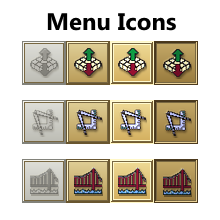
  • In-game terrain menu buttons for Flatten, Constant Grade, and Bridge Approach tools
  • Interactive drag-based terrain editing with live previews
  • Diagonal and fractional flattening using line-mask mode
  • Constant-grade paths for smooth ramps, roads, rails, canals, and terrain cuts
  • Rectangle flattening for more precise terrain leveling
  • Flatten modes for reference average, delta, explicit height, selected-area average, minimum, and maximum
  • Bridge Approach tool for grading one or both ends of a bridge span, with adjustable bridge height, maximum grade, approach side, and approach width
  • Terrain snapshot panel opened with the terrainsnap cheat (experimental). Allows to save, preview, restore, delete, and region-restore terrain snapshots
  • Contour overlay with configurable interval, opacity, thickness, and major-line behavior
  • Slope heatmap overlay with configurable slope mode, opacity, minimum grade, and color thresholds

Dependency

SC4 Terrain Extensions requires SC4RenderServices v0.6.2 or newer, which can be found at the GitHub link or from the STEX:


Usage instructions

Open a city and use the new terrain menu buttons. The instructions below might seem daunting at first but once you get used to it it becomes a blast to be able to detail terrain so accurately!

  • Flatten
  • Constant Grade
  • Bridge Approach

Flatten tool:

  • Drag a rectangle to flatten an area.
  • Press D to toggle between rectangle mode and diagonal/fractional angle mode.
  • Press Tab or Shift+Tab to cycle height modes.
  • In reference mode, press H to pick or repick the source tile.
  • Use Alt+Scroll to adjust explicit height or delta height.
  • Use Shift+Scroll to adjust line-mask thickness.
  • Release the mouse to apply the preview.
  • Press Esc to cancel.

Constant Grade tool:

  • Drag from the start tile to the end tile to create a straight sloped path.
  • Drag sideways to widen the affected path.
  • Use Alt+Scroll to adjust the target grade from downhill to uphill.
  • Use Ctrl+Scroll to toggle side smoothing.
  • Release the mouse to apply the grade.
  • Press Esc to cancel.

Bridge Approach tool:

  • Drag along the bridge direction to set the bridge span.
  • Drag sideways to set the approach width.
  • Use Alt+Scroll to adjust bridge height.
  • Use Shift+Scroll to adjust maximum grade.
  • Use Ctrl+Scroll to cycle approach side: both, start, end, or none.
  • Release the mouse to place the approaches.
  • Press Esc to cancel.


Cheat commands are also available:

  • earthbender
  • bridgebuilder
  • terrainsnap (experimental)
  • contour
  • slope (experimental)


Project page:
https://github.com/caspervg/sc4-terrain-extensions

System Requirements

  • SimCity 4 version 1.1.641.x
  • Windows 10 or later
  • SC4RenderServices v0.6.2 or newer
  • Microsoft Visual C++ 2015-2022 Redistributable x86
  • DirectX/hardware rendering mode recommended for overlay previews, contours, and slope heatmaps

Installation

  1. Close SimCity 4.
  2. Install SC4RenderServices first.
  3. Run the included SC4 Terrain Extensions installer.
  4. Select your SimCity 4 installation folder.
  5. Select your SimCity 4 Plugins folder.
  6. Let the installer verify the SC4RenderServices dependency.
  7. Start SimCity 4 and load a city.
  8. Open the Terrain menu and use the new terrain tools.

The installer places SC4TerrainExtensions.dll and SC4TerrainExtensions.dat in your Plugins folder. It also installs README.txt and the uninstaller under Documents\SimCity 4\SC4TerrainExtensions.

  • Like 25
  • Yes 1
  • Thanks 4


User Feedback

Recommended Comments

Oh my gosh, another game changer! Hope it will work with patched WIndows 7 too. Looks amazing, I'll write a review after trying it out!

Share this comment


Link to comment
Share on other sites

Great work.  I could not test it because if some of you are wondering, it does not work on windows 8.1. The game refuse to launch.  I know it is written in the description so this not a negative comment, just a heads up for those with old system like mine. 

Share this comment


Link to comment
Share on other sites

Wow!! what a great mod. Thanks!

For those who couldn't get it to work, it requires god mode in mayor mode mod.

Share this comment


Link to comment
Share on other sites

First off, very impressive tool, didn't think this was even possible.

I encountered an issue while using it: my game would instantly close when I Alt+Tab, never happened to me before and as soon as I uninstalled it the issue was resolved.

Share this comment


Link to comment
Share on other sites
51 minutes ago, Lokiness said:

First off, very impressive tool, didn't think this was even possible.

I encountered an issue while using it: my game would instantly close when I Alt+Tab, never happened to me before and as soon as I uninstalled it the issue was resolved.

If you're running into crashes, try:

Quote

For people suffering from crashes, it's advisable to install SC4 Graphics Options DLL and to ensure dgVoodoo2 is properly installed. For most configurations this helps a ton!


Share this comment


Link to comment
Share on other sites
57 minutes ago, nos.17 said:

If you're running into crashes, try:


Thanks for answering :)
I'm already running SC4 Graphics Options and dgVoodoo2 is properly installed (shown when launching the game).

It's not a "classic" crash when it happens, as the screen doesn't freeze, PC fans keeps their normal speed, just the game closing without making any fuss.

Share this comment


Link to comment
Share on other sites
46 minutes ago, Lokiness said:

Thanks for answering :)
I'm already running SC4 Graphics Options and dgVoodoo2 is properly installed (shown when launching the game).

It's not a "classic" crash when it happens, as the screen doesn't freeze, PC fans keeps their normal speed, just the game closing without making any fuss.

Yep, that's generally what a SC4 CTD entails. Post the contents of your  SC4TerrainExtensions.log file here. Also tagging @CasperVg as STEX authors don't get notifications for new comments. :/

Share this comment


Link to comment
Share on other sites
15 minutes ago, nos.17 said:

Also tagging @CasperVg as STEX authors don't get notifications for new comments. :/

Oh? When did this quit working?

CasperVg is Following this STEX entry so they should get beeped for every new comment. I do as a follower and I'm just a random voyeur in this case. *:P 

  • Like 2

Share this comment


Link to comment
Share on other sites
3 hours ago, nos.17 said:

Yep, that's generally what a SC4 CTD entails. Post the contents of your  SC4TerrainExtensions.log file here. Also tagging @CasperVg as STEX authors don't get notifications for new comments. :/

I didn't find such log anywhere :(
Looked in Plugins/SC4TerrainExtensions, Plugins/SC4RenderServices, Plugins/ and Plugins/150-mods/caspervg.sc4-terrain-extension-dll.0.1.0.sc4pac
Crash happened exactly the same way, the plugin works perfectly as long as I don't Alt+Tab.

Share this comment


Link to comment
Share on other sites

@Lokiness I use Everything. With it sorted by the date timestamp any lost recently updated files show up at the top of the list so you don't have to hunt them down.

Share this comment


Link to comment
Share on other sites
6 hours ago, CorinaMarie said:

@Lokiness I use Everything. With it sorted by the date timestamp any lost recently updated files show up at the top of the list so you don't have to hunt them down.

Well that tool found the log about 100 times faster the Windows search would've, thank you for that gem !

SC4TerrainExtensions.log

  • Like 2

Share this comment


Link to comment
Share on other sites
2 hours ago, Lokiness said:

Well that tool found the log about 100 times faster the Windows search would've, thank you for that gem !

SC4TerrainExtensions.log

@Lokiness Can you also post your SC4RenderServices.log? All the lines below in your log make me suspicious that something is still incorrectly configured with your SC4Graphics/dgVoodoo2

[2026-06-28 05:07:52.205] [SC4TerrainExtensions] [warning] DrawOverlayCallback_: AcquireD3DInterfaces failed, skipping overlay draw
[2026-06-28 05:07:52.238] [SC4TerrainExtensions] [warning] DrawOverlayCallback_: AcquireD3DInterfaces failed, skipping overlay draw
[2026-06-28 05:07:52.272] [SC4TerrainExtensions] [warning] DrawOverlayCallback_: AcquireD3DInterfaces failed, skipping overlay draw

Share this comment


Link to comment
Share on other sites

@CasperVg Hello *:)
After I tried running RenderServices alone, without TerrainExtensions, it still crashed, so it seems it's the actual culprit as you suspect.

Here's the SC4RenderServices.log

SC4RenderServices.log

Share this comment


Link to comment
Share on other sites

10/10, having its own UI button, ie SC4 modern camera ,or a menu, ie Plop and Paint, for tools and contour lines toggle would bring this to 11/10. 

Share this comment


Link to comment
Share on other sites

Sign In or register to comment...

To comment in reply, you must be a community member

Sign In  

Already have an account? Sign in here.

Sign In Now

Create an Account  

Sign up to join our friendly community. It's easy!  

Register a New Account

×

Thank You for the Continued Support!

Simtropolis depends on donations to fund site maintenance costs.
Without your support, we just would not be in our 24th year online!  You really help make this a great community. *:thumb:

But we still need your support to stay online. If you're able to, please consider a donation to help us stay up and running. This helps sustain a platform where we can share our community creations for years to come.

Make a Donation, Get a Gift!

Expand your city with the best from the Simtropolis Exchange.
Make a Donation and get one or all three discs today!

STEX Collections

By way of a "Thank You" gift, we'd like to send you our STEX Collector's DVD. It's some of the best buildings, lots, maps and mods collected for you over the years. Check out the STEX Collections for more info.

Each donation helps keep Simtropolis online, open and free!

Thank you for reading and enjoy the site!

More About STEX Collections

