


Jump to content

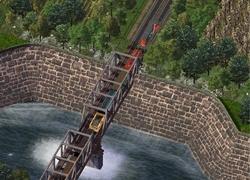
1 Screenshot

About This File

This set functions like V2 (requires use of the "setsealevel" cheat) but is different (and better) due to the following features:


1. The use of prop family IDs for the ortho_1x and diag_1x lots to avoid the repeating texture problem when building long stretches.

2. Resized prop exemplars which allow mayor-mode flora to be placed on the ground (grass) section of the diag and ortho-to-diag pieces.

3. A new texture.


All the details, list of lots, how to use, etc. ... are in the readme file. Please read.

1. Lots are located in your Landmark Menu near or at the bottom.

2. All lots have minimal Landmark and Park effect.

3. Plop Cost = $1, Monthly Budget Amount = $1. (A super deal from Walmart)


There are no dependencies.


For those who want to avoid using the "setsealevel" cheat so you don't have to rebuild your bridges and tunnels,

I've posted an "how to" in the forums at:

https://community.simtropolis.com/forums/topic/31448-js-seawalls-v2/


If you have any difficulties, PM me. (Or post in the forums)

- JS


  • Like 13
  • Thanks 2


User Feedback

Create an account or Sign In to leave a review

You need to be a member in order to leave a review

Sign In  

Already have an account? Sign in here.

Sign In Now

Create an Account  

Sign up to join our friendly community. It's easy!  

Register a New Account


CorinaMarie

   2 of 2 members found this review helpful 2 / 2 members

I've installed your seawalls and have been playing around with them in the game. They are absolutely wonderful. I really, really like the olde world look of the stones (instead of more modern concrete).

Btw, you can make a separate copy of the Terrain Properties exemplar, change the SeaLevel (property 0x48CD7B21) in it, and swap that one in or out of plugins as needed before loading the game.

This prevents tunnels and bridges from being destroyed while allowing placement of the seawalls. I plop the road stubs along the water's edge first as you suggest, save then quit, add in the Terrain Properties with SeaLevel at 220, and then load the game for placing all the Seawalls. Once placed and saved, the 220 meter version can be removed from plugins to bring the water back to normal height.

  • Like 2

Share this review


Link to review
Raymond7cn

   1 of 1 member found this review helpful 1 / 1 member

Brilliant work!*:thumb:

  • Like 2
  • Yes 1

Share this review


Link to review
×

Thank You for the Continued Support!

Simtropolis depends on donations to fund site maintenance costs.
Without your support, we just would not be in our 24th year online!  You really help make this a great community. *:thumb:

But we still need your support to stay online. If you're able to, please consider a donation to help us stay up and running. This helps sustain a platform where we can share our community creations for years to come.

Make a Donation, Get a Gift!

Expand your city with the best from the Simtropolis Exchange.
Make a Donation and get one or all three discs today!

STEX Collections

By way of a "Thank You" gift, we'd like to send you our STEX Collector's DVD. It's some of the best buildings, lots, maps and mods collected for you over the years. Check out the STEX Collections for more info.

Each donation helps keep Simtropolis online, open and free!

Thank you for reading and enjoy the site!

More About STEX Collections
