

Jump to content

Region of Texas  1.0

   (7 Reviews)
Sign In to follow this  

1 Screenshot

About This File

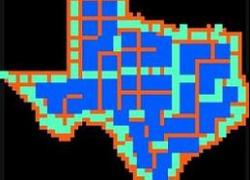
Here is the region Texas.  It's just the config.bmp file 64 x 62 pixels in the shape of the state of Texas!  and the region.ini file (you can change the name in the .ini file to whatever you want).  It's huge, so lots of empty terrain to build on!!  Enjoy!!


User Feedback

Recommended Comments

Feel free to edit the city layout in the config.bmp file if you know how. If anyone knows of a good grayscale accurate jpeg of the topography of texas, let me know!! Keep in mind also, that the bigger the config.bmp is, the longer it takes to import a jpeg into it, tho with this one it's not processing all the cities of a full 64x62 pixel bmp so it won't take as long as a full 64x62 bmp. But it's still gonna take a while....

Share this comment


Link to comment
Share on other sites
Yeah, the terrain is totally undeveloped. You could place a small coast using the small cities along the edge; or you could even edit the config.bmp and put the Gulf of Mexico in there if you wanted. Or maybe the Rio Grand?

Share this comment


Link to comment
Share on other sites
great job - this thing looks huge!!! using i made a quick greyscale, but i don't know if it will work for what you need. look: http://img144.imageshack.us/img144/7236/txgrey7yq.jpg

Share this comment


Link to comment
Share on other sites
Excellent & if the grayscale made by sanantonio works well include a link to it in the decscription because soon people are going to be asking about it.

Share this comment


Link to comment
Share on other sites
Expect this CJ sometime soon from someone: New Small Texas Republic! I suppose it would be rather easy to make a config.bmp file shaped like Wyoming or Colorado...

Share this comment


Link to comment
Share on other sites
Or Utah for that matter... Great map man I definately will use this,( that is if i can figure out how) ~No I'm just joking!~ 10/10

Share this comment


Link to comment
Share on other sites
thanks for the compliments! i haven't had a chance yet to import that grayscale that i said i would; i got distracted working on another state. will let you know how it goes tho when i do get around to it.

Share this comment


Link to comment
Share on other sites
great! 5/5 can you make the region maryland? with small cities bordering the outside and large cities inside?

Share this comment


Link to comment
Share on other sites

Sign In or register to comment...

To comment in reply, you must be a community member

Sign In  

Already have an account? Sign in here.

Sign In Now

Create an Account  

Sign up to join our friendly community. It's easy!  

Register a New Account

  • Recently Browsing   0 members

    No registered users viewing this page.

×

Thank You for the Continued Support!

Simtropolis depends on donations to fund site maintenance costs.
Without your support, we just would not be in our 24th year online!  You really help make this a great community. *:thumb:

But we still need your support to stay online. If you're able to, please consider a donation to help us stay up and running. This helps sustain a platform where we can share our community creations for years to come.

Make a Donation, Get a Gift!

Expand your city with the best from the Simtropolis Exchange.
Make a Donation and get one or all three discs today!

STEX Collections

By way of a "Thank You" gift, we'd like to send you our STEX Collector's DVD. It's some of the best buildings, lots, maps and mods collected for you over the years. Check out the STEX Collections for more info.

Each donation helps keep Simtropolis online, open and free!

Thank you for reading and enjoy the site!

More About STEX Collections