

Jump to content

1 Screenshot

About This File

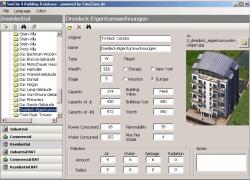
SC4Tool (English) features a collection of useful tools both for BAT and lot developers and SimCity 4 players. It was started as a database for all Maxis growables, and since then grew to its current shape, which is still under development. More features, such as editing lot properties like name, plop cost or pollution values, will be added in later versions. (German version shown in screenshot)

  • Like 15
  • Yes 1
  • Thanks 2


User Feedback

Recommended Comments

[quote name='laziale07' timestamp='1309780637']
I can't open :(
[/quote]


Program works just fine, after install right click on the .exe file, click on properties--> compatibility --> Disable Visual Themes, desktop composition and display scaling on high DPI settings. Check compatibility under Windows XP Service pack 2. Thats all you need to do
  • Like 2

Share this comment


Link to comment
Share on other sites
I had this great tool working just fine on Vista but
after the latest windows update it just hangs when I
try to select the TE Editor. Damn Microsoft garbage.
Any fix in the works ?
  • Confused 1

Share this comment


Link to comment
Share on other sites
Just to let you know that I found a newer version of the program that seems to work fine under Windows 7 (I use 64-bit version). It is version 2.2.7a from 2009. You can find it here: [url="http://kurier.simcityplaza.de/details.php?file=315"]http://kurier.simcityplaza.de/details.php?file=315[/url]
You might also want to download the separate installation file for the Maxis buildings screenshots from the same page. You DON't need the Microsoft .NET Framework 1.1 in Windows 7.

Now do the following to get it running under Windows 7:

- Run the SC4Tool installer.
- Run the SC4Tool Images installer (optional, for the screenshots of the Maxis buildings). The files should be extracted to the \images
subfolder of the SC4Tool installation folder.
- Now go to SC4Tool shortcut, right-click on it, click on Properties and open the Compatibility tab.
- Tick the box "Run this program in compatibility mode for:" and select "Windows XP (Service Pack 3)" from the drop-down box.
- Under Settings, tick the following boxes:
- "Disable visual themes"
- "Disable desktop composition" (otherwise opening files from within the program is very slow)
- "Disable display scaling on high DPI settings" (optional, if you use large-scale font sizes in Windows)
- Click Apply and OK.

That should do the trick and let the program run smoothly. :-)

It might be a good idea to replace the program with the newer version here too.
  • Like 5

Share this comment


Link to comment
Share on other sites

is this the same thing that lets you edit the properties of in game things? like the subway station to increase capacity and such?

Share this comment


Link to comment
Share on other sites

Hi, I can't for the life of me get the Maxis buildings screenshots. The readme file is of absolutely no use. 

Share this comment


Link to comment
Share on other sites

Sign In or register to comment...

To comment in reply, you must be a community member

Sign In  

Already have an account? Sign in here.

Sign In Now

Create an Account  

Sign up to join our friendly community. It's easy!  

Register a New Account

×

Thank You for the Continued Support!

Simtropolis depends on donations to fund site maintenance costs.
Without your support, we just would not be in our 24th year online!  You really help make this a great community. *:thumb:

But we still need your support to stay online. If you're able to, please consider a donation to help us stay up and running. This helps sustain a platform where we can share our community creations for years to come.

Make a Donation, Get a Gift!

Expand your city with the best from the Simtropolis Exchange.
Make a Donation and get one or all three discs today!

STEX Collections

By way of a "Thank You" gift, we'd like to send you our STEX Collector's DVD. It's some of the best buildings, lots, maps and mods collected for you over the years. Check out the STEX Collections for more info.

Each donation helps keep Simtropolis online, open and free!

Thank you for reading and enjoy the site!

More About STEX Collections


