

 Supported


About This File

A DLL plugin that adds various enhancements to the building query tool and query dialog.
For DLL developers, it also provides services that can be used to add more building query values and/or customize the building and network tool tips.
Shift + Click Object Copying
Some objects can be copied by holding down the shift key and clicking on them with the query tool.
Buildings
Clicking a building will activate the Place Lot tool with the building's lot selected.
Flora
Clicking certain flora types will activate the Place Flora tool with that flora type selected. Note that this only works with the flora objects that have a hover query tool tip.
New Building Query Variables
The DLL provides a number of new variables that can be used in the LTEXT files of a building query dialog in the form of #variable_name#. See the Query Variable List page on GitHub.
Lua Function to Read Occupant Properties
A null45_query_ui_extensions.get_property_value function is provided to allow query UIs to read occupant exemplar properties. This can be used to show properties that are not in the Query Variable List page, or use Lua code to customize the display formatting of the occupant property values. See null45_query_ui_extensions.lua for details.
Extended Terrain Query
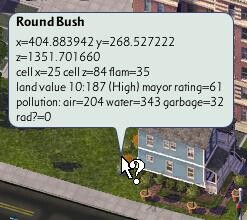
The TerrainQuery command now shows the x, y, and z variables without truncating to the first decimal place, and the cell moisture value is now provided as part of the standard query info.
Alternate Terrain Query
This mode is accessed by holding the Alt key. It shows the humidity and ambient wind information, this data appears to be for the entire tile instead of varying per-cell.
Pollution Terrain Query
This mode is accessed by holding the Ctrl key. It shows the flammability, land value, mayor rating, and pollution (air, water, garbage, and radiation).
Advanced Query Tool Tips
These tool tips are accessed by holding Control + Alt + Shift when hovering over an appropriate item.
Flora
This tool tip provides the flora object's exemplar name, birth date, and last seeding date.
Network
This tool tip provides technical info about the transportation networks, excluding power lines and pipes.
Props
This tool tip provides the prop object's exemplar name.
SC4QueryUIHooks INI File
This file contains the following options.
EnableOccupantQuerySounds
This option controls whether the query sounds are played when clicking on an item to open the query dialog or copy the lot, the default is true. The occupant query sound properties affected by this option are SFX:Query Sound, SFX:Query Sound Abandoned and SFX:Query Sound Decayed.
LogBuildingPluginPath
This option controls whether the building name and plugin file path will be written to the log file when the query dialog is opened, the default is false.
System Requirements
- SimCity 4 version 641
- Windows 10 or later
- Microsoft Visual C++ 2022 x86 Redistribute
The plugin may work on Windows 7 or later, but I do not have the ability to test that.
Installation
- Close SimCity 4.
- Copy SC4QueryUIHooks.dll, SC4QueryUIHooks.dat, and SC4QueryUIHooks.ini into the top-level of the Plugins folder in the SimCity 4 installation directory or Documents/SimCity 4 directory.
- Start SimCity 4.
Troubleshooting
The plugin should write a SC4QueryUIHooks.log file in the same folder as the plugin.
The log contains status information for the most recent run of the plugin.
Source Code and Support
Plugin thread: https://community.simtropolis.com/forums/topic/763107-query-tool-ui-extensions-dll/
The plugin's source code and issue tracker are located on GitHub: https://github.com/0xC0000054/sc4-query-ui-hooks
If you would like to make voluntary contributions to support me in continuing to create more content for SimCity 4, I accept donations via PayPal: https://paypal.me/0xC0000054
Thanks to the few people who have donated to me.
What's New 2.7.0 View Changelog
Released
- Allow copying the exact building from a building family.
-
Depreciate the use of hexadecimal string parameters.
- This was fundamentally broken due to Lua automatically converting hexadecimal strings that start with numbers to a decimal number.
- Hexadecimal strings are supported for backwards compatibility, but callers should convert the strings to a number with the hex2dec function to ensure correct behavior for all possible values.
-
 26
26
-
 1
1
-
 7
7





