

Jump to content

PedMall Compatible Transit Pack  1.0

   (39 Reviews)

2 Screenshots

About This File

New Underground Parking Props released on the STEX! Go Get Them!

Pedestrian-Mall tiles are the NAM's answer to SimCity's lack of pedestrian streets. You can create pedestrian-only "streets" for realistic-looking cities (either downtown or suburban).

Aproblemconcerning the pedestrian-mall tiles is their need for adjacent transit stations and stops (otherwise they don't work). Consequently, you will need an extensive mass-transit system to make them easily reachable.

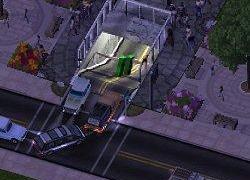
This package attempts to provide a partial solution to this problem by enabling car access to the lots served by the pedestrian streets. This is achieved by underground parking (and parking/bus) stations, suitable for pedestrian streets. Your sims can drive to the parking (or ride a bus) and walk a short distance to their workplaces. A set of subway stations is also available. By offering more transport options, the lots around the pedestrian streets are less likely to face abandonment issues, at least due to poor commute.

The lots have pavements compatible to the ped-malls' ones (open paved, cobblestone etc), so as not to visually disrupt your pedestrian streets's appearance. In addition they are transit- and UDI-enabled. You can see pedestrians walking through the stations and getting to the road. You can see cars endering and exiting the parking. You can also drive your car in and out of the parking entrance.

The parking entrance, bus sign and subway props are externally selectable. You can configure and select which of them may appear. These props have been taken from BATs/lots released earlier on the STEX. For a list of dependencies please check the documentation.

Updates in this Version:
- The plugin now works with both the 060805 and 061705 (and later) versions of NAM
- The conflict with CSX Extras Volume 01 has been resolved
- The new plugin includes transit lots with "Centre Pole"-compatible pavement as well
- The lots are now transit-enabled as roads in addition to as streets
- The pavements now are rotated together with the lots

Credits:
Many thanks to brenda_xne, frogface, madawac, mcdrye and ralphaelninja for granting permission to use their models in the package.

Make sure you have NAM installed.Also check the documentation for a list of dependencies so as to avoid brown boxes.

View my other Lots on the STEX

  • Like 3


User Feedback


Recommended Comments

Well, hey, this isn't bad... the primary image shown on the STEX menu doesn't show much at all... Hey, how's a 9/10 for ya??

Share this comment


Link to comment
Share on other sites
my subway stations and unerground parking came up as big boxes. and some of my pavings didnt work. Can u tell me y???????????????????????

Share this comment


Link to comment
Share on other sites
I recently downloaded this mod, but when I tried to place them, all I got were ped-mall tiles, rather than the actual underground entrances. Sometimes, they also appear as big boxes. Is there any way to fix this?

Share this comment


Link to comment
Share on other sites
Sorry, this is an old pack, and there are currently no plans to update it. However you could use any GLR station (for the puzzle-piece GLR, not the draggable one), it will work the same (only the pavement texture will be different). Or you can request one, I would suggest posting in the SC4devotion.com forums.
  • Like 1

Share this comment


Link to comment
Share on other sites
@kevinkpeng and others... For anyone having the brown box problem,check the read me with the installer. Has links to the dependencies. When plopping, you get a random station, and if the props aren't there for one but not another, you will get the random brown boxes as you described. I had the same problem until I fully read the read me. I give 4/5.
  • Like 1

Share this comment


Link to comment
Share on other sites
I have installed this file and have downloaded all dependancies and unzipped them to my plugin folder, but am still getting the brown boxes. Do they need to be installed to the same folder or in a certain order? Sorry to be so dense, but I've gone over the readme several times and am still getting the brown boxes.

Share this comment


Link to comment
Share on other sites
@editfish: most probably one (or some) of the dependencies are not installed. It must be easy to identify them, plop the station(s) several times and see which props appear and which not.
  • Like 1

Share this comment


Link to comment
Share on other sites

Sign In or register to comment...

To comment in reply, you must be a community member

Sign In  

Already have an account? Sign in here.

Sign In Now

Create an Account  

Sign up to join our friendly community. It's easy!  

Register a New Account

  • Recently Browsing   0 members

    No registered users viewing this page.

×

Thank You for the Continued Support!

Simtropolis depends on donations to fund site maintenance costs.
Without your support, we just would not be in our 24th year online!  You really help make this a great community. *:thumb:

But we still need your support to stay online. If you're able to, please consider a donation to help us stay up and running. This helps sustain a platform where we can share our community creations for years to come.

Make a Donation, Get a Gift!

Expand your city with the best from the Simtropolis Exchange.
Make a Donation and get one or all three discs today!

STEX Collections

By way of a "Thank You" gift, we'd like to send you our STEX Collector's DVD. It's some of the best buildings, lots, maps and mods collected for you over the years. Check out the STEX Collections for more info.

Each donation helps keep Simtropolis online, open and free!

Thank you for reading and enjoy the site!

More About STEX Collections
