

Jump to content

New York City NY  1.0

   (48 Reviews)

Guest

1 Screenshot

About This File

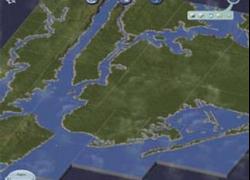
This is a beautiful region with plenty of rivers and 'bridging possibilities'.

Don't forget to download the .bmp configuration file.

Region Type: Flat, Rivers, Uneven Coastline, Water.


User Feedback


Recommended Comments

When i try to install this map it says it has to be 1025 X 1025, but this map is 1025 X 1537. Is there any way to fix this? thanks
  • Like 5

Share this comment


Link to comment
Share on other sites
I'm glad somebody else understands that a region doesn't have to be rectangular! Oh and Tom, you need to include the config.bmp file for this region or SimCity won't know how to use the differently-sized elevation image.

Share this comment


Link to comment
Share on other sites
I need this region to be fixed. How did you do that installation.It's impossible. Thanks

Share this comment


Link to comment
Share on other sites
This is a very nice rendition of the NYC area, and it will be very easy to work on as well with the large map areas.

Share this comment


Link to comment
Share on other sites
I am having the same problem as some other people here. region size too big and i have included the config.bmp file in the same folder. what else can I do. thanks

Share this comment


Link to comment
Share on other sites
Only one issue cant load it. same prob as everyone else to big. How do you fix this?

Share this comment


Link to comment
Share on other sites
I'm a complete n00b when it comes to SimCity maps, modds, etc. I'm completely clueless when it comes to maps and what not. Can someone please help me put this map from the downloaded file to my game screen? Also, I still get the error of 1025x1537 being too large.
  • Like 3

Share this comment


Link to comment
Share on other sites
Nice looking, but it would look even more attractive if the Central Park lakes were on there.

Share this comment


Link to comment
Share on other sites
TO USE THIS MAP: Create a new region in SC4. Quit SC4. Delete the config.bmp in the new region's folder. Download the BMP and JPG from here, saving them into the region folder. If necessary, rename the BMP to "config.bmp". Start SC4 and open the region. CTRL-SHIFT-ALT-R Choose the greyscale JPG. Wait awhile. Voila.
  • Like 3

Share this comment


Link to comment
Share on other sites
how do you fix the problem, i tried woth picasa... but it dind't work :|

Share this comment


Link to comment
Share on other sites
ATTENTION: The problem with this region is that the config.bmp is NOT named "config.bmp." After you download it, rename it and then render the region using SC4 the normal way, or using SC4Terraformer or SC4Mapper (much faster). I kept having the same problem as everyone else, and the moment I renamed the config.bmp, it worked!
  • Like 1

Share this comment


Link to comment
Share on other sites
I've done everything you said to do, SC4 still says the map has the wrong dimensions. HELP!

Share this comment


Link to comment
Share on other sites
the original config file is titled newyork_config.bmp which SC4 does not recognize correctly. If you rename it to config.bmp and go through ALL the steps again, including restarting SC4, it will work properly. I know, I just did it.
  • Like 2

Share this comment


Link to comment
Share on other sites
Every time I click the download button it just takes me to a picture of the map.... same with every single other map available for download. However, if I try and DL a different file, say the money tree, it works. What am I doing wrong.....
  • Like 1

Share this comment


Link to comment
Share on other sites
I can't download the bmp configuration file. It just give me a tumbalis if it

Share this comment


Link to comment
Share on other sites
i have a prob i hope someone can help!!!!

i download the jpeg and bitmap files name the bitmap to config.bmp then try to load it up in simcity 4 and the game just crashes to desktop, i have installed maps before but all of a sudden it wont work, any healp would be great........


oh also if i dont rename the config file the reigon loads and when trying to get it to render it says the fill dimensions error...

Share this comment


Link to comment
Share on other sites
hey i really want to enjoy playing this map but when i download it where to i put it in the Sim City 4 Files because i put it into regions but it doesnt appear in game
thanks

Share this comment


Link to comment
Share on other sites

Sign In or register to comment...

To comment in reply, you must be a community member

Sign In  

Already have an account? Sign in here.

Sign In Now

Create an Account  

Sign up to join our friendly community. It's easy!  

Register a New Account

  • Recently Browsing   0 members

    No registered users viewing this page.

×

Thank You for the Continued Support!

Simtropolis depends on donations to fund site maintenance costs.
Without your support, we just would not be in our 24th year online!  You really help make this a great community. *:thumb:

But we still need your support to stay online. If you're able to, please consider a donation to help us stay up and running. This helps sustain a platform where we can share our community creations for years to come.

Make a Donation, Get a Gift!

Expand your city with the best from the Simtropolis Exchange.
Make a Donation and get one or all three discs today!

STEX Collections

By way of a "Thank You" gift, we'd like to send you our STEX Collector's DVD. It's some of the best buildings, lots, maps and mods collected for you over the years. Check out the STEX Collections for more info.

Each donation helps keep Simtropolis online, open and free!

Thank you for reading and enjoy the site!

More About STEX Collections
