

 Supported



About This File
Made by Ragutaro
Link: http://hide-inoki.com/sc4/buildings_bat.htm [Web archive] and http://hide-inoki.com/bbs/archives/sc4old_0155.html [Web archive]
04.02.05 Released
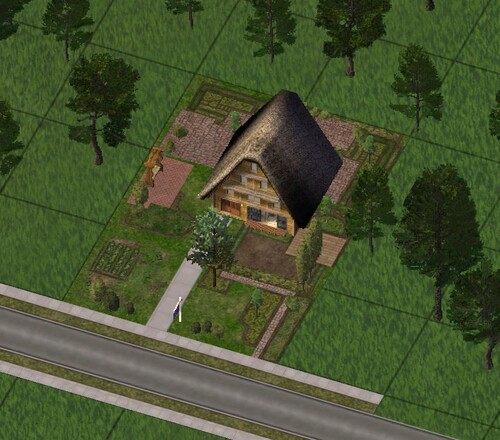
I created this based on the gassho-style houses of Shirakawa-go. It appears in R$$.
I immediately tried rendering it with BAT. It will appear additionally in R$$. Also, here’s a basic set of steps:
1. Launch gmaxgamepacksBATSC4BatLauncher.exe.
2. Open the model you want to render. For example, let’s say Model.gmax.
3. Click the B.A.T button in the Utilities tab of gMax.
4. Set Quality to High and click the Export button. If needed, preview it once.
5. Rendering takes time, so just wait patiently.
6. Once completed, Model.sc4model will be created in My DocumentsSimcity4Plugins.
7. Launch C:Program FilesMaxisSimCity 4AppsSC4PluginMan.exe.
8. Model.sc4model should appear in the right-side list view.
9. Drag and drop Model.sc4model into the left-side list view where you set lot attributes. For example, if you want to make it a prop, drop it into Prop.
10. After that, just edit it in LotEditor as usual.
[ORIGINAL DESCRIPTION]
04.02.05公開
白川郷の合掌造りの家屋をモデルにして作成しました。R$$で出現します。
早速、BATでレンダリングしてみました。R$$で、追加で出現します。
後、基本的な手順を紹介しておきます。
1. \gmax\gamepacks\BAT\SC4BatLauncher.exeを起動する。
2. レンダリングしたいモデルを開く。一例として、Model.gmaxとする。
3. gMaxのUtilitiesタブ内のB.A.Tボタンをクリック。
4. QualityをHighにして Exportボタンをクリック。必要であれば、一度Previewする。
5. レンダリングには時間がかかるので、ひたすら待つ。
6. 完了後、\My Documents\Simcity4\Pluginsに Model.sc4modelが出来る。
7. C:\Program Files\Maxis\SimCity 4\Apps\SC4PluginMan.exeを起動する。
8. 右側リストビューに Model.sc4modelがあるはず。
9. Model.sc4modelを左側リストビューに列挙されている、ロットの属性設定を決めるリストにドラッグ・アンド・ドロップする。例えば、プロップにしたい時には Prop にドロップする。
10.後は、LotEditorでいつものように編集する。
What's New 1.0.0 View Changelog
 With version 1.0.0:
-
 1
1
-
 1
1


