

 Supported


About This File
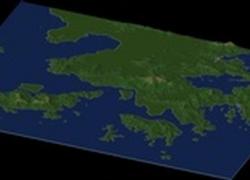
Hong Kong China By blade2k5 & heblem
Map Details and Information
Hong Kong is a special administrative region of the People's Republic of China. Situated on China's south coast and enclosed by the Pearl River Delta and South China Sea, it is renowned for its expansive skyline and deep natural harbour. With land mass of 1,104 km2 (426 sq mi) and a population of 7,055,071[2009 estimate], Hong Kong is one of the most densely populated areas in the world. The city's population is 95% ethnic Chinese and 5% from other groups.
Under the principle of "one country, two systems", Hong Kong runs on economic and political systems different from those of mainland China. Hong Kong is one of the world's leading international financial centres, with a major capitalist service economy characterised by low taxation, free trade and minimum government intervention under the ethos of positive non-interventionism. The Hong Kong dollar is the 9th most traded currency in the world.
Hong Kong's independent judiciary functions under the common law framework. Its political system is governed by the Basic Law of Hong Kong, its constitutional document. It has a burgeoning multi-party system, and its legislature is partly elected through universal suffrage. The Chief Executive of Hong Kong is the head of government.
Hong Kong became a colony of the British Empire after the First Opium War (1839–1842). Originally confined to Hong Kong Island, the colony's boundaries were extended in stages so as to include the Kowloon Peninsula and the New Territories by 1898. It was occupied by the Japanese during the Pacific War, after which the British resumed control until 1997, when China regained sovereignty. The Basic Law stipulates that Hong Kong shall enjoy a "high degree of autonomy" in all matters except foreign relations and military defence.
Map Specifics
Map Type: Real World
Region map size: Map is configured for 192 large city tiles and is 16x12 in size.
config.bmp size: included with zip file
Dependencies: Either SC4 Mapper or SC4 Terraformer for importing.
Maps were created by taking 3 arc elevation data.
To install SC4M map file:
SC4Mapper
1. Unzip this file.
2. Run SC4Mapper, click on 'create region'
3. Choose SC4M
4. Browse to the unzipped folder and point the map file .SC4M
5. Click on 'Save Region' and name it, and Quit SC4Mapper
6. Run SC4 and load the new region. The colors of the region in SC4 will be the same colors as SC4Mapper until you enter and save each city tile. But you have the choice to do it as you go and not right away.
SC4Terraformer
1. Create a new region folder in your Plugins\Region
2. Copy my config.bmp into the folder and overwrite the old one. (make changes to config.bmp file now if you want)
3. Open the new region you just created with SC4 Terraformer
4. Click on Import Image in the Global Tools Menu and browse for my SC4M file.
5. When file is imported click File - Save (the region is now saved to SC4
6. The colors of the region in SC4 will be the same colors as SC4TF until you enter and save each city tile. But you have the choice to do it as you go and not right away.
Start opening tiles!
Credits
blade2k5 - Original map scaling, importing, rendering. SC4TF modification.
heblem - Original map creation, scaling, importing. SC4TF modification.
Check out more maps by blade2k5 and NHP
Any comments and feedback welcomed. Thanks for looking and enjoy.
-
 1
1


