

 Supported


About This File
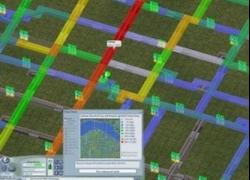
This Subway Volume View acts in most ways like the normal underground Subway View, which is entered by selecting the Subway Tool when you want to build or demolish subways. However, it has included in it the Subway View from my Improved Traffic Volume View, which allows you to see the usage of your subways as you are building (or demolishing) them. Like the Improved Traffic Volume View, this view shows the volume of traffic in each subway line visisble in the main map, as well as in all subway lines in the minimap. The maximum volume shown for the subway is 300% of the capacity of the subway network. (Since only one commute period is shown at a time, this is one half of the standard subway capacity, which is calculated for a full day.) The legend contains nine entries, and each color in the legend is followed by the percentage of the underlying network capacity that that color represents, as well as the actual number of Sims represented by that percentage.
The colors in the display have been arranged so that they are more concentrated at lower levels, in order to give finer granularity at lower volumes. Between volumes of 0% and 10%, colors change about every 1.5%. Between 10% and 130%, colors change about ever 5%. And between 130% and 300%, colors change about every 10%. Please note that while every attempt has been made to attain the greatest accuracy possible, all numbers are somewhat approximate. The numbers following each color in the legend refer to the approximate beginning of the range of that particular color.
You may notice that starting at 100%, the colors closely follow those in the Traffic Congestion View. However, it is important to keep in mind the difference between theTraffic Congestion View and the Traffic Volume View. The Congestion View is compiled from an entire day's travel statistics, while the Volume View refers to only a single commute period. Therefore, yellow in a single volume view does not necessarily indicate congestion, and blue or green in a single folume view does not necessarily indicate lack of congestion. Furthermore, some of the volume views include non-congestion producing travel types, which are pedestrians, buses, and ferries. An experienced player may be able to look at both commute periods of certain volume views and get a good idea of congestion, but it is necessary to be careful here.
In order to have the minimap data displayedwith the subway volume data, you must have the Data Views selected and the minimap open. If you neglect to do this before entering the Subway View, then you can get the proper data displayed simply by selecting Data Views from within the Subway View, opening the minimap, and selecting the subway tool again. You know you have the right data displayed when the minimap subheading says "Subway, Elevated Train, and Ground Light Rail Volume Data." Note that the elevated train and ground light rail volume data is displayed along with the subway volume data; this is always the case. You can tell where the subway lines are, though, because you can see them underneath the colors. When subway lines are not colored, it means there is no volume in those lines.
When you exit the Subway Volume View, the minimap will revert to displaying whatever it was displaying before you entered that view.
Finally, most subway stations light up in the Subway Volume View. This does not indicate anything about usage; it is simply so you can identify them easily. Certain types of subway stations do not light up because of the way they were designed.
Note: This file has been made largely obsolete by the June 2009 NAM, as it is bundled with the Traffic Volume View for all traffic simulators supported by that NAM and later ones. The only reason to download this file is if you want to use it with an earlier NAM, or if you want to create a custom bundle of the data views.


