

 Supported


About This File
Welcome back to escape, its now 4800, we have set up the eco stystem and we currently have 100,000 residents. we still however have ample space and still need people to establish cities as our economy isn't strong. So we are going to put new land up for grabs.
Map info:
Butterfly lakes: this region was requested by mrs. eco who wanted a nice place for all of the butterflies to live so that they don't go extinct, however she cant pay the rent so we are putting it up for development.Summary: very flat with a lake and island lystem in the shape of a butterfly.PLEASE NOTE: this region was made by my 7 year old sister.
The peoples palace: this area originally was meant for ming lee the 253rd but apparently its not good enough for him to even look at, so we are putting this area up for development.Summary: Mostly flat with a winding river and several mountains< also there is an off coast isle made for an imperial palace.
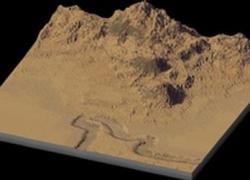
Helios: welcome to hottest, dryest area in all of escape, temperatures and annual rainfall on par with death valley this area is only good for its spectacular views and the monthly flood that keeps the land moist. the area is the foot of the great stratos ranges and is downstream of the monsoon plains and thus floods monthly.Summary: Approx 1/2 of the area is usable and the other half is unusably mountainous, also there is a valley in the southwest corner of the map.
P.S. any and all feedback is appreciated.
P.P.S. if you have any ideas that could help please express your ideas here. https://www.simtropolis.com/forum/messageview.cfm?catid=120&threadid=119707&enterthread=y
P.P.P.S.my little sister did not make the story.
Rules for Mapper
Unzip the sc4m file.
Open wouanagaines Mapper
Press create region from sc4m
Navigate the desired SC4M.file and click open
Click open and wait for map to generate
Press save region
Open SimCity and create your masterpiece
Rules for Terraformer
Unzip the sc4m and config files
Make a new folder in one's region directory and place the config.bmp into it.
Open Terraformer and select the region then click ok and click ok in the next dialogue.
Click global tools and choose Import Image.
Navigate to the desired SC4M.file and click open, click ok.
Select file and choose save.
Open SimCity and create your masterpiece
Courtesy of drunkapple for those instructions, sure did save me some time


