

 Supported


About This File
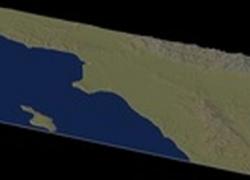
Los Angeles Metro By blade2k5 & Heblem
Map Details and Information
Los Angeles is the largest city in the state of California and the second largest in the United States. Often abbreviated as L.A. and nicknamed The City of Angels, Los Angeles has an estimated population of 3.8 million and spans over 498.3 square miles (1,290.6 km2) in Southern California. Additionally, the Los Angeles Metropolitan Area is home to nearly 12.9 million residents. Los Angeles is the seat of Los Angeles County, the most populated and one of the most diverse counties in the United States. Its inhabitants are known as "Angelenos."
The encompasses Thousand Oaks and Malibu in the north-west, to San Bernardino in the north-east, to Irvine and Orange County in the south-east to Santa Catalina Island and the Pacific in the south-west.
This map is 50% scaled to actual size and elevation.
Map Specifics
Map Type: Real World
Region map size: Map is configured for 162 lrg city tiles and is 18x9 in size.
config.bmp: included with zip file
Dependencies: Either SC4 Mapper or SC4 Terraformer for importing.
Maps were created by taking 1/3 Arc USGS DEM elevation data.
Install/Uninstall Instructions
To install SC4M map file:
SC4Mapper
1. Unzip this file.
2. Run SC4Mapper, click on 'create region'
3. Choose SC4M
4. Browse to the unzipped folder and point the map file .SC4M
5. Click on 'Save Region' and name it, and Quit SC4Mapper
6. Run SC4 and load the new region. The colors of the region in SC4 will be the same colors as SC4Mapper until you enter and save each city tile. But you have the choice to do it as you go and not right away.
SC4Terraformer
1. Create a new region folder in your Plugins\Region
2. Copy my config.bmp into the folder and overwrite the old one. (make changes to config.bmp file now if you want)
3. Open the new region you just created with SC4 Terraformer
4. Click on Import Image in the Global Tools Menu and browse for my SC4M file.
5. When file is imported click File - Save (the region is now saved to SC4
6. The colors of the region in SC4 will be the same colors as SC4TF until you enter and save each city tile. But you have the choice to do it as you go and not right away.
Start opening tiles!
Credits
blade2k5 - importing, rendering.
Heblem - Original map creation, scaling, importing. SC4TF modification.
Check out NHPs Map Catalog forum here.
Check out more maps by blade2k5 and NHP
Any comments and feedback welcomed. Thanks for looking and enjoy.


