



OWR-4 Ferry Loop (NAM36 visual tutorial)

OWR-4 Ferry Loop (NAM36 visual tutorial)
On a 6 point scale, this tutorial rates as Difficult:
Beginner ► Intermediate ► Advanced ► Difficult ► Sophisticated ► Expert
Yes, this is a tad difficult, but totally doable, even for an intermediate SimCity 4 player. I'm rather new to the NAM, so I can well understand people feeling they have a need for a visual tutorial to help them with some of the features. Aside from creating a ferry loop road, this tutorial also covers:
- 45 degree bends with the OWR-4.
- OWR-4 intersections.
- Creating an L1 Road Viaduct over the OWR-4, given FLUPs and Road Overpass features don't integrate with OWR-4 road networks.
The 4-lane One Way Road (OWR-4), is one of the more difficult features to use from the Network Widening Mod (NWM). It doesn't do 90 degree corners, and doesn't do fractionally angled curves. You can't put a FLUPs underpass underneath it. It won't interface with a roundabout. The OWR-4 only supports orthogonal intersections (officially), not diagonal, and doing 45 degree bends with it is really tricky, and needs LOTS of room!
Given the difficulties, there's only one reason to use the OWR-4, and that's because it's the highest capacity road with RCI access, bar none. Even the OWR-5 has just the same road capacity as the OWR-4, despite the extra lane. The AVE-6 and TLA-7 have the same capacity, but only if you count both directions of travel. The OWR-4 has twice the capacity of the OWR-3, and 2½ times the capacity of the Maxis vanilla OWR-2.
The OWR-4, like all One Way Roads (OWR-1, OWR-2, OWR-3 and OWR-5), also allows a 50% higher car speed limit than Avenues and Roads. 
High capacity ferry loops are a key component of my C$$$ tourism based economy in old New York, so the occasion demanded the highest RCI road capacity I could get. If you're wondering how to use the OWR-4, or frustrated because it didn't work for you, this visual tutorial will show you how.
This is the eighth OWR-4 ferry loop, that I've constructed. The first one I constructed was a long and frustrating process, which you can read about in this Taking NAM for my very first test drive post, but now they're really easy for me. Just follow the steps below to construct your very own OWR-4 loop road:
Ingredients List
- Maxis vanilla Streets tool (Alt+R), and commercial zoning tools (A,S,D), for drafting out the OWR-4 before you start.
- Terraforming tools for the Ferry and Beach plops, which will be the subject of another tutorial of mine ... another day.
- Maxis vanilla Avenue tool (Ctrl+R), for the avenue (AVE-4) intersection.
- NAM "4-lane One-Way Road (OWR-4) Starter Piece" (pictured below), selected from the Starters button on the Roads menu, then tab through to the right starter piece.
- Maxis vanilla One Way Road tool, for drawing the OWR-4 orthogonals through the starter pieces, drawing the OWR-4 diagonals from the orthogonals, and re-drawing pieces of bulldozed OWR-4.
- NAM "1-Level FLEX Road On-Slope" (pictured below), selected from the Drag ERD button on the Roads menu, then tab through to the right starter piece.
- Maxis vanilla Road tool (R), for drawing the L1 Road Viaduct (RD-2).

NAM OWR-4 Tutorial – Creating a High Capacity Ferry Loop
13 steps to creating your very own high capacity ferry loop, which uses OWR-4 to take maximum benefit in C$$$ commercial growth driven by ferry traffic. Not for the faint of heart! Be ready to practice this in your sandbox, before attempting it in a real city. I found this video tutorial on the MGB NAM YouTube channel very helpful (thank you, @rsc204!), covering 45 degree bends for TLA-5. The OWR-4 is a little bit different to work with than the TLA-5, but there are similarities.
The OWR-4 also handles an inline transition from the RHW-8S, which sounds incredibly useful ... but I haven't done that yet.
Perhaps needless to say ... save often during this process!
Given the difficulty of construction, one thing you don't want to do with OWR-4, is change your mind half-way through! So, the first steps are planning ones.
1. Plan out the orthogonal pieces of the OWR-4 using streets, making sure that each lane fits a clear diagonal with each other piece of OWR-4 orthogonal.

2. In the case of a ferry loop, do your terraforming first! Plop your beaches if you're going to use them, and terraform a little inlet for the ferry so that the ferry butts up against the sea-side piece of OWR-4. An intersection messes up the traffic funnelling effect that that the OWR-4 ferry loop uses to produce high commercial growth in the adjacent commercial lots, and OWR-4 is very unforgiving of a one-tile error! Make sure the Ferry plop turns blue right up against the draft streets. I use a weird looking street roundabout in my draft below, to indicate the position of the ferry. With a road network as fragile as the OWR-4 happens to be, terraforming after construction is a really bad idea. 

3. Dezone (or bulldoze) the draft streets. Click the Starters button on the Roads menu, then tab through to the "4-lane One-Way Road (OWR-4) Starter Piece". Make sure to get the arrows in the right direction, using Home/End keys, and plop the OWR-4 starter piece, in the very centre 2 tiles of each orthogonal length of OWR-4 you have planned. Then take the vanilla Maxis one way road tool (OWR-2), and draw twice through the starter piece, making sure to draw in the same direction of the arrows. This is a right-hand drive ferry loop. Use the opposite direction if you're running with a left-hand drive (UK) installation of SimCity 4. Steps a, b, c, d shown below.
3a)  3b)
3b) 
3c)  3d)
3d) 
There's 4 lengths of orthogonal OWR-4 in this case, repeat steps a through d above to produce all 4 orthogonal stretches of OWR-4.

4. The diagonals are the trickiest bit. Draw the inside lanes first, making sure the yellow preview looks like the pictures below. Draw the outside lanes one step back from the inside lanes, otherwise the diagonal won't work! The diagonals anchor better when they have another piece of orthogonal OWR-4 to attach to, which is why step 3 (above) is important to do first. If the yellow preview doesn't look right, don't let go of the mouse button! If you think you've drawn it wrong, cancel the draw by pressing the Esc key. These diagonals are extremely sensitive to mouse position, and letting go of the mouse button when the yellow preview doesn't look right will produce a very nasty result ... which you'll need to bulldoze and start again. THIS MUST BE DONE IN FOUR STEPS, a, b, c, d, as follows:
4a)  4b)
4b) 
4c)  4d)
4d) 
5. Use the same technique with the Maxis vanilla one way road tool (OWR-2), for the other three diagonals.

Congratulations, you now have something that looks like a ferry loop, but we're not done yet.
6. Bulldoze the starter pieces, at the centre of each orthogonal stretch of OWR-4. Starter pieces hidden under the asphalt can cause problems. In particular, it causes the avenue (AVE-4) intersection at step 8 (below) to fail, so it's better to just get this done now. Careful not to bulldoze too many tiles!

7. Draw the orthogonals again (similar to steps 3b and 3c above), making sure that the preview looks right each time before you release the mouse button. Most importantly, make sure you're using the one way road (OWR-2) tool in the anti-clockwise direction, following the direction of your earlier work. It now looks almost the same as step 5 (above), but notice there's a few more arrows on the orthogonals, indicating that the starter pieces are all gone.

8. Connect up the avenue (AVE-4) intersection, opposite the ferry. The OWR-4 allows avenue (AVE-4) intersections at every orthogonal, but I'm yet to test if the ferry loop still delivers maximum benefits for commercial growth if there are more avenue (AVE-4) intersections.

You could also use this same OWR-4 technique to make a ginormous roundabout, in which case it will work better if all 4 orthogonals are 6 tiles long. I've noticed that there's a slightly different avenue intersection technique that seems to work for the diagonal OWR-4 pieces, too, but I haven't tested it with traffic yet.
9. Providing road access to the centre of the OWR-4 ferry loop requires an L1 Road Viaduct. FLUPs and road overpasses won't work with OWR-4. Bulldoze the two orthogonal tiles where you want to build the L1 Road Viaduct.

10. Click on the Drag ERD button on the Roads menu, then tab through to the "1-Level FLEX Road On-Slope" (pictured below). Place the brown starter piece square in one of the bulldozed tiles of OWR-4. Then press Home/End key to flip sides, and place a second "1-Level FLEX Road On-Slope" starter piece in the other bulldozed tile of the OWR-4.

11. Using the Maxis vanilla road tool (RD-2), draw across the 4 tiles to connect the two ramps. The yellow preview should look like this:

12. Then redraw the orthogonal piece of OWR-4, underneath the L1 Road Viaduct, using two strokes of the Maxis vanilla one way road (OWR-2) tool. Once again, make sure you're following the anti-clockwise directional arrows!

13. Do the same four steps 9, 10, 11, 12, to the other side of the OWR-4 ferry loop, then zone and plop your Ferry, and you're good to go! 
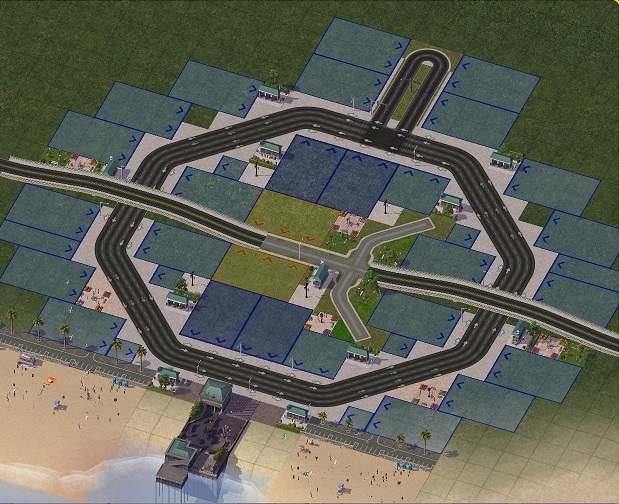
Well done! When the commercial lots on the diagonals grow, you may need to dezone and Ctrl rezone them, if the sims subdivide the 2x3 lots down to 1x3. The OWR-4 carries so much traffic, that it's an ideal location for high wealth C$$$ lots, assuming that you're driving enough traffic in this direction.
If anyone has further tips on this stuff, please feel free to add your comments below! 
I go to so much trouble just for a ferry terminal area, for C$$$ economic reasons, not for cosmetic reasons. This post of mine explains the "Eternal Commuter Bug", and how it afflicts ferries in particular, and how to milk this common SimCity 4 traffic issue for C$$$ commercial growth. The effect is even stronger if you use Car Ferries, which is another NAM experiment I intend to try out. 
-
 4
4


0 Comments
Recommended Comments
There are no comments to display.
Sign In or register to comment...
To comment in reply, you must be a community member
Sign In
Already have an account? Sign in here.
Sign In NowCreate an Account
Sign up to join our friendly community. It's easy!
Register a New Account