



NAM36 Tutorial: RHW-4 to MIS inline branch (DRI)

NAM36 Tutorial: RHW-4 to MIS inline branch (DRI)
This tutorial covers transitioning from a single carriageway of RHW-4 to double tile MIS inline branch, which looks very similar to my earlier post RHW-2 to MIS inline transition (DRI), but it's not! These two techniques often work well together.
On a 6 point scale, the RHW-4 to MIS inline branch rates as Intermediate:
Beginner ► Intermediate ► Advanced ► Difficult ► Sophisticated ► Expert
This is another key element of my Compact RHW-4 T-Interchange, a common DRI pattern I will be using very frequently. Unlike my earlier post, the yellow line is on the left-side of both MIS roads (or on the right side in a UK left-hand drive setup), so this MIS ramp provides a one-way inline branch. The difference between this and most MIS ramps, is that it branches the RHW-4 into two MIS ramps, thereby terminating the stretch of RHW-4.
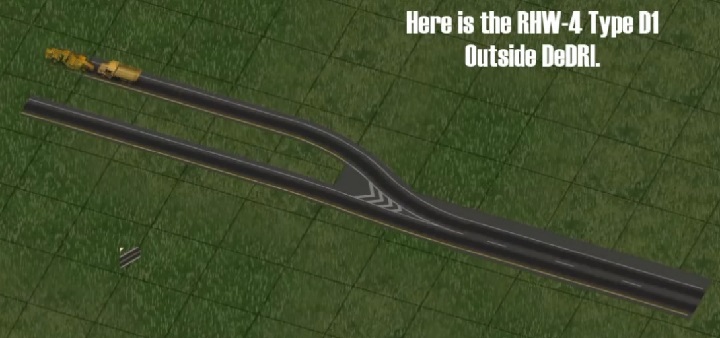
In NAM36, this inline branch is another feature you won't find under the RealHighway Width Transitions menu. I think there might be a way to achieve this using the FLEXRamp Type D1, but quite frankly, it seems much easier to use DRI. These DRI techniques also tend to result in a more robust highway construction which is less prone to breakage. This technique even allows you to avoid using the RHW-4 and MIS starter pieces! Yay! 
The Draggable Ramp Interface (DRI) can be a little hard to learn, because the completed DRI draw (using the RHW-2 tool), transforms immediately into MIS ramps. The completed draw typically shows the MIS ramps in yellow preview, as long as you hold down the mouse button, which is super helpful. Just press the Esc key if the yellow preview doesn't look right.
I discovered the technique 52 seconds into this same YouTube tutorial on advanced DRI, by Ganaram Inukshuk, highly recommended. The first screenshot, is the DRI draw using the all-purpose RHW-2 tool, with the last piece of the DRI draw showing the yellow preview, and after that, is the completed single tile RHW-2 to double tile MIS inline branch.
https://youtu.be/G4h0Jq2vClQ?t=52
Network Addon Mod Version 33 Teaser 6: RealHighway Draggable Ramp Interface Extension, Part 2
starting at 52 seconds, by Ganaram Inukshuk
.jpg.5eb0c0166d3154d6773ce8c61c27bf19.jpg)
There are MANY, MANY varieties of this transition, with both compact parallel ramps, and wide 45º ramps, ground L0, L1, and more. Just a quick word of warning, however, that working at ground L0 is MUCH easier!
On a 6 point scale, this same RHW-4 to MIS inline branch suddenly becomes Difficult, if you're working at elevated L1 or higher above ground. It's not that the DRI technique becomes Difficult, but all the subsequent highway building around it! 
Beginner ► Intermediate ► Advanced ► Difficult ► Sophisticated ► Expert
The video tutorials on YouTube go by so quick. I pause the video (K), at the very moment the yellow preview appears, so that I can see the draw used to produce the ramps.
::::::::::::::::::::::::::::::::::::::::::::::::::::::::::::::::::::::::::::::::::::::::::::::::::::::::::::::::::::::::::::::::::::::::::::::::::::
See the full catalog of my NAM tutorial posts linked in the comments under this other Simtropolis post of mine ...
NAM36: Starting Out advice for newcomers
-
 4
4


0 Comments
Recommended Comments
There are no comments to display.
Sign In or register to comment...
To comment in reply, you must be a community member
Sign In
Already have an account? Sign in here.
Sign In NowCreate an Account
Sign up to join our friendly community. It's easy!
Register a New Account