


Mapping

 Lyhoko: And here is a basic tutorial/outline of how Lyhoko comes up with the maps.

Lyhoko: To start out, one needs the map from SC4 in order to know just where all the streets are at to begin with.
Lyhoko: If you're starting out with an already established city, rather than building your map as you build your city, a basic map using the "All Off" setting can be helpful to allow you to easily figure out the coastline without roads getting in the way.
Lyhoko: Using the volume+car/train/other settings can also help for established cities, in order to distinguish road and rail lines.

Lyhoko: Once you have the map, or maps, paste them into an image editing program of some sort that can handle layers and transparencies. Lyhoko uses Paint.NET.
Lyhoko: Lyhoko is also assuming that you know how to use whatever program you chose well enough, as well.
Lyhoko: Trim it down so that the only part you have is the map itself, without any border.
Lyhoko: In this case, Lyhoko colored the water so that the coastline was easier to see, and for each new update, only the part that was changed was added to the base map file, so the result is somewhat messy.
Lyhoko: If you have multiple maps, place each on its own layer.

Lyhoko: Then you may need to resize it, as it is likely too small. Lyhoko uses a scale of 2m per pixel, or 8 pixels per SC4 tile. This requires a scale increase of 800% for a large city tile, 400% for a medium city tile, and 200% for a small city tile, as the in SC4 maps are all the same size (256x256).
Lyhoko: Final size will be 512x512 pixels for a small city tile, 1024x1024 for medium, and 2048x2048 for a large at the 8 pixels per SC4 tile scale.
Lyhoko: Use the "nearest neighbor" resizing option so that the scaled version remains blocky so you can still see individual tiles.
Lyhoko: Different programs will have different menus, but should have the same or similar features.

Lyhoko: Another layer is just a flat white-ish background, with stuff like parks and other things colored out. For the actual colors, Lyhoko uses the same ones from Google Maps.
Lyhoko: Hide this layer if it gets in the way, which it usually will.
Lyhoko: On a layer above that, trace out the coastlines and fill in the water. Again, color from Google Maps. For this layer, and any above it, it should be initially completely transparent.

Lyhoko: On a new layer, trace out the roads. In this case, side roads are 8 pixels wide, and main roads are 10. Color is a basic gray.
Lyhoko: On a separate layer, trace out rails. In this case, color is an alternating checkerboard of black and dark gray. Width is 4 pixels per rail.

Lyhoko: On a another layer, between the road base and the rails, trace over the roads again with the main color, width is 2 pixels less than whatever the base is. (6 for side streets, 8 for main roads.)
Lyhoko: Some cleanup may be necessary when drawing the lines.
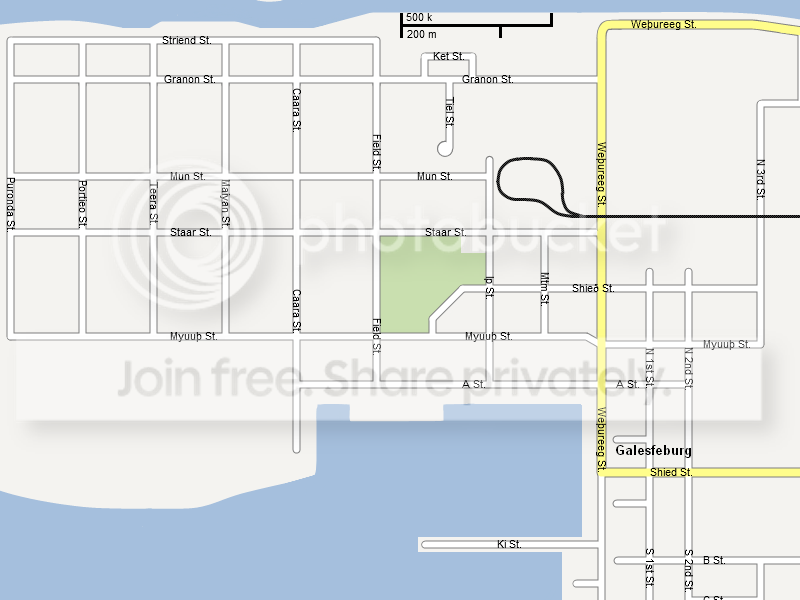
Lyhoko: And on a final layer, type out the names. For the vertical names, Lyhoko types them out in a separate image, then rotates that image by 90 degrees, then copies the names back.
Lyhoko: Actually coming up with the names is a matter of imagination.
Lyhoko: The final layer order, starting from the top, is the following: names, rails, road surfaces, road base, water, basic land, original SC4 map(s).
Lyhoko: Any questions?
Poll
Lyhoko: What should be added to town next?
Lyhoko: Remember to look closely at which option is which number when voting. Don't say something like "3 - expand Galesfeburg." 3 is expand the unburg area, expanding Galesfeburg is 2.
Lyhoko: Unburg is a Myonian term for an unincorporated village. The one referred to here was shown last update.
Lyhoko: Voting is now closed!
1: 4 votes
Add in a ferry network to connect Galesfeburg with the unburg and allow for development on the north side of the river.
2: 1 vote
Expand Galesfeburg
3: 0 votes
Expand the area around the unburg
4: 5 votes
Connect the Galesfeburg region with the Myonian highway network
Lyhoko: Please choose one option at a time... but you may vote more than once, as long as you do not double post. Let other people have a chance to vote!
-
 3
3


3 Comments
Recommended Comments
Sign In or register to comment...
To comment in reply, you must be a community member
Sign In
Already have an account? Sign in here.
Sign In NowCreate an Account
Sign up to join our friendly community. It's easy!
Register a New Account