




Mod Conflicts and Menus in Banished
When Banished was released it also came with a wiki
https://banished-wiki.com/wiki/Special:AllPages
Its still quite useful but unfortunately over time with no-one maintaining it the spammers have gotten into it so there are a few dodgy articles in it now, would recommend taking copies of any of the articles that you find helpful, but the best place to get help is over at the Banished forums as there have been a number of changes to the game over the years especially once the modders got their hands on it and starting adding mods.
Mod conflicts unlike SimCity 4 if you can a conflict between your mods you are going to be able to see this in your in-game mod folder, your unactivated mods will look like this

You can also look inside each mod to see what inside it, and if any of the contents are conflicting with anything else and if Banished is going to load some or all the contents

Once you do activate your mods they are either going to go slightly green or red (red incompatibility warning), there are a few mods that if you try and run them together they will crash your game but the modders do warn people if that's the case and in some cases you need to load mods in a particular order for them to work properly but usually a red incompatibility warning does not mean its not going to show up in game, or that it will crash your game. It's just a friendly warning that the two mods are trying to use the same file or in-game resources and that only the mod that is on top on your mod list will be fully loaded.
You can end up spending quite a bit of time re-arranging your mod folder to get as many "green" mods as possible, but equally if they all end up red it shouldn't cause you any problems.

In addition to the above menus you also have a number of settings, your start screen looks like this

Creating a new village map

Accessing your saved villages, you can have a number of different village maps on the go or and this is what I usually do ... is I have the same village map saved at various points so if something goes wrong or I don't like the direction the village is going in I can go backwards to a previous save

There is also a built-in tutorial section so you can play around with the game before starting your own village map

Achievements we covered in a previous post (and they will only work in a vanilla game - no mods)

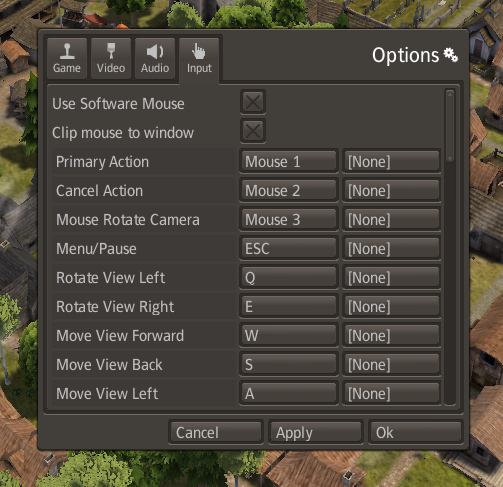
You also have four settings menus


-
 1
1
-
 1
1


0 Comments
Recommended Comments
There are no comments to display.
Sign In or register to comment...
To comment in reply, you must be a community member
Sign In
Already have an account? Sign in here.
Sign In NowCreate an Account
Sign up to join our friendly community. It's easy!
Register a New Account