


This tutorial deals with the subject of placing props on water ploppable lots.
Summary of the problem
Props adapt to the elevation of the surface that they are placed on. If they are placed on a lot that is water compatible, they adapt to the height of the seabed and not the sea level where you might want them to be (floating objects like boats, etc.). The props are sinking to the seabed.
The following illustrates this problem:

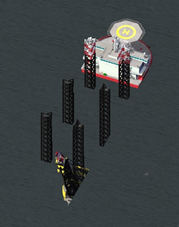
As far as my research went and the community could answer there is no elegant fix in any setting that can change this. If you know of any, I would be thrilled to hear them and I will gladly adjust or delete this tutorial 
This tutorial offers a simple solution for this problem.
Attempt for solution
In order to solve this problem the lot can be placed on an island or shallow that has roughly the elevation of the sea level. After placing the lot with the props at the desired elevation, the ground can be lowered again to give the appeal of a swimming prop. This can however proof very difficult and may need lots of saving and reloading as removing too much of the supporting island may cause the building to be destroyed. It also requires the props to be larger than tile they are placed on, otherwise beach may be visible underneath them. Additionally, depending on the water mod used, the island might still be visible through clear water.
NEW: Alternative Solution
The method described above did not leave me very satisfied and dampened my excitement to create complex models for the offshore world that would need to be exported and arranged on a lot as several props. In a recent project with a fellow Simtropolis member, we developed a new method to place props easily and reliably at sea level. The approach is rather simple and easy, I did however not find this solution documented anywhere and wanted to share the approach:
Working with defined water depths
It is as easy as the caption says. Since the elevation of a prop that you can set in lot editor by holding CTRL and using up / down arrow is relative to the elevation of the surface the lot is plopped on, the relative elevation set in lot editor has to match the water depth you are working with.
Example
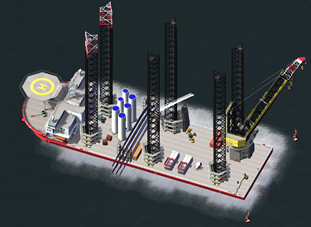
I will stick to my wind turbine installation vessel for this example:


At first the relative height of all props on the lot towards each other should be defined as wished. After that, all props have to be selected and raised to the “defined” water depth that the lot should be plopped on. For my example I picked a water depth of 30m. As you can see, the props are all raised to the desired water depth in addition to their relative position towards each other: deck at an elevation of 0m and railing at an elevation of 3.4m move to 30m and 33.4m. This approach will look quite odd in lot editor, but do not worry.
Once this is done and the lot is saved and converted into a water compatible lot, the digging tools of NAM can be used to create an island at sea level and then dig a hole of 30m and create a nice even seabed at a depth of 30m.
The cheat for the terrain query tool (CTRL+X to open cheat window, enter: terrainquery, return) plus the latest NAM 41 digging tools with increments as small as 0.1m can help you with this. (Sea level is 250m for whatever reason…probably to not get into negative numbers)
y-value indicates height:
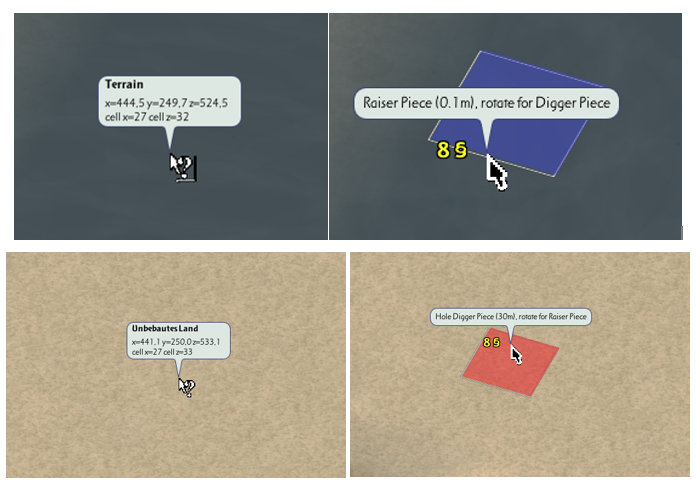
Once you created the basin with your pre-defined water depth you should be able to plop your lot with the elevated props in it and they should be hovering directly at the water line!

EDIT 16/08/2023 - Further Hints
@Dreadnought advised that choosing the water depth depends largely upon the used "water MOD". If the MOD is "opaque" any depth will do -- the more shallow the better. If their water MOD is semi-transparent (like PEG Brigantine) you need to make sure you can just barely see the bottom.
Another tip is to make sure your harbour bottoms is absolutely flat to avoid trouble.



There are no comments to display.
Sign In or register to comment...
To comment in reply, you must be a community member
Sign In
Already have an account? Sign in here.
Sign In NowCreate an Account
Sign up to join our friendly community. It's easy!
Register a New Account