


Contributor/author(s): Kyle D.J.
(Originally published 03 August 2002.)
(Editor's update: Contrary to what this article may state, these road-to-highway connections are non-functional—traffic cannot cross these connections. If you build these in your city, they will be "broken links" in your transportation network. Therefore, these connections are useful only for aesthetics, for example, if you are trying to replicate a real-world city in detail. If you use these connections, be sure to have alternate transportation routes so that your city will function properly.)

The above image shows a highway that splits into two like a "Y". Roads are used for each half of the highway after the split. Two uses for this creation are:
- Termination of a highway at a crossroad, as found in some real cities (Toronto, Canada has at least two of these). This is an effective, fully functional highway termination, without the traffic congestion you get from normal highway ramps. This is particularly useful in a dense area of the city where there isn't enough room for a big fancy interchange. Buildings could be placed wherever there are trees in the image above.
- Transition from a regular highway into a "divided highway", where roads are used to represent each half of the divided highway.
Construction of this Y-split uses techniques described in another article, Interconnecting Highways with Roads (#0909), hereafter called "Reference A". You should be familiar with that article before proceeding here.
Follow the steps in the image below (and try to ignore the graphics "glitches" that are common with highway-on-slope tiles):
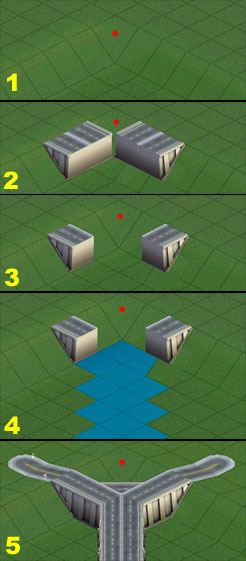
- You will be working in the "corner" of a ridge, 65m ("4 clicks") higher than the lower ground. (The red dot indicates the "corner" tile of the ridge.)
- By building two highway tunnels using the techniques in Reference A, create highway-on-slope tiles as shown. All other tiles used in the construction techniques of Reference A have been bulldozed (the tunnels, bridges, extra highway tiles, etc.).
- Bulldoze the two highway-on-slope tiles that are nearest the corner of the ridge.
- Build a highway starting from the corner in the ridge.
- Connect roads to the highway, using either power lines, slopes, or rail crossings as described in Reference A (I've used slopes in this image).
You can now do whatever you wish with the roads and the surrounding terrain. Experiment, and enjoy!
See also
 Building an effective highway interchange system
A more aesthetic highway interchange system
Highway interchange: dog-eared
Highway interchange: cloverleaf
Interconnecting highways with roads
Ramped highway-avenue interconnection
Highways to avenues: avoiding tunnels
Simpleton Series: Highway techniques


There are no comments to display.
Sign In or register to comment...
To comment in reply, you must be a community member
Sign In
Already have an account? Sign in here.
Sign In NowCreate an Account
Sign up to join our friendly community. It's easy!
Register a New Account