


Contributor/author(s): Simpleton
This is a small wrinkle but a useful one at an early strategic planning stage of city terrain and layout.
The basic bridge design (all of them) in SimCity gives you 52 metres of height difference you can use between one side of the bridge to the other. You could for example have (or create) any size river and have terrain at one bank at 65 metres and the other bank at 13, 26, 39 or 52 metres by using the 'flat entry to bridge' technique on one side, then adjusting the bridge's own standard devices on the other.
This can be a more visually attractive method of changing levels rather than building roads up hills. The space you lose with the river can balance the space you would waste with a dry land slope you cannot build on - unless you use the slope as a 'green belt' via tree planting. Additionally you get water frontage to build on.
The process is simple and requires little work. Here is how:
-
Arrange your terrain each side of the river with the elevation difference you require. The demonstration given here is 26 metres on one side and 65 metres on the other.
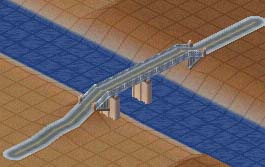
-
Build a normal bridge (or double bridge).
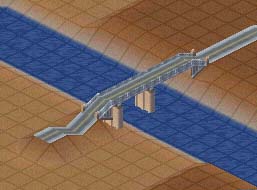
- Note the bridge has automatically built 'flat' on the high side. On the low side we have some interesting undulations presented to us!
-
Bulldoze the road entry tiles on the low side.

-
Use the Level Terrain & Raise Terrain tools to tidy up and build a ramp at the slope you wish.
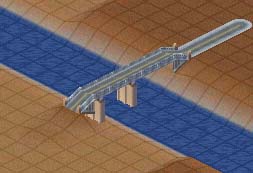
- Build your roads to both sides of the bridge.
Note: If you do not use the full 65 metres on one side of the river then you will also have earthworks to tidy up on the high side as well.
See also
 Crossing water with your subway


There are no comments to display.
Sign In or register to comment...
To comment in reply, you must be a community member
Sign In
Already have an account? Sign in here.
Sign In NowCreate an Account
Sign up to join our friendly community. It's easy!
Register a New Account