


Contributor/author(s): Martin Laforce, Simpleton, Andro, Chris S., Kyle D.J., Douwe
(Originally published 04 August 2002.)
(Editor's update: Contrary to what this article may state, these road-to-highway connections are non-functional—traffic cannot cross these connections. If you build these in your city, they will be "broken links" in your transportation network. Therefore, these connections are useful only for aesthetics, for example, if you are trying to replicate a real-world city in detail. If you use these connections, be sure to have alternate transportation routes so that your city will function properly.)
Credits
The following article has been compiled from individual creative work by the above mentioned. They have agreed to merge their work, as a team, into a straight forward, easy to use, central reference work on this subject to enable better cities for SimCity enthusiasts. We owe these guys a deep debt of gratitude for that reason - they could have had stand-alone articles under their own name, but have looked towards a greater goal. Acknowledgements are 'spot given' on some of the major techniques and methods. Otherwise, there was considerable overlap in research which it is impossible to segregate without confusion and repetition.
Overview
There are three areas:
- Obtaining an actual union between highway and road.
- Interconnecting the union between the two road systems in a practical and visually logical manner.
- Applications of the union.
Most of these methods are very expensive, require a number of steps and may require a lot of space. Users are advised to use a practice mode before draining their city banks or clearing large areas (See "Simpleton Series - Cheats & Scribble Boards").
You are recommended to scroll through the article first. The images will give you a better idea of what it is about - rather than reading an index.
Understanding basic techniques
This is not part of the SC automatic program, so you have to follow directions carefully.
Union: The Highway and road are at different driving elevations. To provide a platform for a union between them a Highway Tunnel first has to be formed (which requires its own technique to obtain). This enables either a flat level union or a ramped union. Other techniques then have to be used to make the end of the added road portion 'open' so traffic will flow.
Interconnection: Placing road tiles adjacent to the union may destabilize the union. Techniques may have to be used to control this. In addition design techniques are needed to both make the situation work as well as look right.
Applications: Once skill with the methods has been gained then there are a huge amount of applications you may turn your own imagination to.
Methods
The tunnel mouth method
(Note: On all the following images there is sufficient magnification for you to count tiles).
This is the basic building method (courtesy of Martin Laforce) but now with additions to it.
1. Layout
Put down markers as shown.

2. Build the tunnel berm
Use the Raise Terrain tool between the two 'forcer' tiles until the mouse shadow turns red. Use the Level Terrain Tool to build the berm as shown. Then bulldoze the forcer tiles.

3. Build the highway tunnel
Select the 'Surface Water' tool. You MUST use this - you cannot excavate down and use natural water for this technique to work. From the face of the berm, on the Highway side, count out and leave AT LEAST 5 clear tiles length. On the next tile put in one tile of 'surface water' plus one beside it. Select the 'Build Highway' tool and position it over your highway marker tile. Depress the mouse button and drag in a straight line across the water and onto the FIRST sloping tile of the berm face.

Release the button and accept the 'Build Bridge' invite which is followed immediately by the 'Build Tunnel' invite. Accept that also.
You now have this:

4. Adjust the tunnel exit terrain
Bulldoze the two highway tiles protruding from the tunnel mouth on the dual carriageway side. Engage the 'Raise Terrain' tool and position it one tile removed from the tunnel entrance. Carefully click up until the tile adjacent to the tunnel entrance is flat.

From here use the Level Terrain tool to extend a transverse berm two tiles each side of the tunnel mouths. At this point you can use the Terrain tools to ramp up to the tunnel mouths for the dual carriageway, but ensure you leave the tiles at the entry dead flat!

5. Making the union
Select Build Utilities and then select Power lines. Place the mouse drop shadow on one end of the transverse berm you have just built. Depress the button and DRAG the mouse across the six tiles at the tunnel entry, then let go. The next two images show the action and what you get.


(Important Note: You do not have to use Power Lines if you (a) have a slope up or down to the union point - it will connect automatically - or if (b) you run a railway line across the tunnel mouth. In either case you will obtain the full connection (See Interconnection Techniques below).
You may now connect your road system to the highway and tidy up to suit yourself.
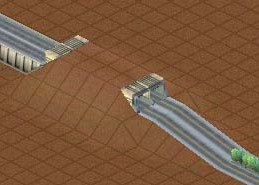
The no tunnel method
This method (Courtesy of Andro) leads to far greater flexibility in using the method in various scenarios.
First build a Highway Tunnel as given above up to Step 4.

Bulldoze the tunnel instead of the Highway mouth tiles. Here we will remove the other end as well. You can keep it to create an intersection if you want.

Lower the defunct berm to the level of the highway and build Power Lines over the 4 tiles next to the Highway ending, or adjust terrain level by ramping with the Raise/Lower Terrain tools.


Build in the roads to make the union.

Now finish off to suit yourself.

(Note: Without the Power Lines to stabilize the union, the union may not persist when you introduce nearby roads and intersections. Therefore on these 'Open Unions' either power lines, slopes or railway lines may be required).
The on-ramp method
This method (courtesy of Chris S) provides a much cheaper, and easier, alternative which is still visually and practically pleasing. It does not interface directly with boulevards and therefore requires imagination with building the interchange road formations.
Build a stretch of highway and cross a road as shown.

Build ramps from the highway to the road using the menu selection tool.

Use the bulldozer to delete the stretch of highway - do this in one move - as shown!

Voila! The on ramps are now highway-to-road converters.

The land reclaimed by demolishing the highway section is reusable. As you can see from the image - there is a graphical error in the program which gives an odd picture. This may be obscured as follows:

Interconnection techniques
"Spaghetti". You need to be familiar with this - all your expensive creativity may be nullified by these tiles. At any road intersection is a densely patterned intersection tile. Put two or more of these together and they automatically dominate vehicle traffic and create major blockages to traffic flow. Their appearance must be minimised at all costs as they may destabilize the highway/road union or, via road congestion, just defeat what you are trying to do.
Stabilizing the union and minimising 'spaghetti' (Courtesy Kyle D. J.). The following pics give you a view of the three methods - powerlines, slope, and railway.

Road Interface from ramp/power line/rail tile - gives a special non spaghetti intersection that looks better. (courtesy Kyle D. J.).

No Tunnel Method - Intersection. (Courtesy Andro) - Open union each side. This could be productively the start of two Highways going in different directions from adjacent to a city centre.

A straight line interface may be achieved in many ways. Here are some examples:
Tunnel Mouth Method - controlling your exit elevations. In conjunction with an elevated inner city terrain you then have access to adding underpasses, flat exit bridges, under-river tunnels - with arterial access right on the doorstep of the city centre.

No Tunnel - Ramped Highway. (Courtesy Oopsy) This may be the most visually attractive technique if blended in well with the techniques which initially require tunnels.

Applications
There are so many you could use. To round off this article here is a method of creating a railway viaduct (courtesy of Oopsy). This combines a number of techniques and gives an indication (with a positive result) of how you may apply this article.
A railway viaduct
Excavate for two highway tunnels TOWARDS each other leaving a minimum of 5 tiles between the berms.

Build the highway sections

Build a Highway section to connect the two tunnels.

Destroy the tunnels and berms - leaving the inserted Highway intact with flat ground each side of it.

Use the 'Power line' technique to connect avenues from either end, then run your rail line through the Highway.

Adjusting terrain levels can give you various effects

See also
 Avenues: form or functional?
Highways to avenues: avoiding tunnels
Beautify your highway system
Y-Splits for highways
Ramped highway-avenue interconnection
Highway interchange mania
How to make a highway tunnel
Building side-by-side tunnels



There are no comments to display.
Sign In or register to comment...
To comment in reply, you must be a community member
Sign In
Already have an account? Sign in here.
Sign In NowCreate an Account
Sign up to join our friendly community. It's easy!
Register a New Account