


Note: the information on this page has not yet been thoroughly tested. Proceed at your own risk.
The following information has been supplied by Eric Rojas and posted by Wren Weburg. If you have any problems, additions, or corrections, please let one of us know!
Background
PC Exchange is a control panel which allows Mac users to read PC documents by telling the DOS suffixes to work with specified Mac applications. It is included in every version of the MacOS from 7.5 and up.
You can try the following procedure to see if you can read Windows tileset files (.mif) with the Macintosh version of SCURK.
1. Open the PC Exchange control panel and hit the ADD button
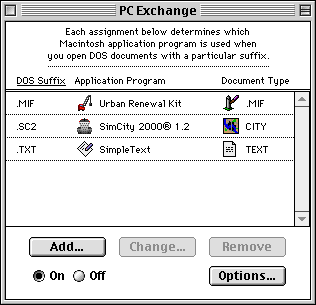
2. Find the application you need (in this case, SCURK) and select the type of document from the popup menu on the right side (.mif). Type in the proper DOS suffix (.mif), hit OK, and then restart.

3. To use, just drag-n-drop the Windows tileset on the Urban Renewal Kit software (or if that doesn't work, go into the program, hit OPEN, and find it). Hit SAVE TILESET in the Urban Renewal Kit software and you can load it through SC2000.


There are no comments to display.
Sign In or register to comment...
To comment in reply, you must be a community member
Sign In
Already have an account? Sign in here.
Sign In NowCreate an Account
Sign up to join our friendly community. It's easy!
Register a New Account