
The lost airports of SimCity 3000
Contributor/author(s): Simpleton
This is probably the first SimCity archaeological article in Knowledge Neighborhood. Come with me while we look for a part of the program which never made it out of the Maxis workshops, but of which the wreckage and traces are still there in the published program. We will take a look at what was meant to be, and also what you can still have!
First hints. The auto-generated airports in SimCity are horrible looking affairs. The scale is out of whack and they are tiny little things. I fly for a living and naturally wanted something which looked like an airfield if I were to build decent looking complete cities.
Obviously the program was using supplied dedicated 'Airport Tiles' but usually in an ugly, unworkable jumble – could I build my own airfield from the parts? So I learnt about the 'Building Plop' cheat and started reading the Building List the cheat opens.
I found 20 dedicated 'Airport Tiles' in the list (some of which the program never uses). That is a lot of tiles for just one service. (I am giving you the full list as an annex to this article). There were beautifully crafted Air Gates, a range of support buildings, two types of Terminal, two types of runway, two types of Hangar, runway connection and crossing tiles. Obviously something very impressive had been once intended – but is not there now.
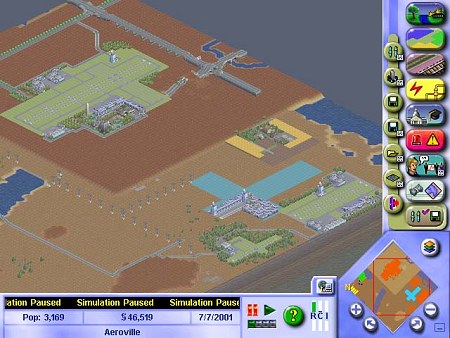
Sensing a trail. I decided to give the program a fair go and zoned a large cross area, hooked it up to power and water, then watched. I was hoping to entice the program to give me a much larger airport, hopefully with two runways and preferably with cross runways. The image below shows what was auto-generated!
The runway was only 10 tiles long with that huge (out of scale) control tower standing on one end, a second control tower (for some obscure purpose) and a large area filled with a mess of Airport component tiles serving no functional purpose.
Certainly the Airport worked. Aircraft came and went, landing, taxiing in to the Terminals, stopping then taxiing out and taking off. Even a little pause at the runway to get takeoff permission. I still felt there was something more which should be there, but was not – so I built my own.
Buildings & traces of activity emerge. The next image shows a small to medium sized airport serving Domestic airlines and charter, such as would be a support (or secondary) airport for a large city.
Apart from a couple of parks, fountains, the roads and some open parking tiles – everything else is dedicated Airport tiles. The grass is 'Airport Grass'; the apron and taxiways are 'Tarmac'; the apron is large enough for the Air Gates to be positioned properly, coming from the Terminal Connectors which themselves back on to the Terminal buildings. The multi story car parks are 'Airport Parking Garage'.
On the other side of the airfield is a maintenance facility and there is also a main hangar area somewhat separated from the Terminal area. The Control Tower stands in its usual splendid isolation. The program does not have a Windsock tile.
Another way of looking at the above is that the program could build this itself, the parts are there for it to do so. There is a very good reason why it does not and I will come to that later in this story.
Prior zoning and then 'plopping' does not work – the Query Tool comes back 'Unzoned' even if you have plopped an Airport tile on an Airport Zone. But – I immediately got aircraft animation activity and I got a lot of it. The program identified two 10 tile runways in the long parallel runways I had built, and started using them – at the same time. However aircraft never went near the Terminals. They just followed the normal 10 tile animation sequence as if the program had auto-generated the usual SimCity airport. This meant they turned out onto the grass, got in each other's way and the whole thing looked total chaos (although I was to find it could look a lot worse!).
Anyway – that was a start, now could I get a cross runway layout?
Unearthing the runways and a missing link. Most readers will be aware that building tiles in SimCity are fixed in orientation – that is the way the building, object or facility will point, and that is that. Not quite! Observation showed that with Airports the program could and would change orientation of at least the runway tiles.
This seemed to indicate that a cross runway layout should be possible and may once have been intended. There was definitely something else there. I discovered that although runway tiles had to be plopped individually, once they adjoined they took the properties of a 'single tile'. Touch any part of a runway with the bulldozer and you lose the lot in that single move!
But I could not change the orientation of the runway tile so could not get the cross runway. What else was there? Let's look at the other runway type.
In the program there is the 'Runway' tile (which is a modern, painted up affair) and the 'Landing Strip'. What would the latter do? Absolutely nothing! It did not generate animation; it stays in component tiles, even if it looks connected when laid out, so you can adjust length with the bulldozer; but you cannot change its orientation! However, the natural orientation is at 90 degrees to the Runway tile and the program has a 'Runway Crossing' tile.
I had my cross runway and it would still look natural as airports often have primary runways for the 'heavies' and secondary runways to enable the 'lighties' to deal with cross winds.
The Runway Crossing tile was the key. The tile looks quite bland when seen in isolation but is a very clever piece of design work. It could cross two Runways, two Landing Strips, or a Landing Strip with a Runway – and be a perfect match in any of those applications. That could NOT be coincidence, yet there is no present function for it! Rather than a 'missing link' the link is there all right but the purpose it was designed for is not! SimCity had airports which are now totally lost to us - well not quite!.
The cross runway re-emerges. The next image shows a much more major airport. This could be a city Primary International/Domestic, with two pairs of runways in a cross layout. There are a row of plain domestic terminals and a row of international terminals with Air Gates, at 90 degrees to each other. The taxiway system is complex to allow access to any part of the airfield or to the runways while bypassing busy areas used for specific purposes.
There are maintenance depots for two airlines on the far side of the airfield and at one end of the field is a private maintenance and charter outfit.
Size of purpose brings with it other things to keep a visual and functional balance. A lot more parking is required along with a shopping complex, major hotel and some minor support businesses. Something of this size has to be directly interconnected with an arterial road system which also has to be shown. This starts using a lot of space but I have sketched an indication.
To conserve room I have therefore underpassed the airfield in two places to bring dual carriageways directly into the Terminal heart. I have also built a straight line interconnection between highway and dual carriageway to avoid a complex, tile hungry, on and off ramp interchange; then I have connected the highway spur to another main highway.
More clues to the lost airports. The large, cross runway airport I built had some more information in store. The program recognized THREE airports amongst the long runways and began running aircraft animation sequences for all three at the same time. The place looked like a wasps nest, and what happened on the ground was disgusting!
Interestingly one of the 'airports' the program 'saw' was 22 tiles long – and it adapted the normal animation pattern to the 22 tiles. The animation sequence was exactly the same but over 22 tiles instead of the normal 10 or less that the program auto-generates. SimCity still has some basic programming in it of dealing with far larger airports than we ever get!
At the same time building a functional and large Terminal array produced another animation – or at least made it obvious enough to not miss. Most of you will be aware that the basic Sim pedestrian animation happens on pavements anywhere and is geared to volume and type of buildings which may be around. Equally, the program recognizes specific localities so you get workmen carrying timber near building sites and trucks loaded with hay near farms.
With Airports the Terminal Buildings trigger an 'Airport Specific' pedestrian traffic which happens in front of the terminal and maybe a tile or two each side. This is overlaid over the normal pavement pedestrian animations. With several Terminals side by side fronting a road, you suddenly find you are looking at hordes of Sims swarming about carrying, pushing or towing various luggage, plus normal peds. This gives a very nice impression of a busy airport which is going real well – or would be progressively scaled down (but still there) for smaller airports.
Once again it was difficult not to conclude that a lot of effort and planning had gone into the lost airports which could have (and actually does when you build them yourself) look real good.
One definite piece of knowledge which came out of this was that zoning triggers the auto-generation of an airport, but it is then the appearance of specific tiles (the Runway and Terminal Building tiles) which triggers the animation sequences. This happens in either auto-generation or plopping. Once the tiles are down the program responds.
Balancing the scales. So much for the large airports but what of others? People have different scenarios in mind so I went down in size. The next image shows a typical small country town airport.
Here there is enough local demand and dollars for a few passenger services a week to put in a decent runway and some paved surfaces and taxiways (but not much); a small terminal backed by parking and a couple of support buildings; and out the back is a private maintenance concern giving the local area support, selling hangar space, fuel etc. There is also the usual small aero club and flying school. They have paved areas as well, but these are a bit cheap and tatty.
Light aircraft are the chief users so there is a lesser quality cross runway to enable the place to operate in windy conditions from a greater choice of operational directions.
Then again, some of us want to create a fair amount of rural development in our cities – so what of the landing strips? The next illustration shows a typical small airstrip successful farmers will carve out of their properties for their own personal transport and to give a base for crop sprayers to treat their farms. It has a modest runway and only the vestige of taxiways. A farm building has been pressed into service as a hangar. To suit the wind seasons a grass cross strip has been cut into the agricultural fields.
The problem maxis had. Why were those airports 'lost'? Very simple – scale. There is a limit to what you can do with getting a viewer to 'assume' scale. You can do it by suggesting they assume all the minor roads are not visible when residential blocks can go 4 tiles from the nearest road. You cannot do it when players start looking at defined objects like aircraft, runways and buildings like giant control towers!
Consider the aircraft depictions. The Shooting Star (or Scorpion?) jet could be parked under one wing of the DC3 but looks much the same size. The DC3 could (apart from height) be parked under one wing of a 747. Try and depict a 747 on an SC auto-generated airport on the same scale and the aircraft would be half the size of the place. So the dominoes went down and with them went the practical use of tarmac, air gates, hangars and all the rest – resulting in the jumble of bits we get now and a total program ban on runways being any closer than 9 tiles to each other, so there go the cross runways.
You can see this very clearly on the following image. All the 'built' airfields you have now looked at were designed for visual scale – a balance of size in buildings, aircraft and consequent runway length. This is how big they actually are in relation to the 256 x 256 playing board and the SC auto-generated airport. All five are there, but pay particular attention to the playing board map in the bottom right hand corner and you can see how much space they take.
The airport function alone would have reduced SimCity to what it actually is in visual scale – at the most, just a small town! So the airport, despite all the effort which went into it, must have been canned and a small token replication put in place to satisfy a commercial program demand from which to give the player a rev, and an image to promote a 'City Concept'..
What were the lost airports? The following is speculation assembled from the evidence available. Air transportation is of course a major component in modern life and particularly in the case of a SimCity remote from its neighbours – the service had to be there. But SimCity runs over a considerable time frame which embraces the evolution of aviation itself – so there is an historical catch, you cannot have a 747 trotting around in the 1930's, but you can just get away with a DC3 still trotting around in the 2230's.
Originally I thought there were two basic airports intended, now I am not so sure. If the tiles were triggered historically, starting with the Landing Strip for early periods and evolving into Runways in the jet age, plus the program was geared to autogenerating (and possibly further evolving) airports according to city size and demand – then there could have been a whole variety of sizes and shapes, plus a combination or runways including cross runways. All the parts are there to do it, with elements of supporting animation still remaining in the current program!
In the present animation left we have a very early airliner and then the DC3 (giving a possibly intended historical progression), but the later large jets do not appear and so leaves the Air Gates and hence general terminal layout, redundant – because an Air Gate certainly cannot service a tailwheel aircraft!
I surmise that when the scale problem really hit home the Airport was reduced to a token effort, aircraft depiction was limited to not beyond the DC3 and we never see bigger jet transports we had in earlier versions. In place we have a couple of military jets to ensure we are definitely in the 'jet age'. Wonderful!
The real missing link is a 'Taxiway Tile'. Just possibly they intended the aircraft to act like Sims do on pavement. The sims have no problem padding up and down pavements, around corners and bends etc. Using the same mechanism in a dedicated taxiway tile you could have the aircraft doing the same thing, going to any terminal, parking at air gates etc. It would have looked totally convincing!
There is one (so far) piece of evidence to support more intelligence in aircraft movements. If you watch closely on any SimCity airport you will see a second aircraft come in to park behind one already parked. The second aircraft 'sees' the first and stops short, it does not blindly follow a simple set animation sequence and plough into it!
Meet the ancestors? As you can see from the illustrations – you certainly can! You can design and have any airport you like to make your city more realistic, satisfying etc. You have the same problem as Maxis – scale. But you can see that small and realistic airports are possible which look far better than the autogenerated ones.
If you want to do this then you have to use the Building Plop cheat. Make your design and then fill it in simply, but laboriously, with the cheat. I simply do not know if the program will recognise the place as an 'Airport' in city economic terms. The key tiles will certainly give you as much visual activity as you want. Perhaps best to find an isolated spot up the top left hand corner somewhere and zone a 'real' airport to shut the program up – then put in your own nice one where it will enhance the appearance of your city?
Conclusion. Excavating the lost airports has been interesting and has given me a greater insight into the game, so I hope this article has done the same for you. I tip my hat to the guys and gals at Maxis who had a wonderful vision they did so much on but could not launch. Perhaps in SC4?
Annex – The program airport tiles
As they appear in the Building List (or at least my list!)
Group 1
Landing Strip. (a simple runway suitable for a Country airport or secondary runway)
Landing Strip Cross. (a connector tile enabling cross runways)
Airport Tower.
Terminal Building (#1 – see #2 below)
Airport Storage Supply Shed
Airport Grounds Control Centre
Terminal Walkway (Air Gate – single orientation, plan position carefully)
Parked Airplane (DC3)
Group 2
Airport Hangar (#1 – see #2 below)
Group 3
Airport Parking Lot
Airport Parking Garage (Multistory)
Runway (a modern runway suitable for jets etc)
Runway End (#1 – Threshold marker tile)
Runway End (#2 – Same as above – other end of runway)
Airport Grass
Tarmac (Use for taxiways, hardstandings and Terminal Aprons)
Runway Connector (Use for runway ingress/egress along runway length)
Airport Hangar (#2 – different design and 90 degrees orientation difference)
Airport Terminal (#2 – different design and 90 degrees orientation difference)
Airport Terminal Connector (Can connect neatly via any of its four sides to any terminal or itself)
See also
How to develop airports
Efficient airports and/or eliminating them entirely
Do they really want more airports?
Airport aesthetics
Crossed airport runways

