
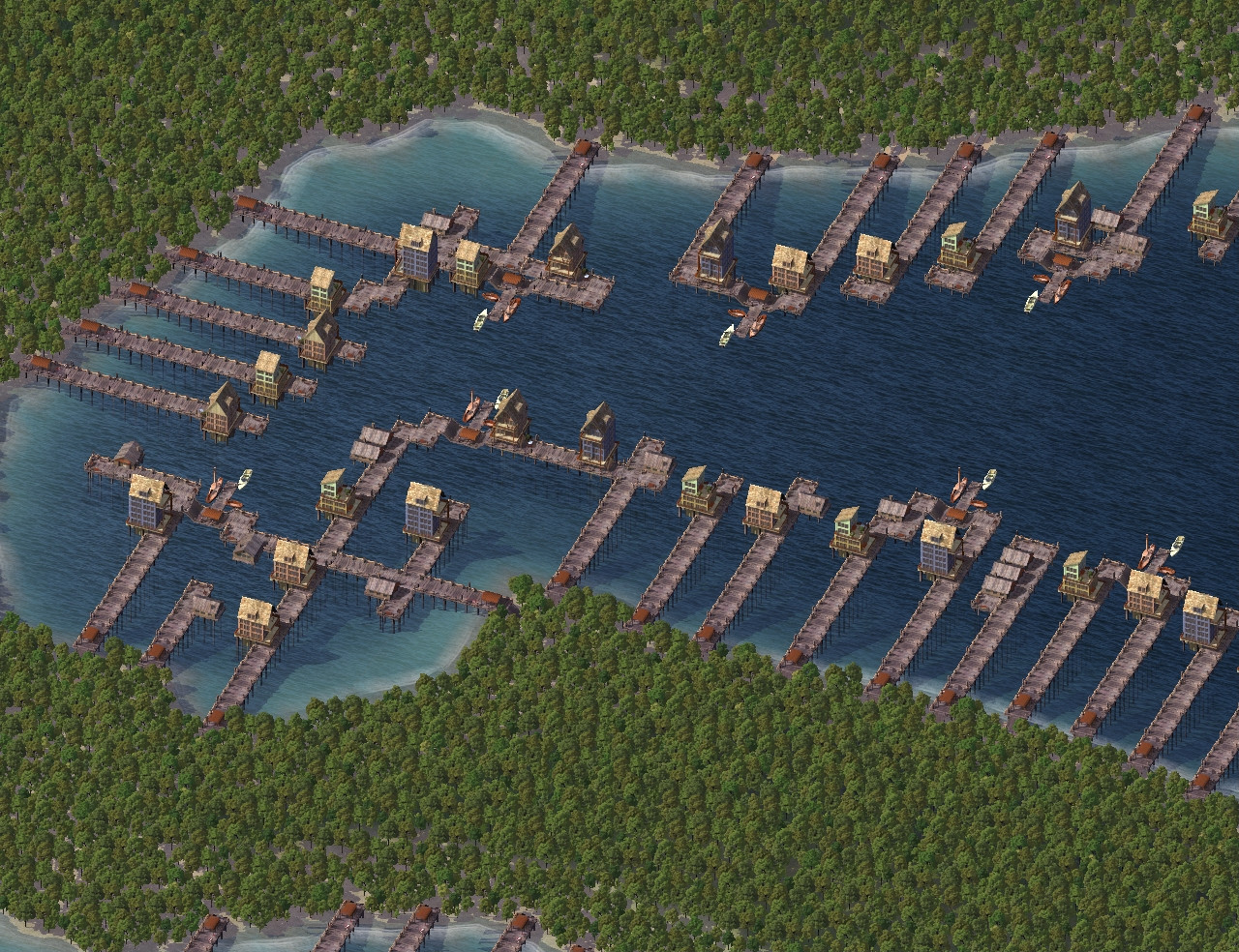
Harbor Village by Cobb (Lost Tweaks Restored by Cori and CB)
Created with Harbor Village by Cobb
Back in June, 2020 I'd found this Harbor Village set by @Cobb32118 and I've just recently gotten around to playing with it.
^ Yes, I do still need to grow a town on the land too.
The idea for the above came from:
File Overrides Created by Cori and CB:
One thing I noticed right off is they all have a base texture which shows thru shallow water and which go goofy like the water bug (only a bit different) when accessing data views. In the comments for the file I see @Equinox created exemplar overrides to remove the base textures along with some other enhancements.
The linky to their CobbHarborVillageTweaked.zip file is now broken so CB and I set about making similar updates.
(The model files are not included and are a dependency for these overrides.)
Here's the initial situation: ^ Notice the sand showing thru the water. Then go to some data view: And once returning to regular view it'll look like this: ^
Override Option 1: For a quick fix, I've removed all base textures which are in the water. You can get that with this file: z Cobb's Harbor Village - Cori Option 1 - Texture Fix - Landmarks.dat
Because of the z in my file name, you can drop it in the same folder as all of Cobb's original files. Note: After adding my file, you can delete their .SC4Desc files but do keep the 12 .SC4Model files and their 12 .SC4Lot files. These latter ones because they have the PNG menu icons.
This Option 1 version leaves them in the Landmarks menu as originally created. Also, I've created a second starter piece for the land to water junction which is 1 x 3 cells with no base texture. Additional starter piece: (Shown in the Landmarks menu when using Option 1) When loading a city tile with existing original Harbor Village plops, it will initially still show the base textures and look goofy in the water pollution data view like this: But, with the override file in place it'll fix itself as soon as you save: And now it looks just how we want: Here's a comparison of the starter lots: ^ With the new 1 x 3 piece you'd prolly want to make the approach to it with MMP gravel or something. Override Option 2: Later in the comments, peeps asked for the Lots to be moved to the Water Transportation menu and I feel that really is a better place for them. I've made an Option 2 file which does that along with other tweaks: Ofc, once moving them from Landmarks they cannot continue to use the Landmark Query UI so I changed that to access the standard Maxis Parks one. Here's the full list of tweaks for the Option 2 override: All in water base textures removed Moved to Water Transportation Menu (including the new 1 x 3 Start Piece) Query UI changed to standard Maxis Park UI Query sound and plop changed to that of the Maxis Marina Removed Budget Item: Dept, Line, and Purpose since they no longer apply Kept Budget Item: Cost at the same zero amount as the original Removed Item Name property and replaced with User Visible Name Key CB created LTexts associated with each Name Key to allow renaming lots which persist between play sessions Changed Item Order to a single number so it's less likely other items will become interspersed Changed plop costs to be $1 to $13 which maintains the same menu order as the original Includes the new 1 x 3 Starter Piece
Here's the file for download: z Cobb's Harbor Village - Cori Option 2 - Texture Fix - Seaport Menu.dat
Same as the Option 1 file, this Option 2 starts with a z in my file name, so you can drop it in the same folder as all of Cobb's original files. After adding my file, you can delete their .SC4Desc files but do keep the 12 .SC4Model files and their 12 .SC4Lot files. These latter ones because they have the PNG menu icons. Override Option 3: The original exemplars also contain some settings I feel are unnecessary. So, here's some additional tweaking we did...
All tweaks of Option 2 including Water Transportation menu placement (plus the following): Changed Bulldoze Cost to $1 so it's easier to count how many lots that will be destroyed Set all pollution numbers to zero Changed power consumed to zero (they do still need power for nightlights to work) Changed Flammability to zero (would be impossible to get a fire truck to them so this way that's not a concern) Set Max Fire Stage to 0x05 (moot point with no flammability, but set anyhow) Set all pollution radii to zero Removed the Landmark Effect (the original had +40 over 20 tiles) Removed the +10 Mayor Rating over 256 tiles (this was a pure cheat since it's additive per plop)
Here's the file for download: z Cobb's Harbor Village - Cori Option 3 - Texture Fix - Seaport - Neutral.dat
Important Note:
Option 3 should only be used if you have never plopped the originals.
Same as the Options 1 and 2, this Option 3 starts with a z in my file name, so you can drop it in the same folder as all of Cobb's original files. After adding my file, you can delete their .SC4Desc files but do keep the 12 .SC4Model files and their 12 .SC4Lot files. These latter ones because they have the PNG menu icons. Special thanks to @Cyclone Boom for help with exemplar editing, proofreading, and polishing up this post so it looks nice.
Here's the initial situation: ^ Notice the sand showing thru the water. Then go to some data view: And once returning to regular view it'll look like this: ^
Override Option 1: For a quick fix, I've removed all base textures which are in the water. You can get that with this file: z Cobb's Harbor Village - Cori Option 1 - Texture Fix - Landmarks.dat
Because of the z in my file name, you can drop it in the same folder as all of Cobb's original files. Note: After adding my file, you can delete their .SC4Desc files but do keep the 12 .SC4Model files and their 12 .SC4Lot files. These latter ones because they have the PNG menu icons.
This Option 1 version leaves them in the Landmarks menu as originally created. Also, I've created a second starter piece for the land to water junction which is 1 x 3 cells with no base texture. Additional starter piece: (Shown in the Landmarks menu when using Option 1) When loading a city tile with existing original Harbor Village plops, it will initially still show the base textures and look goofy in the water pollution data view like this: But, with the override file in place it'll fix itself as soon as you save: And now it looks just how we want: Here's a comparison of the starter lots: ^ With the new 1 x 3 piece you'd prolly want to make the approach to it with MMP gravel or something. Override Option 2: Later in the comments, peeps asked for the Lots to be moved to the Water Transportation menu and I feel that really is a better place for them. I've made an Option 2 file which does that along with other tweaks: Ofc, once moving them from Landmarks they cannot continue to use the Landmark Query UI so I changed that to access the standard Maxis Parks one. Here's the full list of tweaks for the Option 2 override: All in water base textures removed Moved to Water Transportation Menu (including the new 1 x 3 Start Piece) Query UI changed to standard Maxis Park UI Query sound and plop changed to that of the Maxis Marina Removed Budget Item: Dept, Line, and Purpose since they no longer apply Kept Budget Item: Cost at the same zero amount as the original Removed Item Name property and replaced with User Visible Name Key CB created LTexts associated with each Name Key to allow renaming lots which persist between play sessions Changed Item Order to a single number so it's less likely other items will become interspersed Changed plop costs to be $1 to $13 which maintains the same menu order as the original Includes the new 1 x 3 Starter Piece
Here's the file for download: z Cobb's Harbor Village - Cori Option 2 - Texture Fix - Seaport Menu.dat
Same as the Option 1 file, this Option 2 starts with a z in my file name, so you can drop it in the same folder as all of Cobb's original files. After adding my file, you can delete their .SC4Desc files but do keep the 12 .SC4Model files and their 12 .SC4Lot files. These latter ones because they have the PNG menu icons. Override Option 3: The original exemplars also contain some settings I feel are unnecessary. So, here's some additional tweaking we did...
All tweaks of Option 2 including Water Transportation menu placement (plus the following): Changed Bulldoze Cost to $1 so it's easier to count how many lots that will be destroyed Set all pollution numbers to zero Changed power consumed to zero (they do still need power for nightlights to work) Changed Flammability to zero (would be impossible to get a fire truck to them so this way that's not a concern) Set Max Fire Stage to 0x05 (moot point with no flammability, but set anyhow) Set all pollution radii to zero Removed the Landmark Effect (the original had +40 over 20 tiles) Removed the +10 Mayor Rating over 256 tiles (this was a pure cheat since it's additive per plop)
Here's the file for download: z Cobb's Harbor Village - Cori Option 3 - Texture Fix - Seaport - Neutral.dat
Important Note:
Option 3 should only be used if you have never plopped the originals.
Same as the Options 1 and 2, this Option 3 starts with a z in my file name, so you can drop it in the same folder as all of Cobb's original files. After adding my file, you can delete their .SC4Desc files but do keep the 12 .SC4Model files and their 12 .SC4Lot files. These latter ones because they have the PNG menu icons. Special thanks to @Cyclone Boom for help with exemplar editing, proofreading, and polishing up this post so it looks nice.
-
-
- 12 Replies

