
The C.O.R.I. Reports
The C.O.R.I. Reports (beta version)
(Collection Of Relevant Information)
I've been poking around in SC4's memory while the game is running and decided to create a text report of the global variables I found. This mod is basically all LUA code except for the LText needed for the popup and news item. It is a normal .dat file which needs to be placed in the Plugins folder. The data is simply what's currently in the global variables. That's not to say they are completely true to what the game shows in various places. (Those may be modified by other functions.)
So, this is a beta release of something which may or may not be useful. Either way I've had fun playing around with it. (Some of the descriptions may need to be tweaked. When I didn't know for sure what something was I made it basically the in game variable name.)
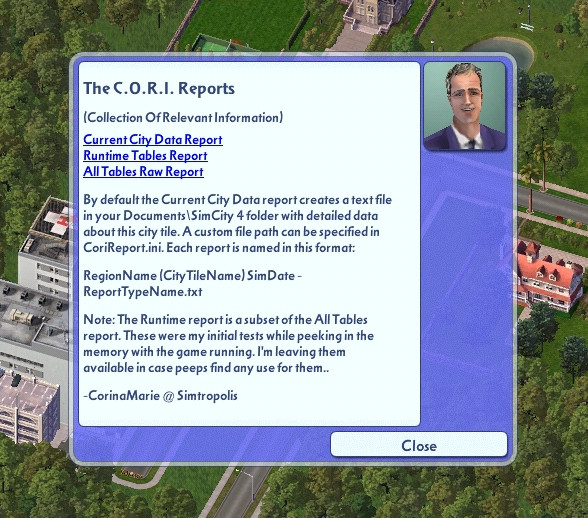
With the mod installed it will trigger a popup if Urgent Advice is turned on:
The urgent advice is not required tho. Either way it can be found in the news box:
Or you can chat with the City Planner.
It can take several in game days (if the saved game time was running) or several seconds if paused before it shows up.
The mod will stay put in the news and advisor panel so you can output a report anytime you like. (Reports output on the same Sim Game Date will overwrite a previous one.) Reports on unique dates will be written one after the other. You can X the news item and it will stay gone for the remainder of that city tile session. Some variables take about 14 game days before they populate properly.
By default the report is placed in your Documents\SimCity 4 folder. (The folder path can be customized. More on that momentarily.) Also, by default the report has some header gibberish (which can be suppressed). Here's a sample of the generic version of the report:
The report file is best viewed as a true .txt document with either Windoze Notepad or the much superior Notepad++. If you pull it up in Word or similar it'll goof up the spacing of the block and group headers.
To customize where the text file is output (and other options) it needs to find CoriReport.ini and that must be in the install folder where SimCity 4.exe is located.
The most useful entry in the INI is CoriReportPath= followed by a valid path to the folder where you want the text file to be written. The folder must already exist. My mod does not create any new folders. The easiest way (at least in Win 7) is to create the folder and copy the address as text.
Paste that after the CoriReportPath= (with no space after the = sign)
Example: CoriReportPath=C:\Users\Owner\Documents\SimCity 4\Cori Reports
Note that it's ok to have spaces in the folder names and do not put quotes around the path. Also, do not add a trailing backslash. No other text is allowed on this line, but you can have text on other lines for your notes. You can also have multiple CoriReportPath= lines and whichever is the last one is where the output will be written.
CoriReportPath=C:\Users\Owner\Documents\SimCity 4\Cori Reports
CoriReportPath=C:\Users\Owner\Documents\SimCity 4\My Farms
CoriReportPath=C:\Users\Owner\Documents\SimCity 4\My Farms\First 50 Years
CoriReportPath=C:\Cori\Tested\This
^ In this example the report would go into C:\Cori\Tested\This
You can also comment out a line. Any character you like can be used. -CoriReportPath=C:\Users\Owner\Documents\SimCity 4\Cori Reports CoriReportPath=C:\Users\Owner\Documents\SimCity 4\My Farms xCoriReportPath=C:\Users\Owner\Documents\SimCity 4\My Farms\First 50 Years ;CoriReportPath=C:\Cori\Tested\This ^ Here the report will go into C:\Users\Owner\Documents\SimCity 4\My Farms If you comment out all of them, the file output will default back to Documents\SimCity 4 The next option (on a separate line) in the INI file is: NumbersFormat= and it has 4 options: NumbersFormat=raw NumbersFormat=comma NumbersFormat=round NumbersFormat=both The raw format will show the numbers exactly as found in the variables. The comma option will add commas to separate groups of thousands. The round choice will round numbers that should be integers to zero decimal places, 1 decimal place for tax rates, and two decimal places for percentages. (Note: Currently the % symbol is not appended to anything.) And both will do round and comma. (Both is the default if this line isn't present.)
Other options that can be used in the INI file do not need an = sign. They are simply toggles: HideGibberish HideFileName HideTimeStamp HideIniContents HideVersion HideGibberish suppresses the extra verbiage in the report. HideFileName suppresses the line that shows the output path and file name. HideTimeStamp suppresses the line with the date and time that the file was created. HideIniContents suppresses the output of what the mod found in CoriReport.ini, and HideVersion keeps the version number line from printing. Using all 5 of these options gives the cleanest looking report.
One last option is the CustomTitle= option. By adding text here it will replace the default " * * * The C.O.R.I. City Report * * * " part of the report title. Example: CustomTitle=Your Custom Title Here For all entries in the INI file it does not care about upper or lower or camel case. However, for a custom report title you will want to make that however you want it to appear in the report. Also, any line can be commented out by placing some character in front of it. This includes the space character if you like. Special thanks to @Cyclone Boom who encouraged me throughout my trials and tribulations while learning about Lua coding. He's also responsible for many of the great ideas and options and for tirelessly testing version after version (after version) of the alpha releases. Things I've noticed: Street, road, and avenue tile counts are doubled Bridge tiles don't include road (may all be zero, I haven't checked the other kinds) Highway connection to a neighbor tile is counted as an avenue connection Anything relating to ferries is always zero Network building counts are the number of tiles occupied so one vanilla train station is counted as 6 Freight stations seem to be counted as Train stations Number of tollbooths is always zero Overworked power plants is always zero (CB's discovery) Power strike and power strike chance are always zero Colleges, libraries, and museums are not counted in total educational buildings Medical clinics are counted as hospitals Health capacity is always zero Number of patients is the same number as the landfill capacity (after a few game days running) Parks and recreation are the same number File attachment: The_CORI_Reports_beta_v02a.dat (old version see below) March 29, 2018 Update: Beta version v02b Fixes and Additions: The alpha versions had a last line for the End Of File and was missing in the beta release. I've added that back in. Added an INI option HideEOF to suppress said additional line if desired Made all possible variables used local to their functions to avoid cluttering the global stack Clears all necessary global variables when finished outputting the report file This also allows tabbing out to change any value in the CoriReport.ini between reports Added a UTILITIES block heading for Power and Water and moved Garbage and Pollution data to it Fixed the rounding of Tax Rates to match Maxis's method Added .0 to the end of integer value tax rates so a 9 will show as 9.0 now File attachment: The_CORI_Reports_beta_v02b.dat (old version see below) March 31, 2018 Update: Beta version v02c Tweaks and Additions: Now also searches in Documents\SimCity 4 for CoriReport.ini Added new INI option: CreateCSV The created .csv works with any NumbersFormat= but will strip out commas File attachment: The_CORI_Reports_beta_v02c.dat (old version see below) April 2, 2018 Update: Beta version v02d Fixes and Additions: Added the city tile size to the CSV file. Small will have the value of 4096 Medium will be 16384 Large is 65536 Added an INI option UniqueFilename to include a filename timestamp preventing reports being overwritten which have the same Sim Date. Fixed four block headings on the text report to be all caps like the others and added two missing new line commands below of them. Hotfix April 2, 2018 (had an else in the wrong place and non-unique City report wasn't running the CSV output) File attachment: The_CORI_Reports_beta_v02d.dat December 25, 2018 Update: Beta version v02e Bug Fix: Fixed a bug where the report would not run if the Sim Year had 4 digits. File attachment: The_CORI_Reports_beta_v02e.dat
You can also comment out a line. Any character you like can be used. -CoriReportPath=C:\Users\Owner\Documents\SimCity 4\Cori Reports CoriReportPath=C:\Users\Owner\Documents\SimCity 4\My Farms xCoriReportPath=C:\Users\Owner\Documents\SimCity 4\My Farms\First 50 Years ;CoriReportPath=C:\Cori\Tested\This ^ Here the report will go into C:\Users\Owner\Documents\SimCity 4\My Farms If you comment out all of them, the file output will default back to Documents\SimCity 4 The next option (on a separate line) in the INI file is: NumbersFormat= and it has 4 options: NumbersFormat=raw NumbersFormat=comma NumbersFormat=round NumbersFormat=both The raw format will show the numbers exactly as found in the variables. The comma option will add commas to separate groups of thousands. The round choice will round numbers that should be integers to zero decimal places, 1 decimal place for tax rates, and two decimal places for percentages. (Note: Currently the % symbol is not appended to anything.) And both will do round and comma. (Both is the default if this line isn't present.)
Other options that can be used in the INI file do not need an = sign. They are simply toggles: HideGibberish HideFileName HideTimeStamp HideIniContents HideVersion HideGibberish suppresses the extra verbiage in the report. HideFileName suppresses the line that shows the output path and file name. HideTimeStamp suppresses the line with the date and time that the file was created. HideIniContents suppresses the output of what the mod found in CoriReport.ini, and HideVersion keeps the version number line from printing. Using all 5 of these options gives the cleanest looking report.
One last option is the CustomTitle= option. By adding text here it will replace the default " * * * The C.O.R.I. City Report * * * " part of the report title. Example: CustomTitle=Your Custom Title Here For all entries in the INI file it does not care about upper or lower or camel case. However, for a custom report title you will want to make that however you want it to appear in the report. Also, any line can be commented out by placing some character in front of it. This includes the space character if you like. Special thanks to @Cyclone Boom who encouraged me throughout my trials and tribulations while learning about Lua coding. He's also responsible for many of the great ideas and options and for tirelessly testing version after version (after version) of the alpha releases. Things I've noticed: Street, road, and avenue tile counts are doubled Bridge tiles don't include road (may all be zero, I haven't checked the other kinds) Highway connection to a neighbor tile is counted as an avenue connection Anything relating to ferries is always zero Network building counts are the number of tiles occupied so one vanilla train station is counted as 6 Freight stations seem to be counted as Train stations Number of tollbooths is always zero Overworked power plants is always zero (CB's discovery) Power strike and power strike chance are always zero Colleges, libraries, and museums are not counted in total educational buildings Medical clinics are counted as hospitals Health capacity is always zero Number of patients is the same number as the landfill capacity (after a few game days running) Parks and recreation are the same number File attachment: The_CORI_Reports_beta_v02a.dat (old version see below) March 29, 2018 Update: Beta version v02b Fixes and Additions: The alpha versions had a last line for the End Of File and was missing in the beta release. I've added that back in. Added an INI option HideEOF to suppress said additional line if desired Made all possible variables used local to their functions to avoid cluttering the global stack Clears all necessary global variables when finished outputting the report file This also allows tabbing out to change any value in the CoriReport.ini between reports Added a UTILITIES block heading for Power and Water and moved Garbage and Pollution data to it Fixed the rounding of Tax Rates to match Maxis's method Added .0 to the end of integer value tax rates so a 9 will show as 9.0 now File attachment: The_CORI_Reports_beta_v02b.dat (old version see below) March 31, 2018 Update: Beta version v02c Tweaks and Additions: Now also searches in Documents\SimCity 4 for CoriReport.ini Added new INI option: CreateCSV The created .csv works with any NumbersFormat= but will strip out commas File attachment: The_CORI_Reports_beta_v02c.dat (old version see below) April 2, 2018 Update: Beta version v02d Fixes and Additions: Added the city tile size to the CSV file. Small will have the value of 4096 Medium will be 16384 Large is 65536 Added an INI option UniqueFilename to include a filename timestamp preventing reports being overwritten which have the same Sim Date. Fixed four block headings on the text report to be all caps like the others and added two missing new line commands below of them. Hotfix April 2, 2018 (had an else in the wrong place and non-unique City report wasn't running the CSV output) File attachment: The_CORI_Reports_beta_v02d.dat December 25, 2018 Update: Beta version v02e Bug Fix: Fixed a bug where the report would not run if the Sim Year had 4 digits. File attachment: The_CORI_Reports_beta_v02e.dat
-
-
- 45 Replies


